Solved Task manager shows 72% Ram usage.

Frikster

New member
Member
VIP
Local time
6:48 AM
Messages
135
Location
Macedonia
Hi
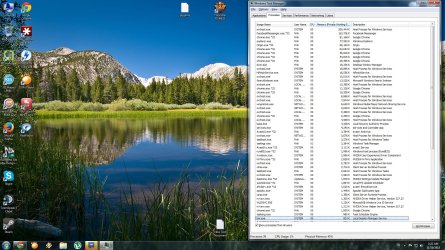
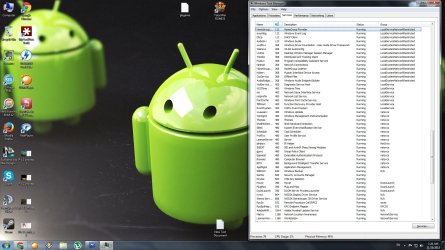
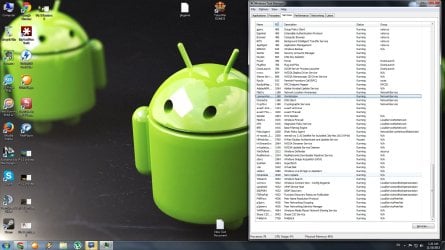
so as the title states my pc currently uses 72% of my 4GB RAM.
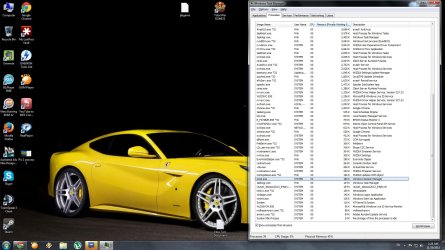
it says that its got 79 processes running , 30-45 CPU Usage and that leads to 2.87GB Ram usage at the moment.
WHAT ... THE ...?????
My highest current ram user is Facebook Messenger .exe *32 , 168k
svchost.exe 162k
explorer 116k
and the rest are chrome with 12 processes ranging from 2500 to 113k

What information do you need for diagnosing this ... issue ... and what should i do ?
I currently use avast prime and i doubt any virus could have got in since i dont go on any "fishy" websites.

Looking forward to solutions
Thank you.
 

My Computer

Computer type
PC/Desktop
OS
Windows 7 64bit
CPU
i5 6600 3.3 GHz
Motherboard
ASUS B150M-A
Memory
16gb HyperX Fury 2x8gb
Graphics Card(s)
Gigabyte G1 Gaming 1060
Monitor(s) Displays
Samsung SyncMaster B2330HD
Screen Resolution
1920 x 1080
Hard Drives
1tb Toshiba
PSU
Corsair builder VS550
Case
SAMA Assasin
Cooling
Stock
Keyboard
A4Tech KB-28G
Mouse
X7 X-710BK
Internet Speed
99 Mbps
Antivirus
Malwarebytes
Browser
Chrome
Other Info
Nothing at the moment
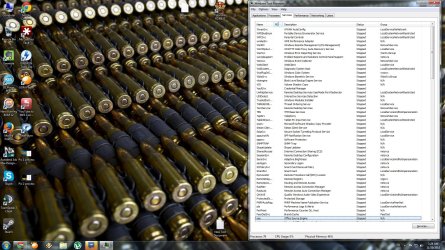
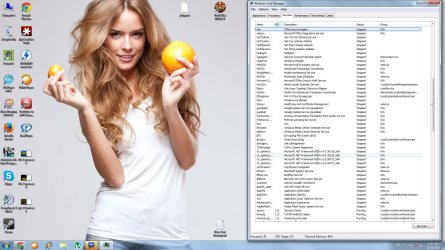
Post a screenshot of Task Manager - Performance tab and Processes tab, sorted by memory usage.
Be sure to check "Show processes from all users".
 

My Computer

Computer type
PC/Desktop
Computer Manufacturer/Model Number
HP
OS
Windows 7 Pro 64 bit
CPU
Xeon W3520
Memory
8 GB
Graphics Card(s)
Nvidia Geforce 210
Well i dont know how or why but current usage dropped to 45% where i dont have much open or running ( at least, not stuff that im using like chrome or facebook chat )

So , anything else ?
 

Attachments

  • Pic 1 process 1.jpg
    Pic 1 process 1.jpg
    379 KB · Views: 8
  • Pic 2 process 2.jpg
    Pic 2 process 2.jpg
    231.8 KB · Views: 3
  • pic 3 Services 1.jpg
    pic 3 Services 1.jpg
    317.5 KB · Views: 1
  • Pic 4 services 2.jpg
    Pic 4 services 2.jpg
    261.3 KB · Views: 2
  • Pic 5 Services 3.jpg
    Pic 5 Services 3.jpg
    248.1 KB · Views: 2
  • Pic 5 Services 4.jpg
    Pic 5 Services 4.jpg
    248.8 KB · Views: 2

My Computer

Computer type
PC/Desktop
OS
Windows 7 64bit
CPU
i5 6600 3.3 GHz
Motherboard
ASUS B150M-A
Memory
16gb HyperX Fury 2x8gb
Graphics Card(s)
Gigabyte G1 Gaming 1060
Monitor(s) Displays
Samsung SyncMaster B2330HD
Screen Resolution
1920 x 1080
Hard Drives
1tb Toshiba
PSU
Corsair builder VS550
Case
SAMA Assasin
Cooling
Stock
Keyboard
A4Tech KB-28G
Mouse
X7 X-710BK
Internet Speed
99 Mbps
Antivirus
Malwarebytes
Browser
Chrome
Other Info
Nothing at the moment
It would appear that your Graphics are built in which means some of your ram is being used by the built graphics card which brings you down to 3.75 gigs left for normal use. Next is chrome which is taking up approximately another quarter of of ram. The rest is being used by the system and other programs that are running from either start up programs (things running in the background. Two things you can do : 1) go into msconfig and turn off some of the programs you have that start up on boot up, or 2) add more ram. Another 4 gigs of ram could make a world of difference, it is not all that costly. . . Good Luck.
 

My Computer

Computer Manufacturer/Model Number
HP Pavilion a4302f
OS
Win 7 Pro x64, VM Win XP, Win7 Pro Sandbox, Kubuntu 11
CPU
AMD Athlon(tm) II X4 640 @ 3.0 Gbz
Memory
12GB 1066MHz DDR3 SDRAM - 2x4GB, 2x2GB
Graphics Card(s)
ATI Radeon HD 4350 HD Graphics/Audio with 512MB
Sound Card
Realtek High Definition Audio
Monitor(s) Displays
1. Dell 23" SP2307, 2. Mitsublishi 40" HDTV, Hannspree 25"
Screen Resolution
1. 2048x1152, 2. 1920-1080, 3. 1920x1200
Hard Drives
Int: 1 120 Gig SSD i
1 - 2.5" 500 USB External HDD
1 -1 Tb USB External HDD
Case
Mid Tower
Cooling
Standard Fans - 5 fans (very quiet)
Keyboard
Microsoft Wireless 2000
Mouse
Microsoft Wireless Mouse 5000
Internet Speed
10 Mbit (realistically 500 Kbit - 1.2 Mbit)
Other Info
Speakers - Bose Desktop (Excellent Sound)
1 external CD|DVD\Blue-ray Recorders/Players (Sony)
Well... **** ... -_-
I was thinking of the option to add 4 more gb of ram and i think thats the best option i can do for now since all these processes are a pain when i try to play games that take a lot of ram ( battlefield 4, rome 2 etc. )
If there are any other suggestions please share them here
if not, i believe the thread can be closed
 

My Computer

Computer type
PC/Desktop
OS
Windows 7 64bit
CPU
i5 6600 3.3 GHz
Motherboard
ASUS B150M-A
Memory
16gb HyperX Fury 2x8gb
Graphics Card(s)
Gigabyte G1 Gaming 1060
Monitor(s) Displays
Samsung SyncMaster B2330HD
Screen Resolution
1920 x 1080
Hard Drives
1tb Toshiba
PSU
Corsair builder VS550
Case
SAMA Assasin
Cooling
Stock
Keyboard
A4Tech KB-28G
Mouse
X7 X-710BK
Internet Speed
99 Mbps
Antivirus
Malwarebytes
Browser
Chrome
Other Info
Nothing at the moment
You have to understand that memory was meant to be used, not sit idle. Memory usage in any modern OS is highly dynamic. When adequate memory is available the memory manager will allow processes to use pretty much what they want. But when memory is needed for new processes the current usage will be trimmed back, drastically if necessary. The memory manager will always try to assign memory where it is needed to maintain optimum overall system performance.

Don't try to add up items in the memory usage column. This rarely provides meaningful information and only leads to confusion.
 

My Computer

Computer type
PC/Desktop
Computer Manufacturer/Model Number
HP
OS
Windows 7 Pro 64 bit
CPU
Xeon W3520
Memory
8 GB
Graphics Card(s)
Nvidia Geforce 210
i am not trying to add up anything
i just try and use my pc whenever i need it and i would rather have it sleep than be idle
I will just , add the 4 GB and see what happens
Thank you for the suggestion
 

My Computer

Computer type
PC/Desktop
OS
Windows 7 64bit
CPU
i5 6600 3.3 GHz
Motherboard
ASUS B150M-A
Memory
16gb HyperX Fury 2x8gb
Graphics Card(s)
Gigabyte G1 Gaming 1060
Monitor(s) Displays
Samsung SyncMaster B2330HD
Screen Resolution
1920 x 1080
Hard Drives
1tb Toshiba
PSU
Corsair builder VS550
Case
SAMA Assasin
Cooling
Stock
Keyboard
A4Tech KB-28G
Mouse
X7 X-710BK
Internet Speed
99 Mbps
Antivirus
Malwarebytes
Browser
Chrome
Other Info
Nothing at the moment
Back
Top