Solved Task Scheduler Corrupt

bigmck

Very Senior Member
Guru
Gold Member
VIP
Local time
3:24 PM
Messages
4,745
Location
Houston, Texas
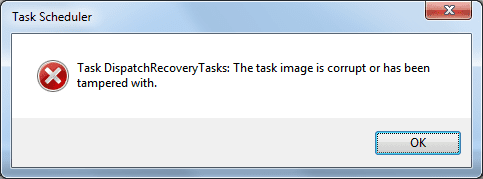
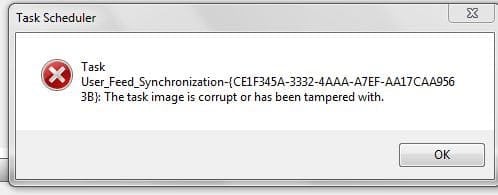
I went to open my Task Scheduler and got this prompt. Any one know how to fix this? Thanks,
 

Attachments

  • Capture.JPG
    Capture.JPG
    18.2 KB · Views: 79

My Computer My Computer

At a glance

Windows 7 Home Premium 32-Bit - Build 7600 SP1Intel Core i3-2120 3.30GhzKingston 4 GB DDR3 1333 mhzAMD Radeon HD6670
Computer type
PC/Desktop
Computer Manufacturer/Model Number
Custom Build
OS
Windows 7 Home Premium 32-Bit - Build 7600 SP1
CPU
Intel Core i3-2120 3.30Ghz
Motherboard
Asus P8Z68-V LX Intel Z68 Socket H2 ATX
Memory
Kingston 4 GB DDR3 1333 mhz
Graphics Card(s)
AMD Radeon HD6670
Sound Card
Sound Blaster Audigy SE 24-Bit
Monitor(s) Displays
Asus VE228
Screen Resolution
1440 X 900
Hard Drives
OCZ Vertex 3 120 GB Sata 3 SSD ==
Kingston SH103/S3 120 G Hyper X 120 GB SSD ==
Western Digital 500 GB Caviar Green 7200 RPM ==
PSU
Corsair CX600M == 600 Watt
Case
NZXT Apollo - Silver with Clear Side Panel
Cooling
Three 120 mm Fans
Keyboard
Microsoft Natural 4000
Mouse
Microsoft Custom Optical 3000
Internet Speed
AT&T Fiber Optic Wireless Network
Antivirus
Microsoft Security Essentials
Browser
Chrome
Other Info
120 mm Blue LED Fan -- Three Blue LED Lazer Light Sticks
i have had the same pop up as you without being able to fix it are your task scheduler programs working ? i use winpatrol (free version) BillP Studios Download Page not sure if this program may cause this?
 

My Computer My Computer

At a glance

Operating System : Windows 7 Home Premium Edi...Processor : Intel Core 2 Quad Q8300 @ 2500 MHzPhysical Memory :8GB Corsair4x 2GB 800MHz C5 ...Video Card : XFX 6700 AMD
Computer Manufacturer/Model Number
packard bell IXTREME M5722
OS
Operating System : Windows 7 Home Premium Edition 6.01.7600 SP1 (x64)
CPU
Processor : Intel Core 2 Quad Q8300 @ 2500 MHz
Motherboard
Mainboard : Packard Bell (Acer EG43M )
Memory
Physical Memory :8GB Corsair4x 2GB 800MHz C5 DDR2
Graphics Card(s)
Video Card : XFX 6700 AMD
Monitor(s) Displays
Maestro 234DL - BenQ V2220 - BenQ VW2420H
Screen Resolution
Current Display :1920x1080p pixels at 60 Hz in HD LED
Hard Drives
Hard Disks : WDC (1000 GB)
Drive C: (Hard Disk) : 428 GB available on 491 GB
Drive D: (Hard Disk) : 426 GB available on 492 GB
SAMSUNG spinpoint HD103SJ 1000.2 GB
(X 2) KINGSTON SSD NOW V 30GB
PSU
XFX ProSeries 550W PSU
Case
PACKARD BELL IXTREME
Cooling
System Blower Current: 150mA Air Flow16CFM ;Akasa 90mm rear
Keyboard
Gigabyte Aivia K8100
Mouse
TRUST-Wireless Laser Mouse - Carbon edition MI-7770C
Internet Speed
TP-LINK > TL-WN951N / AV500 Gigabit Powerline Adapters
Browser
chrome dev
Other Info
EXTRA COOLING>(FAN CONTROLLER) PC Bay Cooler 3 x 40mm fans; Akasa AK-HD-BL Blue hard drive cooler 2 x 40 mm fan 4500 rpm 29.7 dBA
Bios> American Megatrends Inc.
Version : P01-A1
Date : 08/31/2009

My Computer My Computer

At a glance

Windows 10 Pro x 2/Windows 11 HomeIntel i7 2600K @ 3.40 GHzCorsair Vengeance 16GB DDR3 1600MHz CL8 Dual ...EVGA GeForce RTX 3080 XC3 ULTRA GAMING 10GB G...
Computer type
PC/Desktop
Computer Manufacturer/Model Number
My own abomination, I call it the Money Pit
OS
Windows 10 Pro x 2/Windows 11 Home
CPU
Intel i7 2600K @ 3.40 GHz
Motherboard
ASUS Sabertooth P67
Memory
Corsair Vengeance 16GB DDR3 1600MHz CL8 Dual Channel Kit
Graphics Card(s)
EVGA GeForce RTX 3080 XC3 ULTRA GAMING 10GB GDDR6X
Sound Card
Onboard Realtek or Nvidia High Definition Audio (HDMI)
Monitor(s) Displays
Samsung JS7000 50" SUHD TV or Samsung 27" FHD 60Hz 8ms GTG V
Screen Resolution
1920 x 1080
Hard Drives
1 x Samsung 870 EVO 250 GB SSD (Windows 10 Pro), 1 x Samsung 850 EVO 250 GB SSD (Windows 10 Pro)
PSU
Corsair AX860 - 860W Modular Power Supply
Case
Phanteks Enthoo Luxe Full Tower Case - Black
Cooling
CORSAIR Hydro Series H150i PRO RGB 360mm Liquid CPU Cooler
Keyboard
Logitech K830 Illuminated Living-Room Keyboard
Mouse
Logitech MX Anywhere 2S Wireless Mouse
Internet Speed
100 Mbps
Antivirus
ESET Internet Security
Browser
Latest Version Of Firefox & Microsoft Edge Chromium Stable
Other Info
LG Super Multi Blue Internal Blu-ray Disk Rewriter - BH10LS30
6x2 HDMI Switcher (6 inputs, 2 outputs) so I can send the output of my Cable Box, Roku, or any my 4 computers to either my TV or Monitor separately or simultaneously.

My Computer My Computer

At a glance

Windows 10 Pro X64Intel Quad Core i7-4770 @ 3.4Ghz16.0GB PC3-12800 DDR3 SDRAM 1600 MHzIntel Integrated HD Graphics
Computer type
PC/Desktop
Computer Manufacturer/Model Number
Lenovo IdeaCenter 450
OS
Windows 10 Pro X64
CPU
Intel Quad Core i7-4770 @ 3.4Ghz
Memory
16.0GB PC3-12800 DDR3 SDRAM 1600 MHz
Graphics Card(s)
Intel Integrated HD Graphics
Sound Card
Realtek HD Audio
Monitor(s) Displays
HP 22" LCD
Screen Resolution
1680 x 1050
Hard Drives
250GB Samsung EVO SATA-3 SSD
2TB Seagate ST2000DM001 SATA-2
1.5TB Seagate ST3150041AS SATA
Keyboard
Dell USB
Mouse
Lenovo USB
Internet Speed
Cable via Road Runner 3MB Upload, 30MB Download
Antivirus
Windows Defender, MBAM Pro, MBAE
Browser
Seamonkey
Other Info
UEFI/GPT
PLDS DVD-RW DH16AERSH
Similar error here after installing SP1.

So I found the following:

[HKEY_LOCAL_MACHINE\SOFTWARE\Microsoft\Windows NT\CurrentVersion\Schedule\TaskCache\Tasks\{A52B03F5-82E5-4712-977D-B19F793ABAF5}]
"Path"="\\Microsoft\\Windows\\Media Center\\DispatchRecoveryTasks"
"Triggers"=hex:ff,ff,ff,ff,ff,ff,ff,ff,00,00,00,00,00,00,00,00,00,00,00,00,00,\
00,00,00,00,00,00,00,00,00,00,00,ff,ff,ff,ff,ff,ff,ff,ff,08,05,42,02,48,48,\
48,48,49,b0,02,0b,48,48,48,48,00,48,48,48,48,48,48,48,00,48,48,48,48,48,48,\
48,05,00,00,00,48,48,48,48,0c,00,00,00,48,48,48,48,01,01,00,00,00,00,00,05,\
12,00,00,00,48,48,48,48,00,00,00,00,48,48,48,48,38,00,00,00,48,48,48,48,00,\
00,00,00,ff,ff,ff,ff,80,f4,03,00,ff,ff,ff,ff,07,00,00,00,00,00,00,00,00,00,\
00,00,00,00,00,00,00,00,00,00,00,00,00,00,00,00,00,00,2e,00,45,00,00,00,00,\
00,00,00,00,00,ff,ff,00,00,00,00,00,00,00,00,00,00,00,00,00,00,00,00,00,00,\
00,00,00,00,00,00,00,00,00,00,00,00,ff,ff,ff,ff,ff,ff,ff,ff,00,00,00,00,ff,\
ff,ff,ff,00,00,00,00,00,00,00,00,00,00,00,00,00,07,00,00,01,00,52,00,65,00,\
63,00,6f,00,72,00,64,00,69,00
"DynamicInfo"=hex:03,00,00,00,cf,48,6c,33,e0,f2,ca,01,00,00,00,00,00,00,00,00,\
00,00,00,00,00,00,00,00
"Hash"=hex:d7,99,05,68,1a,09,f8,60,81,a8,1d,c6,3b,6b,64,2b,c0,26,40,2b,fb,26,\
7b,a5,1e,96,3d,b5,0f,26,8d,79
Delete the key, same error. So something to do with Media Center, which I never use.

There is no \\Microsoft\\Windows\\Media Center\\DispatchRecoveryTasks in Task Scheduler either.

So tired creating it but I get an error saying it already exits.

Then I deleted C:\Windows\System32\Tasks\Microsoft\Windows\Media Center\DispatchRecoveryTasks and deleted the above registry key.

No more error. Problem solved. :)

Thanks for the above links.
 

Attachments

  • dispatchRecoveryTasksCorrupted.png
    dispatchRecoveryTasksCorrupted.png
    7.3 KB · Views: 61
Last edited:

My Computer My Computer

At a glance

Windows 7 Ultimate x64 SP1
OS
Windows 7 Ultimate x64 SP1
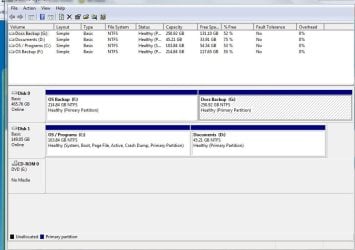
Sorry I haven't gotten back with a response for your help, but today has been one of those days....................I tried a few suggestions given and it didn't work so I restored my OS partition with Macrium. It is working now, but my Disk Managment looks different or maybe it is just me. Should the Layout say "Simple" and the Type say "Basic"? Thanks,
 

Attachments

  • disk management 3-3-11.JPG
    disk management 3-3-11.JPG
    77.5 KB · Views: 31

My Computer My Computer

At a glance

Windows 7 Home Premium 32-Bit - Build 7600 SP1Intel Core i3-2120 3.30GhzKingston 4 GB DDR3 1333 mhzAMD Radeon HD6670
Computer type
PC/Desktop
Computer Manufacturer/Model Number
Custom Build
OS
Windows 7 Home Premium 32-Bit - Build 7600 SP1
CPU
Intel Core i3-2120 3.30Ghz
Motherboard
Asus P8Z68-V LX Intel Z68 Socket H2 ATX
Memory
Kingston 4 GB DDR3 1333 mhz
Graphics Card(s)
AMD Radeon HD6670
Sound Card
Sound Blaster Audigy SE 24-Bit
Monitor(s) Displays
Asus VE228
Screen Resolution
1440 X 900
Hard Drives
OCZ Vertex 3 120 GB Sata 3 SSD ==
Kingston SH103/S3 120 G Hyper X 120 GB SSD ==
Western Digital 500 GB Caviar Green 7200 RPM ==
PSU
Corsair CX600M == 600 Watt
Case
NZXT Apollo - Silver with Clear Side Panel
Cooling
Three 120 mm Fans
Keyboard
Microsoft Natural 4000
Mouse
Microsoft Custom Optical 3000
Internet Speed
AT&T Fiber Optic Wireless Network
Antivirus
Microsoft Security Essentials
Browser
Chrome
Other Info
120 mm Blue LED Fan -- Three Blue LED Lazer Light Sticks
Looks the same as mine.
 

My Computer My Computer

At a glance

Windows 10 Pro X64Intel Quad Core i7-4770 @ 3.4Ghz16.0GB PC3-12800 DDR3 SDRAM 1600 MHzIntel Integrated HD Graphics
Computer type
PC/Desktop
Computer Manufacturer/Model Number
Lenovo IdeaCenter 450
OS
Windows 10 Pro X64
CPU
Intel Quad Core i7-4770 @ 3.4Ghz
Memory
16.0GB PC3-12800 DDR3 SDRAM 1600 MHz
Graphics Card(s)
Intel Integrated HD Graphics
Sound Card
Realtek HD Audio
Monitor(s) Displays
HP 22" LCD
Screen Resolution
1680 x 1050
Hard Drives
250GB Samsung EVO SATA-3 SSD
2TB Seagate ST2000DM001 SATA-2
1.5TB Seagate ST3150041AS SATA
Keyboard
Dell USB
Mouse
Lenovo USB
Internet Speed
Cable via Road Runner 3MB Upload, 30MB Download
Antivirus
Windows Defender, MBAM Pro, MBAE
Browser
Seamonkey
Other Info
UEFI/GPT
PLDS DVD-RW DH16AERSH
Hi,

In order to fix this, you have to delete the actual task XML file that contains the task settings, then rerun the Task Scheduler to confirm that the error is gone, then import a non-corrupted version of the task back into the Task Scheduler.
Most of the work you have to do is to locate the task file in question.
The task files are located in C:\Windows\System32\Tasks.
If you try to open the task folder, you might get a UAC prompt asking you for permission to access the folder, this is OK, just click continue to access the folder.
In my case, the corrupt task was "Microsoft-Windows-DiskDiagnosticDataCollector".
This was a Microsoft task, therefore I had to go into the C:\Windows\System32\Tasks\Microsoft\Windows\DiskDiagnostic folder to locate the actual task xml file,
which was named "Microsoft-Windows-DiskDiagnosticDataCollector".

Once you have located the task file, close the task scheduler, back up the corrupted task file to any location of your choice, then delete it, then open the task scheduler to confirm that the error has gone.

What you now need to do is to export the non-corrupted task from another computer or virtual machine, and import it into the task scheduler.
To export the task in question from another computer, follow these steps.

1. Open the Task Scheduler, then drill down into the task in question, then right-click on the task and select "Export...".
2. Save the exported XML file to a location of your choosing, then copy it over to the affected computer.
3. Once you are back on the affected computer, make sure that the task scheduler is closed, then you need to run the task scheduler as an Administrator.
4. To run the task scheduler as an Administrator, click Start>All Programs>Accessories>System Tools, then locate "Task Scheduler", right-click it and select "Run as Administrator".
5. Once the task scheduler is open, drill down to the folder where the task is supposed to be located, right-click on a blank portion of the window, and select "Import Task...".
6. Once you have imported the task, a "Create task" window will open as shown below, just click OK to it.
7. The task should then be successfully imported, you can then close the task scheduler, and the problem should be fully resolved.
 

My Computer My Computer

At a glance

Windows 7 Ultimate x64
OS
Windows 7 Ultimate x64
Hi. I've encountered this problem in the past when I've made a registry restoration from a registry backup program called ERUNT. In my case, a System Restore corrected the Task Scheduler corrupted task images problem. I have only encountered this problem with Windows 7.
 

My Computer My Computer

At a glance

Windows 7 Home Premium 64 BitAMD Phenom II X4 820 2.80 GHZ8GbATI Radeon HD4200
Computer Manufacturer/Model Number
HP Pavilion P6616f-b
OS
Windows 7 Home Premium 64 Bit
CPU
AMD Phenom II X4 820 2.80 GHZ
Motherboard
FOXCONN 2AB1 DVT
Memory
8Gb
Graphics Card(s)
ATI Radeon HD4200
Sound Card
Realtek High Definition Audio
Monitor(s) Displays
HP 2010i 20" Widescreen 1600x900 Resolution
Hard Drives
ST375052 8AS SATA Disk Device (750.15 GB)
Back
Top