Task Scheduler Not Operating Correctly

RockyMtnHi

New member
Local time
3:44 PM
Messages
7
I have several custom .vbs scripts kicked off in Windows 7 Task Scheduler. They perform ftp operations that back up our online database files. Obviously this is critical to our operations.

When I run the .vbs tasks manually they run fine. The files are downloaded as they should be. I can't get the scheduled tasks to run. I have checked all items that made sense and they just don't get kicked off. I just now enabled task history (found out how to do that in another sevenforums post, thanks) for all tasks so I don't know what was reported by the OS when they were supposed to be kicked off.

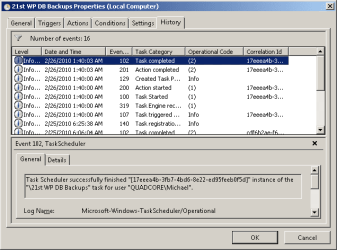
I just changed the trigger time of one of the tasks so I can see it run and see the history. All indications are that it started and ran fine (task started, action started, task completed, action completed). The files weren't FTP'ed into the local folder though. It looks as if Windows started and finished the task but the .vbs file didn't actually execute.

When I run the .vbs file manually by double clicking it the script runs fine and the files are FTP'ed as they should be.

Not only is this critical for our operation but out clients. I am backing up their files also.

I have to say that in previous versions of Windows Scheduled Tasks was never as complicated, and it always just worked.

Can someone provide some insight into what is up (or down) with Windows 7 Scheduled Tasks? Thanks for the help.
 

My Computer

Computer Manufacturer/Model Number
The Computer Guys, Denver
OS
Win 7 64 bit
CPU
AMD Phenom II X4 965 Processor 3.40 GHz
Memory
8Gb
Graphics Card(s)
ATI Radeon HD 4200
Sound Card
Realtek High Definition Audio
Monitor(s) Displays
Sony SDM HS93
Hard Drives
ST3500312CS ATA Device
Please post all parameters exactly as you have them in the task that is not running.
Maybe the syntax of the command you are trying to run is not correct.
 

My Computer

Computer Manufacturer/Model Number
Self Built
OS
Win 7 Ultimate 32bit
CPU
C2D E6600 2.4Ghz
Motherboard
Intel D965WH
Memory
4G Kingston KHX5400D2
Graphics Card(s)
EVGA GTX 570 HD SC (012-P3-1573-KR)
Sound Card
On-Board
Monitor(s) Displays
Samsung 226BW
Screen Resolution
1680 x 1050
Hard Drives
2 x 250 Seagate Barracuda
2 x 500 Seagate Barracuda (Raid1)
PSU
Corsair TX750W
Case
In-Win C589
Cooling
Stock Intel Cooling
Hi Tepid,
Thanks for the reply.

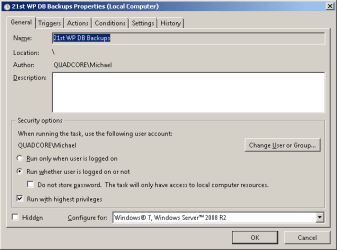
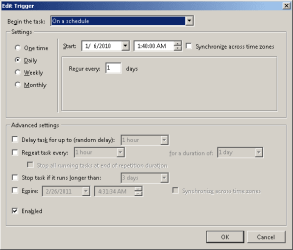
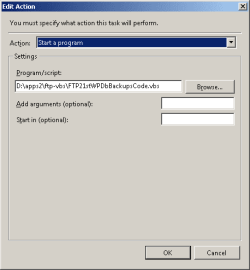
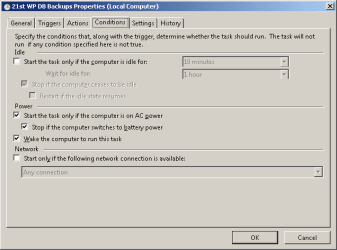
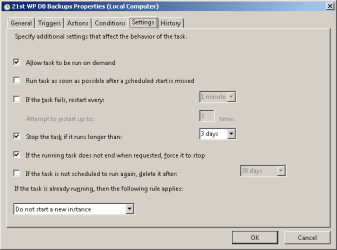
I took screenshots of all of the Task Settings dialogs and attached them.

The task apparently was successfully run from the perspective of the OS but the files in that were supposed to be FTP'ed by running the .vbs file weren't FTP'ed.

Thanks for the help.
 

Attachments

  • General Task Settings.png
    General Task Settings.png
    6.1 KB · Views: 44
  • Triggers Task Settings.png
    Triggers Task Settings.png
    6.7 KB · Views: 30
  • Action Task Settings.png
    Action Task Settings.png
    3.6 KB · Views: 37
  • Conditions Task Settings.png
    Conditions Task Settings.png
    6.8 KB · Views: 29
  • Settings Task Settings.png
    Settings Task Settings.png
    6.5 KB · Views: 25
  • History Task Settings.png
    History Task Settings.png
    9.2 KB · Views: 32

My Computer

Computer Manufacturer/Model Number
The Computer Guys, Denver
OS
Win 7 64 bit
CPU
AMD Phenom II X4 965 Processor 3.40 GHz
Memory
8Gb
Graphics Card(s)
ATI Radeon HD 4200
Sound Card
Realtek High Definition Audio
Monitor(s) Displays
Sony SDM HS93
Hard Drives
ST3500312CS ATA Device
created bat file to run the .vbs files

Here's what I tried next based on some Google research ideas. I created a .bat file with this code:

@echo off
echo %date% %time% %username% > c:\test.txt

start D:\apps2\ftp-vbs\FTP21stWPDbBackupsCode.vbs 1>>c:\test.txt 2>>&1
echo %date% %time% >> c:\test.txt

I ran it as an administrator and this was the results in the c:\test.txt file:
Fri 02/26/2010 5:07:11.10 Artie
Fri 02/26/2010 5:07:11.16

The files still weren't ftp'ed.

I also tried these lines with the same results, no files FTP'ed:
wscript D:\apps2\ftp-vbs\FTP21stWPDbBackupsCode.vbs 1>>c:\test.txt 2>>&1
cscript D:\apps2\ftp-vbs\FTP21stWPDbBackupsCode.vbs 1>>c:\test.txt 2>>&1

When I tried to set the default for the .bat file to run as an administrator the option was disabled.

I also looked into powershell scripts, but not sure I want to go down that path. It seems that I'd be able to do what I need here using vbscripts and maybe batch files..
 
Last edited:

My Computer

Computer Manufacturer/Model Number
The Computer Guys, Denver
OS
Win 7 64 bit
CPU
AMD Phenom II X4 965 Processor 3.40 GHz
Memory
8Gb
Graphics Card(s)
ATI Radeon HD 4200
Sound Card
Realtek High Definition Audio
Monitor(s) Displays
Sony SDM HS93
Hard Drives
ST3500312CS ATA Device
well,, found this,, not sure if you saw this or not,.,..

http://forums.techarena.in/windows-server-help/1143091.htm

I might setup a simple test vbs file to see if the VBS is even getting called when run from a Task. It may not be, and just not giving any indication that it ran or not.

use wscript as that will pop a window with a message.

If that does run,, then maybe a permissions issue within the code when trying to FTP?
Not creating the connection over FTP during the task run?
I am just guessing.

I am not a scripting guru, but know very little.
If it runs fine when you run it by double click, then something that needs rights, isn't getting passed those rights from the task run is possibly causing the problem.
 

My Computer

Computer Manufacturer/Model Number
Self Built
OS
Win 7 Ultimate 32bit
CPU
C2D E6600 2.4Ghz
Motherboard
Intel D965WH
Memory
4G Kingston KHX5400D2
Graphics Card(s)
EVGA GTX 570 HD SC (012-P3-1573-KR)
Sound Card
On-Board
Monitor(s) Displays
Samsung 226BW
Screen Resolution
1680 x 1050
Hard Drives
2 x 250 Seagate Barracuda
2 x 500 Seagate Barracuda (Raid1)
PSU
Corsair TX750W
Case
In-Win C589
Cooling
Stock Intel Cooling
Windows 7 Task Scheduler not Firing Tasks

Windows 7 Task Scheduler does not fire scripts:: No call in any manner to cscript or wscript (with and without path to both Systerm3 [space] The file location) .. not even one line scripts appending to a log file, fire in Win7 Task Scheduler .. all work noProblems manually from Command and in Windows XP. Is there an update or something new in Win7 that is required? All radio buttons in Win7 checked and unchecked.
 

My Computer

OS
32 bit Windows 7 Professional
Have reset all permissions in Windows/System32/Tasks files to execute and on all script files as well. Still Task Scheduler History states(only) "failure" or "failure to launch". Again, this is a one line script that runs in Command with each and every different call I've tried, and the same do not run in Task Scheduler. Example in Action Tab Program/Script = "C:\Windows\System32\cscript.exe C:\Logs\TestTaskSch.vbs"
 

My Computer

OS
32 bit Windows 7 Professional
Now have built and compiled .exe files for Win7 Task Scheduler to run. TS says it runs but it does not. The .exe simply opens an Excel.WB and closes it. Works fine by double clicking in Win Explorer....but not Task Scheduler. Anybody go anything?
 

My Computer

OS
32 bit Windows 7 Professional
Back
Top