Task Scheduler Problem

hgw53t

New member
Local time
4:07 PM
Messages
26
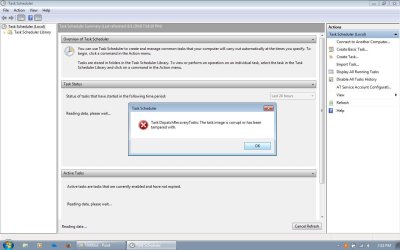
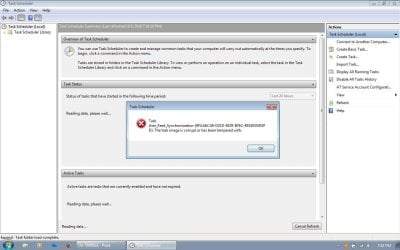
Hello- Windows Task Scheduler will not open most of the time & getting worse. The newest messages I am getting has to do with the Microsoft Management Control (MMC) snap in problem. I have 2- older screen shots of what I saw initially. I may be able to get a shot of the newest, but what happens now is that the Task Scheduler will not close without using my Task Manager to end the program.
 

Attachments
  • Task Scheduler.jpg
    Task Scheduler.jpg
    86.6 KB · Views: 3
  • Task Scheduler (2).jpg
    Task Scheduler (2).jpg
    83.3 KB · Views: 1

My Computer

Computer type
Laptop
Computer Manufacturer/Model Number
Toshiba
OS
Windows 7 Home Premium 32-bit
Memory
4-GB physical memory
Hard Drives
SSD 110-GB
Antivirus
Avast
Browser
I.E. 11 and Mozilla Firefox
Perhaps you have some corrupt Windows files. Try this: Go to search, type in CMD. Right click it and run as Admin. In the command prompt type sfc /scannow. Notice the space between sfc and scannow. This may help with reinstalling corrupt Windows files.

If that fails a repair install may be in order. This requires your OS disk. Or one that matches the version of Windows you have.

I'd also check your hard drive with Crystaldiskinfo and/or HDtune. It could help on telling you whether you have a bad drive. The fact you may have corrupt Windows files leads me to believe your HDD was the main cause. But this is just speculation. Malware and any number of other things can do it.
 

My Computer

Computer type
PC/Desktop
OS
Windows 7 Ultimate x64
Windows Task Scheduler Problem

Hello- Windows Task Scheduler will not open most of the time & getting worse. The newest messages I am getting has to do with the Microsoft Management Control (MMC) snap-in problem. I opened MMC and it looks like I see no info on that screen, so it looks like there is a problem with that as well. I have 2- older screen shots of what I saw initially. I may be able to get a shot of the newest, but what happens now is that the Task Scheduler will not close without using my Task Manager to end the program.
In reply to F22 Simpilot- I've already run the sfc /scannow as admin. & it completes but shows some corrupt files that the scan could not repair. Any suggestions on that?
The hard drive is in good shape. I have already checked that out, too.
 

My Computer

Computer type
Laptop
Computer Manufacturer/Model Number
Toshiba
OS
Windows 7 Home Premium 32-bit
Memory
4-GB physical memory
Hard Drives
SSD 110-GB
Antivirus
Avast
Browser
I.E. 11 and Mozilla Firefox
If SFC /scannow shows corrupt files it could not repair then a repair install is in order.

Have you tried a system restore point prior to this happening?

Repair Install
 

My Computer

Computer type
PC/Desktop
OS
Windows 7 Ultimate x64
No, because as seldom as I open Task Scheduler, I had no idea how long it had not worked correctly.
 

My Computer

Computer type
Laptop
Computer Manufacturer/Model Number
Toshiba
OS
Windows 7 Home Premium 32-bit
Memory
4-GB physical memory
Hard Drives
SSD 110-GB
Antivirus
Avast
Browser
I.E. 11 and Mozilla Firefox
Back
Top