
task scheduler won't start!

freiheit59

New member
Local time
4:29 AM
Messages
22
Dear Helper

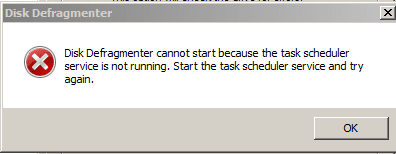
I wanted to make disk defragment to the drive C. but a dialog box tells me that the task scheduler is disabled. I tride to enable it but evey thing is gray. my os is win7 ultimate-64bit. so if there is any tip to fix this problem?

Thanks in advance
 

Attachments
  • Capture.PNG
    Capture.PNG
    3.5 KB · Views: 51

My Computer

Computer Manufacturer/Model Number
Toshiba satellite A200 1MB
OS
Windows7 Ultimate 32bit-version 6.1.7600 Bult
Motherboard
intel(R) core(TM)cpu T5300 @ 1.73GHz
Have you checked in Services to see if the service has started?
 

My Computer

Computer Manufacturer/Model Number
Lenovo ThinkPad T60
OS
Windows 7 Ultimate 64Bit
CPU
GenuineIntel Intel(R) Core(TM) DuoCore T2400 @ 1.83GHz
Motherboard
Intel(R) 82801G (ICH7 Family)
Memory
2.00 GB
Graphics Card(s)
Mobile Intel(R) 945 Express Chipset
Sound Card
SoundMAX Integrated Digital HD Audio
Monitor(s) Displays
ThinkPad Display
Screen Resolution
1400x1050
Hard Drives
100Gb SATA
Keyboard
Standard Keyboard
Mouse
HID-compliant Mouse
Internet Speed
Cable Broadband - 54Mbps
Other Info
Intel(R) PRO/1000 PL Network Connection
11a/b/g Wireless LAN Mini PCI Express Adapter
Hi, Welcome to SF,

The reason your getting this error is because Task Scheduler is not running under Services. It is quite possible that one of the reason could be that Windows Event Log Service,Remote Procedure Call(RPC), DCOM Server Process Launcher is not Running.

To Start these Services

1, Go To Start > under search Type services.msc
2, Now Look for Task Scheduler, Windows Event Log, Remote Procedure Call(RPC), DCOM Server Process Launcher
3, If you double click on it now can go to its properties
4, Make sure the Start up type is set to Automatic and start the service
5, Once you do it for all those service reboot you system then try it

Hope this helps
 

My Computer

Computer Manufacturer/Model Number
Samsung NP550P5C-S02IN
OS
Windows 7 Ultimate - 64-bit | Windows 8 Pro - 64-bit
CPU
Intel® Core™ i7 Processor 3,610QM (2.30Hz, 6MB L3 Cach
Memory
8 GB
Graphics Card(s)
NVIDIA® GeForce® GT 650M 2GB Graphics, Optimus™ techno
Sound Card
SoundAlive™ JBL 3 Speakers (With sub-Woofer)
Monitor(s) Displays
39.62cm (15.6) SuperBright 300nit HD+ LED Display
Screen Resolution
1,600 x 900, Anti-Reflective
Hard Drives
1TB S-ATA II Hard Drive (5,400RPM)
Have you checked in Services to see if the service has started?
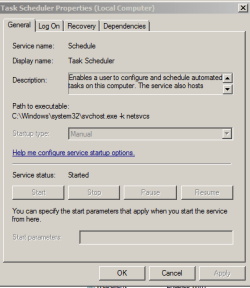
sure I tride to ebble it from Services but no success because the property boxes are gray as you see in my attached picture!

I appreciate your quick replay
 

Attachments

  • Capture2.PNG
    Capture2.PNG
    8.6 KB · Views: 52

My Computer

Computer Manufacturer/Model Number
Toshiba satellite A200 1MB
OS
Windows7 Ultimate 32bit-version 6.1.7600 Bult
Motherboard
intel(R) core(TM)cpu T5300 @ 1.73GHz
Well mine is the same, i even logged with built-in admin account and same thing.
 

My Computer

Computer Manufacturer/Model Number
Lenovo ThinkPad T60
OS
Windows 7 Ultimate 64Bit
CPU
GenuineIntel Intel(R) Core(TM) DuoCore T2400 @ 1.83GHz
Motherboard
Intel(R) 82801G (ICH7 Family)
Memory
2.00 GB
Graphics Card(s)
Mobile Intel(R) 945 Express Chipset
Sound Card
SoundMAX Integrated Digital HD Audio
Monitor(s) Displays
ThinkPad Display
Screen Resolution
1400x1050
Hard Drives
100Gb SATA
Keyboard
Standard Keyboard
Mouse
HID-compliant Mouse
Internet Speed
Cable Broadband - 54Mbps
Other Info
Intel(R) PRO/1000 PL Network Connection
11a/b/g Wireless LAN Mini PCI Express Adapter
sorry dosn't help

Hi, Welcome to SF,

The reason your getting this error is because Task Scheduler is not running under Services. It is quite possible that one of the reason could be that Windows Event Log Service,Remote Procedure Call(RPC), DCOM Server Process Launcher is not Running.

To Start these Services

1, Go To Start > under search Type services.msc
2, Now Look for Task Scheduler, Windows Event Log, Remote Procedure Call(RPC), DCOM Server Process Launcher
3, If you double click on it now can go to its properties
4, Make sure the Start up type is set to Automatic and start the service
5, Once you do it for all those service reboot you system then try it

Hope this helps
Dear Helper

Remote Procedure Call(RPC), DCOM Server Process Launcher. I turn it to Automatic but no change.

Thanks for supporting me


My Computer

Computer Manufacturer/Model Number
Toshiba satellite A200 1MB
OS
Windows7 Ultimate 32bit-version 6.1.7600 Bult
Motherboard
intel(R) core(TM)cpu T5300 @ 1.73GHz
I think i got it.

HKLM >System>CurrentcontrolSet>Services>Schedule

Modify the Value from 2 to 3 of "Start" string.

Reboot and you should have no more greyout. This should stop the service and set to manual start. And will allow u to Start it.

If it works, rep+ me pls. :p

I hope what you tried with the other attempts hasn't done anything to the registry to offset this lol.

Edit: The startup Type remained greyed out, however you should be able to Start the services now.
 

My Computer

Computer Manufacturer/Model Number
Lenovo ThinkPad T60
OS
Windows 7 Ultimate 64Bit
CPU
GenuineIntel Intel(R) Core(TM) DuoCore T2400 @ 1.83GHz
Motherboard
Intel(R) 82801G (ICH7 Family)
Memory
2.00 GB
Graphics Card(s)
Mobile Intel(R) 945 Express Chipset
Sound Card
SoundMAX Integrated Digital HD Audio
Monitor(s) Displays
ThinkPad Display
Screen Resolution
1400x1050
Hard Drives
100Gb SATA
Keyboard
Standard Keyboard
Mouse
HID-compliant Mouse
Internet Speed
Cable Broadband - 54Mbps
Other Info
Intel(R) PRO/1000 PL Network Connection
11a/b/g Wireless LAN Mini PCI Express Adapter
I have checked XP and they don't have this reg called "ServiceSidType", so i deleted it, i also change values for "Type" to 10. This has still not allowed the Start Up type to be changed. :(
 

My Computer

Computer Manufacturer/Model Number
Lenovo ThinkPad T60
OS
Windows 7 Ultimate 64Bit
CPU
GenuineIntel Intel(R) Core(TM) DuoCore T2400 @ 1.83GHz
Motherboard
Intel(R) 82801G (ICH7 Family)
Memory
2.00 GB
Graphics Card(s)
Mobile Intel(R) 945 Express Chipset
Sound Card
SoundMAX Integrated Digital HD Audio
Monitor(s) Displays
ThinkPad Display
Screen Resolution
1400x1050
Hard Drives
100Gb SATA
Keyboard
Standard Keyboard
Mouse
HID-compliant Mouse
Internet Speed
Cable Broadband - 54Mbps
Other Info
Intel(R) PRO/1000 PL Network Connection
11a/b/g Wireless LAN Mini PCI Express Adapter
You are Great

I think i got it.

HKLM >System>CurrentcontrolSet>Services>Schedule

Modify the Value from 2 to 3 of "Start" string.

Reboot and you should have no more greyout. This should stop the service and set to manual start. And will allow u to Start it.

If it works, rep+ me pls. :p

I hope what you tried with the other attempts hasn't done anything to the registry to offset this lol.
Dear aem
You showed me the right solution. I fund in the value box 4 and I change it to 3 as you sead. I defragmented the drive c successfully.
I appreciate your support and wish you good luck in this new year.
I hope you accept this small gift when you click this link and click on the black space flower_garden.swf (application/x-shockwave-flash Object)

Best regards
 

My Computer

Computer Manufacturer/Model Number
Toshiba satellite A200 1MB
OS
Windows7 Ultimate 32bit-version 6.1.7600 Bult
Motherboard
intel(R) core(TM)cpu T5300 @ 1.73GHz
Hehehe very nice, thanks.

All the best for the new year too.
 

My Computer

Computer Manufacturer/Model Number
Lenovo ThinkPad T60
OS
Windows 7 Ultimate 64Bit
CPU
GenuineIntel Intel(R) Core(TM) DuoCore T2400 @ 1.83GHz
Motherboard
Intel(R) 82801G (ICH7 Family)
Memory
2.00 GB
Graphics Card(s)
Mobile Intel(R) 945 Express Chipset
Sound Card
SoundMAX Integrated Digital HD Audio
Monitor(s) Displays
ThinkPad Display
Screen Resolution
1400x1050
Hard Drives
100Gb SATA
Keyboard
Standard Keyboard
Mouse
HID-compliant Mouse
Internet Speed
Cable Broadband - 54Mbps
Other Info
Intel(R) PRO/1000 PL Network Connection
11a/b/g Wireless LAN Mini PCI Express Adapter
sorry to disturb you again

Hehehe very nice, thanks.

All the best for the new year too.
Dear aem

I went pack to Services to make sure that the property of task scheduler still ok.
I've been shockd when I fund it greyout again! I went to regedit. the value is 3 that means it's ok. So what do you think, is the problem still existing?

So sorry to tell that

Best regards
 

Attachments

  • Capture.PNG
    Capture.PNG
    8.6 KB · Views: 26
  • Capture2.PNG
    Capture2.PNG
    11.8 KB · Views: 28

My Computer

Computer Manufacturer/Model Number
Toshiba satellite A200 1MB
OS
Windows7 Ultimate 32bit-version 6.1.7600 Bult
Motherboard
intel(R) core(TM)cpu T5300 @ 1.73GHz
Yeh i editted my post to say unabled to change the type of Startup. lol, thought you went off ..

So what is the status of the Task Schedule in Service now?
 

My Computer

Computer Manufacturer/Model Number
Lenovo ThinkPad T60
OS
Windows 7 Ultimate 64Bit
CPU
GenuineIntel Intel(R) Core(TM) DuoCore T2400 @ 1.83GHz
Motherboard
Intel(R) 82801G (ICH7 Family)
Memory
2.00 GB
Graphics Card(s)
Mobile Intel(R) 945 Express Chipset
Sound Card
SoundMAX Integrated Digital HD Audio
Monitor(s) Displays
ThinkPad Display
Screen Resolution
1400x1050
Hard Drives
100Gb SATA
Keyboard
Standard Keyboard
Mouse
HID-compliant Mouse
Internet Speed
Cable Broadband - 54Mbps
Other Info
Intel(R) PRO/1000 PL Network Connection
11a/b/g Wireless LAN Mini PCI Express Adapter
As you see!

Yeh i editted my post to say unabled to change the type of Startup. lol, thought you went off ..

So what is the status of the Task Schedule in Service now?
Dear aem

the status now is-started.manual. what abut if I want to disable it again?
* I attached a thumbnail.

many thanks for quick replay

best rgards
 

Attachments

  • Capture3.PNG
    Capture3.PNG
    23.5 KB · Views: 28
  • Capture.PNG
    Capture.PNG
    8.6 KB · Views: 29

My Computer

Computer Manufacturer/Model Number
Toshiba satellite A200 1MB
OS
Windows7 Ultimate 32bit-version 6.1.7600 Bult
Motherboard
intel(R) core(TM)cpu T5300 @ 1.73GHz
Ok and you need to be Automatic startup type right?

In Registry, change Start to 2 and Type 20. Previously i thought you have trouble starting so 3 would just to Stop and manual start (from memory).

As for the ability to change the Startup type at will/ or live. Have not gotten that to work myself.
 

My Computer

Computer Manufacturer/Model Number
Lenovo ThinkPad T60
OS
Windows 7 Ultimate 64Bit
CPU
GenuineIntel Intel(R) Core(TM) DuoCore T2400 @ 1.83GHz
Motherboard
Intel(R) 82801G (ICH7 Family)
Memory
2.00 GB
Graphics Card(s)
Mobile Intel(R) 945 Express Chipset
Sound Card
SoundMAX Integrated Digital HD Audio
Monitor(s) Displays
ThinkPad Display
Screen Resolution
1400x1050
Hard Drives
100Gb SATA
Keyboard
Standard Keyboard
Mouse
HID-compliant Mouse
Internet Speed
Cable Broadband - 54Mbps
Other Info
Intel(R) PRO/1000 PL Network Connection
11a/b/g Wireless LAN Mini PCI Express Adapter
Some questions

Ok and you need to be Automatic startup type right?

In Registry, change Start to 2 and Type 20. Previously i thought you have trouble starting so 3 would just to Stop and manual start (from memory).

As for the ability to change the Startup type at will/ or live. Have not gotten that to work myself.
Dear aem

you've added to my knowledge quite important comp-tips. concerning this problem every thing is clear now. my questions are- is this the only way to put the task scheduler in different moods-manual, automatic and disable? or could you show me the way to change them at services in the property it self with out to edit the registry values?

best regards
 

My Computer

Computer Manufacturer/Model Number
Toshiba satellite A200 1MB
OS
Windows7 Ultimate 32bit-version 6.1.7600 Bult
Motherboard
intel(R) core(TM)cpu T5300 @ 1.73GHz
Having played around with the Schedule regsitry, i've only found the ability to stop the service, which allows you to go into services and Start it again. Once the service is started, it's locked out. The only other things i can suggest is rebuilt the Schedule registry, thru the importing another from another machine that doesn't have the service greyed out. You can even mimic the setting (not neccessary import). OR mimic XP's Schedule registry valuae. These i have not done but i'm sure is worth a go if you know what you are doing.

If someone can check their Service for Task Scheduler, and if it's not greyed out. let me know am i'll be more than willing to mess with my registry.
 

My Computer

Computer Manufacturer/Model Number
Lenovo ThinkPad T60
OS
Windows 7 Ultimate 64Bit
CPU
GenuineIntel Intel(R) Core(TM) DuoCore T2400 @ 1.83GHz
Motherboard
Intel(R) 82801G (ICH7 Family)
Memory
2.00 GB
Graphics Card(s)
Mobile Intel(R) 945 Express Chipset
Sound Card
SoundMAX Integrated Digital HD Audio
Monitor(s) Displays
ThinkPad Display
Screen Resolution
1400x1050
Hard Drives
100Gb SATA
Keyboard
Standard Keyboard
Mouse
HID-compliant Mouse
Internet Speed
Cable Broadband - 54Mbps
Other Info
Intel(R) PRO/1000 PL Network Connection
11a/b/g Wireless LAN Mini PCI Express Adapter
Good job

Having played around with the Schedule regsitry, i've only found the ability to stop the service, which allows you to go into services and Start it again. Once the service is started, it's locked out. The only other things i can suggest is rebuilt the Schedule registry, thru the importing another from another machine that doesn't have the service greyed out. You can even mimic the setting (not neccessary import). OR mimic XP's Schedule registry valuae. These i have not done but i'm sure is worth a go if you know what you are doing.

If someone can check their Service for Task Scheduler, and if it's not greyed out. let me know am i'll be more than willing to mess with my registry.
Drear aem
Good morning. I'm going to check up if I could mange that.
Thanks s a lot and we keep in touch.
My best regarding
 

My Computer

Computer Manufacturer/Model Number
Toshiba satellite A200 1MB
OS
Windows7 Ultimate 32bit-version 6.1.7600 Bult
Motherboard
intel(R) core(TM)cpu T5300 @ 1.73GHz
Well i have bit the bullet and replaced my W7 Schedule registry wholely with my Xp Sp3's. Or you could even do your Xp's so long as it's not greyed out.

If you are game enough to do it, here are my Xp Sp3 Schedule reg.

Note: Before you attempt to do the replacement, pls export your existing registry with the Export option. I am not responsible for anything that goes wrong with your system.

Steps:

1) Go to your Schedule Registry

HKLM > System > CurrentControlSet > Services> Schedule.

2) Hightlight ALL of the contents on the right hand side pane. Then Right-click and Delete. All should be gone except for (Default) which canont be deleted.

3) Locate the reg that you have downloaded (mine), right-click, and merge. Accept all yes, and that'll do the merge, only with this, you are putting all the Xp Schedule reg details into the w7's.

Logoff and re-logon, and see if it the Start up menu is no longer greyed out.

   Note
Should you find that you cannot Start the service after reboot. Locate your exported W7 Schedule which you have done prior to the above steps, right-click it and then merge.
   Note
After rebooting, the service should be started.

Mine worked. :party:
 

Attachments

My Computer

Computer Manufacturer/Model Number
Lenovo ThinkPad T60
OS
Windows 7 Ultimate 64Bit
CPU
GenuineIntel Intel(R) Core(TM) DuoCore T2400 @ 1.83GHz
Motherboard
Intel(R) 82801G (ICH7 Family)
Memory
2.00 GB
Graphics Card(s)
Mobile Intel(R) 945 Express Chipset
Sound Card
SoundMAX Integrated Digital HD Audio
Monitor(s) Displays
ThinkPad Display
Screen Resolution
1400x1050
Hard Drives
100Gb SATA
Keyboard
Standard Keyboard
Mouse
HID-compliant Mouse
Internet Speed
Cable Broadband - 54Mbps
Other Info
Intel(R) PRO/1000 PL Network Connection
11a/b/g Wireless LAN Mini PCI Express Adapter
Excellent

Well i have bit the bullet and replaced my W7 Schedule registry wholely with my Xp Sp3's. Or you could even do your Xp's so long as it's not greyed out.

If you are game enough to do it, here are my Xp Sp3 Schedule reg.

Note: Before you attempt to do the replacement, pls export your existing registry with the Export option. I am not responsible for anything that goes wrong with your system.

Steps:

1) Go to your Schedule Registry

HKLM > System > CurrentControlSet > Services> Schedule.

2) Hightlight ALL of the contents on the right hand side pane. Then Right-click and Delete. All should be gone except for (Default) which canont be deleted.

3) Locate the reg that you have downloaded (mine), right-click, and merge. Accept all yes, and that'll do the merge, only with this, you are putting all the Xp Schedule reg details into the w7's.

Logoff and re-logon, and see if it the Start up menu is no longer greyed out.

Mine worked. :party:
Dear aem
You did a lot for me and only the word (thank you) would not describe my feeling. I"m going to download the attached reg file and try my best.

greeting and wish you happy days
 

My Computer

Computer Manufacturer/Model Number
Toshiba satellite A200 1MB
OS
Windows7 Ultimate 32bit-version 6.1.7600 Bult
Motherboard
intel(R) core(TM)cpu T5300 @ 1.73GHz
I just just made an note, in my last post (about not able to start after reboot). So pls read that also.
 

My Computer

Computer Manufacturer/Model Number
Lenovo ThinkPad T60
OS
Windows 7 Ultimate 64Bit
CPU
GenuineIntel Intel(R) Core(TM) DuoCore T2400 @ 1.83GHz
Motherboard
Intel(R) 82801G (ICH7 Family)
Memory
2.00 GB
Graphics Card(s)
Mobile Intel(R) 945 Express Chipset
Sound Card
SoundMAX Integrated Digital HD Audio
Monitor(s) Displays
ThinkPad Display
Screen Resolution
1400x1050
Hard Drives
100Gb SATA
Keyboard
Standard Keyboard
Mouse
HID-compliant Mouse
Internet Speed
Cable Broadband - 54Mbps
Other Info
Intel(R) PRO/1000 PL Network Connection
11a/b/g Wireless LAN Mini PCI Express Adapter
Back
Top