
task scheduler won't start!

Back to the square no 1

Well i have bit the bullet and replaced my W7 Schedule registry wholely with my Xp Sp3's. Or you could even do your Xp's so long as it's not greyed out.

If you are game enough to do it, here are my Xp Sp3 Schedule reg.

Note: Before you attempt to do the replacement, pls export your existing registry with the Export option. I am not responsible for anything that goes wrong with your system.

Steps:

1) Go to your Schedule Registry

HKLM > System > CurrentControlSet > Services> Schedule.

2) Hightlight ALL of the contents on the right hand side pane. Then Right-click and Delete. All should be gone except for (Default) which canont be deleted.

3) Locate the reg that you have downloaded (mine), right-click, and merge. Accept all yes, and that'll do the merge, only with this, you are putting all the Xp Schedule reg details into the w7's.

Logoff and re-logon, and see if it the Start up menu is no longer greyed out.

   Note
Should you find that you cannot Start the service after reboot. Locate your exported W7 Schedule which you have done prior to the above steps, right-click it and then merge.
   Note
After rebooting, the service should be started.

Mine worked. :party:
Dear aem

first how do you do, I hope every thing going well with you.
recently you helped me to solve the problem with the task difragmenter if you still remember. now I'm facing the same problem. I merge your
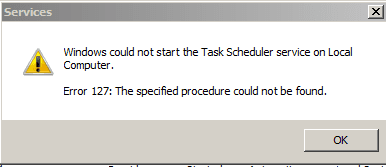
Xp schedule to my reg. the property is not any more gray, and it's auto but when I start it I receive a massage (I attached it). Also could you please take my hand to a possible solution again?


Attachments
  • Capture.PNG
    Capture.PNG
    3.2 KB · Views: 31

My Computer

Computer Manufacturer/Model Number
Toshiba satellite A200 1MB
OS
Windows7 Ultimate 32bit-version 6.1.7600 Bult
Motherboard
intel(R) core(TM)cpu T5300 @ 1.73GHz
One simplification

I used the reg file, but I removed all the sections other than the security one. Go into the file with an editor, remove all the sections other than the following:

Worked for me, and didn't cause any issues.


Windows Registry Editor Version 5.00

[HKEY_LOCAL_MACHINE\SYSTEM\CurrentControlSet\services\Schedule\Security]
"Security"=hex:01,00,14,80,90,00,00,00,9c,00,00,00,14,00,00,00,30,00,00,00,02,\
00,1c,00,01,00,00,00,02,80,14,00,ff,01,0f,00,01,01,00,00,00,00,00,01,00,00,\
00,00,02,00,60,00,04,00,00,00,00,00,14,00,8d,01,02,00,01,01,00,00,00,00,00,\
05,0b,00,00,00,00,00,18,00,9d,01,02,00,01,02,00,00,00,00,00,05,20,00,00,00,\
23,02,00,00,00,00,18,00,ff,01,0f,00,01,02,00,00,00,00,00,05,20,00,00,00,20,\
02,00,00,00,00,14,00,fd,01,02,00,01,01,00,00,00,00,00,05,12,00,00,00,01,01,\
00,00,00,00,00,05,12,00,00,00,01,01,00,00,00,00,00,05,12,00,00,00
 

My Computer

OS
windows 7 32 bit
Re: the HKLM instructions, they look to be exactly what i want, although i cant seem to carry this out. maybe its too straight forward for me.. :shock:
eg. this is where my probing gets me HKEY_LOCAL_MACHINE

I have the same problem with task scheduler not working (i have fiddled
with a few different services both in the msc services and msconifg).

2 questions
1: how do i get to schedule registry?
2: how do i get HKLM > System > CurrentControlSet > Services> Schedule.
 
Last edited:

My Computer

OS
Windows 7 Ultimate x64
Having played around with the Schedule regsitry, i've only found the ability to stop the service, which allows you to go into services and Start it again. Once the service is started, it's locked out. The only other things i can suggest is rebuilt the Schedule registry, thru the importing another from another machine that doesn't have the service greyed out. You can even mimic the setting (not neccessary import). OR mimic XP's Schedule registry valuae. These i have not done but i'm sure is worth a go if you know what you are doing.

If someone can check their Service for Task Scheduler, and if it's not greyed out. let me know am i'll be more than willing to mess with my registry.


Hello AEM, I believe i have the same problem, however i dont know what everyone means when they talk about the Schedule Registry..

I can get to services.msc and msconfig to play around with services, however using 'run as' in win7 i can't find Schedule Registry. I'm sorry to ask, as it seems to be a simple solution i cant manage :mad::zip:.
 

My Computer

OS
Windows 7 Ultimate x64
I think i got it.

HKLM >System>CurrentcontrolSet>Services>Schedule

Modify the Value from 2 to 3 of "Start" string.

Reboot and you should have no more greyout. This should stop the service and set to manual start. And will allow u to Start it.

If it works, rep+ me pls. :p

I hope what you tried with the other attempts hasn't done anything to the registry to offset this lol.

Edit: The startup Type remained greyed out, however you should be able to Start the services now.

Had this problem a while ago and spent precious time trying to find the fix. Thank you so much! Really helped a lot of us!
 

My Computer

Computer type
Laptop
Computer Manufacturer/Model Number
Sony
OS
Windows 7 Home Premium 32bit
I think i got it.

HKLM >System>CurrentcontrolSet>Services>Schedule

Modify the Value from 2 to 3 of "Start" string.

Reboot and you should have no more greyout. This should stop the service and set to manual start. And will allow u to Start it.

If it works, rep+ me pls. :p

I hope what you tried with the other attempts hasn't done anything to the registry to offset this lol.

Edit: The startup Type remained greyed out, however you should be able to Start the services now.

hey, i have the same problem but am not familiar with registries. could you give me detailed instructions on how to do this? thanks!
 

My Computer

Computer type
Laptop
OS
7
Back
Top