Taskbar Color

scout149

New member
Local time
9:22 AM
Messages
2
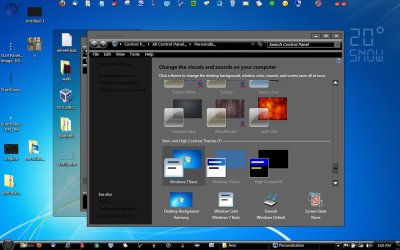
I have been trying for the past 45 minutes or so to change the color. I know how and where to go but when I try to change it I get this -->

Untitled-16.png
It doesn't let me change my color and I know it is sort of a minor problem but it is annoying me none the less. Please help, someone?
 

My Computer

OS
Windows 7
You'll find it under Window Color. Since you are only running Basic, you will probably see color choices similar to what you were expecting.
 

My Computer

OS
Windows 7 Ultimate x64 SP1
CPU
Intel Core i7-2600
Motherboard
Gigabyte GA-P67A-UD3P-B3
Memory
12 GB Patriot Extreme DDR3-1333
Graphics Card(s)
Nvidia GTX 470
Monitor(s) Displays
Dell UltraSharp 2209WA
Hard Drives
OCZ Agility3 240 GB, WD5001AALS, WD7501AALS
PSU
OCZ ModStream 700W
Case
CoolerMaster HAF 912 Advanced
Cooling
CoolerMaster Hyper 212 Plus
The Taskbar is kind of transparent, maybe you can use an appropriate desktop background picture.
 

My Computer

OS
Windows 7 Home Premium 32bit
You'll find it under Window Color. Since you are only running Basic, you will probably see color choices similar to what you were expecting.

I can't change the task bar at all. My picture I posted up there is Window Color and it does not let me change the task bar at all.

The Taskbar is kind of transparent, maybe you can use an appropriate desktop background picture.

I would still like to figure out why I can't change the task bar color.
 

My Computer

OS
Windows 7
You can't change your taskbar colour unless you have Aero on. There's an option but it doesn't change anything. Yeah, it's lame. It's always blue.
 

My Computer

OS
Microsoft Windows 7 Ultimate x64 (Build 7601 SP1)
CPU
AMD Phenom II X2 555 @ X4 B55 (3.2Ghz, 2MB L2/6MB L3 Cache)
Motherboard
ASUS M4A785TD-V Evo
Memory
4GB (2x2GB) Corsair DDR3, 1333Mhz
Graphics Card(s)
ASUS ENGTX560, DirectCU, 1GD5
Sound Card
8-Channel HD Audio
Monitor(s) Displays
Philips 226CL2SB
Screen Resolution
1920x1080p
Hard Drives
500GB Seagate, SATA2, 7200rpm, 16MB/s
PSU
Corsair TX650 v2
Internet Speed
90mbps Fiber Optics
You can not change the Basic taskbar color from Windows Color and Appearance

BUT

I just did it by following this UNAWAVE - Windows 7 Basic Theme transparent
It said You will need to do 1 of these 2 guides for it to work.
http://www.sevenforums.com/tutorials/28377-theme-how-apply-custom-themes.html or (I use) http://www.sevenforums.com/tutorials/34579-enabling-custom-themes-windows-7-a.html
you need to use windows classic theme then logoff then logon take ownership of the aero.msstyle in C:\Windows\Resources\Themes\Aero change the name to aeroold
then put a aero theme with the taskbar changed in C:\Windows\Resources\Themes\Aero & name it aero now windows basic will change.
Jerry

PS I can change the aero.msstyle for you give me a color.

I did it here to http://www.sevenforums.com/customization/136621-there-any-solution-changing-basic-taskbar-color.html
 

Attachments

  • Screenshot (16h 05m 28s).jpg
    Screenshot (16h 05m 28s).jpg
    94.7 KB · Views: 32

My Computer

Computer type
Laptop
Computer Manufacturer/Model Number
Sager NP9170
OS
Win 7 Pro x64 / Win 10 Pro
CPU
Intel(R) Core(TM) i7-3630QM CPU @ 2.40GHz
Motherboard
CLEVO P170EM
Memory
12 GB
Graphics Card(s)
(1) Intel(R) HD Graphics 4000 (2) NVIDIA GeForce GTX 675M
Sound Card
(1) Realtek High Definition Audio (2) Intel(R) Display Aud
Monitor(s) Displays
17.3
Screen Resolution
1920x1080
Hard Drives
(1) Samsung 860 EVO 500GB(OS) (1) Samsung 860 EVO 500GB(Data)
Keyboard
Backlite
Antivirus
MSE, Malwarebytes Pro
Browser
Firefox
Other Info
DESKTOP: Custom-built.
OS: Win 10 Pro x64.
CASE: Rosewill R5.
CPU: Intel I5 4670K CPU @ 3.40GHz.
CPU COOLER: Cool Master Hyper 212 EVO.
MOTHERBOARD: Asus Z87-A.
MEMORY: Kingston HyperX 2x4 GB.
GPU: Nvidia Geforce 650 TI.
PSU: Corsair TX750.
DRIVES: (1) Samsung 840 120 GB SSD (2) Western Digital blue 500 GB 7200 RPM.
Back
Top