Taskbar Context Menus - Enable or Disable

How to Enable or Disable the Taskbar Context Menus in Windows 7

   Information
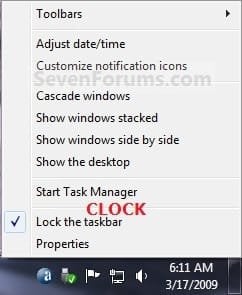
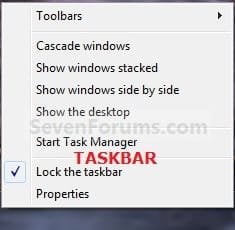
This will allow you to enable or disable the Start button, clock, and taskbar context menus for all users on the computer in Windows 7. These context menus are enabled by default in Windows 7.

EXAMPLE: Start button, Clock, and Taskbar Context MenusStart_Button.jpgClock.jpgTaskbar.jpg


OPTION ONE

Using a REG File Download

1. To Enable Taskbar Context MenusA) Click on the Download button below to download the file below.Enable_Taskbar_Context_Menus.zip


Download


B) Go to step 3.

2. To Disable Taskbar Context MenusA) Click on the Download button below to download the file below Disable_Taskbar_Context_Menus.zip


Download


3. Save the .zip file to the desktop.

4. Open the .zip file and extract the .reg file to the desktop.

5. Right click on the extracted .reg file, and click on Merge.

6. Click on Run, Yes (UAC), Yes, and OK when prompted.

7. When done, you can delete the downloaded .reg and .zip files if you like.


OPTION TWO

Through the Local Group Policy Editor

1. Open the all users, specific users or groups, or all users except administrators Local Group Policy Editor for how you want this policy applied.

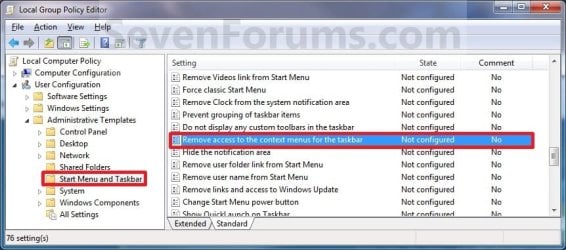
2. In the left pane, click on to expand User Configuration, Administrative Templates, and Start Menu and Taskbar. (See screenshot below)Group_Policy.jpg

3. In the right pane, right click on Remove access to the context menus for the taskbar and click on Edit. (See screenshot above)

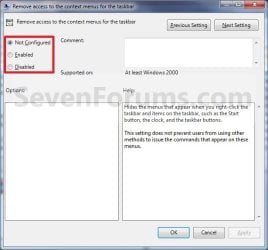
4. To Enable Taskbar Context Menus A) Select (dot) either Not Configured or Disabled. (See screenshot below step 6)

B) Go to step 6.

5. To Disable Taskbar Context Menus A) Select (dot) Enabled. (See screenshot below step 6)

6. Click on OK. (See screenshot below)Properties.jpg

7. Close the Local Group Policy Editor window.

That's it,
Shawn Brink


Attachments

Last edited:
Disable menus .reg
Code:
Windows Registry Editor Version 5.00

[HKEY_CURRENT_USER\Software\Microsoft\Windows\CurrentVersion\Policies\Explorer]
"NoTrayContextMenu"=dword:00000001

[HKEY_LOCAL_MACHINE\Software\Microsoft\Windows\CurrentVersion\Policies\Explorer]
"NoTrayContextMenu"=dword:00000001

Enable menus .reg
Code:
Windows Registry Editor Version 5.00

[HKEY_CURRENT_USER\Software\Microsoft\Windows\CurrentVersion\Policies\Explorer]
"NoTrayContextMenu"=-
[HKEY_LOCAL_MACHINE\Software\Microsoft\Windows\CurrentVersion\Policies\Explorer]
"NoTrayContextMenu"=-

Manually
To Enable, Delete "NoTrayContextMenu" REG_DWORD
To Disable, Set "NoTrayContextMenu" REG_DWORD Data Value to 1
 

My Computers

System One System Two

  • Computer type
    PC/Desktop
    OS
    W7U x64
    CPU
    AMD A4-6300 APU with Radeon(tm) HD Graphics 3.70 GHz
    Motherboard
    ASRock FM2A78M-DG3+
    Memory
    2x8GB
    Graphics Card(s)
    NVidia GT710 2GB DDR3
    Sound Card
    Tascam US-122L
    Monitor(s) Displays
    3
    Screen Resolution
    1920x1080 + (1280x1024 x2)
    Hard Drives
    HDDs
  • Computer type
    PC/Desktop
Back
Top