Taskbar - Customize Skin

How to Customize the Windows 7 Taskbar Skin

   Information
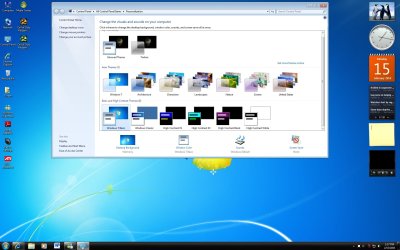
Here’s something for those, who are stuck with the Basic skin, and don’t like the default Taskbar appearance...
attachment.php

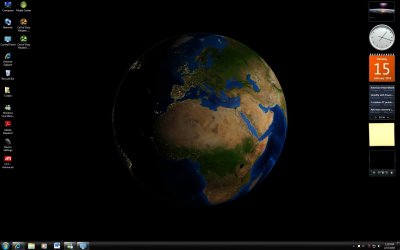
...but would rather have it look different:
attachment.php

Unfortunately, the Basic Taskbar appearance can't be changed thru settings, but requires you to alter the image files it's based on. This said, as the images are only a few pixels big, it's not difficult at all.


STEP ONE

Preparation


1. Download the Uxtheme patch in order to use these modifications.
WARNING: Make sure you download the right files! As always, make backups of the files you alter, as there’s always a chance to break something. Especially when messing around with system files.

2. In there you’ll need the 829.png to 832.png and 990.png to 993.png files. For build 7229, you'll need the 841.png to 844.png and 1010.png to 1013.png files instead.
NOTE: I created a little overview. Here you can see, where the images are used.
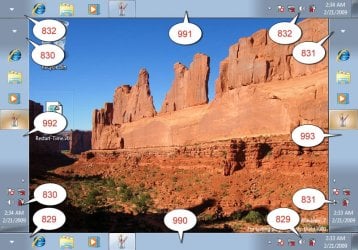
basic_bar_pos.jpg
3. Apply the Uxtheme patch (If not already done before).

4. Take ownership of aero.msstyles (so you can overwrite it).

5. Create a backup of aero.msstyles.


STEP TWO

How to Edit


1. Open your aero.msstyles backup with Resource Tuner (or a comparable tool)

2. Extract the image files.

3. Modify the file(s) to your liking.

4. In Resource Tuner select Edit Resource to add the edited image.
NOTE: The file name has to be the same as the original file.

5. Select Save File as and create a copy of aero.msstyles somewhere

6. Replace the old file with the newly created one

7. Change to a different Scheme and back to apply your settings
Enjoy! :D

   Tip
I have attached the plain black bar in a ZIP file below for those who want to see what it looks like without having to edit something. Click on the Download button below to download the ZIP file. :p

Download


Attachments

  • basic_bar_black.zip
    basic_bar_black.zip
    829.1 KB · Views: 11,123
  • Basic_Bar1.jpg
    Basic_Bar1.jpg
    14.7 KB · Views: 132,539
  • basic_bar_default.jpg
    basic_bar_default.jpg
    3.9 KB · Views: 132,217
Last edited by a moderator:
Nice Guide Killer Kat. Just What I Was Looking For lol.
 

My Computer

Computer Manufacturer/Model Number
Acer Aspire 8730-6951
OS
Windows 7, Windows Vista
CPU
2.4 GHZ
Memory
4.0 GB
Graphics Card(s)
Nvidia 9600m GT 1GB
Screen Resolution
1680*945
Hard Drives
320GB
Nice work. :)
 

My Computer

Computer Manufacturer/Model Number
Dilithium Computers/Engineering (Myself) Star date 42.739285.5432.9
OS
Win7 Ultimate x64 on Desktop / Win7 Ultimate x86 on laptop / Win7 x86 Starter on Netbook
CPU
AMD Phenom 965 X4 3.4Ghz cpu Black Edition
Motherboard
Gigabyte 790XT
Memory
12 Gb DDR3
Graphics Card(s)
Nvidea Gforce GTX 470
Sound Card
Onboard Realtek hi-fi
Monitor(s) Displays
Lg 3D led 23"
Screen Resolution
1920x1080
Hard Drives
Loads maxstore sata 1 & 2/ loads of partitions + 1Tb Hitachi sata 2. 256Gb Crucial ssd.
PSU
OCZ 700W GameXstream
Case
Artec 10000
Cooling
On board + many case fans
Keyboard
Logitech wireless K350
Mouse
Inferno gaming mouse
Internet Speed
Talk talk. 10Mb
Other Info
My PC was hand built with matchsticks. xbox 360 controller. Printers,fax.........
great work...killercat ;)

i shall have a toy with this later.....


:)SK
 

My Computer

Computer Manufacturer/Model Number
myself
OS
SEVEN x64
CPU
Q9450 @ 3.6GHZ 1.34v
Motherboard
ASUS P5K PREMIUM P35
Memory
8GB 1066 buffalo firestix @ 1152mhz CL5
Graphics Card(s)
Sapphire HD 5970 + GTX260 (physX)
Sound Card
Creative X-FI Xtreme Gamer
Monitor(s) Displays
SAMSUNG 20'' & SAMSUNG 23'' (dual screens)
Screen Resolution
2048x1152 & 1680x1050
Hard Drives
1x seagate 160gb IDE & 1x seagate 160gb SATA
PSU
XCILIO 850w (78A)
Case
CM590 1x 120x38mm & 2x92x38mm / 4x 120x25mm
Cooling
AC7 PRO @ 92x38mm blower, Lamptron military bus bay controll
Keyboard
LOGITECH E110
Mouse
logitech NX5
Internet Speed
2MB
Other Info
its a continual ''work in progress''....
Updated info for build 7068 ...

Hey

Thanks for the great post! However, I think the resources have changed for build 7068 upwards... the png's don't match those you mention in your tut.

Any chance of updating this for??

Thanks again!
 

My Computer

OS
Win7 7068
Hello everyone

I think that png's are changing with build numbers. If I do something for 7100 I'll post it here but I'll be gratefull if someone posts some black basic skin (love ati 7500)
 

My Computer

OS
windows 7
Yeah does anyone know how to modify this for RC 7100? Trying to apply this causes explorer.exe not to work and force me to system restore.

Ive looked through the aero.msstyle for the actual .png file for the taskbar but can't find it. I can find and replace the skin for the start menu but alas not the most important one ~ the taskbar.

(BTW my comp can't run aero, no GFX card)
 

My Computer

OS
Windows 7
Regarding step 2,
for those struggling to find the resource's, the images for build 7229 are as follows:

841.png upto 844.png and then 1010.png upto 1013.png


This maybe the same for other builds.
 

My Computer

Computer Manufacturer/Model Number
Self Built
OS
XP Pro SP3 x86/Vista SP2 x64/Win7 x64 Triple-boot
CPU
AMD64 X2 AM2 5000+
Motherboard
Asus MSN-X Plus
Memory
Corsair TWX 2Gb (2x1Gb) DDR2 800Mhz
Graphics Card(s)
PCI-X 2.0 Inno3D (NVidia) 9500GT 1Gb DDR2
Sound Card
Onboard Realtec ALC662-GR
Monitor(s) Displays
Relisys 17' CRT (model unknown)
Screen Resolution
1024x768
Hard Drives
750Gb Samsung 7200-3Gb/s 32Mb Cache SATA
PSU
500W
Cooling
Standard AMD CPU Fan, One side, front and rear case fan.
Keyboard
Microsoft Multimedia Keyboard
Mouse
Samsung Optical
Internet Speed
10M
resource editing.....system 32 files love it! (not really)
now there's a field of which i have A LOT of experience in. I semi-sucessfully modified most of the files in XP (a boredom project) with out (much) problem. good to know i can do it in 7 too.... just another part of my OCD w/ customizing things :)
or better yet...rip all the 7 resources, and add them to xp muhuhahahaha....sorry, got carried away. thanks for the info guys.
 

My Computer

Computer Manufacturer/Model Number
eMachines W3502
OS
Windows 7 Ultimate x32
CPU
Intel Celeron D 3.2 Ghz 533 fsb (LGA 775)
Motherboard
Intel D101GGC
Memory
1 GB (2x512MB) PC-3200 DDR @ 200Mhz
Graphics Card(s)
Nvidia GeForce 9400GT- 1GB
Sound Card
Sound Blaster X-Fi Xtreame Gamer
Monitor(s) Displays
19" LCD HDtv
Screen Resolution
1360x768 @ 60Htz
Hard Drives
SeaGate Barracuda 750GB
SeaGate Barracuda 100GB
Toshiba CD/DVDW/ TS-H552D [DVD+R, DL]
PSU
stock (idk)
Case
The busted remains of the stock case
Cooling
Dust cooled, waitwut?
Keyboard
Stock. Missing a few keys.
Mouse
Logitech LX8 5-btn mouse (wireless)
Internet Speed
TWC 10Mb
Other Info
Keeps going, and going, and going.......
Regarding step 2,
for those struggling to find the resource's, the images for build 7229 are as follows:

841.png upto 844.png and then 1010.png upto 1013.png

This maybe the same for other builds.

Thank you Generator. I have updated the tutorial to include these. :)
 

My Computer

Computer type
PC/Desktop
Computer Manufacturer/Model Number
Self built custom
OS
64-bit Windows 11 Pro for Workstations
CPU
Intel i7-8700K OC'd to 5 GHz
Motherboard
ASUS ROG Maximus XI Formula Z390
Memory
64 GB (4x16GB) G.SKILL TridentZ RGB DDR4 3600 MHz
Graphics Card(s)
ASUS ROG-STRIX-GTX1080TI-O11G-GAMING
Sound Card
Integrated
Monitor(s) Displays
2 x Samsung Odyssey G7 27"
Screen Resolution
2560x1440
Hard Drives
1TB Samsung 990 PRO M.2,
4TB Samsung 990 PRO PRO M.2,
TerraMaster F8 SSD Plus NAS
PSU
Seasonic Prime Titanium 850W
Case
Thermaltake Core P3
Cooling
Corsair Hydro H115i
Keyboard
Logitech wireless K800
Mouse
Logitech MX Master 4
Internet Speed
2 Gb/s Download and 100 Mb/s Upload
Antivirus
Malwarebyte Anti-Malware Premium
Browser
Google Chrome
Other Info
Logitech Z625 speaker system,
Logitech BRIO 4K Pro webcam,
HP Color LaserJet Pro MFP M477fdn,
APC SMART-UPS RT 1000 XL - SURT1000XLI,
Galaxy S23 Plus phone
thanks for the update Generator!
 

My Computer

OS
7600 x86
CPU
Core 2 Duo e7200, 2.53 ghz
Motherboard
Micro-Star MS-7529
Memory
2x DDR2 PC5300 1gb, 667 mhz
Graphics Card(s)
GeForce 9500gt, 512mb
Monitor(s) Displays
22" LG Flatron w2234s
Screen Resolution
1680x1050
Hard Drives
Excelstor SATA-II 250gb 7200rpm, 8mb cache
PSU
CoolerMaster M520
Internet Speed
30/20 mbits
??

i downloaded ux theme patch,, and when i open the dll file in resource tuner,, i cant find ne images? that match what you described,, ne help ?? plz
 

My Computer

Computer Manufacturer/Model Number
Compaq Presario SR1230NX
OS
windows 7, ubuntu,
CPU
AMD Athlon XP 3200+
Motherboard
AsusTek VIA KM400
Memory
512mb
Graphics Card(s)
VIA S3G Unichrome
Sound Card
Realtek AC'97
Monitor(s) Displays
standard 20"
Screen Resolution
1024 x 768
Hard Drives
160gb
i downloaded ux theme patch,, and when i open the dll file in resource tuner,, i cant find ne images? that match what you described,, ne help ?? plz
aero.msstyles is not a dll file. Please read the first post in this thread.
 

My Computer

OS
Windows 7
Can someone attach files for blue start menu, windows 7 final?
 

My Computer

OS
Windows 7 SP1 32bit
CPU
Intel Pentium 4 2.80GHz
Motherboard
Asus P4v800d-x
Memory
1.5GB RAM ddr
Graphics Card(s)
ATi Radeon 9600 pro 256mb agp
Sound Card
integrated
Monitor(s) Displays
Asus VW193D-b
Hard Drives
WD 320GB AAJS
PSU
350W
Case
I don't know
Keyboard
Logitech PS/2
Mouse
Logitech USB
Internet Speed
4 MB/s
really really really new to this where do i find the files that i have to patch for the uxtheme patch ?
 

My Computer

Computer Manufacturer/Model Number
toshiba
OS
windows 7 x 32
Windows 7 Basic Black Magic

Hi

I just made a black magic for the taskbar, when you are in basic mode.
And thx for the great advice here to do it.
 

Attachments

  • aero.zip
    aero.zip
    833.8 KB · Views: 501
  • Black Basic1.jpg
    Black Basic1.jpg
    397.1 KB · Views: 1,111
  • Black Madic2.jpg
    Black Madic2.jpg
    231.8 KB · Views: 983

My Computer

OS
windows 7 64 bit ultimate
Just upgraded to Windows 7 Ultimate (32 bit) today - but I'm confused... when I go into the Aero folder I have to go farther, into the en-US folder... and then I find aero.msstyles.mui ... and I don't know what an MUI file is. Tried replacing it, to no avail. Is this something that is occuring on newer releases of Windows 7? Or am I just too computer illiterate to know what's going on? :)
 

My Computer

OS
Windows 7 Ultimate
Back
Top