

Ephraim613
New member
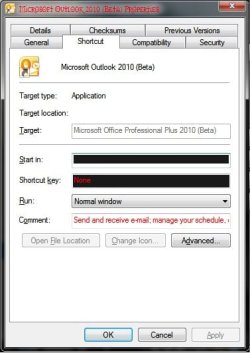
First I'd like to apologize if this is somewhere else of the forum, I did run a search but did not find anything really close. I'm wondering if there is a folder in the \Windows directory or else where that contains the shortcuts of the taskbar. There is an icon I'd like to change but it has frozen me out of that setting

Ok, I found the location of the folder: C:\Users\user_name\AppData\Roaming\Microsoft\Internet Explorer\Quick Launch\User Pinned\TaskBar
still have the original problem of not being able to change the icon
Ok, I found the location of the folder: C:\Users\user_name\AppData\Roaming\Microsoft\Internet Explorer\Quick Launch\User Pinned\TaskBar
still have the original problem of not being able to change the icon
Attachments
Last edited:
My Computer
At a glance
Win7 Ultimate Build 7600 RTMAMD Turion 64 X2 Mobile Technology TL-60 2.00GHz3.00 GB (2.87GB usable)ATI Radeon X1250
- Computer Manufacturer/Model Number
- Toshiba Satellite 350D
- OS
- Win7 Ultimate Build 7600 RTM
- CPU
- AMD Turion 64 X2 Mobile Technology TL-60 2.00GHz
- Memory
- 3.00 GB (2.87GB usable)
- Graphics Card(s)
- ATI Radeon X1250
- Sound Card
- Realtek High Definition Audio
- Monitor(s) Displays
- Generic PnP Monitor (Laptop)
- Hard Drives
- Toshiba MK2546GSX ATA Device


