
taskbar folder

Ephraim613

New member
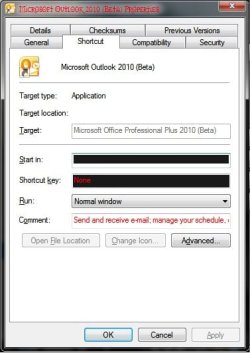
First I'd like to apologize if this is somewhere else of the forum, I did run a search but did not find anything really close. I'm wondering if there is a folder in the \Windows directory or else where that contains the shortcuts of the taskbar. There is an icon I'd like to change but it has frozen me out of that setting

moz-screenshot.png


Ok, I found the location of the folder: C:\Users\user_name\AppData\Roaming\Microsoft\Internet Explorer\Quick Launch\User Pinned\TaskBar

still have the original problem of not being able to change the icon
 

Attachments
  • more_icon_fail.jpg
    more_icon_fail.jpg
    61.2 KB · Views: 22
Last edited:

My Computer

Computer Manufacturer/Model Number
Toshiba Satellite 350D
OS
Win7 Ultimate Build 7600 RTM
CPU
AMD Turion 64 X2 Mobile Technology TL-60 2.00GHz
Memory
3.00 GB (2.87GB usable)
Graphics Card(s)
ATI Radeon X1250
Sound Card
Realtek High Definition Audio
Monitor(s) Displays
Generic PnP Monitor (Laptop)
Hard Drives
Toshiba MK2546GSX ATA Device
Best to create a desktop shortcut first and change the shortcut icon then launch the program and then pin it to the taskbar.
 

My Computer

Computer Manufacturer/Model Number
Home Brew
OS
Windows 7 Ultimate Vista Ultimate x64
CPU
Core 2 Duo E8500 3.16Ghz @ 3.8Ghz
Motherboard
eVGA 750i FTW
Memory
2x2Gigs Patriot PC2-6400 LL
Graphics Card(s)
Inno3D GeForce GTX260 216 SP
Monitor(s) Displays
ASUS VW222U 22" 2ms Response time
Screen Resolution
1680x1050
Hard Drives
SATA 150GB
SATA II 250GB
USB IDE 750GB Ext.
PSU
HYTEC 600W & Thermaltake 650W Toughpower Power Exp
Case
Thermaltake Armor LCS (Liquid Cooling System)
Cooling
Liquid Cooling System
Keyboard
Logitech G15 Gaming Keyboard
Mouse
Logitech G9 Gaming Mouse
Best to create a desktop shortcut first and change the shortcut icon then launch the program and then pin it to the taskbar.

I agree with Mr GRiM and here's the steps to elaborate on his solution.

1. Copy the shortcut out to your desktop from the %userprofile%\AppData\Roaming\Microsoft\Internet Explorer\Quick Launch\User Pinned\TaskBar folder
2. Change the icon on the shortcut
3. Make sure that your program is closed and unpin it from the taskbar
4. Open the program from your new shortcut
5. Pin it to the taskbar
6. Delete the shortcut from the desktop

Worked like a charm in testing and I learned something too.
 

My Computer

Computer Manufacturer/Model Number
Custom Hack job
OS
Windows 7 Ultimate 64 bit
CPU
Intel(R) Core(TM)2 Quad CPU Q8200 @ 2.33GHz
Motherboard
GigaByte EP45-UD3
Memory
8 GB Kingston
Graphics Card(s)
Nvidia GeForce 9600GT
Sound Card
Soundblaster Audigy
Monitor(s) Displays
AOC x2 22"
Hard Drives
2 x Samsung 500GB (RAID)
2 x Samsung 2TB
1 x WD Green 2TB
1 x Seagate 1TB
1 x Samsung 500GB
PSU
Thermaltake QFan 750W
Case
CM Scout Gaming
Cooling
Coolermaster V10
Keyboard
Microsoft Wireless Keyboard 1000
Mouse
Microsoft Wireless Optical 2000
Internet Speed
320
Other Info
Winfast PVR2000CP
LG DVD-RAM DVD/RW/DL Super Multi
Linksys WMP300Nx2 Wireless Adapter
Thanks, worked nicely. Lost the jump list but i never used the jump list for outlook anyway
 

My Computer

Computer Manufacturer/Model Number
Toshiba Satellite 350D
OS
Win7 Ultimate Build 7600 RTM
CPU
AMD Turion 64 X2 Mobile Technology TL-60 2.00GHz
Memory
3.00 GB (2.87GB usable)
Graphics Card(s)
ATI Radeon X1250
Sound Card
Realtek High Definition Audio
Monitor(s) Displays
Generic PnP Monitor (Laptop)
Hard Drives
Toshiba MK2546GSX ATA Device
Back
Top