
Taskbar highlight color

obones

New member
Hello,

In the attached capture, every button has a white background while the active window gets an even whiter background. This which makes it hard for me to read the text. It's even worse when hovering the explorer button but as this is only temporary, I can live with it.

Can this white background be changed to anything else?

I have searched in a lot of places, read lots of web pages but could not find anything else than "it can't be done".

Any help would be most welcome.
 

Attachments

  • Taskbar capture.png
    Taskbar capture.png
    22.1 KB · Views: 104

My Computer

OS
Windows 7 Pro x64

Attachments

  • task.PNG
    task.PNG
    28.4 KB · Views: 136

My Computer

Computer type
Laptop
Computer Manufacturer/Model Number
Sager NP9170
OS
Win 7 Pro x64 / Win 10 Pro
CPU
Intel(R) Core(TM) i7-3630QM CPU @ 2.40GHz
Motherboard
CLEVO P170EM
Memory
12 GB
Graphics Card(s)
(1) Intel(R) HD Graphics 4000 (2) NVIDIA GeForce GTX 675M
Sound Card
(1) Realtek High Definition Audio (2) Intel(R) Display Aud
Monitor(s) Displays
17.3
Screen Resolution
1920x1080
Hard Drives
(1) Samsung 860 EVO 500GB(OS) (1) Samsung 860 EVO 500GB(Data)
Keyboard
Backlite
Antivirus
MSE, Malwarebytes Pro
Browser
Firefox
Other Info
DESKTOP: Custom-built.
OS: Win 10 Pro x64.
CASE: Rosewill R5.
CPU: Intel I5 4670K CPU @ 3.40GHz.
CPU COOLER: Cool Master Hyper 212 EVO.
MOTHERBOARD: Asus Z87-A.
MEMORY: Kingston HyperX 2x4 GB.
GPU: Nvidia Geforce 650 TI.
PSU: Corsair TX750.
DRIVES: (1) Samsung 840 120 GB SSD (2) Western Digital blue 500 GB 7200 RPM.
Hum... ok, thanks for the pointer, I see one has to go deep into the system resources to be able to change this.
I tried it in a VM, just drawing something on top of the existing 1014 resource in aero.msstyles ans sure enough, the buttons changed.
So now I have to figure out a nice design of my own. Or maybe you have some suggestions?
 

My Computer

OS
Windows 7 Pro x64
Hum... ok, thanks for the pointer, I see one has to go deep into the system resources to be able to change this.
I tried it in a VM, just drawing something on top of the existing 1014 resource in aero.msstyles ans sure enough, the buttons changed.
So now I have to figure out a nice design of my own. Or maybe you have some suggestions?
I will leave the design up to you:D you may need to edit #s 1015, 1016, 1017 to depends on how you have your taskbar buttons set.
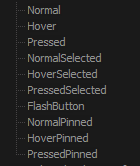
Here is a hint when you look at #1014 you see 10 images on it from the top they are Normal, Hover, Pressed, etc. (screenshot)
Jerry
 

Attachments

  • buttons.PNG
    buttons.PNG
    3.5 KB · Views: 1,063

My Computer

Computer type
Laptop
Computer Manufacturer/Model Number
Sager NP9170
OS
Win 7 Pro x64 / Win 10 Pro
CPU
Intel(R) Core(TM) i7-3630QM CPU @ 2.40GHz
Motherboard
CLEVO P170EM
Memory
12 GB
Graphics Card(s)
(1) Intel(R) HD Graphics 4000 (2) NVIDIA GeForce GTX 675M
Sound Card
(1) Realtek High Definition Audio (2) Intel(R) Display Aud
Monitor(s) Displays
17.3
Screen Resolution
1920x1080
Hard Drives
(1) Samsung 860 EVO 500GB(OS) (1) Samsung 860 EVO 500GB(Data)
Keyboard
Backlite
Antivirus
MSE, Malwarebytes Pro
Browser
Firefox
Other Info
DESKTOP: Custom-built.
OS: Win 10 Pro x64.
CASE: Rosewill R5.
CPU: Intel I5 4670K CPU @ 3.40GHz.
CPU COOLER: Cool Master Hyper 212 EVO.
MOTHERBOARD: Asus Z87-A.
MEMORY: Kingston HyperX 2x4 GB.
GPU: Nvidia Geforce 650 TI.
PSU: Corsair TX750.
DRIVES: (1) Samsung 840 120 GB SSD (2) Western Digital blue 500 GB 7200 RPM.
Back
Top
