Taskbar icon for open program/window change

Keruto

New member
Local time
10:41 AM
Messages
4
Hi everybody.

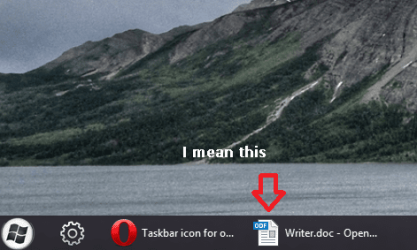
Just wanted to know: is there any way то change icon of open window in taskbar? I'm using openoffice writer and don't really like its default icon.

I've spent last 3 days trying to google it out. :banghead: Something i realized:

1. It's not the icon of program
2. It's not the icon of pinned shortcut
3. It's not the icon of filetype

Would appreciate any kind of help.

P. S. Have another little question, don't want to start new thread. How do I pin shortcut to some folder in the taskbar? I mean, I tried to pin shortcut to desktop folder, but it just opens Explorer instead of folder window.
 

My Computer

OS
Windows 7 Home Premium x64
Are you referring to windows explorer taskbar icon?
 

My Computer

Computer Manufacturer/Model Number
D3f's Customs
OS
Win 7 Ultimate SP1 x64
CPU
Intel Pentium Dual Core E5300 OC'd @ 3GHz
Motherboard
Asus P5G41-M LE
Memory
Kingston 2x2GB DDR2-800 Dual Channel SDRAM
Graphics Card(s)
Integrated Intel GMA X4500
Sound Card
Realtek 5.1 HD Audio (ALC887)
Monitor(s) Displays
LG Flatron W1943S @ 60Hz
Screen Resolution
1360 x 768
Hard Drives
Internal - WD Caviar Blue 500GB, External - WD My Passport Essential 500GB
PSU
Headway 450w PSU
Case
Pixxo Slim Black mATX Case
Cooling
Stock Cpu Fan, 1 x Top Case Fan
Keyboard
Logitech K120
Mouse
Logitech LS1 Laser Mouse
Internet Speed
17.66Mb/s Down, 0.82Mb/s Up
Other Info
Creative SBS A300 2.1 Speaker System, LG GH22NS50 22x Internal Super-Multi DVD-RW, 2Wire 5012NV Wireless Modem Router
Yeah, I guess. See pic:
 

Attachments

  • Снимок.PNG
    Снимок.PNG
    57.9 KB · Views: 28

My Computer

OS
Windows 7 Home Premium x64
Is this what you want?
 

My Computer

Computer Manufacturer/Model Number
D3f's Customs
OS
Win 7 Ultimate SP1 x64
CPU
Intel Pentium Dual Core E5300 OC'd @ 3GHz
Motherboard
Asus P5G41-M LE
Memory
Kingston 2x2GB DDR2-800 Dual Channel SDRAM
Graphics Card(s)
Integrated Intel GMA X4500
Sound Card
Realtek 5.1 HD Audio (ALC887)
Monitor(s) Displays
LG Flatron W1943S @ 60Hz
Screen Resolution
1360 x 768
Hard Drives
Internal - WD Caviar Blue 500GB, External - WD My Passport Essential 500GB
PSU
Headway 450w PSU
Case
Pixxo Slim Black mATX Case
Cooling
Stock Cpu Fan, 1 x Top Case Fan
Keyboard
Logitech K120
Mouse
Logitech LS1 Laser Mouse
Internet Speed
17.66Mb/s Down, 0.82Mb/s Up
Other Info
Creative SBS A300 2.1 Speaker System, LG GH22NS50 22x Internal Super-Multi DVD-RW, 2Wire 5012NV Wireless Modem Router
I have had the same damn problem but I fixed it temporarily, I'm not sure what progam made the change or if any of the programs for that where needed.
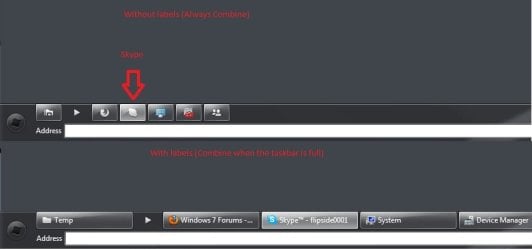
But I think 7CONIFIER can fix this if you choose the option to always combine programs in the taskbar.
If you have labels it will change back to the default icons. I'm still trying to find a way to change the icons when having labels, but this will do for the moment.

Here's a picture if it was unclear ;)
Pic.jpg
 

Attachments

  • Pic.jpg
    Pic.jpg
    18.7 KB · Views: 120

My Computer

OS
Windows 7 Ultimate x64
CPU
Inte Core2Quad 9450
Motherboard
Asus P5P43TD Pro
Memory
Corsair
Graphics Card(s)
Asus Radeon HD6970 DCII
Monitor(s) Displays
BenQ G2410HDBL
Hard Drives
Corsair Force 120 Gb
and lots of WD HDDs.
PSU
Thermaltake 750W
Case
Fractal Design Define XL
Well, I've found answers to my both questions. Maybe it will be useful for somebody:

1. Taskbar takes icons for open window from some exe, dll, or res, or bin file. It's not file type icon, it could be icon of program or could be not. For openoffice swriter, it's stored in file soffice.bin. There is no easy and fast way to change it. I used program Resource Hacker to replace default icon to my own. The hard thing - is to figure out, what file you should change and what icon to replace (soffice.bin has hundreds of it). Good luck.

2. To pin shortcut for some folder you should create file dummy.txt (or something) then rename it to dump.exe and drag to you taskbar. Then right cilck it, right click line "dummy.exe - Shortcut", choose "Properties". Change stroke "Target" and "Start in" addresses to that what you want, change icon (i've chosen transparent icon cause i don't like a lot of shortcuts on my taskbar). Enjoy :D
 

My Computer

OS
Windows 7 Home Premium x64
Back
Top