Taskbar - Pin or Unpin a Program

How to Pin or Unpin a Program to the Windows 7 Taskbar

   Information
This will show you how to Pin or Unpin a .exe file or shortcut of a installed program to the Windows 7 taskbar as a icon on the taskbar.

   Note
The pinned taskbar items are located in this hidden system folder:

Code:
C:\Users\(User-Name)\AppData\Roaming\Microsoft\Internet Explorer\Quick Launch\User Pinned\TaskBar

The default icon links on the taskbar is Internet Explorer, Windows Media Player, and Windows Explorer (opens to Libraries).

   Tip
Each program icon pinned to the taskbar can be opened by pressing the Windows key + 1 to 0 (1-10) keyboard shortcuts. You would use a number for how the program icons are ordered on the taskbar from left to right (for top or bottom) or top to bottom (for left or right) desktop location.
   Warning
You will need to have Recent Items turned on to see the recent items in a pinned program's Jump List.

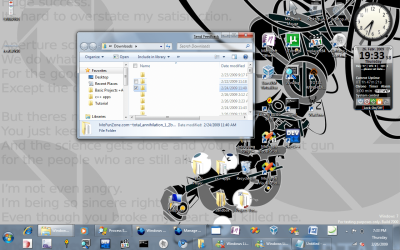
EXAMPLE: New Taskbar
attachment.php


OPTION ONE

To Pin a Program to the Taskbar


NOTE: You can use step 2 or 3 to pin a folder in the Windows Explorer taskbar icon jump list.
1. Right click on a program exe file or shortcut that you want to pin to the taskbar, and click on Pin to Taskbar. (See screenshot below)
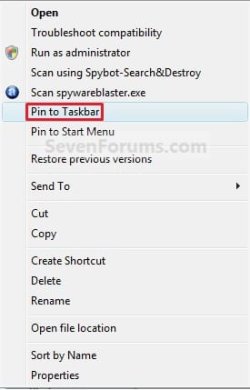
Context_menu.jpg
OR

2. Drag a file that has a program associated for it (ex: .txt file for Notepad) to a empty area on the taskbar until you see the Pin to (program name) (ex: Pin to notepad.exe) pop-up, then drop it. (See screenshot below)
NOTE: This will pin the program (ex: Notepad) to the taskbar with the file (ex: txt) included in it's right click menu.
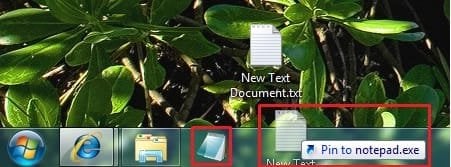
Program_File.jpg
OR

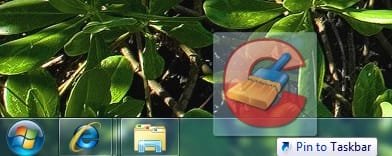
3. Drag a program .exe file or shortcut (ex: CCLeaner), to a empty area of the taskbar until you see the Pin to Taskbar pop-up, then drop it. (See screenshot below)
Program_exe_Shortcut.jpg
OR

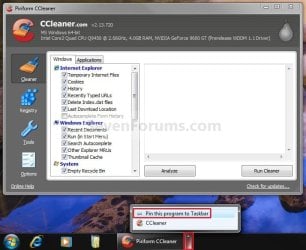
4. Right click on a open window taskbar button or icon that you want to pin to the taskbar, and click on Pin this program to the Taskbar. (See screenshot below)
Pin_Program.jpg
OR

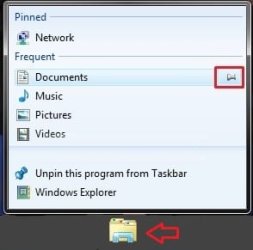
5. Pin to program's jump list. (See screenshot below)
Explorer-Pin.jpg


OPTION TWO

To Unpin a Program to the Taskbar


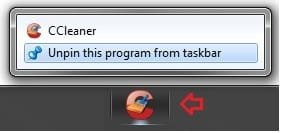
1. Right click on a pinned taskbar icon link that you want to unpin, and click on Unpin this program from the Taskbar. (See screenshot below)
Unpin_from_taskbar.jpg
OR

2. Unpin from program's jump list. (See screenshot below)
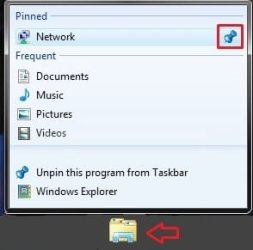
Explorer-Unpin.jpg
That's it,
Shawn


Related Tutorials


Attachments

  • New_Taskbar.jpg
    New_Taskbar.jpg
    9.4 KB · Views: 327,912
  • Unpin.jpg
    Unpin.jpg
    770 bytes · Views: 149,856
  • Pin.jpg
    Pin.jpg
    551 bytes · Views: 150,666
Last edited:
yes. this is what i meant! thank you very much for your help, I will let you know how it goes when I try it after I get home.
 

My Computer

OS
7 beta
You're welcome Daniel. Hope it goes well.
 

My Computer

Computer type
PC/Desktop
Computer Manufacturer/Model Number
Self built custom
OS
64-bit Windows 11 Pro for Workstations
CPU
Intel i7-8700K OC'd to 5 GHz
Motherboard
ASUS ROG Maximus XI Formula Z390
Memory
64 GB (4x16GB) G.SKILL TridentZ RGB DDR4 3600 MHz
Graphics Card(s)
ASUS ROG-STRIX-GTX1080TI-O11G-GAMING
Sound Card
Integrated
Monitor(s) Displays
2 x Samsung Odyssey G7 27"
Screen Resolution
2560x1440
Hard Drives
1TB Samsung 990 PRO M.2,
4TB Samsung 990 PRO PRO M.2,
TerraMaster F8 SSD Plus NAS
PSU
Seasonic Prime Titanium 850W
Case
Thermaltake Core P3
Cooling
Corsair Hydro H115i
Keyboard
Logitech wireless K800
Mouse
Logitech MX Master 4
Internet Speed
2 Gb/s Download and 100 Mb/s Upload
Antivirus
Malwarebyte Anti-Malware Premium
Browser
Google Chrome
Other Info
Logitech Z625 speaker system,
Logitech BRIO 4K Pro webcam,
HP Color LaserJet Pro MFP M477fdn,
APC SMART-UPS RT 1000 XL - SURT1000XLI,
Galaxy S23 Plus phone
i figured it out. both boxes in the properties menu have to be checked for the taskbar to allow you to pin something to windows explorer. this doesn't really make sense to me. just because something is pinned somewhere doesn't mean it is a recent item. pinning abilities should be independent of frequency of use or recentness.

thanks again for your help.
 

My Computer

OS
7 beta
Daniel,

I'm happy to hear that you got it sorted out now. Yeah, you would think the they would make that separate.
 

My Computer

Computer type
PC/Desktop
Computer Manufacturer/Model Number
Self built custom
OS
64-bit Windows 11 Pro for Workstations
CPU
Intel i7-8700K OC'd to 5 GHz
Motherboard
ASUS ROG Maximus XI Formula Z390
Memory
64 GB (4x16GB) G.SKILL TridentZ RGB DDR4 3600 MHz
Graphics Card(s)
ASUS ROG-STRIX-GTX1080TI-O11G-GAMING
Sound Card
Integrated
Monitor(s) Displays
2 x Samsung Odyssey G7 27"
Screen Resolution
2560x1440
Hard Drives
1TB Samsung 990 PRO M.2,
4TB Samsung 990 PRO PRO M.2,
TerraMaster F8 SSD Plus NAS
PSU
Seasonic Prime Titanium 850W
Case
Thermaltake Core P3
Cooling
Corsair Hydro H115i
Keyboard
Logitech wireless K800
Mouse
Logitech MX Master 4
Internet Speed
2 Gb/s Download and 100 Mb/s Upload
Antivirus
Malwarebyte Anti-Malware Premium
Browser
Google Chrome
Other Info
Logitech Z625 speaker system,
Logitech BRIO 4K Pro webcam,
HP Color LaserJet Pro MFP M477fdn,
APC SMART-UPS RT 1000 XL - SURT1000XLI,
Galaxy S23 Plus phone
i´m sorry but when i tried to pin a shortcut from the desktop, this is what happens:

theres a red icon instead of the blue arrow :(

thump_2067116untitled23213.jpg


Please help!
 

My Computer

OS
windows seven

My Computer

Computer type
PC/Desktop
Computer Manufacturer/Model Number
Self built custom
OS
64-bit Windows 11 Pro for Workstations
CPU
Intel i7-8700K OC'd to 5 GHz
Motherboard
ASUS ROG Maximus XI Formula Z390
Memory
64 GB (4x16GB) G.SKILL TridentZ RGB DDR4 3600 MHz
Graphics Card(s)
ASUS ROG-STRIX-GTX1080TI-O11G-GAMING
Sound Card
Integrated
Monitor(s) Displays
2 x Samsung Odyssey G7 27"
Screen Resolution
2560x1440
Hard Drives
1TB Samsung 990 PRO M.2,
4TB Samsung 990 PRO PRO M.2,
TerraMaster F8 SSD Plus NAS
PSU
Seasonic Prime Titanium 850W
Case
Thermaltake Core P3
Cooling
Corsair Hydro H115i
Keyboard
Logitech wireless K800
Mouse
Logitech MX Master 4
Internet Speed
2 Gb/s Download and 100 Mb/s Upload
Antivirus
Malwarebyte Anti-Malware Premium
Browser
Google Chrome
Other Info
Logitech Z625 speaker system,
Logitech BRIO 4K Pro webcam,
HP Color LaserJet Pro MFP M477fdn,
APC SMART-UPS RT 1000 XL - SURT1000XLI,
Galaxy S23 Plus phone
Hello Xzrd, and welcome to Seven Forums,

Do you have Recent Programs and Recent Items turned on?

Hope this helps,
Shawn

hey brink just wanted to let you know that they might be a workaround for folders and have no idea how i made i get here but i got :confused:

test1.PNG
test2.PNG
test3.PNG


test5.PNG
oh and its unstable meaning that it will disapear and will go to the windows explorer shortcut and click and it will regain focus...

oh and it behaves like wmp x64 meaning that the name would not be shown correctly...:confused:
 

My Computer

Computer Manufacturer/Model Number
Tx2500z Tablet Pc/Homemade Server
OS
Windows 7 Ult x64(x2), HomePrem x32(x4), Server 08 (+VM), 08 R2 (VM) , SuSe 11.2 (VM), XP 32 (VM)
CPU
Turion X2 ultra (oh well came with laptop)/P4 @3.2 (yes P4)
Motherboard
IDK HP Motherboard / Intel DG965SS
Memory
OCZ Dual Channel 4GB kit/ 1gb Dual Channel
Graphics Card(s)
HD 3200 graphics /GMA x3100 (yay for intergrated!!)
Sound Card
Realtek HD Audio(mic working, well sort of)/Siig IC-70012
Monitor(s) Displays
built-in Hp 12" laptop screen/ Acer 19"
Screen Resolution
1280x800 /1440x900
Cooling
All Air Cooled
Mouse
Logi MX Rev. /MS Wheel Optical 1.1A /Logitech Optical Mouse
Internet Speed
College baby but its still routed through vpn to 1536k...
Other Info
love my wacom pen and pressure sensitivity...
wished it worked in 7, SUSE for that matter though
Hi DA,

That does look interesting. To bad it is not stable though. I'll have to look into one. :)

Thank you,
Shawn
 

My Computer

Computer type
PC/Desktop
Computer Manufacturer/Model Number
Self built custom
OS
64-bit Windows 11 Pro for Workstations
CPU
Intel i7-8700K OC'd to 5 GHz
Motherboard
ASUS ROG Maximus XI Formula Z390
Memory
64 GB (4x16GB) G.SKILL TridentZ RGB DDR4 3600 MHz
Graphics Card(s)
ASUS ROG-STRIX-GTX1080TI-O11G-GAMING
Sound Card
Integrated
Monitor(s) Displays
2 x Samsung Odyssey G7 27"
Screen Resolution
2560x1440
Hard Drives
1TB Samsung 990 PRO M.2,
4TB Samsung 990 PRO PRO M.2,
TerraMaster F8 SSD Plus NAS
PSU
Seasonic Prime Titanium 850W
Case
Thermaltake Core P3
Cooling
Corsair Hydro H115i
Keyboard
Logitech wireless K800
Mouse
Logitech MX Master 4
Internet Speed
2 Gb/s Download and 100 Mb/s Upload
Antivirus
Malwarebyte Anti-Malware Premium
Browser
Google Chrome
Other Info
Logitech Z625 speaker system,
Logitech BRIO 4K Pro webcam,
HP Color LaserJet Pro MFP M477fdn,
APC SMART-UPS RT 1000 XL - SURT1000XLI,
Galaxy S23 Plus phone
I know it is possible to drag a file that has a program associated for it (ex: .txt file for Notepad) to an empty area on the taskbar, so as to pin it.

However is it possible to pin the file itself, so one doesn't have to right click on the program icon, then move the mouse up and left click on the file you want opened. It was possible to open a file pinned to the quickstart area in Windows XP with one step, and now it seems to be three steps - my only complaint with Windows 7 so far. But I might just be missing a simple solution..

Thanks in advance for any help.
 

My Computer

OS
Windows 7 Home Basic
CPU
AMD Athlon 6000+ x2
Memory
2GB
Graphics Card(s)
Powercolor Radeon 5770 1GB
Sound Card
Audigy 2 Value
Monitor(s) Displays
19"
Mouse
Furry
Hello Fritz, and welcome to Seven Forums. :)

Sorry but no, you cannot pin a document for a program like that separately onto the taskbar in Windows 7.

However, you can use the same method for adding Quick Launch to the taskbar to add a folder with your documents instead on the right side of the taskbar.

Hope this helps,
Shawn
 

My Computer

Computer type
PC/Desktop
Computer Manufacturer/Model Number
Self built custom
OS
64-bit Windows 11 Pro for Workstations
CPU
Intel i7-8700K OC'd to 5 GHz
Motherboard
ASUS ROG Maximus XI Formula Z390
Memory
64 GB (4x16GB) G.SKILL TridentZ RGB DDR4 3600 MHz
Graphics Card(s)
ASUS ROG-STRIX-GTX1080TI-O11G-GAMING
Sound Card
Integrated
Monitor(s) Displays
2 x Samsung Odyssey G7 27"
Screen Resolution
2560x1440
Hard Drives
1TB Samsung 990 PRO M.2,
4TB Samsung 990 PRO PRO M.2,
TerraMaster F8 SSD Plus NAS
PSU
Seasonic Prime Titanium 850W
Case
Thermaltake Core P3
Cooling
Corsair Hydro H115i
Keyboard
Logitech wireless K800
Mouse
Logitech MX Master 4
Internet Speed
2 Gb/s Download and 100 Mb/s Upload
Antivirus
Malwarebyte Anti-Malware Premium
Browser
Google Chrome
Other Info
Logitech Z625 speaker system,
Logitech BRIO 4K Pro webcam,
HP Color LaserJet Pro MFP M477fdn,
APC SMART-UPS RT 1000 XL - SURT1000XLI,
Galaxy S23 Plus phone

My Computer

OS
Windows 7 Home Basic
CPU
AMD Athlon 6000+ x2
Memory
2GB
Graphics Card(s)
Powercolor Radeon 5770 1GB
Sound Card
Audigy 2 Value
Monitor(s) Displays
19"
Mouse
Furry
You're welcome Fritz. I'm happy to hear that will work for you. :)
 

My Computer

Computer type
PC/Desktop
Computer Manufacturer/Model Number
Self built custom
OS
64-bit Windows 11 Pro for Workstations
CPU
Intel i7-8700K OC'd to 5 GHz
Motherboard
ASUS ROG Maximus XI Formula Z390
Memory
64 GB (4x16GB) G.SKILL TridentZ RGB DDR4 3600 MHz
Graphics Card(s)
ASUS ROG-STRIX-GTX1080TI-O11G-GAMING
Sound Card
Integrated
Monitor(s) Displays
2 x Samsung Odyssey G7 27"
Screen Resolution
2560x1440
Hard Drives
1TB Samsung 990 PRO M.2,
4TB Samsung 990 PRO PRO M.2,
TerraMaster F8 SSD Plus NAS
PSU
Seasonic Prime Titanium 850W
Case
Thermaltake Core P3
Cooling
Corsair Hydro H115i
Keyboard
Logitech wireless K800
Mouse
Logitech MX Master 4
Internet Speed
2 Gb/s Download and 100 Mb/s Upload
Antivirus
Malwarebyte Anti-Malware Premium
Browser
Google Chrome
Other Info
Logitech Z625 speaker system,
Logitech BRIO 4K Pro webcam,
HP Color LaserJet Pro MFP M477fdn,
APC SMART-UPS RT 1000 XL - SURT1000XLI,
Galaxy S23 Plus phone
Anyone know how to pin 'Show Desktop' with this? It is not an option in the context menu. I used QL mainly for a way to quickly show my desktop when it is block by other windows. If I have several open it is way easier than hitting minimize 5 times.

Currently I have to enable the old QL to be able to use the 'Show Desktop' icon and it is annoying because it seems to take up more space than if I had just pinned it in the new way.
 

My Computer

Computer type
PC/Desktop
OS
Windows 7 Ultimate 64-bit
Hello Joe, and welcome to Seven Forums.

You do already have a built-in Show Desktop button on the far right of the taskbar. ;)

Hope this helps,
Shawn
 

My Computer

Computer type
PC/Desktop
Computer Manufacturer/Model Number
Self built custom
OS
64-bit Windows 11 Pro for Workstations
CPU
Intel i7-8700K OC'd to 5 GHz
Motherboard
ASUS ROG Maximus XI Formula Z390
Memory
64 GB (4x16GB) G.SKILL TridentZ RGB DDR4 3600 MHz
Graphics Card(s)
ASUS ROG-STRIX-GTX1080TI-O11G-GAMING
Sound Card
Integrated
Monitor(s) Displays
2 x Samsung Odyssey G7 27"
Screen Resolution
2560x1440
Hard Drives
1TB Samsung 990 PRO M.2,
4TB Samsung 990 PRO PRO M.2,
TerraMaster F8 SSD Plus NAS
PSU
Seasonic Prime Titanium 850W
Case
Thermaltake Core P3
Cooling
Corsair Hydro H115i
Keyboard
Logitech wireless K800
Mouse
Logitech MX Master 4
Internet Speed
2 Gb/s Download and 100 Mb/s Upload
Antivirus
Malwarebyte Anti-Malware Premium
Browser
Google Chrome
Other Info
Logitech Z625 speaker system,
Logitech BRIO 4K Pro webcam,
HP Color LaserJet Pro MFP M477fdn,
APC SMART-UPS RT 1000 XL - SURT1000XLI,
Galaxy S23 Plus phone
no more objectdock for me!! :D :)SK

I was on ObjectDock too! Used it when I was running Vista. Boy oh boy... Vista... What a friggin slow peice of nothing that was... I'm GLAD I got rid of it. Not taking my words back.. EVER.

@Shawn - Great tutorial, a little bit beginner style though - Sad I can't rep [Sorry, you cannot give reputation to this post.]
 

My Computer

Computer type
PC/Desktop
Computer Manufacturer/Model Number
Multirama PC Expert [Bulgaria]
OS
Windows 7 Home Premium [64-Bit]
CPU
Intel Core 2 Quad CPU Q8200 @ 2.33 GHz
Motherboard
GIGABYTE GA-G31M-S2C
Memory
4094 MB DDR2
Graphics Card(s)
SAPPHIRE Radeon HD 6970 (2 GB VRAM)
Sound Card
Realtek ALC883 @ Intel 82801GB ICH7 - High Definition Audio
Monitor(s) Displays
Samsung SyncMaster BX2235 [21.5" LCD with LED Backlight]
Screen Resolution
1920x1080
Hard Drives
Hitachi HDT721075SLA360 - 750 GB
PSU
Cooler Master GX750 - 750W
Case
Multirama (Black / 2010 Revision)
Cooling
Stock + Cooler Master
Keyboard
Logitech G510 (Gaming Keyboard)
Mouse
Razer Lachesis (4000 DPI, Blue Version)
Internet Speed
Vivacom Optical [100 Mbps]
Browser
Chrome [Windows]
Oh wow that is very nice, I like the 'Peek' function from mouseover. Thanks for the fast reply!

Is there any way to drag this to the left next to the Start button like I'm used to?
 

My Computer

Computer type
PC/Desktop
OS
Windows 7 Ultimate 64-bit

My Computer

Computer type
PC/Desktop
Computer Manufacturer/Model Number
Self built custom
OS
64-bit Windows 11 Pro for Workstations
CPU
Intel i7-8700K OC'd to 5 GHz
Motherboard
ASUS ROG Maximus XI Formula Z390
Memory
64 GB (4x16GB) G.SKILL TridentZ RGB DDR4 3600 MHz
Graphics Card(s)
ASUS ROG-STRIX-GTX1080TI-O11G-GAMING
Sound Card
Integrated
Monitor(s) Displays
2 x Samsung Odyssey G7 27"
Screen Resolution
2560x1440
Hard Drives
1TB Samsung 990 PRO M.2,
4TB Samsung 990 PRO PRO M.2,
TerraMaster F8 SSD Plus NAS
PSU
Seasonic Prime Titanium 850W
Case
Thermaltake Core P3
Cooling
Corsair Hydro H115i
Keyboard
Logitech wireless K800
Mouse
Logitech MX Master 4
Internet Speed
2 Gb/s Download and 100 Mb/s Upload
Antivirus
Malwarebyte Anti-Malware Premium
Browser
Google Chrome
Other Info
Logitech Z625 speaker system,
Logitech BRIO 4K Pro webcam,
HP Color LaserJet Pro MFP M477fdn,
APC SMART-UPS RT 1000 XL - SURT1000XLI,
Galaxy S23 Plus phone
Hi all! ^^

There´s a method to create a shorcut to a folder in taskbar of Windows 7?

In Windows Vista or XP it´s possible without problems, only dragging shorcut to taskbar but in Windows 7 it´s not possible.

Thanks!!!
 

My Computer

OS
Windows 7 RC2 x64 Build 7201

My Computer

Computer type
PC/Desktop
Computer Manufacturer/Model Number
Self built custom
OS
64-bit Windows 11 Pro for Workstations
CPU
Intel i7-8700K OC'd to 5 GHz
Motherboard
ASUS ROG Maximus XI Formula Z390
Memory
64 GB (4x16GB) G.SKILL TridentZ RGB DDR4 3600 MHz
Graphics Card(s)
ASUS ROG-STRIX-GTX1080TI-O11G-GAMING
Sound Card
Integrated
Monitor(s) Displays
2 x Samsung Odyssey G7 27"
Screen Resolution
2560x1440
Hard Drives
1TB Samsung 990 PRO M.2,
4TB Samsung 990 PRO PRO M.2,
TerraMaster F8 SSD Plus NAS
PSU
Seasonic Prime Titanium 850W
Case
Thermaltake Core P3
Cooling
Corsair Hydro H115i
Keyboard
Logitech wireless K800
Mouse
Logitech MX Master 4
Internet Speed
2 Gb/s Download and 100 Mb/s Upload
Antivirus
Malwarebyte Anti-Malware Premium
Browser
Google Chrome
Other Info
Logitech Z625 speaker system,
Logitech BRIO 4K Pro webcam,
HP Color LaserJet Pro MFP M477fdn,
APC SMART-UPS RT 1000 XL - SURT1000XLI,
Galaxy S23 Plus phone
ive got a problem.... everything i pinned to the taskbar was working but when i enabled quicklaunch and put shortcuts to my drives everything stopped working.... when i click each item on the taskbar this window pops up: "it might have been moved, renamed or deleted... do you want to remove this item?".... so i removed everything, started again, now each time i .exe to the taskbar a quicklaunch folder will be created on the desktop.... the item would work but when i deleted the quicklaunch folder the window would pop up again.... :cry: does anybody here encountered this? :cry:
 

My Computer

Computer Manufacturer/Model Number
ASUSTeK Computer INC.
OS
Windows 7 Ultimate 64bit
CPU
Intel Core i5 750
Motherboard
Maximus III Formula
Memory
2 x 4GB Corsair Dominator ddr3 1600mhz dual channel
Graphics Card(s)
XFX 5850
Sound Card
SupremeFX X-Fi
Monitor(s) Displays
Acer G235H
Screen Resolution
1920x1080
Hard Drives
60GB OCZ Vertex SSD
160GB WD Cav Blue
PSU
Silverstone DA650
Case
Bitfenix Shinobi
Cooling
Swiftech Apogee XT
Keyboard
Microsoft X6
Mouse
Razer Salmosa Korean Tournament Ed.
Internet Speed
3 MBPs
Back
Top