
Taskbar - Pin or Unpin a Program

How to Pin or Unpin a Program to the Windows 7 Taskbar

   Information
This will show you how to Pin or Unpin a .exe file or shortcut of a installed program to the Windows 7 taskbar as a icon on the taskbar.

   Note
The pinned taskbar items are located in this hidden system folder:

Code:
C:\Users\(User-Name)\AppData\Roaming\Microsoft\Internet Explorer\Quick Launch\User Pinned\TaskBar

The default icon links on the taskbar is Internet Explorer, Windows Media Player, and Windows Explorer (opens to Libraries).

   Tip
Each program icon pinned to the taskbar can be opened by pressing the Windows key + 1 to 0 (1-10) keyboard shortcuts. You would use a number for how the program icons are ordered on the taskbar from left to right (for top or bottom) or top to bottom (for left or right) desktop location.
   Warning
You will need to have Recent Items turned on to see the recent items in a pinned program's Jump List.

EXAMPLE: New Taskbar
attachment.php


OPTION ONE

To Pin a Program to the Taskbar


NOTE: You can use step 2 or 3 to pin a folder in the Windows Explorer taskbar icon jump list.
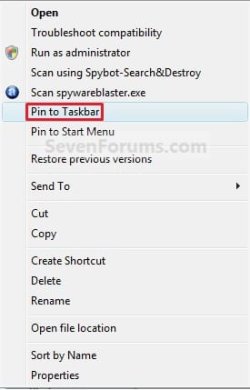
1. Right click on a program exe file or shortcut that you want to pin to the taskbar, and click on Pin to Taskbar. (See screenshot below)
Context_menu.jpg
OR

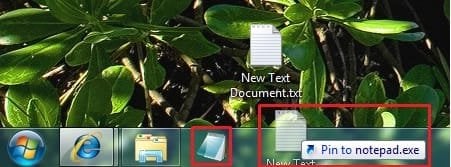
2. Drag a file that has a program associated for it (ex: .txt file for Notepad) to a empty area on the taskbar until you see the Pin to (program name) (ex: Pin to notepad.exe) pop-up, then drop it. (See screenshot below)
NOTE: This will pin the program (ex: Notepad) to the taskbar with the file (ex: txt) included in it's right click menu.
Program_File.jpg
OR

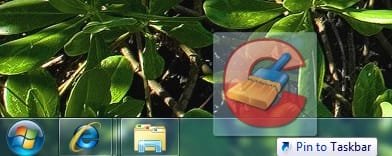
3. Drag a program .exe file or shortcut (ex: CCLeaner), to a empty area of the taskbar until you see the Pin to Taskbar pop-up, then drop it. (See screenshot below)
Program_exe_Shortcut.jpg
OR

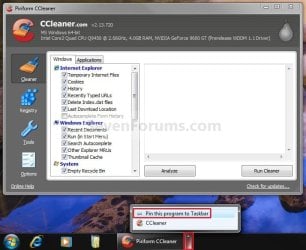
4. Right click on a open window taskbar button or icon that you want to pin to the taskbar, and click on Pin this program to the Taskbar. (See screenshot below)
Pin_Program.jpg
OR

5. Pin to program's jump list. (See screenshot below)
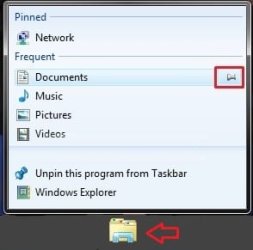
Explorer-Pin.jpg


OPTION TWO

To Unpin a Program to the Taskbar


1. Right click on a pinned taskbar icon link that you want to unpin, and click on Unpin this program from the Taskbar. (See screenshot below)
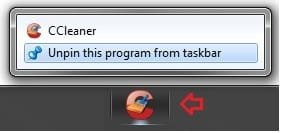
Unpin_from_taskbar.jpg
OR

2. Unpin from program's jump list. (See screenshot below)
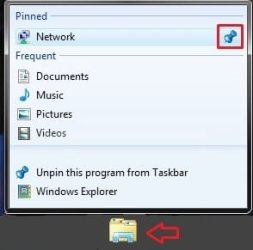
Explorer-Unpin.jpg
That's it,
Shawn


Related Tutorials


Attachments

  • New_Taskbar.jpg
    New_Taskbar.jpg
    9.4 KB · Views: 327,912
  • Unpin.jpg
    Unpin.jpg
    770 bytes · Views: 149,856
  • Pin.jpg
    Pin.jpg
    551 bytes · Views: 150,666
Last edited:

My Computer

Computer type
PC/Desktop
Computer Manufacturer/Model Number
Self built custom
OS
64-bit Windows 11 Pro for Workstations
CPU
Intel i7-8700K OC'd to 5 GHz
Motherboard
ASUS ROG Maximus XI Formula Z390
Memory
64 GB (4x16GB) G.SKILL TridentZ RGB DDR4 3600 MHz
Graphics Card(s)
ASUS ROG-STRIX-GTX1080TI-O11G-GAMING
Sound Card
Integrated
Monitor(s) Displays
2 x Samsung Odyssey G7 27"
Screen Resolution
2560x1440
Hard Drives
1TB Samsung 990 PRO M.2,
4TB Samsung 990 PRO PRO M.2,
TerraMaster F8 SSD Plus NAS
PSU
Seasonic Prime Titanium 850W
Case
Thermaltake Core P3
Cooling
Corsair Hydro H115i
Keyboard
Logitech wireless K800
Mouse
Logitech MX Master 4
Internet Speed
2 Gb/s Download and 100 Mb/s Upload
Antivirus
Malwarebyte Anti-Malware Premium
Browser
Google Chrome
Other Info
Logitech Z625 speaker system,
Logitech BRIO 4K Pro webcam,
HP Color LaserJet Pro MFP M477fdn,
APC SMART-UPS RT 1000 XL - SURT1000XLI,
Galaxy S23 Plus phone
You're welcome Tim. That's great news. :)
 

My Computer

Computer type
PC/Desktop
Computer Manufacturer/Model Number
Self built custom
OS
64-bit Windows 11 Pro for Workstations
CPU
Intel i7-8700K OC'd to 5 GHz
Motherboard
ASUS ROG Maximus XI Formula Z390
Memory
64 GB (4x16GB) G.SKILL TridentZ RGB DDR4 3600 MHz
Graphics Card(s)
ASUS ROG-STRIX-GTX1080TI-O11G-GAMING
Sound Card
Integrated
Monitor(s) Displays
2 x Samsung Odyssey G7 27"
Screen Resolution
2560x1440
Hard Drives
1TB Samsung 990 PRO M.2,
4TB Samsung 990 PRO PRO M.2,
TerraMaster F8 SSD Plus NAS
PSU
Seasonic Prime Titanium 850W
Case
Thermaltake Core P3
Cooling
Corsair Hydro H115i
Keyboard
Logitech wireless K800
Mouse
Logitech MX Master 4
Internet Speed
2 Gb/s Download and 100 Mb/s Upload
Antivirus
Malwarebyte Anti-Malware Premium
Browser
Google Chrome
Other Info
Logitech Z625 speaker system,
Logitech BRIO 4K Pro webcam,
HP Color LaserJet Pro MFP M477fdn,
APC SMART-UPS RT 1000 XL - SURT1000XLI,
Galaxy S23 Plus phone
Can't pin multiple instances of Thunderbird

My wife and I are both using Thunderbird and each have our own profile. I have two Thunderbird shortcuts on the desktop, one for each of us, with the appropriate command line arguments to bring up our respective profiles. I can only get one icon to pin to the taskbar, however.

How can I get both icons pinned to the taskbar?
 

My Computer

OS
Windows 7 Pro
Hello Carl, and welcome to Seven Forums.

Since they are the same program, that would be why you are not able to pin both to the taskbar using the normal Pin to taskbar context menu option.

If you like, you could enable Quick Launch as a workaround, then be able to add both Thunderbird shortcuts inside Quick Launch to have them on the taskbar though.

Hope this helps,
Shawn
 

My Computer

Computer type
PC/Desktop
Computer Manufacturer/Model Number
Self built custom
OS
64-bit Windows 11 Pro for Workstations
CPU
Intel i7-8700K OC'd to 5 GHz
Motherboard
ASUS ROG Maximus XI Formula Z390
Memory
64 GB (4x16GB) G.SKILL TridentZ RGB DDR4 3600 MHz
Graphics Card(s)
ASUS ROG-STRIX-GTX1080TI-O11G-GAMING
Sound Card
Integrated
Monitor(s) Displays
2 x Samsung Odyssey G7 27"
Screen Resolution
2560x1440
Hard Drives
1TB Samsung 990 PRO M.2,
4TB Samsung 990 PRO PRO M.2,
TerraMaster F8 SSD Plus NAS
PSU
Seasonic Prime Titanium 850W
Case
Thermaltake Core P3
Cooling
Corsair Hydro H115i
Keyboard
Logitech wireless K800
Mouse
Logitech MX Master 4
Internet Speed
2 Gb/s Download and 100 Mb/s Upload
Antivirus
Malwarebyte Anti-Malware Premium
Browser
Google Chrome
Other Info
Logitech Z625 speaker system,
Logitech BRIO 4K Pro webcam,
HP Color LaserJet Pro MFP M477fdn,
APC SMART-UPS RT 1000 XL - SURT1000XLI,
Galaxy S23 Plus phone
Thanks!

Shawn, Thanks for the tip. It worked great. By moving the QuickLaunch bar to the left side and selecting large icons I get just what I was looking for.
 

My Computer

OS
Windows 7 Pro
You're most welcome Carl. I'm happy to hear that worked for you. :)
 

My Computer

Computer type
PC/Desktop
Computer Manufacturer/Model Number
Self built custom
OS
64-bit Windows 11 Pro for Workstations
CPU
Intel i7-8700K OC'd to 5 GHz
Motherboard
ASUS ROG Maximus XI Formula Z390
Memory
64 GB (4x16GB) G.SKILL TridentZ RGB DDR4 3600 MHz
Graphics Card(s)
ASUS ROG-STRIX-GTX1080TI-O11G-GAMING
Sound Card
Integrated
Monitor(s) Displays
2 x Samsung Odyssey G7 27"
Screen Resolution
2560x1440
Hard Drives
1TB Samsung 990 PRO M.2,
4TB Samsung 990 PRO PRO M.2,
TerraMaster F8 SSD Plus NAS
PSU
Seasonic Prime Titanium 850W
Case
Thermaltake Core P3
Cooling
Corsair Hydro H115i
Keyboard
Logitech wireless K800
Mouse
Logitech MX Master 4
Internet Speed
2 Gb/s Download and 100 Mb/s Upload
Antivirus
Malwarebyte Anti-Malware Premium
Browser
Google Chrome
Other Info
Logitech Z625 speaker system,
Logitech BRIO 4K Pro webcam,
HP Color LaserJet Pro MFP M477fdn,
APC SMART-UPS RT 1000 XL - SURT1000XLI,
Galaxy S23 Plus phone
Hello Ryan, and welcome to Seven Forums.

Are you able to right click on those program's shortcuts (ex: in the Start Menu) or exe files, and click on* Pin to Taskbar* to do so?

When I right click on any of them, there is no option for "Pin to Taskbar". Nothing on my desktop has that option or the option to Pin to Quick Start. I may have used one of the Tweak programs to remove the shortcut arrows, but I am not sure which it was yet.
 

My Computer

OS
Windows 7 32bit Professional

My Computer

Computer type
PC/Desktop
Computer Manufacturer/Model Number
Self built custom
OS
64-bit Windows 11 Pro for Workstations
CPU
Intel i7-8700K OC'd to 5 GHz
Motherboard
ASUS ROG Maximus XI Formula Z390
Memory
64 GB (4x16GB) G.SKILL TridentZ RGB DDR4 3600 MHz
Graphics Card(s)
ASUS ROG-STRIX-GTX1080TI-O11G-GAMING
Sound Card
Integrated
Monitor(s) Displays
2 x Samsung Odyssey G7 27"
Screen Resolution
2560x1440
Hard Drives
1TB Samsung 990 PRO M.2,
4TB Samsung 990 PRO PRO M.2,
TerraMaster F8 SSD Plus NAS
PSU
Seasonic Prime Titanium 850W
Case
Thermaltake Core P3
Cooling
Corsair Hydro H115i
Keyboard
Logitech wireless K800
Mouse
Logitech MX Master 4
Internet Speed
2 Gb/s Download and 100 Mb/s Upload
Antivirus
Malwarebyte Anti-Malware Premium
Browser
Google Chrome
Other Info
Logitech Z625 speaker system,
Logitech BRIO 4K Pro webcam,
HP Color LaserJet Pro MFP M477fdn,
APC SMART-UPS RT 1000 XL - SURT1000XLI,
Galaxy S23 Plus phone
How to unpin Windows Media Player

Hello

How to unpin permanently Windows Media Player?
I tried unpin it, but after restart it comes back again
I have also removed it from
C:\Users\(user-name)\AppData\Roaming\Microsoft\Internet Explorer\Quick Launch\User Pinned\TaskBar
but it still there
any advise?
 

My Computer

OS
Windows 7 Home Premium 32bit
Hello Short, and welcome to Seven Forums.

It sounds like something may be corrupted. Let's see if resetting the pinned taskbar items may help.
  • First, make note of the icons you wanted to keep on the taskbar, to make it easier to pin them back when finished since they will all be removed.
  • Download the attached BAT file below.
  • Right click on the downloaded BAT file and click on Run as administrator.
  • This will reset and remove all pinned taskbar icons.
  • Now, manually pin the icons you wanted back to the taskbar.
Hope this helps,
Shawn
 

Attachments

My Computer

Computer type
PC/Desktop
Computer Manufacturer/Model Number
Self built custom
OS
64-bit Windows 11 Pro for Workstations
CPU
Intel i7-8700K OC'd to 5 GHz
Motherboard
ASUS ROG Maximus XI Formula Z390
Memory
64 GB (4x16GB) G.SKILL TridentZ RGB DDR4 3600 MHz
Graphics Card(s)
ASUS ROG-STRIX-GTX1080TI-O11G-GAMING
Sound Card
Integrated
Monitor(s) Displays
2 x Samsung Odyssey G7 27"
Screen Resolution
2560x1440
Hard Drives
1TB Samsung 990 PRO M.2,
4TB Samsung 990 PRO PRO M.2,
TerraMaster F8 SSD Plus NAS
PSU
Seasonic Prime Titanium 850W
Case
Thermaltake Core P3
Cooling
Corsair Hydro H115i
Keyboard
Logitech wireless K800
Mouse
Logitech MX Master 4
Internet Speed
2 Gb/s Download and 100 Mb/s Upload
Antivirus
Malwarebyte Anti-Malware Premium
Browser
Google Chrome
Other Info
Logitech Z625 speaker system,
Logitech BRIO 4K Pro webcam,
HP Color LaserJet Pro MFP M477fdn,
APC SMART-UPS RT 1000 XL - SURT1000XLI,
Galaxy S23 Plus phone
I have an item on my taskbar that I want to unpin. I get no menu popping up when I left click the button, and it works fine when I right click it, I just don't want it there anymore. I tried going into the file that contains the shortcuts, and it doesn't appear in there. I have tried restarting numerous times. What can I do???
 

My Computer

OS
Windows 7 Home Premium 64bit
Hello Moshe, and welcome to Seven Forums.

Normally you would right click on a pinned taskbar icon and click on "Unpin this program from taskbar" to remove it from the taskbar.

Could you post a screenshot showing this to help see what may be wrong?
 

My Computer

Computer type
PC/Desktop
Computer Manufacturer/Model Number
Self built custom
OS
64-bit Windows 11 Pro for Workstations
CPU
Intel i7-8700K OC'd to 5 GHz
Motherboard
ASUS ROG Maximus XI Formula Z390
Memory
64 GB (4x16GB) G.SKILL TridentZ RGB DDR4 3600 MHz
Graphics Card(s)
ASUS ROG-STRIX-GTX1080TI-O11G-GAMING
Sound Card
Integrated
Monitor(s) Displays
2 x Samsung Odyssey G7 27"
Screen Resolution
2560x1440
Hard Drives
1TB Samsung 990 PRO M.2,
4TB Samsung 990 PRO PRO M.2,
TerraMaster F8 SSD Plus NAS
PSU
Seasonic Prime Titanium 850W
Case
Thermaltake Core P3
Cooling
Corsair Hydro H115i
Keyboard
Logitech wireless K800
Mouse
Logitech MX Master 4
Internet Speed
2 Gb/s Download and 100 Mb/s Upload
Antivirus
Malwarebyte Anti-Malware Premium
Browser
Google Chrome
Other Info
Logitech Z625 speaker system,
Logitech BRIO 4K Pro webcam,
HP Color LaserJet Pro MFP M477fdn,
APC SMART-UPS RT 1000 XL - SURT1000XLI,
Galaxy S23 Plus phone
Hi all,
I'm hoping someone might have an answer as I have been looking all over but can't find anything similar.

If I pin an item from the Most Frequent Used Programs on the Start Menu to the Taskbar the program is removed from the Most Frequent Used Programs list.
(If I unpin it from the Taskbar it appears back on the Most Frequent Used Programs list).

This only recently started happening, but I can't recall it coinciding with anything I did.

It used to be that I could have the program, with it's jump list, in the Start Menu Most Frequent Used Programs and on the Taskbar.
Does anyone know how to get this behaviour back?

Thank you!
 

My Computer

OS
Windows 7 Professional x64
CPU
Intel Core 2 Quad Q6600 G0 Stepping
Motherboard
ASUS P5K-E Wifi
Memory
KINGSTON HYPER PC-2 8500 4GB MEMORY KIT (2 x 2GB)
Graphics Card(s)
XfX 8800 GTS 320Mb (G80)
Sound Card
On board
Monitor(s) Displays
Dell U2711
Screen Resolution
2560 x 1440
Hard Drives
Samsung HD501LJ (500Mb)
Western Digital WD15EARS (1.5Tb)
Western Digital WD3200AAKS (320Mb)
PSU
SEASONIC S12II-430W
Case
Antec SOLO
Cooling
Noctua NF-S12-800 & Noctua NF-S12-1200
Keyboard
Microsoft Natrural Ergonomic 4000 v1.0
Mouse
Logitech MX518
Hello X10, :)

What happens if you pin it from the source location instead of from the "Most Frequent" location?
 

My Computer

Computer type
PC/Desktop
Computer Manufacturer/Model Number
Self built custom
OS
64-bit Windows 11 Pro for Workstations
CPU
Intel i7-8700K OC'd to 5 GHz
Motherboard
ASUS ROG Maximus XI Formula Z390
Memory
64 GB (4x16GB) G.SKILL TridentZ RGB DDR4 3600 MHz
Graphics Card(s)
ASUS ROG-STRIX-GTX1080TI-O11G-GAMING
Sound Card
Integrated
Monitor(s) Displays
2 x Samsung Odyssey G7 27"
Screen Resolution
2560x1440
Hard Drives
1TB Samsung 990 PRO M.2,
4TB Samsung 990 PRO PRO M.2,
TerraMaster F8 SSD Plus NAS
PSU
Seasonic Prime Titanium 850W
Case
Thermaltake Core P3
Cooling
Corsair Hydro H115i
Keyboard
Logitech wireless K800
Mouse
Logitech MX Master 4
Internet Speed
2 Gb/s Download and 100 Mb/s Upload
Antivirus
Malwarebyte Anti-Malware Premium
Browser
Google Chrome
Other Info
Logitech Z625 speaker system,
Logitech BRIO 4K Pro webcam,
HP Color LaserJet Pro MFP M477fdn,
APC SMART-UPS RT 1000 XL - SURT1000XLI,
Galaxy S23 Plus phone
Hi Brink,
Thank you for the super fast response!

The same result happens if I pin it from the source folder from Explorer, the Start Menu->All Programs or the Most Frequent Used Programs.

Happy to try any other suggestions!

I tried turning off and on the Most Frequent Used Programs list in the Start Menu properties and deleting all the items in it, still the same.

I am right that the behaviour I'm seeing isn't normal?

X10
 

My Computer

OS
Windows 7 Professional x64
CPU
Intel Core 2 Quad Q6600 G0 Stepping
Motherboard
ASUS P5K-E Wifi
Memory
KINGSTON HYPER PC-2 8500 4GB MEMORY KIT (2 x 2GB)
Graphics Card(s)
XfX 8800 GTS 320Mb (G80)
Sound Card
On board
Monitor(s) Displays
Dell U2711
Screen Resolution
2560 x 1440
Hard Drives
Samsung HD501LJ (500Mb)
Western Digital WD15EARS (1.5Tb)
Western Digital WD3200AAKS (320Mb)
PSU
SEASONIC S12II-430W
Case
Antec SOLO
Cooling
Noctua NF-S12-800 & Noctua NF-S12-1200
Keyboard
Microsoft Natrural Ergonomic 4000 v1.0
Mouse
Logitech MX518
It shouldn't be removed from the most used list when only pinning to taskbar.

As a test, create a new shortcut on your desktop, and pin it to the taskbar to see if it's still removed from the list.

If it does, then try creating the shortcut with "explorer" at the beginning of the target location.
 

My Computer

Computer type
PC/Desktop
Computer Manufacturer/Model Number
Self built custom
OS
64-bit Windows 11 Pro for Workstations
CPU
Intel i7-8700K OC'd to 5 GHz
Motherboard
ASUS ROG Maximus XI Formula Z390
Memory
64 GB (4x16GB) G.SKILL TridentZ RGB DDR4 3600 MHz
Graphics Card(s)
ASUS ROG-STRIX-GTX1080TI-O11G-GAMING
Sound Card
Integrated
Monitor(s) Displays
2 x Samsung Odyssey G7 27"
Screen Resolution
2560x1440
Hard Drives
1TB Samsung 990 PRO M.2,
4TB Samsung 990 PRO PRO M.2,
TerraMaster F8 SSD Plus NAS
PSU
Seasonic Prime Titanium 850W
Case
Thermaltake Core P3
Cooling
Corsair Hydro H115i
Keyboard
Logitech wireless K800
Mouse
Logitech MX Master 4
Internet Speed
2 Gb/s Download and 100 Mb/s Upload
Antivirus
Malwarebyte Anti-Malware Premium
Browser
Google Chrome
Other Info
Logitech Z625 speaker system,
Logitech BRIO 4K Pro webcam,
HP Color LaserJet Pro MFP M477fdn,
APC SMART-UPS RT 1000 XL - SURT1000XLI,
Galaxy S23 Plus phone
It shouldn't be removed from the most used list when only pinning to taskbar.
Good, glad I'm not going mad.

As a test, create a new shortcut on your desktop, and pin it to the taskbar to see if it's still removed from the list.
Still removed

If it does, then try creating the shortcut with "explorer" at the beginning of the target location.
Also removed
 

My Computer

OS
Windows 7 Professional x64
CPU
Intel Core 2 Quad Q6600 G0 Stepping
Motherboard
ASUS P5K-E Wifi
Memory
KINGSTON HYPER PC-2 8500 4GB MEMORY KIT (2 x 2GB)
Graphics Card(s)
XfX 8800 GTS 320Mb (G80)
Sound Card
On board
Monitor(s) Displays
Dell U2711
Screen Resolution
2560 x 1440
Hard Drives
Samsung HD501LJ (500Mb)
Western Digital WD15EARS (1.5Tb)
Western Digital WD3200AAKS (320Mb)
PSU
SEASONIC S12II-430W
Case
Antec SOLO
Cooling
Noctua NF-S12-800 & Noctua NF-S12-1200
Keyboard
Microsoft Natrural Ergonomic 4000 v1.0
Mouse
Logitech MX518
I guess you may need to "Pin to Start" the app to also keep it available on the Start menu. :(
 

My Computer

Computer type
PC/Desktop
Computer Manufacturer/Model Number
Self built custom
OS
64-bit Windows 11 Pro for Workstations
CPU
Intel i7-8700K OC'd to 5 GHz
Motherboard
ASUS ROG Maximus XI Formula Z390
Memory
64 GB (4x16GB) G.SKILL TridentZ RGB DDR4 3600 MHz
Graphics Card(s)
ASUS ROG-STRIX-GTX1080TI-O11G-GAMING
Sound Card
Integrated
Monitor(s) Displays
2 x Samsung Odyssey G7 27"
Screen Resolution
2560x1440
Hard Drives
1TB Samsung 990 PRO M.2,
4TB Samsung 990 PRO PRO M.2,
TerraMaster F8 SSD Plus NAS
PSU
Seasonic Prime Titanium 850W
Case
Thermaltake Core P3
Cooling
Corsair Hydro H115i
Keyboard
Logitech wireless K800
Mouse
Logitech MX Master 4
Internet Speed
2 Gb/s Download and 100 Mb/s Upload
Antivirus
Malwarebyte Anti-Malware Premium
Browser
Google Chrome
Other Info
Logitech Z625 speaker system,
Logitech BRIO 4K Pro webcam,
HP Color LaserJet Pro MFP M477fdn,
APC SMART-UPS RT 1000 XL - SURT1000XLI,
Galaxy S23 Plus phone
Short of re-installing Windows, is there any specific components that deal with the Start Menu and Most Frequently Used policies that I could restore to default, or replace from another Windows 7 installation?

Pinning to start seems counterintuitive to the whole process.
 

My Computer

OS
Windows 7 Professional x64
CPU
Intel Core 2 Quad Q6600 G0 Stepping
Motherboard
ASUS P5K-E Wifi
Memory
KINGSTON HYPER PC-2 8500 4GB MEMORY KIT (2 x 2GB)
Graphics Card(s)
XfX 8800 GTS 320Mb (G80)
Sound Card
On board
Monitor(s) Displays
Dell U2711
Screen Resolution
2560 x 1440
Hard Drives
Samsung HD501LJ (500Mb)
Western Digital WD15EARS (1.5Tb)
Western Digital WD3200AAKS (320Mb)
PSU
SEASONIC S12II-430W
Case
Antec SOLO
Cooling
Noctua NF-S12-800 & Noctua NF-S12-1200
Keyboard
Microsoft Natrural Ergonomic 4000 v1.0
Mouse
Logitech MX518
Back
Top
