Taskbar - Pin or Unpin a Program

How to Pin or Unpin a Program to the Windows 7 Taskbar

   Information
This will show you how to Pin or Unpin a .exe file or shortcut of a installed program to the Windows 7 taskbar as a icon on the taskbar.

   Note
The pinned taskbar items are located in this hidden system folder:

Code:
C:\Users\(User-Name)\AppData\Roaming\Microsoft\Internet Explorer\Quick Launch\User Pinned\TaskBar

The default icon links on the taskbar is Internet Explorer, Windows Media Player, and Windows Explorer (opens to Libraries).

   Tip
Each program icon pinned to the taskbar can be opened by pressing the Windows key + 1 to 0 (1-10) keyboard shortcuts. You would use a number for how the program icons are ordered on the taskbar from left to right (for top or bottom) or top to bottom (for left or right) desktop location.
   Warning
You will need to have Recent Items turned on to see the recent items in a pinned program's Jump List.

EXAMPLE: New Taskbar
attachment.php


OPTION ONE

To Pin a Program to the Taskbar


NOTE: You can use step 2 or 3 to pin a folder in the Windows Explorer taskbar icon jump list.
1. Right click on a program exe file or shortcut that you want to pin to the taskbar, and click on Pin to Taskbar. (See screenshot below)
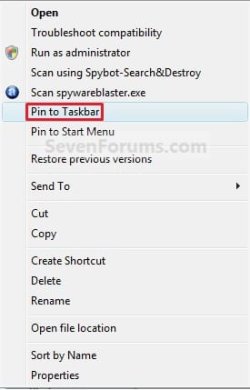
Context_menu.jpg
OR

2. Drag a file that has a program associated for it (ex: .txt file for Notepad) to a empty area on the taskbar until you see the Pin to (program name) (ex: Pin to notepad.exe) pop-up, then drop it. (See screenshot below)
NOTE: This will pin the program (ex: Notepad) to the taskbar with the file (ex: txt) included in it's right click menu.
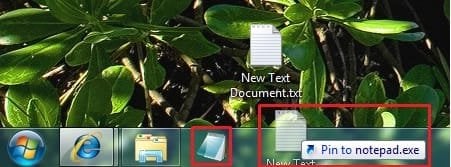
Program_File.jpg
OR

3. Drag a program .exe file or shortcut (ex: CCLeaner), to a empty area of the taskbar until you see the Pin to Taskbar pop-up, then drop it. (See screenshot below)
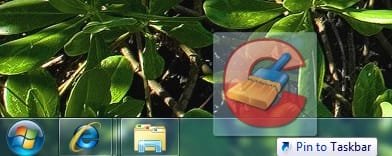
Program_exe_Shortcut.jpg
OR

4. Right click on a open window taskbar button or icon that you want to pin to the taskbar, and click on Pin this program to the Taskbar. (See screenshot below)
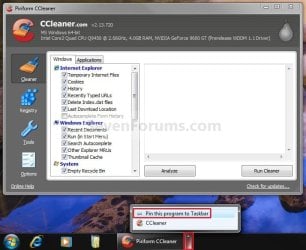
Pin_Program.jpg
OR

5. Pin to program's jump list. (See screenshot below)
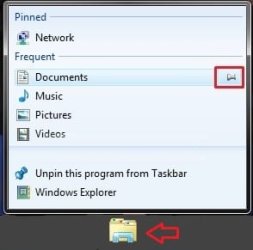
Explorer-Pin.jpg


OPTION TWO

To Unpin a Program to the Taskbar


1. Right click on a pinned taskbar icon link that you want to unpin, and click on Unpin this program from the Taskbar. (See screenshot below)
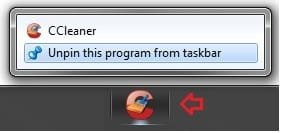
Unpin_from_taskbar.jpg
OR

2. Unpin from program's jump list. (See screenshot below)
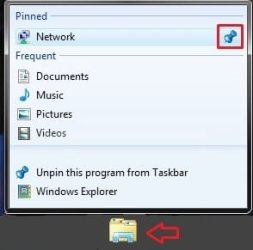
Explorer-Unpin.jpg
That's it,
Shawn


Related Tutorials


Attachments

  • New_Taskbar.jpg
    New_Taskbar.jpg
    9.4 KB · Views: 327,912
  • Unpin.jpg
    Unpin.jpg
    770 bytes · Views: 149,856
  • Pin.jpg
    Pin.jpg
    551 bytes · Views: 150,666
Last edited:
i had this problem with the not official build 7000 x86 and i have it again with the beta 1 x64: after a couple of days i now cannot pin anything to the taskbar anymore. it doesnt matter if i try to use a shortcut from desktop, the start menu or the actual exe file (trying to pin firefox), it simply shows the red crossed circle while dragging (THIS DOES NOT WORK!) and nothing happens when i release... :confused:
 

My Computer

OS
win7x64
Have you tried right-clicking on Firefox when it's open and pinning it that way?

Although not being able to pin a few items is a nuisance.
 

My Computer

Computer type
PC/Desktop
Computer Manufacturer/Model Number
Systems by SmartEyeball
OS
8 Pro x64
CPU
i7 3770K 4.6GHz
Motherboard
ASUS P8Z77 WS
Memory
16GB G.Skill Trident X 2666mhz
Graphics Card(s)
x2 EVGA 780 Ti Superclocked SLI
Sound Card
SB X-FI Surround 5.1 PRO USB / ATH-AD900 Headphones
Monitor(s) Displays
x3 Dell U2410 / 58" Samsung
Screen Resolution
5760*1200/ 1920*1200
Hard Drives
2x Intel 520 240GB (RAID 0) * 2x WD Caviar Blacks 2TB (RAID 0) * 2TB WD Caviar Black * Sony Optirac DVD
PSU
Silverstone Strider Evolution 1200W
Case
Thermaltake Level 10 GT Snow Edition
Cooling
Noctua NH-D14
Keyboard
Topre Realforce // Ducky Shine MX Black // Filco Ninja TKL
Mouse
Thermaltake Theron (Highly Recommended) + Razer Imperator
Antivirus
MSE
Browser
IE, FF, WaterFox
Other Info
GT Extreme V2 Sim Racing Cockpit + 40" LCD and K/B Mouse stand ▼
Fanatec CSR Elite Wheel + Clubsport V1 Pedals + CSR shifter/7G-H ▼Saitek X52 Pro ▼ TrackIR 5 Pro
Buttkicker v2 Seat Rumbler with Dedicated 5.1 and Sub Woofer attached to frame ▼
=
Bloody Big Grin
what do you mean? rightclick the icon in the taskbar when i got an open firefox window? that only brings up the context menu which only says "close window" :(
edit: i notice the already pinned icons of library and windows media player have the option for unpin...
 

My Computer

OS
win7x64
Hello Saiboat,

The tutorial has been updated for the new version of Windows 7. Check through it again to see if it may be able to help you with your problem. :)

Shawn
 

My Computer

Computer type
PC/Desktop
Computer Manufacturer/Model Number
Self built custom
OS
64-bit Windows 11 Pro for Workstations
CPU
Intel i7-8700K OC'd to 5 GHz
Motherboard
ASUS ROG Maximus XI Formula Z390
Memory
64 GB (4x16GB) G.SKILL TridentZ RGB DDR4 3600 MHz
Graphics Card(s)
ASUS ROG-STRIX-GTX1080TI-O11G-GAMING
Sound Card
Integrated
Monitor(s) Displays
2 x Samsung Odyssey G7 27"
Screen Resolution
2560x1440
Hard Drives
1TB Samsung 990 PRO M.2,
4TB Samsung 990 PRO PRO M.2,
TerraMaster F8 SSD Plus NAS
PSU
Seasonic Prime Titanium 850W
Case
Thermaltake Core P3
Cooling
Corsair Hydro H115i
Keyboard
Logitech wireless K800
Mouse
Logitech MX Master 4
Internet Speed
2 Gb/s Download and 100 Mb/s Upload
Antivirus
Malwarebyte Anti-Malware Premium
Browser
Google Chrome
Other Info
Logitech Z625 speaker system,
Logitech BRIO 4K Pro webcam,
HP Color LaserJet Pro MFP M477fdn,
APC SMART-UPS RT 1000 XL - SURT1000XLI,
Galaxy S23 Plus phone
nah anything thats mentioned does not work. if i rightclick any icon whatever there is no option "pin to taskbar" its like if i had uninstalled the pinning function somehow :(
 

My Computer

OS
win7x64
Saiboat,

You might see if running a sfc /scannow command may help fix it. If not, you can try a System Restore using a restore point dated before the problem to see if it may. If none of the above will work, then I guess a reinstall may be in order.
 

My Computer

Computer type
PC/Desktop
Computer Manufacturer/Model Number
Self built custom
OS
64-bit Windows 11 Pro for Workstations
CPU
Intel i7-8700K OC'd to 5 GHz
Motherboard
ASUS ROG Maximus XI Formula Z390
Memory
64 GB (4x16GB) G.SKILL TridentZ RGB DDR4 3600 MHz
Graphics Card(s)
ASUS ROG-STRIX-GTX1080TI-O11G-GAMING
Sound Card
Integrated
Monitor(s) Displays
2 x Samsung Odyssey G7 27"
Screen Resolution
2560x1440
Hard Drives
1TB Samsung 990 PRO M.2,
4TB Samsung 990 PRO PRO M.2,
TerraMaster F8 SSD Plus NAS
PSU
Seasonic Prime Titanium 850W
Case
Thermaltake Core P3
Cooling
Corsair Hydro H115i
Keyboard
Logitech wireless K800
Mouse
Logitech MX Master 4
Internet Speed
2 Gb/s Download and 100 Mb/s Upload
Antivirus
Malwarebyte Anti-Malware Premium
Browser
Google Chrome
Other Info
Logitech Z625 speaker system,
Logitech BRIO 4K Pro webcam,
HP Color LaserJet Pro MFP M477fdn,
APC SMART-UPS RT 1000 XL - SURT1000XLI,
Galaxy S23 Plus phone
its telling me that there are no errors.
so weird that im the only one with that problem as i had it before on my x32 install...

does that functionality maybe depend on some services or so? im running aero etc. at max settings.
 

My Computer

OS
win7x64
Any luck with System Restore?
 

My Computer

Computer type
PC/Desktop
Computer Manufacturer/Model Number
Self built custom
OS
64-bit Windows 11 Pro for Workstations
CPU
Intel i7-8700K OC'd to 5 GHz
Motherboard
ASUS ROG Maximus XI Formula Z390
Memory
64 GB (4x16GB) G.SKILL TridentZ RGB DDR4 3600 MHz
Graphics Card(s)
ASUS ROG-STRIX-GTX1080TI-O11G-GAMING
Sound Card
Integrated
Monitor(s) Displays
2 x Samsung Odyssey G7 27"
Screen Resolution
2560x1440
Hard Drives
1TB Samsung 990 PRO M.2,
4TB Samsung 990 PRO PRO M.2,
TerraMaster F8 SSD Plus NAS
PSU
Seasonic Prime Titanium 850W
Case
Thermaltake Core P3
Cooling
Corsair Hydro H115i
Keyboard
Logitech wireless K800
Mouse
Logitech MX Master 4
Internet Speed
2 Gb/s Download and 100 Mb/s Upload
Antivirus
Malwarebyte Anti-Malware Premium
Browser
Google Chrome
Other Info
Logitech Z625 speaker system,
Logitech BRIO 4K Pro webcam,
HP Color LaserJet Pro MFP M477fdn,
APC SMART-UPS RT 1000 XL - SURT1000XLI,
Galaxy S23 Plus phone
dont want to do that cause its been some days since that error occured and i dont want to go back so far :)
ill just leave it at this then....
 

My Computer

OS
win7x64
OK. :)
 

My Computer

Computer type
PC/Desktop
Computer Manufacturer/Model Number
Self built custom
OS
64-bit Windows 11 Pro for Workstations
CPU
Intel i7-8700K OC'd to 5 GHz
Motherboard
ASUS ROG Maximus XI Formula Z390
Memory
64 GB (4x16GB) G.SKILL TridentZ RGB DDR4 3600 MHz
Graphics Card(s)
ASUS ROG-STRIX-GTX1080TI-O11G-GAMING
Sound Card
Integrated
Monitor(s) Displays
2 x Samsung Odyssey G7 27"
Screen Resolution
2560x1440
Hard Drives
1TB Samsung 990 PRO M.2,
4TB Samsung 990 PRO PRO M.2,
TerraMaster F8 SSD Plus NAS
PSU
Seasonic Prime Titanium 850W
Case
Thermaltake Core P3
Cooling
Corsair Hydro H115i
Keyboard
Logitech wireless K800
Mouse
Logitech MX Master 4
Internet Speed
2 Gb/s Download and 100 Mb/s Upload
Antivirus
Malwarebyte Anti-Malware Premium
Browser
Google Chrome
Other Info
Logitech Z625 speaker system,
Logitech BRIO 4K Pro webcam,
HP Color LaserJet Pro MFP M477fdn,
APC SMART-UPS RT 1000 XL - SURT1000XLI,
Galaxy S23 Plus phone
Rename Pined Items

Ok this is really bugging me but I want to beable to rename the stuff that I have listed when you rightclick on a taskbar item. Like I draged an internet address over my Firefox or IE8 button and pin it there for short cut however I would like 2 rename what is listed. so instead of having http://by131w.bay131.mail.live.c.... listed I would like it 2 say Hotmail and viceversa for other items. is there anyways around this?
 

My Computer

OS
Windows 7 Build 7000
Hello Shadowminx69,

Yes. You will need to unpin the item, rename the original shortcut or program file, then re-pin it to the taskbar.

Hope this helps,
Shawn
 

My Computer

Computer type
PC/Desktop
Computer Manufacturer/Model Number
Self built custom
OS
64-bit Windows 11 Pro for Workstations
CPU
Intel i7-8700K OC'd to 5 GHz
Motherboard
ASUS ROG Maximus XI Formula Z390
Memory
64 GB (4x16GB) G.SKILL TridentZ RGB DDR4 3600 MHz
Graphics Card(s)
ASUS ROG-STRIX-GTX1080TI-O11G-GAMING
Sound Card
Integrated
Monitor(s) Displays
2 x Samsung Odyssey G7 27"
Screen Resolution
2560x1440
Hard Drives
1TB Samsung 990 PRO M.2,
4TB Samsung 990 PRO PRO M.2,
TerraMaster F8 SSD Plus NAS
PSU
Seasonic Prime Titanium 850W
Case
Thermaltake Core P3
Cooling
Corsair Hydro H115i
Keyboard
Logitech wireless K800
Mouse
Logitech MX Master 4
Internet Speed
2 Gb/s Download and 100 Mb/s Upload
Antivirus
Malwarebyte Anti-Malware Premium
Browser
Google Chrome
Other Info
Logitech Z625 speaker system,
Logitech BRIO 4K Pro webcam,
HP Color LaserJet Pro MFP M477fdn,
APC SMART-UPS RT 1000 XL - SURT1000XLI,
Galaxy S23 Plus phone
I tried what you suggested however didn't work no matter what I do it goes by what the URL is. I did however make a shortcut for Sign In which brings me to my mail anyways. but in the Pin thing it says Sign In. I guess its better than what I had. Would love it to say just Hotmail
 

My Computer

OS
Windows 7 Build 7000
Sorry, for a URL, it will always show the URL in the pinned items list for IE8 icon. :(
 

My Computer

Computer type
PC/Desktop
Computer Manufacturer/Model Number
Self built custom
OS
64-bit Windows 11 Pro for Workstations
CPU
Intel i7-8700K OC'd to 5 GHz
Motherboard
ASUS ROG Maximus XI Formula Z390
Memory
64 GB (4x16GB) G.SKILL TridentZ RGB DDR4 3600 MHz
Graphics Card(s)
ASUS ROG-STRIX-GTX1080TI-O11G-GAMING
Sound Card
Integrated
Monitor(s) Displays
2 x Samsung Odyssey G7 27"
Screen Resolution
2560x1440
Hard Drives
1TB Samsung 990 PRO M.2,
4TB Samsung 990 PRO PRO M.2,
TerraMaster F8 SSD Plus NAS
PSU
Seasonic Prime Titanium 850W
Case
Thermaltake Core P3
Cooling
Corsair Hydro H115i
Keyboard
Logitech wireless K800
Mouse
Logitech MX Master 4
Internet Speed
2 Gb/s Download and 100 Mb/s Upload
Antivirus
Malwarebyte Anti-Malware Premium
Browser
Google Chrome
Other Info
Logitech Z625 speaker system,
Logitech BRIO 4K Pro webcam,
HP Color LaserJet Pro MFP M477fdn,
APC SMART-UPS RT 1000 XL - SURT1000XLI,
Galaxy S23 Plus phone
Siabot,

I'm happy to hear that you got it sorted. Thank you for posting back your results.

Shawn
 

My Computer

Computer type
PC/Desktop
Computer Manufacturer/Model Number
Self built custom
OS
64-bit Windows 11 Pro for Workstations
CPU
Intel i7-8700K OC'd to 5 GHz
Motherboard
ASUS ROG Maximus XI Formula Z390
Memory
64 GB (4x16GB) G.SKILL TridentZ RGB DDR4 3600 MHz
Graphics Card(s)
ASUS ROG-STRIX-GTX1080TI-O11G-GAMING
Sound Card
Integrated
Monitor(s) Displays
2 x Samsung Odyssey G7 27"
Screen Resolution
2560x1440
Hard Drives
1TB Samsung 990 PRO M.2,
4TB Samsung 990 PRO PRO M.2,
TerraMaster F8 SSD Plus NAS
PSU
Seasonic Prime Titanium 850W
Case
Thermaltake Core P3
Cooling
Corsair Hydro H115i
Keyboard
Logitech wireless K800
Mouse
Logitech MX Master 4
Internet Speed
2 Gb/s Download and 100 Mb/s Upload
Antivirus
Malwarebyte Anti-Malware Premium
Browser
Google Chrome
Other Info
Logitech Z625 speaker system,
Logitech BRIO 4K Pro webcam,
HP Color LaserJet Pro MFP M477fdn,
APC SMART-UPS RT 1000 XL - SURT1000XLI,
Galaxy S23 Plus phone
this was helpful to get the correct icon back to the libraries icon, but i cannot get the taskbar to let me pin "music" "pictures" etc. within the button of the libraries.

i can pin almost anything to anything else, but nothing to this icon. any idea why?
 

My Computer

OS
7 beta
Hello Daniel,

If you mean the icon on the taskbar, then do you have Recent Programs and Recent Items turned on? Music will pin to the taskbar under the Windows Media Player taskbar icon by default, and pictures will not pin to the taskbar though.

Hope this helps,
Shawn
 

My Computer

Computer type
PC/Desktop
Computer Manufacturer/Model Number
Self built custom
OS
64-bit Windows 11 Pro for Workstations
CPU
Intel i7-8700K OC'd to 5 GHz
Motherboard
ASUS ROG Maximus XI Formula Z390
Memory
64 GB (4x16GB) G.SKILL TridentZ RGB DDR4 3600 MHz
Graphics Card(s)
ASUS ROG-STRIX-GTX1080TI-O11G-GAMING
Sound Card
Integrated
Monitor(s) Displays
2 x Samsung Odyssey G7 27"
Screen Resolution
2560x1440
Hard Drives
1TB Samsung 990 PRO M.2,
4TB Samsung 990 PRO PRO M.2,
TerraMaster F8 SSD Plus NAS
PSU
Seasonic Prime Titanium 850W
Case
Thermaltake Core P3
Cooling
Corsair Hydro H115i
Keyboard
Logitech wireless K800
Mouse
Logitech MX Master 4
Internet Speed
2 Gb/s Download and 100 Mb/s Upload
Antivirus
Malwarebyte Anti-Malware Premium
Browser
Google Chrome
Other Info
Logitech Z625 speaker system,
Logitech BRIO 4K Pro webcam,
HP Color LaserJet Pro MFP M477fdn,
APC SMART-UPS RT 1000 XL - SURT1000XLI,
Galaxy S23 Plus phone
Hello Daniel,

If you mean the icon on the taskbar, then do you have Recent Programs and Recent Items turned on? Music will pin to the taskbar under the Windows Media Player taskbar icon by default, and pictures will not pin to the taskbar though.

Hope this helps,
Shawn

sorry. i wasn't exactly clear. i was referring to the music, pictures, documents, and videos folders that are located in the library. they used to be listed within the libraries icon on the taskbar (accessible by a right click), but after some rearranging i did, they are no longer pinned to the libraries icon in the taskbar.

those pinned links are what i am trying to get back. does that make more sense?

i restored the libraries icon to the taskbar, but now it isn't allowing me to re-pin the locations originally pinned there.

thanks for your help
 

My Computer

OS
7 beta
Yes, that helps much better. ;)

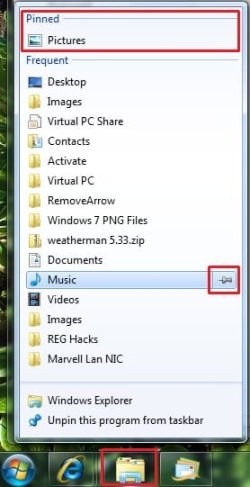
Check to make sure that you have Recent Programs and Recent Items turned on, then open those folders a few times so that they show up under the Frequent or Recent list for the Windows Explorer taskbar icon. Right click on the Windows Explorer taskbar icon, and you should then be able to click on the pin icon to the right of the folder you want to pin in there.

For example, like how the Pictures Library is pinned below, and how you see the pin icon to the right of the Music folder below. Hope this is what you mean. :)

Windows_Explorer.jpg
 

My Computer

Computer type
PC/Desktop
Computer Manufacturer/Model Number
Self built custom
OS
64-bit Windows 11 Pro for Workstations
CPU
Intel i7-8700K OC'd to 5 GHz
Motherboard
ASUS ROG Maximus XI Formula Z390
Memory
64 GB (4x16GB) G.SKILL TridentZ RGB DDR4 3600 MHz
Graphics Card(s)
ASUS ROG-STRIX-GTX1080TI-O11G-GAMING
Sound Card
Integrated
Monitor(s) Displays
2 x Samsung Odyssey G7 27"
Screen Resolution
2560x1440
Hard Drives
1TB Samsung 990 PRO M.2,
4TB Samsung 990 PRO PRO M.2,
TerraMaster F8 SSD Plus NAS
PSU
Seasonic Prime Titanium 850W
Case
Thermaltake Core P3
Cooling
Corsair Hydro H115i
Keyboard
Logitech wireless K800
Mouse
Logitech MX Master 4
Internet Speed
2 Gb/s Download and 100 Mb/s Upload
Antivirus
Malwarebyte Anti-Malware Premium
Browser
Google Chrome
Other Info
Logitech Z625 speaker system,
Logitech BRIO 4K Pro webcam,
HP Color LaserJet Pro MFP M477fdn,
APC SMART-UPS RT 1000 XL - SURT1000XLI,
Galaxy S23 Plus phone
Back
Top