
Taskbar - Pin or Unpin a Program

How to Pin or Unpin a Program to the Windows 7 Taskbar

   Information
This will show you how to Pin or Unpin a .exe file or shortcut of a installed program to the Windows 7 taskbar as a icon on the taskbar.

   Note
The pinned taskbar items are located in this hidden system folder:

Code:
C:\Users\(User-Name)\AppData\Roaming\Microsoft\Internet Explorer\Quick Launch\User Pinned\TaskBar

The default icon links on the taskbar is Internet Explorer, Windows Media Player, and Windows Explorer (opens to Libraries).

   Tip
Each program icon pinned to the taskbar can be opened by pressing the Windows key + 1 to 0 (1-10) keyboard shortcuts. You would use a number for how the program icons are ordered on the taskbar from left to right (for top or bottom) or top to bottom (for left or right) desktop location.
   Warning
You will need to have Recent Items turned on to see the recent items in a pinned program's Jump List.

EXAMPLE: New Taskbar
attachment.php


OPTION ONE

To Pin a Program to the Taskbar


NOTE: You can use step 2 or 3 to pin a folder in the Windows Explorer taskbar icon jump list.
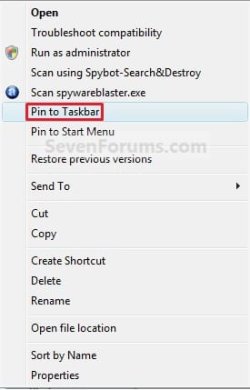
1. Right click on a program exe file or shortcut that you want to pin to the taskbar, and click on Pin to Taskbar. (See screenshot below)
Context_menu.jpg
OR

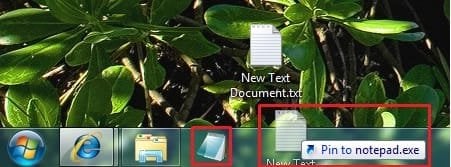
2. Drag a file that has a program associated for it (ex: .txt file for Notepad) to a empty area on the taskbar until you see the Pin to (program name) (ex: Pin to notepad.exe) pop-up, then drop it. (See screenshot below)
NOTE: This will pin the program (ex: Notepad) to the taskbar with the file (ex: txt) included in it's right click menu.
Program_File.jpg
OR

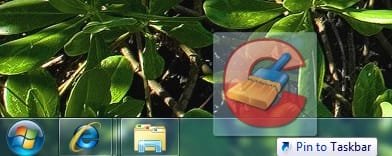
3. Drag a program .exe file or shortcut (ex: CCLeaner), to a empty area of the taskbar until you see the Pin to Taskbar pop-up, then drop it. (See screenshot below)
Program_exe_Shortcut.jpg
OR

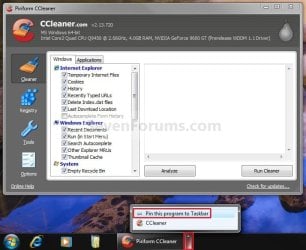
4. Right click on a open window taskbar button or icon that you want to pin to the taskbar, and click on Pin this program to the Taskbar. (See screenshot below)
Pin_Program.jpg
OR

5. Pin to program's jump list. (See screenshot below)
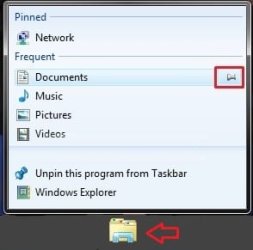
Explorer-Pin.jpg


OPTION TWO

To Unpin a Program to the Taskbar


1. Right click on a pinned taskbar icon link that you want to unpin, and click on Unpin this program from the Taskbar. (See screenshot below)
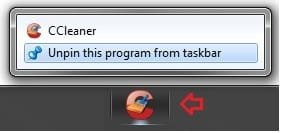
Unpin_from_taskbar.jpg
OR

2. Unpin from program's jump list. (See screenshot below)
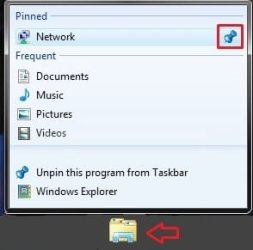
Explorer-Unpin.jpg
That's it,
Shawn


Related Tutorials


Attachments

  • New_Taskbar.jpg
    New_Taskbar.jpg
    9.4 KB · Views: 327,912
  • Pin.jpg
    Pin.jpg
    551 bytes · Views: 150,666
  • Unpin.jpg
    Unpin.jpg
    770 bytes · Views: 149,856
Last edited:
I have ever done, but now I can't

please help me! thanks

I have done, but now I unpin this program, I can't do it again.
 

My Computer

OS
windons 7 build 6801
Hello Njcotjn, and welcome to Windows 7 Forums.

You should be able to drag the program's shortcut or EXE file onto a empty space on the taskbar again to pin it. Check to make sure that you had dragged it down far enough on the taskbar.

Hope this helps,
Shawn
 

My Computer

Computer type
PC/Desktop
Computer Manufacturer/Model Number
Self built custom
OS
64-bit Windows 11 Pro for Workstations
CPU
Intel i7-8700K OC'd to 5 GHz
Motherboard
ASUS ROG Maximus XI Formula Z390
Memory
64 GB (4x16GB) G.SKILL TridentZ RGB DDR4 3600 MHz
Graphics Card(s)
ASUS ROG-STRIX-GTX1080TI-O11G-GAMING
Sound Card
Integrated
Monitor(s) Displays
2 x Samsung Odyssey G7 27"
Screen Resolution
2560x1440
Hard Drives
1TB Samsung 990 PRO M.2,
4TB Samsung 990 PRO PRO M.2,
TerraMaster F8 SSD Plus NAS
PSU
Seasonic Prime Titanium 850W
Case
Thermaltake Core P3
Cooling
Corsair Hydro H115i
Keyboard
Logitech wireless K800
Mouse
Logitech MX Master 4
Internet Speed
2 Gb/s Download and 100 Mb/s Upload
Antivirus
Malwarebyte Anti-Malware Premium
Browser
Google Chrome
Other Info
Logitech Z625 speaker system,
Logitech BRIO 4K Pro webcam,
HP Color LaserJet Pro MFP M477fdn,
APC SMART-UPS RT 1000 XL - SURT1000XLI,
Galaxy S23 Plus phone
great tutorial Shawn.....

no more objectdock for me!! :D

:)SK
 

My Computer

Computer Manufacturer/Model Number
myself
OS
SEVEN x64
CPU
Q9450 @ 3.6GHZ 1.34v
Motherboard
ASUS P5K PREMIUM P35
Memory
8GB 1066 buffalo firestix @ 1152mhz CL5
Graphics Card(s)
Sapphire HD 5970 + GTX260 (physX)
Sound Card
Creative X-FI Xtreme Gamer
Monitor(s) Displays
SAMSUNG 20'' & SAMSUNG 23'' (dual screens)
Screen Resolution
2048x1152 & 1680x1050
Hard Drives
1x seagate 160gb IDE & 1x seagate 160gb SATA
PSU
XCILIO 850w (78A)
Case
CM590 1x 120x38mm & 2x92x38mm / 4x 120x25mm
Cooling
AC7 PRO @ 92x38mm blower, Lamptron military bus bay controll
Keyboard
LOGITECH E110
Mouse
logitech NX5
Internet Speed
2MB
Other Info
its a continual ''work in progress''....
You're welcome Mitch.

LOL, I must admit that I find myself still using both. :geek:
 

My Computer

Computer type
PC/Desktop
Computer Manufacturer/Model Number
Self built custom
OS
64-bit Windows 11 Pro for Workstations
CPU
Intel i7-8700K OC'd to 5 GHz
Motherboard
ASUS ROG Maximus XI Formula Z390
Memory
64 GB (4x16GB) G.SKILL TridentZ RGB DDR4 3600 MHz
Graphics Card(s)
ASUS ROG-STRIX-GTX1080TI-O11G-GAMING
Sound Card
Integrated
Monitor(s) Displays
2 x Samsung Odyssey G7 27"
Screen Resolution
2560x1440
Hard Drives
1TB Samsung 990 PRO M.2,
4TB Samsung 990 PRO PRO M.2,
TerraMaster F8 SSD Plus NAS
PSU
Seasonic Prime Titanium 850W
Case
Thermaltake Core P3
Cooling
Corsair Hydro H115i
Keyboard
Logitech wireless K800
Mouse
Logitech MX Master 4
Internet Speed
2 Gb/s Download and 100 Mb/s Upload
Antivirus
Malwarebyte Anti-Malware Premium
Browser
Google Chrome
Other Info
Logitech Z625 speaker system,
Logitech BRIO 4K Pro webcam,
HP Color LaserJet Pro MFP M477fdn,
APC SMART-UPS RT 1000 XL - SURT1000XLI,
Galaxy S23 Plus phone
I tried lock new taskbar and unlock again

366d1226306659t-taskbar-pin-unpin-program-links-pin_program.jpg

I can't do it , too
May be i unable "pin to taskbar" ??
please help me, i don't want reinstall win.
 

My Computer

OS
windons 7 build 6801
Njcotjn,

Was the CCleaner icon still on the taskbar after you have pinned and closed CCleaner?

Have you tried dragging and dropping the shortcut onto the taskbar?
 

My Computer

Computer type
PC/Desktop
Computer Manufacturer/Model Number
Self built custom
OS
64-bit Windows 11 Pro for Workstations
CPU
Intel i7-8700K OC'd to 5 GHz
Motherboard
ASUS ROG Maximus XI Formula Z390
Memory
64 GB (4x16GB) G.SKILL TridentZ RGB DDR4 3600 MHz
Graphics Card(s)
ASUS ROG-STRIX-GTX1080TI-O11G-GAMING
Sound Card
Integrated
Monitor(s) Displays
2 x Samsung Odyssey G7 27"
Screen Resolution
2560x1440
Hard Drives
1TB Samsung 990 PRO M.2,
4TB Samsung 990 PRO PRO M.2,
TerraMaster F8 SSD Plus NAS
PSU
Seasonic Prime Titanium 850W
Case
Thermaltake Core P3
Cooling
Corsair Hydro H115i
Keyboard
Logitech wireless K800
Mouse
Logitech MX Master 4
Internet Speed
2 Gb/s Download and 100 Mb/s Upload
Antivirus
Malwarebyte Anti-Malware Premium
Browser
Google Chrome
Other Info
Logitech Z625 speaker system,
Logitech BRIO 4K Pro webcam,
HP Color LaserJet Pro MFP M477fdn,
APC SMART-UPS RT 1000 XL - SURT1000XLI,
Galaxy S23 Plus phone
I tried. I have done 3 day ago. Now I can't.
I locked it? I don't know to repair it.
 

My Computer

OS
windons 7 build 6801
It would not hurt to unlock it again to see if that may be the problem. If not, you might do a System Restore with a restore point dated before it stopped working.
 

My Computer

Computer type
PC/Desktop
Computer Manufacturer/Model Number
Self built custom
OS
64-bit Windows 11 Pro for Workstations
CPU
Intel i7-8700K OC'd to 5 GHz
Motherboard
ASUS ROG Maximus XI Formula Z390
Memory
64 GB (4x16GB) G.SKILL TridentZ RGB DDR4 3600 MHz
Graphics Card(s)
ASUS ROG-STRIX-GTX1080TI-O11G-GAMING
Sound Card
Integrated
Monitor(s) Displays
2 x Samsung Odyssey G7 27"
Screen Resolution
2560x1440
Hard Drives
1TB Samsung 990 PRO M.2,
4TB Samsung 990 PRO PRO M.2,
TerraMaster F8 SSD Plus NAS
PSU
Seasonic Prime Titanium 850W
Case
Thermaltake Core P3
Cooling
Corsair Hydro H115i
Keyboard
Logitech wireless K800
Mouse
Logitech MX Master 4
Internet Speed
2 Gb/s Download and 100 Mb/s Upload
Antivirus
Malwarebyte Anti-Malware Premium
Browser
Google Chrome
Other Info
Logitech Z625 speaker system,
Logitech BRIO 4K Pro webcam,
HP Color LaserJet Pro MFP M477fdn,
APC SMART-UPS RT 1000 XL - SURT1000XLI,
Galaxy S23 Plus phone
Hey i dunno if it's a bug but i can't get the "Computer" shorcut pinned. It's always Windows Explorer that keep coming back when i close it.

Is it a bug or it can't just be done ?

Thanks ! :)
 

My Computer

Computer Manufacturer/Model Number
LG P300
OS
Vista Ultimate x64, Windows 7 Ultimate x86
Hello FrAgZoU,

Since Windows 7 considers Computer just another Windows Explorer folder, it will be grouped and pinned inside the pinned user folder (Windows Explorer) on the taskbar. After you drag Computer to the taskbar, click on the arrow to the right of the pinned user folder (hover pointer over to see arrow). You will then see Computer listed under the Pinned area in that box.

Hope this helps,
Shawn
 

My Computer

Computer type
PC/Desktop
Computer Manufacturer/Model Number
Self built custom
OS
64-bit Windows 11 Pro for Workstations
CPU
Intel i7-8700K OC'd to 5 GHz
Motherboard
ASUS ROG Maximus XI Formula Z390
Memory
64 GB (4x16GB) G.SKILL TridentZ RGB DDR4 3600 MHz
Graphics Card(s)
ASUS ROG-STRIX-GTX1080TI-O11G-GAMING
Sound Card
Integrated
Monitor(s) Displays
2 x Samsung Odyssey G7 27"
Screen Resolution
2560x1440
Hard Drives
1TB Samsung 990 PRO M.2,
4TB Samsung 990 PRO PRO M.2,
TerraMaster F8 SSD Plus NAS
PSU
Seasonic Prime Titanium 850W
Case
Thermaltake Core P3
Cooling
Corsair Hydro H115i
Keyboard
Logitech wireless K800
Mouse
Logitech MX Master 4
Internet Speed
2 Gb/s Download and 100 Mb/s Upload
Antivirus
Malwarebyte Anti-Malware Premium
Browser
Google Chrome
Other Info
Logitech Z625 speaker system,
Logitech BRIO 4K Pro webcam,
HP Color LaserJet Pro MFP M477fdn,
APC SMART-UPS RT 1000 XL - SURT1000XLI,
Galaxy S23 Plus phone
hi all, I installed a ramdisk in win7, and it has a drive id "R:"

I have a Full firefox 3 in the ramdisk, the path is: r:\firefox\firefox.exe

when I pin the firefox.exe to taskbar, and click the task icon, win7 will create a new task icon for the firefox session instead of a combine icon with the origin one.

also, I put the whole firefox directory to driver C: , do same action as above, it works as it should.

maybe win7 does not think ramdisk as a local drive?

or it is a bug of win7 super task bar?

sorry my bad english.
 

My Computer

OS
Windows 7
Hello Ourfear, and welcome to Seven Forums.

See if you can create a shortcut in your Start Menu (or where you like in Vista) to the Firefox.exe on the ramdisk, then drag a copy of that shortcut to the taskbar to see if that may work better. If not, then you will have to leave it installed on the C: drive instead for it to work properly.

Hope this helps,
Shawn
 

My Computer

Computer type
PC/Desktop
Computer Manufacturer/Model Number
Self built custom
OS
64-bit Windows 11 Pro for Workstations
CPU
Intel i7-8700K OC'd to 5 GHz
Motherboard
ASUS ROG Maximus XI Formula Z390
Memory
64 GB (4x16GB) G.SKILL TridentZ RGB DDR4 3600 MHz
Graphics Card(s)
ASUS ROG-STRIX-GTX1080TI-O11G-GAMING
Sound Card
Integrated
Monitor(s) Displays
2 x Samsung Odyssey G7 27"
Screen Resolution
2560x1440
Hard Drives
1TB Samsung 990 PRO M.2,
4TB Samsung 990 PRO PRO M.2,
TerraMaster F8 SSD Plus NAS
PSU
Seasonic Prime Titanium 850W
Case
Thermaltake Core P3
Cooling
Corsair Hydro H115i
Keyboard
Logitech wireless K800
Mouse
Logitech MX Master 4
Internet Speed
2 Gb/s Download and 100 Mb/s Upload
Antivirus
Malwarebyte Anti-Malware Premium
Browser
Google Chrome
Other Info
Logitech Z625 speaker system,
Logitech BRIO 4K Pro webcam,
HP Color LaserJet Pro MFP M477fdn,
APC SMART-UPS RT 1000 XL - SURT1000XLI,
Galaxy S23 Plus phone
Hello Ourfear, and welcome to Seven Forums.

See if you can create a shortcut in your Start Menu (or where you like in Vista) to the Firefox.exe on the ramdisk, then drag a copy of that shortcut to the taskbar to see if that may work better. If not, then you will have to leave it installed on the C: drive instead for it to work properly.

Hope this helps,
Shawn

hi Shawn, I tried your suggestion, but it still opens a new task icon :(

also I can't move it to C: drive because of I use a SSD drive, that's why I moved firefox to ramdisk to speedup.
 

My Computer

OS
Windows 7
Ourfear,

Double check to make sure that you have taskbar grouping set to "Always combine..".

You said that it worked like this though: :confused:

also, I put the whole firefox directory to driver C: , do same action as above, it works as it should.


It could be a bug since this is still a pre beta version of Windows 7. You should send a feedback report to Microsoft to help make them aware of it. Hopefully they will fix it in a newer version.
 

My Computer

Computer type
PC/Desktop
Computer Manufacturer/Model Number
Self built custom
OS
64-bit Windows 11 Pro for Workstations
CPU
Intel i7-8700K OC'd to 5 GHz
Motherboard
ASUS ROG Maximus XI Formula Z390
Memory
64 GB (4x16GB) G.SKILL TridentZ RGB DDR4 3600 MHz
Graphics Card(s)
ASUS ROG-STRIX-GTX1080TI-O11G-GAMING
Sound Card
Integrated
Monitor(s) Displays
2 x Samsung Odyssey G7 27"
Screen Resolution
2560x1440
Hard Drives
1TB Samsung 990 PRO M.2,
4TB Samsung 990 PRO PRO M.2,
TerraMaster F8 SSD Plus NAS
PSU
Seasonic Prime Titanium 850W
Case
Thermaltake Core P3
Cooling
Corsair Hydro H115i
Keyboard
Logitech wireless K800
Mouse
Logitech MX Master 4
Internet Speed
2 Gb/s Download and 100 Mb/s Upload
Antivirus
Malwarebyte Anti-Malware Premium
Browser
Google Chrome
Other Info
Logitech Z625 speaker system,
Logitech BRIO 4K Pro webcam,
HP Color LaserJet Pro MFP M477fdn,
APC SMART-UPS RT 1000 XL - SURT1000XLI,
Galaxy S23 Plus phone
hi Brink,

Yes I confirmed, the "Taskbar grouping" option is "Always combine, hide labels".

I already sent a feedback to MS, thank you for help!
 

My Computer

OS
Windows 7
No problem Ourfear. I hope it gets fixed in the next release for you. :)
 

My Computer

Computer type
PC/Desktop
Computer Manufacturer/Model Number
Self built custom
OS
64-bit Windows 11 Pro for Workstations
CPU
Intel i7-8700K OC'd to 5 GHz
Motherboard
ASUS ROG Maximus XI Formula Z390
Memory
64 GB (4x16GB) G.SKILL TridentZ RGB DDR4 3600 MHz
Graphics Card(s)
ASUS ROG-STRIX-GTX1080TI-O11G-GAMING
Sound Card
Integrated
Monitor(s) Displays
2 x Samsung Odyssey G7 27"
Screen Resolution
2560x1440
Hard Drives
1TB Samsung 990 PRO M.2,
4TB Samsung 990 PRO PRO M.2,
TerraMaster F8 SSD Plus NAS
PSU
Seasonic Prime Titanium 850W
Case
Thermaltake Core P3
Cooling
Corsair Hydro H115i
Keyboard
Logitech wireless K800
Mouse
Logitech MX Master 4
Internet Speed
2 Gb/s Download and 100 Mb/s Upload
Antivirus
Malwarebyte Anti-Malware Premium
Browser
Google Chrome
Other Info
Logitech Z625 speaker system,
Logitech BRIO 4K Pro webcam,
HP Color LaserJet Pro MFP M477fdn,
APC SMART-UPS RT 1000 XL - SURT1000XLI,
Galaxy S23 Plus phone
Is there any way to get the old taskbar back from Vista,don~t really like this one for some reason?
 

My Computer

Computer Manufacturer/Model Number
Sony-Vaio VGC-RA828G
OS
Windows 7
CPU
Pentium 4 3.6 GHZ
Memory
2 GB
Graphics Card(s)
Ati Radeon X600
Monitor(s) Displays
Sony 19"
Screen Resolution
1280x1024
Hard Drives
400GB
Mouse
Logitech MX Revolution
Internet Speed
ADSL 6MB/Sec

My Computer

Computer type
PC/Desktop
Computer Manufacturer/Model Number
Self built custom
OS
64-bit Windows 11 Pro for Workstations
CPU
Intel i7-8700K OC'd to 5 GHz
Motherboard
ASUS ROG Maximus XI Formula Z390
Memory
64 GB (4x16GB) G.SKILL TridentZ RGB DDR4 3600 MHz
Graphics Card(s)
ASUS ROG-STRIX-GTX1080TI-O11G-GAMING
Sound Card
Integrated
Monitor(s) Displays
2 x Samsung Odyssey G7 27"
Screen Resolution
2560x1440
Hard Drives
1TB Samsung 990 PRO M.2,
4TB Samsung 990 PRO PRO M.2,
TerraMaster F8 SSD Plus NAS
PSU
Seasonic Prime Titanium 850W
Case
Thermaltake Core P3
Cooling
Corsair Hydro H115i
Keyboard
Logitech wireless K800
Mouse
Logitech MX Master 4
Internet Speed
2 Gb/s Download and 100 Mb/s Upload
Antivirus
Malwarebyte Anti-Malware Premium
Browser
Google Chrome
Other Info
Logitech Z625 speaker system,
Logitech BRIO 4K Pro webcam,
HP Color LaserJet Pro MFP M477fdn,
APC SMART-UPS RT 1000 XL - SURT1000XLI,
Galaxy S23 Plus phone
I knew that thank for your fast reply,I just hate the huge Msn down in taskbar and that I can't put My Computer shortcut there too.Greetings
 

My Computer

Computer Manufacturer/Model Number
Sony-Vaio VGC-RA828G
OS
Windows 7
CPU
Pentium 4 3.6 GHZ
Memory
2 GB
Graphics Card(s)
Ati Radeon X600
Monitor(s) Displays
Sony 19"
Screen Resolution
1280x1024
Hard Drives
400GB
Mouse
Logitech MX Revolution
Internet Speed
ADSL 6MB/Sec
Back
Top
