Taskbar - Pin or Unpin a Program

How to Pin or Unpin a Program to the Windows 7 Taskbar

   Information
This will show you how to Pin or Unpin a .exe file or shortcut of a installed program to the Windows 7 taskbar as a icon on the taskbar.

   Note
The pinned taskbar items are located in this hidden system folder:

Code:
C:\Users\(User-Name)\AppData\Roaming\Microsoft\Internet Explorer\Quick Launch\User Pinned\TaskBar

The default icon links on the taskbar is Internet Explorer, Windows Media Player, and Windows Explorer (opens to Libraries).

   Tip
Each program icon pinned to the taskbar can be opened by pressing the Windows key + 1 to 0 (1-10) keyboard shortcuts. You would use a number for how the program icons are ordered on the taskbar from left to right (for top or bottom) or top to bottom (for left or right) desktop location.
   Warning
You will need to have Recent Items turned on to see the recent items in a pinned program's Jump List.

EXAMPLE: New Taskbar
attachment.php


OPTION ONE

To Pin a Program to the Taskbar


NOTE: You can use step 2 or 3 to pin a folder in the Windows Explorer taskbar icon jump list.
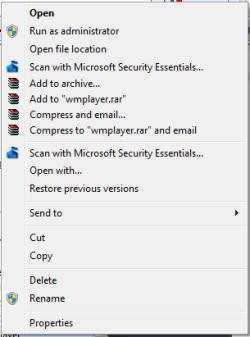
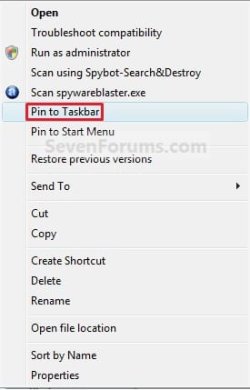
1. Right click on a program exe file or shortcut that you want to pin to the taskbar, and click on Pin to Taskbar. (See screenshot below)
Context_menu.jpg
OR

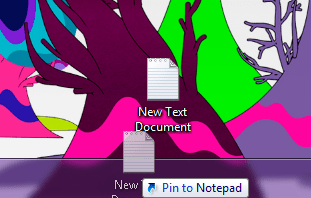
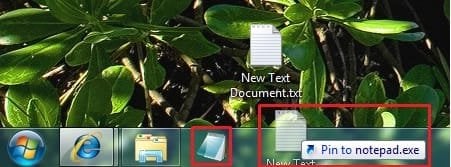
2. Drag a file that has a program associated for it (ex: .txt file for Notepad) to a empty area on the taskbar until you see the Pin to (program name) (ex: Pin to notepad.exe) pop-up, then drop it. (See screenshot below)
NOTE: This will pin the program (ex: Notepad) to the taskbar with the file (ex: txt) included in it's right click menu.
Program_File.jpg
OR

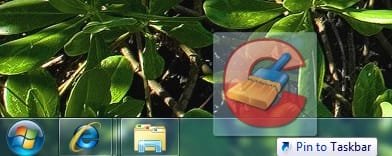
3. Drag a program .exe file or shortcut (ex: CCLeaner), to a empty area of the taskbar until you see the Pin to Taskbar pop-up, then drop it. (See screenshot below)
Program_exe_Shortcut.jpg
OR

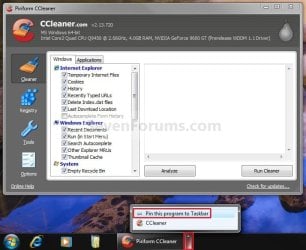
4. Right click on a open window taskbar button or icon that you want to pin to the taskbar, and click on Pin this program to the Taskbar. (See screenshot below)
Pin_Program.jpg
OR

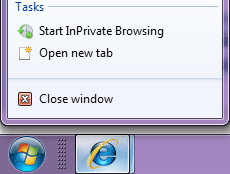
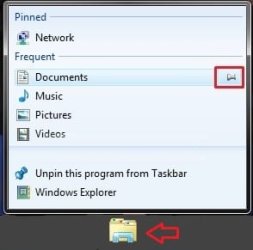
5. Pin to program's jump list. (See screenshot below)
Explorer-Pin.jpg


OPTION TWO

To Unpin a Program to the Taskbar


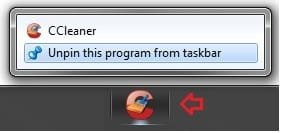
1. Right click on a pinned taskbar icon link that you want to unpin, and click on Unpin this program from the Taskbar. (See screenshot below)
Unpin_from_taskbar.jpg
OR

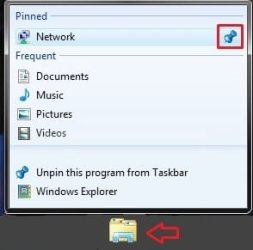
2. Unpin from program's jump list. (See screenshot below)
Explorer-Unpin.jpg
That's it,
Shawn


Related Tutorials


Attachments

  • New_Taskbar.jpg
    New_Taskbar.jpg
    9.4 KB · Views: 327,912
  • Pin.jpg
    Pin.jpg
    551 bytes · Views: 150,666
  • Unpin.jpg
    Unpin.jpg
    770 bytes · Views: 149,856
Last edited:
Hello Nomadgamer,

Doing a repair install may be the fastest and easiest way of fixing this without losing anything.

Hope this helps,
Shawn
 
Last edited:

My Computer

Computer type
PC/Desktop
Computer Manufacturer/Model Number
Self built custom
OS
64-bit Windows 11 Pro for Workstations
CPU
Intel i7-8700K OC'd to 5 GHz
Motherboard
ASUS ROG Maximus XI Formula Z390
Memory
64 GB (4x16GB) G.SKILL TridentZ RGB DDR4 3600 MHz
Graphics Card(s)
ASUS ROG-STRIX-GTX1080TI-O11G-GAMING
Sound Card
Integrated
Monitor(s) Displays
2 x Samsung Odyssey G7 27"
Screen Resolution
2560x1440
Hard Drives
1TB Samsung 990 PRO M.2,
4TB Samsung 990 PRO PRO M.2,
TerraMaster F8 SSD Plus NAS
PSU
Seasonic Prime Titanium 850W
Case
Thermaltake Core P3
Cooling
Corsair Hydro H115i
Keyboard
Logitech wireless K800
Mouse
Logitech MX Master 4
Internet Speed
2 Gb/s Download and 100 Mb/s Upload
Antivirus
Malwarebyte Anti-Malware Premium
Browser
Google Chrome
Other Info
Logitech Z625 speaker system,
Logitech BRIO 4K Pro webcam,
HP Color LaserJet Pro MFP M477fdn,
APC SMART-UPS RT 1000 XL - SURT1000XLI,
Galaxy S23 Plus phone
got the problem fixed.... its the IsShortcut... i always del that from the reg... 'coz i dont want to see those shortcut arrows... thanks m8!!! now i can pin using all your tutorials.... thanks again!!! :D
 

My Computer

Computer Manufacturer/Model Number
ASUSTeK Computer INC.
OS
Windows 7 Ultimate 64bit
CPU
Intel Core i5 750
Motherboard
Maximus III Formula
Memory
2 x 4GB Corsair Dominator ddr3 1600mhz dual channel
Graphics Card(s)
XFX 5850
Sound Card
SupremeFX X-Fi
Monitor(s) Displays
Acer G235H
Screen Resolution
1920x1080
Hard Drives
60GB OCZ Vertex SSD
160GB WD Cav Blue
PSU
Silverstone DA650
Case
Bitfenix Shinobi
Cooling
Swiftech Apogee XT
Keyboard
Microsoft X6
Mouse
Razer Salmosa Korean Tournament Ed.
Internet Speed
3 MBPs
I'm happy to hear that you got it sorted. Thank you for posting back what you found to be the problem. :)
 

My Computer

Computer type
PC/Desktop
Computer Manufacturer/Model Number
Self built custom
OS
64-bit Windows 11 Pro for Workstations
CPU
Intel i7-8700K OC'd to 5 GHz
Motherboard
ASUS ROG Maximus XI Formula Z390
Memory
64 GB (4x16GB) G.SKILL TridentZ RGB DDR4 3600 MHz
Graphics Card(s)
ASUS ROG-STRIX-GTX1080TI-O11G-GAMING
Sound Card
Integrated
Monitor(s) Displays
2 x Samsung Odyssey G7 27"
Screen Resolution
2560x1440
Hard Drives
1TB Samsung 990 PRO M.2,
4TB Samsung 990 PRO PRO M.2,
TerraMaster F8 SSD Plus NAS
PSU
Seasonic Prime Titanium 850W
Case
Thermaltake Core P3
Cooling
Corsair Hydro H115i
Keyboard
Logitech wireless K800
Mouse
Logitech MX Master 4
Internet Speed
2 Gb/s Download and 100 Mb/s Upload
Antivirus
Malwarebyte Anti-Malware Premium
Browser
Google Chrome
Other Info
Logitech Z625 speaker system,
Logitech BRIO 4K Pro webcam,
HP Color LaserJet Pro MFP M477fdn,
APC SMART-UPS RT 1000 XL - SURT1000XLI,
Galaxy S23 Plus phone
I cant seem to pin a program(firefox) installed in my SDCard. Is there anyway to solve this? i can pin it only if its installed on the local harddisk.
 

My Computer

OS
Windows 7
Hello Koren, and welcome to Seven Forums.

Sorry, but you cannot pin items from a removable storage device. :(
 

My Computer

Computer type
PC/Desktop
Computer Manufacturer/Model Number
Self built custom
OS
64-bit Windows 11 Pro for Workstations
CPU
Intel i7-8700K OC'd to 5 GHz
Motherboard
ASUS ROG Maximus XI Formula Z390
Memory
64 GB (4x16GB) G.SKILL TridentZ RGB DDR4 3600 MHz
Graphics Card(s)
ASUS ROG-STRIX-GTX1080TI-O11G-GAMING
Sound Card
Integrated
Monitor(s) Displays
2 x Samsung Odyssey G7 27"
Screen Resolution
2560x1440
Hard Drives
1TB Samsung 990 PRO M.2,
4TB Samsung 990 PRO PRO M.2,
TerraMaster F8 SSD Plus NAS
PSU
Seasonic Prime Titanium 850W
Case
Thermaltake Core P3
Cooling
Corsair Hydro H115i
Keyboard
Logitech wireless K800
Mouse
Logitech MX Master 4
Internet Speed
2 Gb/s Download and 100 Mb/s Upload
Antivirus
Malwarebyte Anti-Malware Premium
Browser
Google Chrome
Other Info
Logitech Z625 speaker system,
Logitech BRIO 4K Pro webcam,
HP Color LaserJet Pro MFP M477fdn,
APC SMART-UPS RT 1000 XL - SURT1000XLI,
Galaxy S23 Plus phone
Hi

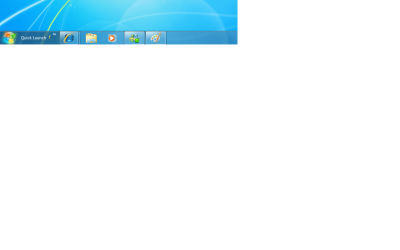
Is there anyway to remove the icon that is after the quick launch wirting. It goes away if the taskbar is unlocked. Has anyone found a way of removing it when the task bar is locked. I have attached a pic.
 

Attachments

  • Untitled.png
    Untitled.png
    33.9 KB · Views: 234

My Computer

Computer type
Laptop
Computer Manufacturer/Model Number
HP
OS
Windows 7

My Computer

Computer type
PC/Desktop
Computer Manufacturer/Model Number
Self built custom
OS
64-bit Windows 11 Pro for Workstations
CPU
Intel i7-8700K OC'd to 5 GHz
Motherboard
ASUS ROG Maximus XI Formula Z390
Memory
64 GB (4x16GB) G.SKILL TridentZ RGB DDR4 3600 MHz
Graphics Card(s)
ASUS ROG-STRIX-GTX1080TI-O11G-GAMING
Sound Card
Integrated
Monitor(s) Displays
2 x Samsung Odyssey G7 27"
Screen Resolution
2560x1440
Hard Drives
1TB Samsung 990 PRO M.2,
4TB Samsung 990 PRO PRO M.2,
TerraMaster F8 SSD Plus NAS
PSU
Seasonic Prime Titanium 850W
Case
Thermaltake Core P3
Cooling
Corsair Hydro H115i
Keyboard
Logitech wireless K800
Mouse
Logitech MX Master 4
Internet Speed
2 Gb/s Download and 100 Mb/s Upload
Antivirus
Malwarebyte Anti-Malware Premium
Browser
Google Chrome
Other Info
Logitech Z625 speaker system,
Logitech BRIO 4K Pro webcam,
HP Color LaserJet Pro MFP M477fdn,
APC SMART-UPS RT 1000 XL - SURT1000XLI,
Galaxy S23 Plus phone
Thanks Brink, :)
 

My Computer

Computer type
Laptop
Computer Manufacturer/Model Number
HP
OS
Windows 7
You're welcome Wizkid. :)
 

My Computer

Computer type
PC/Desktop
Computer Manufacturer/Model Number
Self built custom
OS
64-bit Windows 11 Pro for Workstations
CPU
Intel i7-8700K OC'd to 5 GHz
Motherboard
ASUS ROG Maximus XI Formula Z390
Memory
64 GB (4x16GB) G.SKILL TridentZ RGB DDR4 3600 MHz
Graphics Card(s)
ASUS ROG-STRIX-GTX1080TI-O11G-GAMING
Sound Card
Integrated
Monitor(s) Displays
2 x Samsung Odyssey G7 27"
Screen Resolution
2560x1440
Hard Drives
1TB Samsung 990 PRO M.2,
4TB Samsung 990 PRO PRO M.2,
TerraMaster F8 SSD Plus NAS
PSU
Seasonic Prime Titanium 850W
Case
Thermaltake Core P3
Cooling
Corsair Hydro H115i
Keyboard
Logitech wireless K800
Mouse
Logitech MX Master 4
Internet Speed
2 Gb/s Download and 100 Mb/s Upload
Antivirus
Malwarebyte Anti-Malware Premium
Browser
Google Chrome
Other Info
Logitech Z625 speaker system,
Logitech BRIO 4K Pro webcam,
HP Color LaserJet Pro MFP M477fdn,
APC SMART-UPS RT 1000 XL - SURT1000XLI,
Galaxy S23 Plus phone
I'm a developer that must run various command-line scripts (eg. cmd). In Vista I was able to have these associated to my quick launch but I can't add them to the taskbar. How do I make this work? .EXE work why not .CMD?

Thanks.
 

My Computer

OS
Windows 7
Hello Kaboo, and welcome to Seven Forums.

As a workaround, you can add Quick Launch back to use for those.

Hope this helps,
Shawn
 

My Computer

Computer type
PC/Desktop
Computer Manufacturer/Model Number
Self built custom
OS
64-bit Windows 11 Pro for Workstations
CPU
Intel i7-8700K OC'd to 5 GHz
Motherboard
ASUS ROG Maximus XI Formula Z390
Memory
64 GB (4x16GB) G.SKILL TridentZ RGB DDR4 3600 MHz
Graphics Card(s)
ASUS ROG-STRIX-GTX1080TI-O11G-GAMING
Sound Card
Integrated
Monitor(s) Displays
2 x Samsung Odyssey G7 27"
Screen Resolution
2560x1440
Hard Drives
1TB Samsung 990 PRO M.2,
4TB Samsung 990 PRO PRO M.2,
TerraMaster F8 SSD Plus NAS
PSU
Seasonic Prime Titanium 850W
Case
Thermaltake Core P3
Cooling
Corsair Hydro H115i
Keyboard
Logitech wireless K800
Mouse
Logitech MX Master 4
Internet Speed
2 Gb/s Download and 100 Mb/s Upload
Antivirus
Malwarebyte Anti-Malware Premium
Browser
Google Chrome
Other Info
Logitech Z625 speaker system,
Logitech BRIO 4K Pro webcam,
HP Color LaserJet Pro MFP M477fdn,
APC SMART-UPS RT 1000 XL - SURT1000XLI,
Galaxy S23 Plus phone
Can't Pin a Specific Program

I am unable to pin a specific program to my taskbar. :mad:

Every other program works fine. I followed the path to where these shortcuts are actually stored, and it was already there. Hmmm... I manually deleted it from there, but it still would not let me pin it. I manually copied a shortcut to this folder, but still no go.

None of the tech guys at the HelpDesk have ever seen this (they were able to pin it to their taskbars).

Any profound insight?
 

My Computer

OS
Windows 7 Pro
Hello Bubba, and welcome to Seven Forums.

What program is this for?

Where you able create a New Folder, place the shortcut in it, move the New Folder where you like to keep it stored at on the computer, then pin the folder to the taskbar to use the shortcut this way instead?

Hope this helps for now,
Shawn
 

My Computer

Computer type
PC/Desktop
Computer Manufacturer/Model Number
Self built custom
OS
64-bit Windows 11 Pro for Workstations
CPU
Intel i7-8700K OC'd to 5 GHz
Motherboard
ASUS ROG Maximus XI Formula Z390
Memory
64 GB (4x16GB) G.SKILL TridentZ RGB DDR4 3600 MHz
Graphics Card(s)
ASUS ROG-STRIX-GTX1080TI-O11G-GAMING
Sound Card
Integrated
Monitor(s) Displays
2 x Samsung Odyssey G7 27"
Screen Resolution
2560x1440
Hard Drives
1TB Samsung 990 PRO M.2,
4TB Samsung 990 PRO PRO M.2,
TerraMaster F8 SSD Plus NAS
PSU
Seasonic Prime Titanium 850W
Case
Thermaltake Core P3
Cooling
Corsair Hydro H115i
Keyboard
Logitech wireless K800
Mouse
Logitech MX Master 4
Internet Speed
2 Gb/s Download and 100 Mb/s Upload
Antivirus
Malwarebyte Anti-Malware Premium
Browser
Google Chrome
Other Info
Logitech Z625 speaker system,
Logitech BRIO 4K Pro webcam,
HP Color LaserJet Pro MFP M477fdn,
APC SMART-UPS RT 1000 XL - SURT1000XLI,
Galaxy S23 Plus phone
The program is HelpSTAR 9.0 SQL.

Yes, I was able to build a folder in the taskbar.

I have looked in the folder that stores the taskbar links, and I see the shortcut for this program, but it just never shows up in the taskbar, will not let me pin it, and will not let me drag it to the taskbar (I assume because it detects that it is already there). I have tried deleting the shortcut from this folder, but no go.

Strangely, other folks have been able to pin this to their taskbar.
 

My Computer

OS
Windows 7 Pro
Bubba,

Open the new folder that was pinned to the taskbar instead, then see if you can place the HelpSTAR 9.0 SQL shortcut in it for it to show up in the folder on the taskbar.
 

My Computer

Computer type
PC/Desktop
Computer Manufacturer/Model Number
Self built custom
OS
64-bit Windows 11 Pro for Workstations
CPU
Intel i7-8700K OC'd to 5 GHz
Motherboard
ASUS ROG Maximus XI Formula Z390
Memory
64 GB (4x16GB) G.SKILL TridentZ RGB DDR4 3600 MHz
Graphics Card(s)
ASUS ROG-STRIX-GTX1080TI-O11G-GAMING
Sound Card
Integrated
Monitor(s) Displays
2 x Samsung Odyssey G7 27"
Screen Resolution
2560x1440
Hard Drives
1TB Samsung 990 PRO M.2,
4TB Samsung 990 PRO PRO M.2,
TerraMaster F8 SSD Plus NAS
PSU
Seasonic Prime Titanium 850W
Case
Thermaltake Core P3
Cooling
Corsair Hydro H115i
Keyboard
Logitech wireless K800
Mouse
Logitech MX Master 4
Internet Speed
2 Gb/s Download and 100 Mb/s Upload
Antivirus
Malwarebyte Anti-Malware Premium
Browser
Google Chrome
Other Info
Logitech Z625 speaker system,
Logitech BRIO 4K Pro webcam,
HP Color LaserJet Pro MFP M477fdn,
APC SMART-UPS RT 1000 XL - SURT1000XLI,
Galaxy S23 Plus phone
i can't PIN!

I dont see Pin this program to the Taskbar! I cant drag into it too.
What should i do?
 

Attachments

  • 1.png
    1.png
    11.5 KB · Views: 1,169
  • 2.png
    2.png
    9.9 KB · Views: 287
  • 3.png
    3.png
    9.1 KB · Views: 1,137

My Computer

OS
w7
Hello Tim, and welcome to Seven Forums.

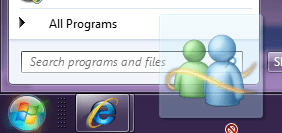
I'm guessing that you are wanting to pin Windows Live Messenger to the taskbar??

If so, right click on the shortcut of it in the Start Menu "All Programs" area to see if you have a "Pin to taskbar" option to use.

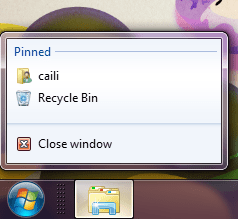
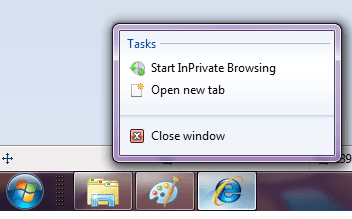
For the Jump Lists screenshots, highlight the listed item you want to pin or unpin from the jump list of the pinned item on the taskbar. Next, you should see a small push pin icon to the right of the selected jump list item to pin (gray) or unpin (blue). Tasks cannot be pinned. Only files, folders, and programs can.

Hope this helps,
Shawn
 

My Computer

Computer type
PC/Desktop
Computer Manufacturer/Model Number
Self built custom
OS
64-bit Windows 11 Pro for Workstations
CPU
Intel i7-8700K OC'd to 5 GHz
Motherboard
ASUS ROG Maximus XI Formula Z390
Memory
64 GB (4x16GB) G.SKILL TridentZ RGB DDR4 3600 MHz
Graphics Card(s)
ASUS ROG-STRIX-GTX1080TI-O11G-GAMING
Sound Card
Integrated
Monitor(s) Displays
2 x Samsung Odyssey G7 27"
Screen Resolution
2560x1440
Hard Drives
1TB Samsung 990 PRO M.2,
4TB Samsung 990 PRO PRO M.2,
TerraMaster F8 SSD Plus NAS
PSU
Seasonic Prime Titanium 850W
Case
Thermaltake Core P3
Cooling
Corsair Hydro H115i
Keyboard
Logitech wireless K800
Mouse
Logitech MX Master 4
Internet Speed
2 Gb/s Download and 100 Mb/s Upload
Antivirus
Malwarebyte Anti-Malware Premium
Browser
Google Chrome
Other Info
Logitech Z625 speaker system,
Logitech BRIO 4K Pro webcam,
HP Color LaserJet Pro MFP M477fdn,
APC SMART-UPS RT 1000 XL - SURT1000XLI,
Galaxy S23 Plus phone
Hi shawn,

1, when iright click on a program exe file or shortcut that i want to pin to the taskbar, but i dont see Pin to Taskbar.

2. Drag a file that has a program associated for it (ex: .txt file for Notepad) to a empty area on the taskbar until you see the Pin to (program name) (ex: Pin to notepad.exe) pop-up, then drop it. But after i let go, it didnt pin at the taskbar.

3. Drag a program .exe file or shortcut (ex: CCLeaner), to a empty area of the taskbar until you see the Pin to Taskbar pop-up, then drop it. Same as the notepad, after i let go, nothing happened.

Where went wrong? I use my friend's W7, all those can be done but not mine. Or is there settings to enable this?

Thanks.
 

Attachments

  • 1.png
    1.png
    5 KB · Views: 262
  • 3.png
    3.png
    22.2 KB · Views: 1,138
  • 2.png
    2.png
    5 KB · Views: 1,113

My Computer

OS
w7
Tim,

Check to make sure that you have Recent Programs turned on, and give this a try. Open the program or file, then right click on the icon on the taskbar and see if the "Pin this program to taskbar" option is there.
 

My Computer

Computer type
PC/Desktop
Computer Manufacturer/Model Number
Self built custom
OS
64-bit Windows 11 Pro for Workstations
CPU
Intel i7-8700K OC'd to 5 GHz
Motherboard
ASUS ROG Maximus XI Formula Z390
Memory
64 GB (4x16GB) G.SKILL TridentZ RGB DDR4 3600 MHz
Graphics Card(s)
ASUS ROG-STRIX-GTX1080TI-O11G-GAMING
Sound Card
Integrated
Monitor(s) Displays
2 x Samsung Odyssey G7 27"
Screen Resolution
2560x1440
Hard Drives
1TB Samsung 990 PRO M.2,
4TB Samsung 990 PRO PRO M.2,
TerraMaster F8 SSD Plus NAS
PSU
Seasonic Prime Titanium 850W
Case
Thermaltake Core P3
Cooling
Corsair Hydro H115i
Keyboard
Logitech wireless K800
Mouse
Logitech MX Master 4
Internet Speed
2 Gb/s Download and 100 Mb/s Upload
Antivirus
Malwarebyte Anti-Malware Premium
Browser
Google Chrome
Other Info
Logitech Z625 speaker system,
Logitech BRIO 4K Pro webcam,
HP Color LaserJet Pro MFP M477fdn,
APC SMART-UPS RT 1000 XL - SURT1000XLI,
Galaxy S23 Plus phone
I did, but still didnt see "Pin this program to taskbar" option.
 

My Computer

OS
w7
Back
Top