Taskbar - Resize

How to Resize the Taskbar in Vista and Windows 7

   Information
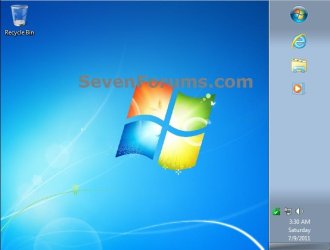
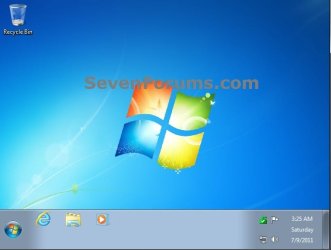
This will show you how to resize the taskbar by changing it's height or width on the desktop in Vista and Windows 7.


Here's How:
1. Unlock the taskbar.

2. Move and hover the mouse pointer over the top or side border of the taskbar until it turns into a double arrow. (see screenshots below)
Resize-1.jpg

Resize-3.jpg
3. Left click and hold, drag the taskbar to the level for how high or wide you would like it to be, then release left click when finished. (see screenshots below)
Resize-2.jpg

Resize-4.jpg
4. Lock the taskbar.
That's it,
Shawn


Last edited:
nope

nope, only doubles it or not...cannot make it any size you want.
 

My Computer

Computer type
PC/Desktop
Computer Manufacturer/Model Number
Cyberpower
OS
win 7 64 home premium
CPU
3.6 amd
Memory
8g
Hard Drives
AMD 500g ssd, 500hdd
Browser
Pale Moon
Yep, it changes the taskbar width or height by any level you like. Please try again. ;)
 

My Computer

Computer type
PC/Desktop
Computer Manufacturer/Model Number
Self built custom
OS
64-bit Windows 11 Pro for Workstations
CPU
Intel i7-8700K OC'd to 5 GHz
Motherboard
ASUS ROG Maximus XI Formula Z390
Memory
64 GB (4x16GB) G.SKILL TridentZ RGB DDR4 3600 MHz
Graphics Card(s)
ASUS ROG-STRIX-GTX1080TI-O11G-GAMING
Sound Card
Integrated
Monitor(s) Displays
2 x Samsung Odyssey G7 27"
Screen Resolution
2560x1440
Hard Drives
1TB Samsung 990 PRO M.2,
4TB Samsung 990 PRO PRO M.2,
TerraMaster F8 SSD Plus NAS
PSU
Seasonic Prime Titanium 850W
Case
Thermaltake Core P3
Cooling
Corsair Hydro H115i
Keyboard
Logitech wireless K800
Mouse
Logitech MX Master 4
Internet Speed
2 Gb/s Download and 100 Mb/s Upload
Antivirus
Malwarebyte Anti-Malware Premium
Browser
Google Chrome
Other Info
Logitech Z625 speaker system,
Logitech BRIO 4K Pro webcam,
HP Color LaserJet Pro MFP M477fdn,
APC SMART-UPS RT 1000 XL - SURT1000XLI,
Galaxy S23 Plus phone
Yep, it changes the taskbar width or height by any level you like. Please try again. ;)

yeah, tried it again...no go...i am sure there are other settings involved that dont allow me to do that. i am kind of a nut for settings and just cant figure that out. but thanks anyway.
 

My Computer

Computer type
PC/Desktop
Computer Manufacturer/Model Number
Cyberpower
OS
win 7 64 home premium
CPU
3.6 amd
Memory
8g
Hard Drives
AMD 500g ssd, 500hdd
Browser
Pale Moon
Are you saying that when you unlock the taskbar and keep dragging it up, you are not able to increase it's height one level at a time to say double, triple, quadrouple it's default one level height?

I find it hard to believe if you are not able to.
 

My Computer

Computer type
PC/Desktop
Computer Manufacturer/Model Number
Self built custom
OS
64-bit Windows 11 Pro for Workstations
CPU
Intel i7-8700K OC'd to 5 GHz
Motherboard
ASUS ROG Maximus XI Formula Z390
Memory
64 GB (4x16GB) G.SKILL TridentZ RGB DDR4 3600 MHz
Graphics Card(s)
ASUS ROG-STRIX-GTX1080TI-O11G-GAMING
Sound Card
Integrated
Monitor(s) Displays
2 x Samsung Odyssey G7 27"
Screen Resolution
2560x1440
Hard Drives
1TB Samsung 990 PRO M.2,
4TB Samsung 990 PRO PRO M.2,
TerraMaster F8 SSD Plus NAS
PSU
Seasonic Prime Titanium 850W
Case
Thermaltake Core P3
Cooling
Corsair Hydro H115i
Keyboard
Logitech wireless K800
Mouse
Logitech MX Master 4
Internet Speed
2 Gb/s Download and 100 Mb/s Upload
Antivirus
Malwarebyte Anti-Malware Premium
Browser
Google Chrome
Other Info
Logitech Z625 speaker system,
Logitech BRIO 4K Pro webcam,
HP Color LaserJet Pro MFP M477fdn,
APC SMART-UPS RT 1000 XL - SURT1000XLI,
Galaxy S23 Plus phone
Are you saying that when you unlock the taskbar and keep dragging it up, you are not able to increase it's height one level at a time to say double, triple, quadrouple it's default one level height?

I find it hard to believe if you are not able to.

ah yes, i can do that, but the problem is the taskbar is too big now and i can only get it to about 3/4 inch high and that is as small as i can move it. my icons look way out of place as they are so small.
 

My Computer

Computer type
PC/Desktop
Computer Manufacturer/Model Number
Cyberpower
OS
win 7 64 home premium
CPU
3.6 amd
Memory
8g
Hard Drives
AMD 500g ssd, 500hdd
Browser
Pale Moon

My Computer

Computer type
PC/Desktop
Computer Manufacturer/Model Number
Self built custom
OS
64-bit Windows 11 Pro for Workstations
CPU
Intel i7-8700K OC'd to 5 GHz
Motherboard
ASUS ROG Maximus XI Formula Z390
Memory
64 GB (4x16GB) G.SKILL TridentZ RGB DDR4 3600 MHz
Graphics Card(s)
ASUS ROG-STRIX-GTX1080TI-O11G-GAMING
Sound Card
Integrated
Monitor(s) Displays
2 x Samsung Odyssey G7 27"
Screen Resolution
2560x1440
Hard Drives
1TB Samsung 990 PRO M.2,
4TB Samsung 990 PRO PRO M.2,
TerraMaster F8 SSD Plus NAS
PSU
Seasonic Prime Titanium 850W
Case
Thermaltake Core P3
Cooling
Corsair Hydro H115i
Keyboard
Logitech wireless K800
Mouse
Logitech MX Master 4
Internet Speed
2 Gb/s Download and 100 Mb/s Upload
Antivirus
Malwarebyte Anti-Malware Premium
Browser
Google Chrome
Other Info
Logitech Z625 speaker system,
Logitech BRIO 4K Pro webcam,
HP Color LaserJet Pro MFP M477fdn,
APC SMART-UPS RT 1000 XL - SURT1000XLI,
Galaxy S23 Plus phone
Back
Top