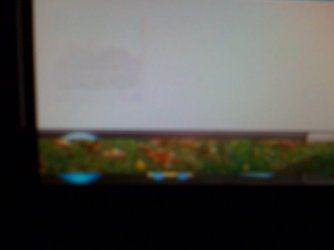
Taskbar shows background image

jnetty99

New member
Member
Local time
11:19 AM
Messages
50
[FONT=&quot]Windows 7 Ultimate x86 RTM
Notice the following mostly on my taskbar. The background image leaks and it looks like it doesn’t refresh properly. If I maximize or minimize a window it seems to fix itself. I seen it mostly on the taskbar but also on other parts of the screen.

I had Windows 7 installed on this computer several times and never seen that issue. It’s a Dell E521 with Intel G965 Integrated video. The main change from before to now is a new monitor. Before I had a crappy CRT monitor and now I have a 20" Compaq Q2009 monitor. Monitor is running at its native resolution of 1600 x 900. I only notice the issue on Windows 7, but not on Windows XP. I checked for both the latest monitor driver and video card driver, any ideas. [/FONT]

[FONT=&quot]Here is a snapshot that I took with my phone.
[/FONT]photo.jpg


My Computer

OS
Windows 7
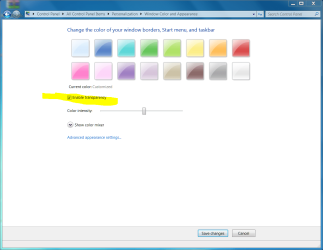
Disable transparency

Right click desktop
Personalize
Windows Color

.
 

Attachments

  • Capture.PNG
    Capture.PNG
    213.6 KB · Views: 69
Disable transparency has help with the issue thank you.

But why i'm getting the issue? Do you think the onboard video can't handle a 1600 x 900 resolution or just some weird driver conflict?
 

My Computer

OS
Windows 7
Disable transparency has help with the issue thank you.

But why i'm getting the issue? Do you think the onboard video can't handle a 1600 x 900 resolution or just some weird driver conflict?
There is no problem at all. No driver problem. No monitor problem. No bug.

That is what Aero looks like. I do not like it either.

The Antman got new glasses last week and doesn't often wear them. This is post not a stupid attack as much as it is a stupid attack.
 
Last edited:
There is no problem at all. No driver problem. No monitor problem. No bug.

That is what Aero looks like. I do not like it either.
uhm but why i didnt get the same thing happened in my windows when i enabled transparency?
 

My Computer

Computer Manufacturer/Model Number
Toshiba Satellite A100
OS
Windows 7 Ultimate x86
CPU
Intel® Core™ 2 Duo T5200 @1.60 GHz
Memory
1 GB
Graphics Card(s)
ATI Mobility Radeon X1400
Sound Card
Realtek Semiconductor Corp.
Monitor(s) Displays
15.4" CSV 1280 x 800
Hard Drives
120 GB
Mouse
e PRO
Internet Speed
1 Mbps down / 80 Kbps up
Wow. I just looked with my new glasses on.

Disregard earlier posts. You may have a driver issue.
 

My Computer

Computer Manufacturer/Model Number
Toshiba Satellite A100
OS
Windows 7 Ultimate x86
CPU
Intel® Core™ 2 Duo T5200 @1.60 GHz
Memory
1 GB
Graphics Card(s)
ATI Mobility Radeon X1400
Sound Card
Realtek Semiconductor Corp.
Monitor(s) Displays
15.4" CSV 1280 x 800
Hard Drives
120 GB
Mouse
e PRO
Internet Speed
1 Mbps down / 80 Kbps up
nah, its cool. dont worry :)
 

My Computer

Computer Manufacturer/Model Number
Toshiba Satellite A100
OS
Windows 7 Ultimate x86
CPU
Intel® Core™ 2 Duo T5200 @1.60 GHz
Memory
1 GB
Graphics Card(s)
ATI Mobility Radeon X1400
Sound Card
Realtek Semiconductor Corp.
Monitor(s) Displays
15.4" CSV 1280 x 800
Hard Drives
120 GB
Mouse
e PRO
Internet Speed
1 Mbps down / 80 Kbps up
i'm going to try to take a better picture of the issue and post it.
 

My Computer

OS
Windows 7
When you disable transparency, it affects all window borders doesn't it?
 

My Computer

Computer Manufacturer/Model Number
HP DV8t quad
OS
Windows 7 Ultimate x64 (Retail)
CPU
i7-Q 720
Motherboard
Motherboard Chipset Intel Ibex Peak-M PM55, Intel Lynnfield
Memory
6 GB
Graphics Card(s)
nVidia GeForce GT 230M (1GB)
Sound Card
IDT High Definition Audio CODEC
Monitor(s) Displays
18.4 inch HP Infinity FHD (Samsung 184HT03-001)
Screen Resolution
1920 x 1080
Hard Drives
Hitachi 500GB 7200 rpm (x2)
Seagate FreeAgent 1.5 TB External USB (x2)
Thermaltake BlacX eSATA/USB 2.0 3.5/2.5 HD dock
Cooling
Zalman NC-2000 notebook cooling pad
Keyboard
laptop
Mouse
Logitech VX Revolution
Other Info
Backup Unit: Lenovo T61p
i'm going to try to take a better picture of the issue and post it.

jnetty

When you post the picture could you fill in your system specs (lower left corner) so we know what hardware you have.

thanks

Ken
 

My Computer

Computer Manufacturer/Model Number
HP Pavillion dv-7 1005 Tx
OS
Win 8 Release candidate 8400
CPU
[email protected]
Memory
4 gigs
Graphics Card(s)
Nvidia 9600M
Sound Card
HD built-in
Monitor(s) Displays
17" Wxga
Screen Resolution
1440x900
Cooling
none
Internet Speed
45Mb down 5Mb up
There was a new driver available from Intel for the G965 Graphics chipset and it looks like the issue is gone.
 

My Computer

OS
Windows 7
i'm going to try to take a better picture of the issue and post it.
Make a screenshot and attach it to your post as told here. It's a better method than just attaching a photo of your screen, telling and showing us more.

Kari
 
Last edited:

My Computer

Computer type
Laptop
Computer Manufacturer/Model Number
HP ENVY 17-1150eg
OS
Windows 10 Pro x64 EN-GB
CPU
1.6 GHz Intel Core i7-720QM Processor
Memory
6 GB
Graphics Card(s)
ATI Mobility Radeon HD 5850 Graphics
Sound Card
Beats sound system with integrated subwoofer
Monitor(s) Displays
17" laptop display, 22" LED and 32" Full HD TV through HDMI
Screen Resolution
1600*900 (1), 1920*1080 (2&3)
Hard Drives
Internal: 2 x 500 GB SATA Hard Disk Drive 7200 rpm
External: 2TB for backups, 3TB USB3 network drive for media
Cooling
As Envy runs a bit warm, I have it on a Cooler Master pad
Keyboard
Logitech diNovo Media Desktop Laser (bluetooth)
Mouse
Logitech Performance Mouse MX
Internet Speed
50/10 Mbps VDSL
Antivirus
Windows Defender 4.3.9431.0
Browser
Maxthon 3.5.2., IE11
Back
Top