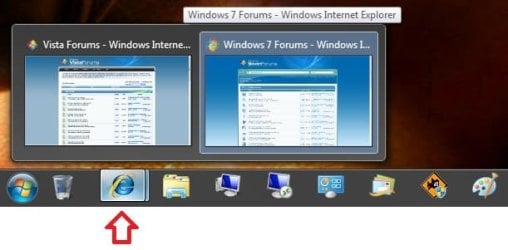
Taskbar Thumbnail Previews - Enable or Disable

How to Enable or Disable Taskbar Thumbnail Previews in Windows 7 and Windows 8

   Information
The usual method used in Vista to disable the taskbar thumbnail previews does not work in Windows 7 and Windows 8.

This tutorial will show you how to enable or disable the thumbnail previews of open items on the taskbar in Windows 7 and Windows 8.

   Warning
In Windows 7, you will need to have a Aero Theme selected and not one of the Basic and High Contrast Themes for taskbar thumbnail previews to display.

Aero Requirements to be Enabled in Windows 7

NOTE: If Aero is not enabled, then taskbar thumbnail previews will not display even when enabled.

  • 1 GHz 32-bit or 64-bit processor
  • 1 GB of system memory
  • Support for DirectX 9 graphics with 128 MB memory (in order to enable Aero theme)
  • You must be have True Color (32 bit) set instead of High Color (16 bit).
  • The desktop composition and Animate controls and elements inside windows options need to be enabled in Visual Effects.
  • The Desktop Window Manager Session Manager and Themes Services need to be set as Started and Automatic.
  • Refresh or update your WEI score. You will need an WEI score minimum of 2.0 in both Graphics & Gaming graphics in order for Aero to be activated.
  • Activate Windows 7.
EXAMPLE: Taskbar Thumbnail Preview
Example.jpg


OPTION ONE

Enable or Disable Taskbar Thumbnail Previews using "7+ Taskbar Tweaker"


NOTE: This will allow you to enable or disable the taskbar thumbnail previews and list mode using a free program called 7+ Taskbar Tweaker. It is a standalone EXE file, so there is nothing to install. You just run the exe file. The download for it is in a RAR file, so you will also need a program like 7-Zip to open the RAR file and extract the EXE file since Windows 7 does not support opening RAR files by default.
1. Download the 7+ Taskbar Tweaker RAR file for your 32-bit or 64-bit Windows 7 or Windows 8.

2. Extract and run the 7+ Taskbar Tweaker exe file.

3. To Disable Taskbar Thumbnail Previews in Windows 7/8
A) Under Hovering in the Taskbar items section, select (dot) the Nothing option. (see screenshot below step 5)
4. To Enable Taskbar Thumbnail Previews in Windows 7/8
NOTE: This is the default setting.

A) Under Hovering in the Taskbar items section, select (dot) the Show thumbnail preview option. (see screenshot below step 5)
5. Close 7+ Taskbar Tweaker.
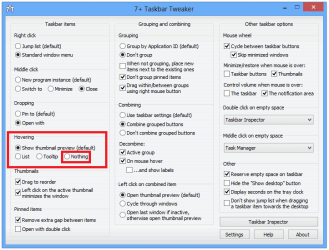
7+-Taskbar-Tweaker.png


OPTION TWO

Enable or Disable Taskbar Thumbnail Previews by Changing Taskbar Thumbnail and List Mode Threshold


NOTE: Changing the threshold (NumThumbnails value) to 0 will disable taskbar thumbnails, and allow you to still use a Aero theme with a list (list mode) of open windows.
1. For how, see: Change Taskbar Thumbnail and List Mode Threshold in Windows 7 and Windows 8


OPTION THREE

Enable or Disable Taskbar Thumbnail Previews by Changing Theme in Windows 7


   Note

PRO: Taskbar thumbnail previews disabled, and you have a list of opened windows for the taskbar item instead.
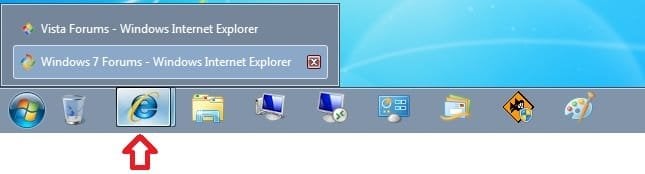
Basic_theme.jpg
CON: No Aero theme.

1. To Enable Taskbar Thumbnail Previews in Windows 7
NOTE: If you still want to use a Aero theme and have taskbar thumbnails previews disabled, then see OPTION TWO or OPTION FOUR instead. This is the default setting.
A) Select an Aero Theme in Personalization. (see screenshot below)
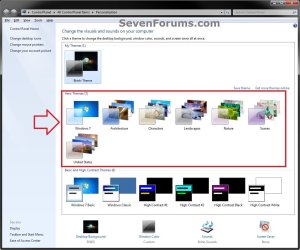
Aero_Theme.jpg
2. To Disable Taskbar Thumbnail Previews in Windows 7
A) Select one of the Basic and High Contrast Themes in Personalization. (see screenshot below)
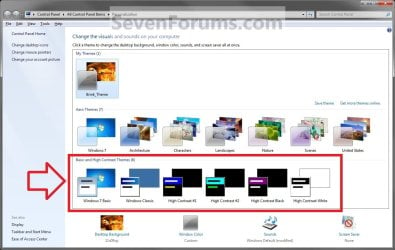
Themes.jpg


OPTION FOUR

Enable or Disable Taskbar Thumbnail Previews by Changing Thumbnail Display Delay Time


   Note
This is more of a workaround instead by setting the taskbar thumbnail preview display time to a long delay time that would effectively be the same as disabling them.

PRO: Taskbar thumbnail previews disabled, and you can have a Aero theme.

CON: You will not even have a list of opened windows for the taskbar items.
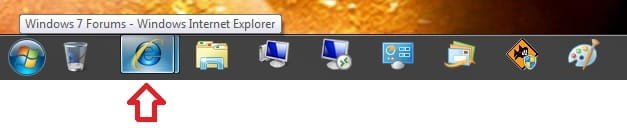
Long_delay_time.jpg

1. To Enable Taskbar Thumbnail Previews in Windows 7/8
NOTE: This is the default setting.
A) Click on the download button below to download the file below.
Default_Taskbar_Thumbnail_Delay_Time.reg

Download


B) Go to step 3.
2. To Disable Taskbar Thumbnail Previews in Windows 7/8
NOTE: This sets the delay time to 100000 ms (1000 milliseconds = 1 second) to effectively disable them.
A) Click on the download button below to download the file below.
100000ms_Taskbar_Thumbnail_Delay_Time.reg

Download
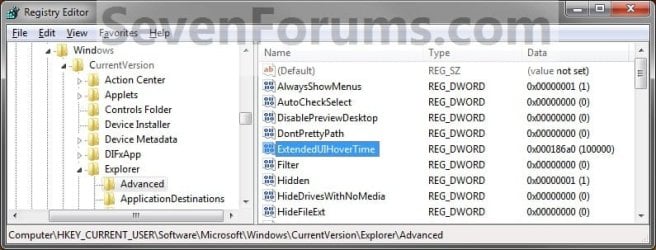


regedit.jpg
3. Save the .reg file to your desktop.

4. Double click/tap on the downloaded .reg file to merge it.

5. If prompted, click/tap on Run, Yes (UAC), Yes, and OK to approve the merge.

6. Log off and log on, or restart the computer to apply the changes.

7. When done, you can delete the downloaded .reg and .zip files if you like.
That's it,
Shawn


Attachments

Last edited:
Thank you. A great Option, many of us and myself have been waiting :)
 

My Computer

Computer Manufacturer/Model Number
Dell Inspiron N5010
OS
Windows 7 Ultimate x64 SP1
CPU
Intel Core i3
Memory
4 GB DDR3
Screen Resolution
1366 X 768
Hard Drives
Seagate 500 GB
Internet Speed
4 MBPS
You're welcome Venths. :)
 

My Computer

Computer type
PC/Desktop
Computer Manufacturer/Model Number
Self built custom
OS
64-bit Windows 11 Pro for Workstations
CPU
Intel i7-8700K OC'd to 5 GHz
Motherboard
ASUS ROG Maximus XI Formula Z390
Memory
64 GB (4x16GB) G.SKILL TridentZ RGB DDR4 3600 MHz
Graphics Card(s)
ASUS ROG-STRIX-GTX1080TI-O11G-GAMING
Sound Card
Integrated
Monitor(s) Displays
2 x Samsung Odyssey G7 27"
Screen Resolution
2560x1440
Hard Drives
1TB Samsung 990 PRO M.2,
4TB Samsung 990 PRO PRO M.2,
TerraMaster F8 SSD Plus NAS
PSU
Seasonic Prime Titanium 850W
Case
Thermaltake Core P3
Cooling
Corsair Hydro H115i
Keyboard
Logitech wireless K800
Mouse
Logitech MX Master 4
Internet Speed
2 Gb/s Download and 100 Mb/s Upload
Antivirus
Malwarebyte Anti-Malware Premium
Browser
Google Chrome
Other Info
Logitech Z625 speaker system,
Logitech BRIO 4K Pro webcam,
HP Color LaserJet Pro MFP M477fdn,
APC SMART-UPS RT 1000 XL - SURT1000XLI,
Galaxy S23 Plus phone
Thank you Shawn, This has been needed quite a bit lately.:thumbsup:
 

My Computer

Computer type
PC/Desktop
Computer Manufacturer/Model Number
Self Built
OS
Win 10 Pro x64
CPU
Intel I5-2500K @3.3GHz
Motherboard
Asrock P67 Extreme4
Memory
16GB G.Skill Ripjaws X (4x4GB)
Graphics Card(s)
EVGA GeForce 750 Ti SC 2GB
Sound Card
ASUS Xonar DG 5.1 Channels 24-bit 96KHz PCI Interface Sound
Monitor(s) Displays
auria eq2367
Screen Resolution
1920 x 1080
Hard Drives
250GB Samsung 850 EVO SSD
1TB WD Blue
1TB Hitachi
PSU
SeaSonic X 650W 80 Plus Gold
Case
Corsair Obsidian 750D
Cooling
Corsair H60, Three 140mm case fans
Keyboard
Logitech Wireless Keyboard K520
Mouse
Logitech Wireless Mouse M310
Internet Speed
Wave Broadband ~ 100 dn 5 up
Antivirus
Windows Defender, Malwarebytes Premium
Browser
Edge, IE11, Chrome
Other Info
Laptop specs: HP g7-1365dx /
CPU: AMD A6-3420M APU with Radeon(tm) HD Graphics /
RAM: Crucial 8Gb (2x4Gb) /
SSD: Crucial M4-CT128M4SSD2 ATA Device/ FW 000F /
GFX: AMD Radeon HD 6520G /
OS: Windows 10 Pro x64
You're welcome Derek. :)
 

My Computer

Computer type
PC/Desktop
Computer Manufacturer/Model Number
Self built custom
OS
64-bit Windows 11 Pro for Workstations
CPU
Intel i7-8700K OC'd to 5 GHz
Motherboard
ASUS ROG Maximus XI Formula Z390
Memory
64 GB (4x16GB) G.SKILL TridentZ RGB DDR4 3600 MHz
Graphics Card(s)
ASUS ROG-STRIX-GTX1080TI-O11G-GAMING
Sound Card
Integrated
Monitor(s) Displays
2 x Samsung Odyssey G7 27"
Screen Resolution
2560x1440
Hard Drives
1TB Samsung 990 PRO M.2,
4TB Samsung 990 PRO PRO M.2,
TerraMaster F8 SSD Plus NAS
PSU
Seasonic Prime Titanium 850W
Case
Thermaltake Core P3
Cooling
Corsair Hydro H115i
Keyboard
Logitech wireless K800
Mouse
Logitech MX Master 4
Internet Speed
2 Gb/s Download and 100 Mb/s Upload
Antivirus
Malwarebyte Anti-Malware Premium
Browser
Google Chrome
Other Info
Logitech Z625 speaker system,
Logitech BRIO 4K Pro webcam,
HP Color LaserJet Pro MFP M477fdn,
APC SMART-UPS RT 1000 XL - SURT1000XLI,
Galaxy S23 Plus phone
This can also be done in GPedit :

  • Click on Start button and type GPEdit.msc in Search text box, then hit Enter.
    Navigate to User Config -> Administrative Templates -> Start Menu and Taskbar in left pane of Local Group Policy Editor.
    Scroll down to and double click on Turn off taskbar thumbnails in right pane of Local Group Policy editor.
    pick enabled button and click OK to make the change effective.
    Logoff and logon again or restart computer if needed.
    To re-enable Taskbar preview feature in Windows 7, just set the value to Disabled or Not Configured.
 

My Computer

Computer Manufacturer/Model Number
built my own
OS
win7 ultimate / virtual box
CPU
Intel Core i7 3770K,1155, Ivy Bridge
Motherboard
MSI Z77A-G43
Memory
GSkill Ripjaws Z Series 1600 CL 9.0 16GB
Graphics Card(s)
KFA2 GeForce GTX 670 EX OC 2048MB GDDR5 PCI-E gfx card
Sound Card
onboard Nvidia HDMI audio
Monitor(s) Displays
ASUS VK222H 22" widescreen LCD monitor
Screen Resolution
1680x1050
Hard Drives
Kingston 128gb SSD
OCZ Vertex 90gb SSD
500GB WDCaviar 16mb 5000KS
320GB WDCaviar 16mb 3200AAKS sata 2
1TB Samsung 16mb HD103SJ sata 2
PSU
Corsair HX 750W ATX2.2 Modular
Cooling
Antec 25 Kuhler H2O 620
Keyboard
logitech
Mouse
logitech MX518
Internet Speed
7mb adsl
This can also be done in GPedit :

  • Click on Start button and type GPEdit.msc in Search text box, then hit Enter.
    Navigate to User Config -> Administrative Templates -> Start Menu and Taskbar in left pane of Local Group Policy Editor.
    Scroll down to and double click on Turn off taskbar thumbnails in right pane of Local Group Policy editor.
    pick enabled button and click OK to make the change effective.
    Logoff and logon again or restart computer if needed.
    To re-enable Taskbar preview feature in Windows 7, just set the value to Disabled or Not Configured.

Hello Ickymay,

Sorry, but this option in gpedit.msc no longer works in Windows 7 even though it is still there. :(
 

My Computer

Computer type
PC/Desktop
Computer Manufacturer/Model Number
Self built custom
OS
64-bit Windows 11 Pro for Workstations
CPU
Intel i7-8700K OC'd to 5 GHz
Motherboard
ASUS ROG Maximus XI Formula Z390
Memory
64 GB (4x16GB) G.SKILL TridentZ RGB DDR4 3600 MHz
Graphics Card(s)
ASUS ROG-STRIX-GTX1080TI-O11G-GAMING
Sound Card
Integrated
Monitor(s) Displays
2 x Samsung Odyssey G7 27"
Screen Resolution
2560x1440
Hard Drives
1TB Samsung 990 PRO M.2,
4TB Samsung 990 PRO PRO M.2,
TerraMaster F8 SSD Plus NAS
PSU
Seasonic Prime Titanium 850W
Case
Thermaltake Core P3
Cooling
Corsair Hydro H115i
Keyboard
Logitech wireless K800
Mouse
Logitech MX Master 4
Internet Speed
2 Gb/s Download and 100 Mb/s Upload
Antivirus
Malwarebyte Anti-Malware Premium
Browser
Google Chrome
Other Info
Logitech Z625 speaker system,
Logitech BRIO 4K Pro webcam,
HP Color LaserJet Pro MFP M477fdn,
APC SMART-UPS RT 1000 XL - SURT1000XLI,
Galaxy S23 Plus phone
This can also be done in GPedit :

  • Click on Start button and type GPEdit.msc in Search text box, then hit Enter.
    Navigate to User Config -> Administrative Templates -> Start Menu and Taskbar in left pane of Local Group Policy Editor.
    Scroll down to and double click on Turn off taskbar thumbnails in right pane of Local Group Policy editor.
    pick enabled button and click OK to make the change effective.
    Logoff and logon again or restart computer if needed.
    To re-enable Taskbar preview feature in Windows 7, just set the value to Disabled or Not Configured.

Hello Ickymay,

Sorry, but this option in gpedit.msc no longer works in Windows 7 even though it is still there. :(

oops yes kinda obvious really when it says "supported in Vista only" in the configuration window ! DOH :o

Oh well there goes my moment of glory :cry:
 

My Computer

Computer Manufacturer/Model Number
built my own
OS
win7 ultimate / virtual box
CPU
Intel Core i7 3770K,1155, Ivy Bridge
Motherboard
MSI Z77A-G43
Memory
GSkill Ripjaws Z Series 1600 CL 9.0 16GB
Graphics Card(s)
KFA2 GeForce GTX 670 EX OC 2048MB GDDR5 PCI-E gfx card
Sound Card
onboard Nvidia HDMI audio
Monitor(s) Displays
ASUS VK222H 22" widescreen LCD monitor
Screen Resolution
1680x1050
Hard Drives
Kingston 128gb SSD
OCZ Vertex 90gb SSD
500GB WDCaviar 16mb 5000KS
320GB WDCaviar 16mb 3200AAKS sata 2
1TB Samsung 16mb HD103SJ sata 2
PSU
Corsair HX 750W ATX2.2 Modular
Cooling
Antec 25 Kuhler H2O 620
Keyboard
logitech
Mouse
logitech MX518
Internet Speed
7mb adsl
LOL, no problem. ;)
 

My Computer

Computer type
PC/Desktop
Computer Manufacturer/Model Number
Self built custom
OS
64-bit Windows 11 Pro for Workstations
CPU
Intel i7-8700K OC'd to 5 GHz
Motherboard
ASUS ROG Maximus XI Formula Z390
Memory
64 GB (4x16GB) G.SKILL TridentZ RGB DDR4 3600 MHz
Graphics Card(s)
ASUS ROG-STRIX-GTX1080TI-O11G-GAMING
Sound Card
Integrated
Monitor(s) Displays
2 x Samsung Odyssey G7 27"
Screen Resolution
2560x1440
Hard Drives
1TB Samsung 990 PRO M.2,
4TB Samsung 990 PRO PRO M.2,
TerraMaster F8 SSD Plus NAS
PSU
Seasonic Prime Titanium 850W
Case
Thermaltake Core P3
Cooling
Corsair Hydro H115i
Keyboard
Logitech wireless K800
Mouse
Logitech MX Master 4
Internet Speed
2 Gb/s Download and 100 Mb/s Upload
Antivirus
Malwarebyte Anti-Malware Premium
Browser
Google Chrome
Other Info
Logitech Z625 speaker system,
Logitech BRIO 4K Pro webcam,
HP Color LaserJet Pro MFP M477fdn,
APC SMART-UPS RT 1000 XL - SURT1000XLI,
Galaxy S23 Plus phone
Didn't seem to work for me. By default, when i hover my cursor over the items in my taskbar, I see the full name of that window with an X beside it to close it. I do not get the thumbnail preview. I downloaded and merged the reg file, restarted, nothing changed. I also checked in the registry location, and the ExtendedUIHoverTime key was not added. Could this be because my onboard gfx doesn't support Aero?

~Des
 

My Computer

Computer Manufacturer/Model Number
Dell D510 Notebook
OS
Win 7 32Bit
CPU
1.7GHz (Single Core)
Motherboard
Intel 915
Memory
1 GB
Graphics Card(s)
Intel 915GM
Sound Card
Sigmatel C Audio
Hard Drives
80 GB
Hi Des,
I would suggest taking a look at option 1
 

My Computer

Computer Manufacturer/Model Number
Dell Vostro 1000
OS
Windows 7 Ultimate x86
CPU
AMD Sempron 3600+
Graphics Card(s)
ATI Radeon Xpress 1150
Monitor(s) Displays
Generic PnP Monitor
Screen Resolution
1200 x 800
Hard Drives
WD Scorpio Blue 500 GB (WD5000BEVT)
Mouse
Logitech V320 Cordless Optical Mouse
Hi Des,
I would suggest taking a look at option 1

I skipped over it cause I like to do my tweaks manually. I did try the program though, and it still doesn't make the preview come up (it was enabled by default) but it had some nice options that i'll be sticking with, such as middle click on item in taskbar to close it.
I suppose thumbnail previews is another feature like Aero that my gfx doesn't support....
Too bad, coz I don't like the apps i've seen that emulate it.


~Des
 

My Computer

Computer Manufacturer/Model Number
Dell D510 Notebook
OS
Win 7 32Bit
CPU
1.7GHz (Single Core)
Motherboard
Intel 915
Memory
1 GB
Graphics Card(s)
Intel 915GM
Sound Card
Sigmatel C Audio
Hard Drives
80 GB
Hello
I have windows 7 Home premium and none of those have worked for me, only the one choosing an "aero free" theme, but I enjoy using the Scrolling of windows..

What else do you recomend?

Thank you
 

My Computer

OS
windows 7 home premium
Hello Medicoanonimo, and welcome to Seven Forums.

What happened when you tried the other methods? Usually OPTION ONE works the best.

Did you restart the computer after trying OPTION THREE?
 

My Computer

Computer type
PC/Desktop
Computer Manufacturer/Model Number
Self built custom
OS
64-bit Windows 11 Pro for Workstations
CPU
Intel i7-8700K OC'd to 5 GHz
Motherboard
ASUS ROG Maximus XI Formula Z390
Memory
64 GB (4x16GB) G.SKILL TridentZ RGB DDR4 3600 MHz
Graphics Card(s)
ASUS ROG-STRIX-GTX1080TI-O11G-GAMING
Sound Card
Integrated
Monitor(s) Displays
2 x Samsung Odyssey G7 27"
Screen Resolution
2560x1440
Hard Drives
1TB Samsung 990 PRO M.2,
4TB Samsung 990 PRO PRO M.2,
TerraMaster F8 SSD Plus NAS
PSU
Seasonic Prime Titanium 850W
Case
Thermaltake Core P3
Cooling
Corsair Hydro H115i
Keyboard
Logitech wireless K800
Mouse
Logitech MX Master 4
Internet Speed
2 Gb/s Download and 100 Mb/s Upload
Antivirus
Malwarebyte Anti-Malware Premium
Browser
Google Chrome
Other Info
Logitech Z625 speaker system,
Logitech BRIO 4K Pro webcam,
HP Color LaserJet Pro MFP M477fdn,
APC SMART-UPS RT 1000 XL - SURT1000XLI,
Galaxy S23 Plus phone
7 Taskbar Tweaker Messed Up my System

Hello,

Over the weekend, I was fiddling around with this, and I tried using 7 Taskbar Tweaker. Not only did it not do what I wanted (show the Taskbar preview windows in list form instead of thumbnails), but it also turned off my Quick Launch Toolbar. Not only did it turn it off, but it prevented the Quick Launch Toolbar from staying on; I know because I turned it back on, then later rebooted my system, and my Quick Launch Toolbar was gone again, even though I had turned the thumbnail views back on.

In summary, I would not recommend using 7 Taskbar Tweaker, because most of the settings it changes you can do yourself by using the Windows 7 Taskbar options menus. Furthermore, I would not want anyone else to run the risk of messing up their system permanently, as it did to mine.

Luckily, I had a Macrium Reflect backup image that I had created a couple of weeks ago, so I used that (with great results, btw), and got my system back and working properly again.

Good luck, and please let me know if you have a way to keep "Aero Peek", but as a list instead of thumbnails.

Best regards,

~Antonio
 

My Computer

Computer Manufacturer/Model Number
HP Pavilion Media Center PC m7350n
OS
Microsoft Windows 7 Home Premium 32-bit 7601 Multiprocessor Free Service Pack 1
CPU
Intel(R) Pentium(R) D CPU 2.80GHz
Motherboard
ASUSTek Computer INC. EMERY
Memory
2.00 GB
Graphics Card(s)
NVIDIA GeForce 6200SE TurboCache(TM)
Sound Card
Realtek High Definition Audio
Monitor(s) Displays
HP L1710 LCD Display
Screen Resolution
1280 x 1024 x 32 bits (4294967296 colors) @ 60 Hz
Hard Drives
(1) SAMSUNG SP2504C (2) EPSON Stylus Storage USB Device (3) Generic USB CF Reader USB Device (4) Generic USB MS Reader USB Device (5) Generic USB SD Reader USB Device (6) Generic USB SM Reader USB Device (7) Seagate FA GoFlex Desk USB Dev
Internet Speed
20+mbps
In summary, I would not recommend using 7 Taskbar Tweaker, because most of the settings it changes you can do yourself by using the Windows 7 Taskbar options menus. Furthermore, I would not want anyone else to run the risk of messing up their system permanently, as it did to mine.

Sorry to hear that, but I find 7 Taskbar Tweaker to be a light weight and awesome little app i've been using for a few months now since I found it here. I used it to un-grounp all similar taskbar items that use the same program (so I can reorganize them without restrictions), bring back the classic right click menu and use the middle mouse click to close windows and apps quickly from the taskbar.

~Des
 

My Computer

Computer Manufacturer/Model Number
Dell D510 Notebook
OS
Win 7 32Bit
CPU
1.7GHz (Single Core)
Motherboard
Intel 915
Memory
1 GB
Graphics Card(s)
Intel 915GM
Sound Card
Sigmatel C Audio
Hard Drives
80 GB
Option Five:
Start the regedit.
Go to HKEY_CURRENT_USER\Software\Microsoft\Windows\CurrentVersion\Policies\Explorer
New: DWORD (32-bit)
Name: TaskbarNoThumbnail
Value: 1

*edit* don't work, sorry
 
Last edited:

My Computer

OS
Win 7
Hello MoinMoin,

Sorry, but that option that worked in Vista no longer works in Windows 7. :(
 

My Computer

Computer type
PC/Desktop
Computer Manufacturer/Model Number
Self built custom
OS
64-bit Windows 11 Pro for Workstations
CPU
Intel i7-8700K OC'd to 5 GHz
Motherboard
ASUS ROG Maximus XI Formula Z390
Memory
64 GB (4x16GB) G.SKILL TridentZ RGB DDR4 3600 MHz
Graphics Card(s)
ASUS ROG-STRIX-GTX1080TI-O11G-GAMING
Sound Card
Integrated
Monitor(s) Displays
2 x Samsung Odyssey G7 27"
Screen Resolution
2560x1440
Hard Drives
1TB Samsung 990 PRO M.2,
4TB Samsung 990 PRO PRO M.2,
TerraMaster F8 SSD Plus NAS
PSU
Seasonic Prime Titanium 850W
Case
Thermaltake Core P3
Cooling
Corsair Hydro H115i
Keyboard
Logitech wireless K800
Mouse
Logitech MX Master 4
Internet Speed
2 Gb/s Download and 100 Mb/s Upload
Antivirus
Malwarebyte Anti-Malware Premium
Browser
Google Chrome
Other Info
Logitech Z625 speaker system,
Logitech BRIO 4K Pro webcam,
HP Color LaserJet Pro MFP M477fdn,
APC SMART-UPS RT 1000 XL - SURT1000XLI,
Galaxy S23 Plus phone
Yes i have test it now. You're right. :(
 

My Computer

OS
Win 7
using option 4

Hey folks!

I tried option 4 to enable the windows toobar preview and
they had downloads; so I downloaded the file (enabling one) and unzipped the file and double clicked on it. It asked me if I wanted to continue so I clicked okay which i think added the registry into my computer.

Since then, display on my internet explorer and some folders look really weird.
Just to give you guys an idea, if i go on a google or hotmail, every tabs are surrounded by the box with thick line and the colors of the texts are blue or green where it is supposed to be black.

I tried chaning the display theme on personalization tab under control panel and that did not fix it. I am clueless.
This is starting to really bothering me a lottttt because I just bought a new laptop and this thing is making things look so funky.

does anyone have a solution to this?
 

My Computer

Computer Manufacturer/Model Number
hp
OS
i have windows 7 home premium 64bit
CPU
intel i7
Motherboard
hp
Memory
8g
Graphics Card(s)
radeon
Sound Card
beat
Monitor(s) Displays
17.3
Back
Top