Taskbar Weirdness is 7077

aeronauticsrock

New member
Local time
4:07 PM
Messages
33
I have a problem with 7077 that I cant see to find anything on...

The taskbar is very weird. These are the symptoms:

1) When it is on the top, it extends past the normal height and is as "tall" as is "wide" when it is docked on the side. Everything looks right, but the mask extends too far down, making things there (the top of my browser, icons) blurry.

Sometimes this goes away when I move it back and forth to different positions... or sometimes:

2) After moving it around, ill have it on the top of my screen. But there is a taskbar mask on the left side of the screen too! So the bar is at the top and the left inch of my screen is randomly blurry (from the taskbar mask).


Have any idea what can cause this? Im fully stumped.
 

My Computer

OS
Windows 7 7127
It sounds like a graphics issue, have you got the latest drivers installed?
 

My Computer

Computer Manufacturer/Model Number
Compaq Desktop
OS
Windows 7 Ultimate x64
CPU
AMD Sempron Dual Core
Memory
3GB
Graphics Card(s)
NVIDIA GeForce 6150SE nForce 430
Screen Resolution
1024x768
Hard Drives
150GB Sata
The nvidia Windows 7 drivers dont work for me... Im on a GeForce Go 7400.

I havent had this problem on any other build.
 

My Computer

OS
Windows 7 7127
had the same problem, just appreard on 7077! but now it seems gone, i moved my bar right then top again and it was fixed.... weird
 

My Computer

OS
Windows 7 7068
CPU
Dual Core 2.0 Ghz
Memory
2Gb
Graphics Card(s)
ATI X1400
Sound Card
Sigmatell 9200
Monitor(s) Displays
Laptop Dell
Screen Resolution
1050x1680
Hard Drives
120GB
Keyboard
azerty Dell
Internet Speed
fibre obtic 32mbs
Have you installed the drivers from here Drivers - Download NVIDIA Drivers ?

You may need to run the installer in compatability mode for XP/Vista depending on the driver you download. Afterwards Windows Update will notify of any drivers that can be upgraded.

It's worth a try (if you haven't already). Otherwise i'm fresh out of ideas, sorry.
 

My Computer

Computer Manufacturer/Model Number
Compaq Desktop
OS
Windows 7 Ultimate x64
CPU
AMD Sempron Dual Core
Memory
3GB
Graphics Card(s)
NVIDIA GeForce 6150SE nForce 430
Screen Resolution
1024x768
Hard Drives
150GB Sata
Can you ge a screenshot of it?

Cause I have no idea what's being referred to.
 

My Computer

OS
7264x64/7260x86
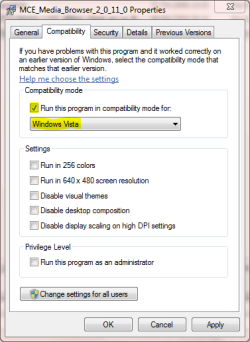
As you can see in the 1st screenshot, you have 1 or 2 options to choose. You can download the specific driver you require (Vista 32 or 64 depending on your installation). You can also allow for the site to check your hardware to see if it's up-to-date.

Once you download the driver, locate where it's saved (usually the Downloads folder) and right-click it then select 'Properties'. Next, click the 'Compatability' tab & set up as seen in 2nd screenshot. Now run the file and it should install, if you get a message stating that an older driver is being installed just choose yes to continue.

Once installed you will need to restart you machine. Then using Windows Update you can use it to search for new drivers.

Hope this helps :)
 

Attachments

  • Capture.PNG
    Capture.PNG
    7.7 KB · Views: 14
  • Capture1.PNG
    Capture1.PNG
    14.5 KB · Views: 11

My Computer

Computer Manufacturer/Model Number
Compaq Desktop
OS
Windows 7 Ultimate x64
CPU
AMD Sempron Dual Core
Memory
3GB
Graphics Card(s)
NVIDIA GeForce 6150SE nForce 430
Screen Resolution
1024x768
Hard Drives
150GB Sata
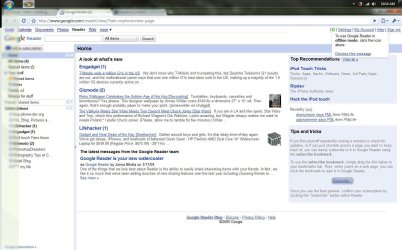
Sure, here.

All that blurred area is "taskbar"
 

Attachments

  • Untitled-1.jpg
    Untitled-1.jpg
    159.8 KB · Views: 46

My Computer

OS
Windows 7 7127
Okay, my first question is why the taskbar is a solid color while the windows are transparent.
 

My Computer

OS
Windows 7 x64 Build 7100
CPU
Intel Core 2 Duo E6600 2.4 GHz. ~ 2.97 GHz.
Motherboard
BIOSTAR Intel G965 Micro 775 V 5.0
Memory
1 x 2 GB G. Skill 800 MHz. (1.8-1.9 V., 5-5-5-15)
Graphics Card(s)
NVidia GeForce 9800 GTX+ 512 MB
Sound Card
REALTEK Integrated HD Audio
Monitor(s) Displays
X2GEN 19" LCD Widescreen
Screen Resolution
1440x900
Hard Drives
Seagate 320 GB PATA (238 GBs allocated to Windows 7, 55.3 GBs allocated to Windows XP)
Case
RAIDMAX Ninja
Cooling
3 Case fans, stock CPU cooler
Keyboard
Nexxtech Wireless Keyboard
Mouse
Nexxtech Wireless Mouse
Internet Speed
DSL 768k
The taskbar is transparent.. that part of my desktop is plain black, so youre seeing that behind it.

Thats chrome, so the top is transparent.
 

My Computer

OS
Windows 7 7127
You can actually see that the taskbar is not solid. You just need to look at the image in the window glass.

As far as fixing this, i'm stumped, not see it before. Will keep digging :p
 

My Computer

Computer Manufacturer/Model Number
Compaq Desktop
OS
Windows 7 Ultimate x64
CPU
AMD Sempron Dual Core
Memory
3GB
Graphics Card(s)
NVIDIA GeForce 6150SE nForce 430
Screen Resolution
1024x768
Hard Drives
150GB Sata
Gotcha. Can you take a screen when your mouse is hovering on the start button?
 

My Computer

OS
Windows 7 x64 Build 7100
CPU
Intel Core 2 Duo E6600 2.4 GHz. ~ 2.97 GHz.
Motherboard
BIOSTAR Intel G965 Micro 775 V 5.0
Memory
1 x 2 GB G. Skill 800 MHz. (1.8-1.9 V., 5-5-5-15)
Graphics Card(s)
NVidia GeForce 9800 GTX+ 512 MB
Sound Card
REALTEK Integrated HD Audio
Monitor(s) Displays
X2GEN 19" LCD Widescreen
Screen Resolution
1440x900
Hard Drives
Seagate 320 GB PATA (238 GBs allocated to Windows 7, 55.3 GBs allocated to Windows XP)
Case
RAIDMAX Ninja
Cooling
3 Case fans, stock CPU cooler
Keyboard
Nexxtech Wireless Keyboard
Mouse
Nexxtech Wireless Mouse
Internet Speed
DSL 768k
surely.

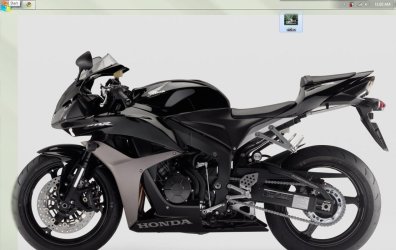
Shark, Ive done all the update stuff. I was doing the update I DL'ed from nvidia, and half way through the screen goes off and on as everything it refreshing. It finishes, everythings fine.

When I reboot, its back. Windows now finds an update, do that. After the update its fine, when I restart its back.

Thanks for the help so far though!
 

Attachments

  • Untitled-1.jpg
    Untitled-1.jpg
    115.3 KB · Views: 24

My Computer

OS
Windows 7 7127
Was the install a fresh install or an upgrade?
 

My Computer

OS
7264x64/7260x86
You may need to check in the task manager as to what programs & processes are running. It now sound like something that is starting on bootup is causing this error.

If you could post screenshots of your task manager processes then i might be able to tell you what might me causing it :)
 

My Computer

Computer Manufacturer/Model Number
Compaq Desktop
OS
Windows 7 Ultimate x64
CPU
AMD Sempron Dual Core
Memory
3GB
Graphics Card(s)
NVIDIA GeForce 6150SE nForce 430
Screen Resolution
1024x768
Hard Drives
150GB Sata
Okay, thanks aero. The reason I asked is someone has been uploading a torrent labeled as "7077" and has everything in 7, but the start button animation was that of the beta (which meant it had been tampered with). So at least we know it's a somewhat genuine build. Is your taskbar locked after moving it?
 

My Computer

OS
Windows 7 x64 Build 7100
CPU
Intel Core 2 Duo E6600 2.4 GHz. ~ 2.97 GHz.
Motherboard
BIOSTAR Intel G965 Micro 775 V 5.0
Memory
1 x 2 GB G. Skill 800 MHz. (1.8-1.9 V., 5-5-5-15)
Graphics Card(s)
NVidia GeForce 9800 GTX+ 512 MB
Sound Card
REALTEK Integrated HD Audio
Monitor(s) Displays
X2GEN 19" LCD Widescreen
Screen Resolution
1440x900
Hard Drives
Seagate 320 GB PATA (238 GBs allocated to Windows 7, 55.3 GBs allocated to Windows XP)
Case
RAIDMAX Ninja
Cooling
3 Case fans, stock CPU cooler
Keyboard
Nexxtech Wireless Keyboard
Mouse
Nexxtech Wireless Mouse
Internet Speed
DSL 768k
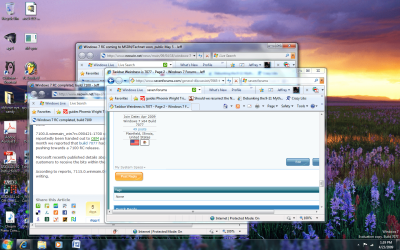
And... does anyone notice the tiny difference between the two taskbars: mine and aero's?
 

Attachments

  • Windows 7 7077 x64 desktop shot.png
    Windows 7 7077 x64 desktop shot.png
    349.5 KB · Views: 31

My Computer

OS
Windows 7 x64 Build 7100
CPU
Intel Core 2 Duo E6600 2.4 GHz. ~ 2.97 GHz.
Motherboard
BIOSTAR Intel G965 Micro 775 V 5.0
Memory
1 x 2 GB G. Skill 800 MHz. (1.8-1.9 V., 5-5-5-15)
Graphics Card(s)
NVidia GeForce 9800 GTX+ 512 MB
Sound Card
REALTEK Integrated HD Audio
Monitor(s) Displays
X2GEN 19" LCD Widescreen
Screen Resolution
1440x900
Hard Drives
Seagate 320 GB PATA (238 GBs allocated to Windows 7, 55.3 GBs allocated to Windows XP)
Case
RAIDMAX Ninja
Cooling
3 Case fans, stock CPU cooler
Keyboard
Nexxtech Wireless Keyboard
Mouse
Nexxtech Wireless Mouse
Internet Speed
DSL 768k
Mine is set on small icons- isnt that the difference?

This was an upgrade.

Im only starting up my touchpad driver, video card, and dock.
 

My Computer

OS
Windows 7 7127
Besides the small icons. On your taskbar, you have those weird textured dots (the pattern obscured by the word "start" in the second photo). If my memory serves me, didn't those only appear when the taskbar was not locked on XP (maybe Vista?).
 

My Computer

OS
Windows 7 x64 Build 7100
CPU
Intel Core 2 Duo E6600 2.4 GHz. ~ 2.97 GHz.
Motherboard
BIOSTAR Intel G965 Micro 775 V 5.0
Memory
1 x 2 GB G. Skill 800 MHz. (1.8-1.9 V., 5-5-5-15)
Graphics Card(s)
NVidia GeForce 9800 GTX+ 512 MB
Sound Card
REALTEK Integrated HD Audio
Monitor(s) Displays
X2GEN 19" LCD Widescreen
Screen Resolution
1440x900
Hard Drives
Seagate 320 GB PATA (238 GBs allocated to Windows 7, 55.3 GBs allocated to Windows XP)
Case
RAIDMAX Ninja
Cooling
3 Case fans, stock CPU cooler
Keyboard
Nexxtech Wireless Keyboard
Mouse
Nexxtech Wireless Mouse
Internet Speed
DSL 768k
oh right, its not lock. I played with locking for a few minutes and it seems to have no effect.
 

My Computer

OS
Windows 7 7127
Back
Top