.........The disturbing part is that after turning on the computer a newly created user account appears with some (seems like) random letter combination name. After deleting, it reappears again the same way. I put a password to the new account. And then the third account appeared. Just to mention - almost right after moving in I've configured my new ESET 6 update. Beside that I didn't download any other software. What are Your thoughts, suggestions?
I use ESET's online scanner, but I've not played with their other products. I installed ESET 6 into a virtual machine to see if there was a feature that could account for these randomly named accounts showing up. The good news is - these accounts are probably a part of ESET's anti-theft protection. It is a way for the product to help you locate a stolen computer.
This is what I saw as I was setting up that feature:
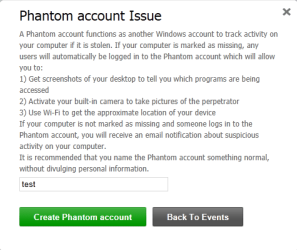
Notice that I called the account "test". My assumption is that I would use that info on ESET's website while I was looking for a lost or stolen computer. The name on the account that the ESET product created on the computer was not "test". And after a restart of the computer - I saw this:
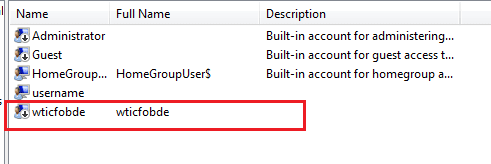
After activating the trial license for ESET 6, that randomly named account was enabled. (The down arrow in the account's icon was gone.) The account came back after I deleted it. I put a password on the that randomly named account... but a new one has not yet appeared. It probably will once the ESET software checks on things.
BTW, the randomly named account is a standard user.
You still have the issue of ESET's warnings about the TCP Flood attack(s) and it is possible that the randomly named accounts are the result of some malware. But those accounts could just be from ESET.
Edit: ESET 6 might be taking care of these attacks for you. You might not need to take any further action against them. Even the native Windows 7 firewall will protect you from such attacks to an extent. This might be a case of the ESET product attempting to justify its existence.
I hope that you have set the network connection type to
Public.
http://www.sevenforums.com/tutorials/43629-network-location-set-home-work-public-network.html
Edit2: corrected some typos and probably added other ones




