Telephony Services not available under services.msc list

win7user123

New member
Local time
5:56 AM
Messages
2
I was trying to install my DataConnect which failed to start.

Realized that the following RAS related services were down.

Remote Access Connection Manager
Remote Access Auto connection Manager

But I received the following error when I tried to start it.
Error: 1075: The dependency service does not exist or has been marked for deletion.

90% of depedency services were up but I don't find the "Telephony" services listed at all!!!

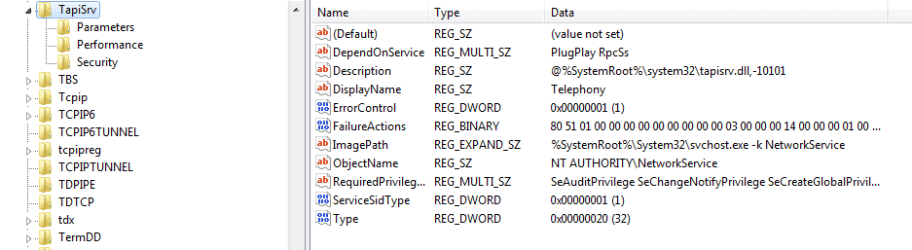
I've attached a snapshot of registry for reference.

Please let me know if am missing any component installation.
 

Attachments
  • tapisrv_regedit_snapshot.png
    tapisrv_regedit_snapshot.png
    12.4 KB · Views: 134

My Computer My Computer

Computer Manufacturer/Model Number
dell studio 1555
OS
windows 7 home ultimate
CPU
Intel Core2 Duo - T6600 @ 2.2GHz
Motherboard
Intel
Memory
4GB
Graphics Card(s)
ATI Mobility Radeon HD4570
Sound Card
ATI High Defn Audio
Monitor(s) Displays
LCD 15.4 Wide Screen
I was trying to install my DataConnect which failed to start.

Realized that the following RAS related services were down.

Remote Access Connection Manager
Remote Access Auto connection Manager

But I received the following error when I tried to start it.
Error: 1075: The dependency service does not exist or has been marked for deletion.

90% of depedency services were up but I don't find the "Telephony" services listed at all!!!

I've attached a snapshot of registry for reference.

Please let me know if am missing any component installation.

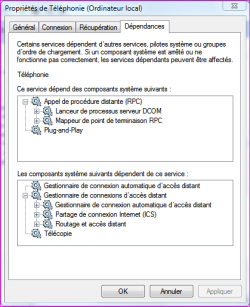
When you're in Control Panel=>Administration Tools=>Services=>Telephony,

right click on it to see "properties", check the last Tab "Dependencies" and have a look at all the services that might be start to trigger this one.
 

Attachments

  • Capture.PNG
    Capture.PNG
    26.6 KB · Views: 156
  • Capture2.PNG
    Capture2.PNG
    14.4 KB · Views: 76

My Computer My Computer

Computer type
PC/Desktop
Computer Manufacturer/Model Number
Custom Build
OS
Windows 7 Professional SP1 - x64 [Non-UEFI Boot]
CPU
Ivy Bridge Core i5 3570K (Delidded)
Motherboard
Asus P8Z77-V LE PLUS
Memory
G.Skill "Ares" DDR3 PC3-12800 - 1600MHz (16Gb)
Graphics Card(s)
Asus Dual-RX480-O4G
Sound Card
Creative Sound Blaster Z w/5.1 sound system
Monitor(s) Displays
Asus IPS 23"
Screen Resolution
16/9
Hard Drives
Internal:
500Go Sata 6Gb/s (x2)
500Go Sata 3Gb/s (x2)
SSD 60Go Sata 6Gb/s
PSU
In Win C 900W Series 80+ Platinum
Case
Thermaltake Chaser A71
Cooling
Custom Water Cooling Loop
Keyboard
Cooler Master QuickFire XTi
Mouse
Razer Imperator 2012 (4G)
Antivirus
MSE
Browser
IE 11.0.xxx Rtm
Other Info
"Raid0" with Intel Smart Response Technology (HDD/SSD)
Hi NoN,

The problem was resolved after I added a missing Registry DWORD to the Telephony configuration.

The "Start" DWORD was missing in my registry entry and adding that resolved the problem.

Thanks for the pointing me to the right direction.

:D :) ;)
 
Last edited:

My Computer My Computer

Computer Manufacturer/Model Number
dell studio 1555
OS
windows 7 home ultimate
CPU
Intel Core2 Duo - T6600 @ 2.2GHz
Motherboard
Intel
Memory
4GB
Graphics Card(s)
ATI Mobility Radeon HD4570
Sound Card
ATI High Defn Audio
Monitor(s) Displays
LCD 15.4 Wide Screen
Back
Top