Temp Monitor Software For CPU

r00ploi

New member
VIP
Local time
9:40 AM
Messages
269
Hi,

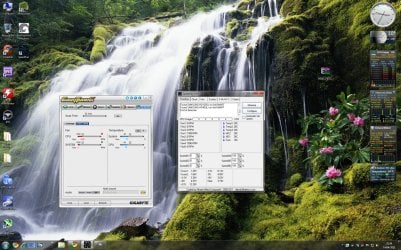
I am looking for some software to monitor the actual CPU temp at the moment I am using Easy Tune 6 which is made by Gigabyte but I have been advised on this fourm that this software has issues with Windows 7. So far for alternative software I have tried Core Temp and HWmonitor but these only seem to display the Core temps and not the CPU temp its self.

I would be grateful if anyone could recommend some other software that allows me to see what the CPU temp is.


Thanks
 

My Computer My Computer

At a glance

Windows 7
Computer type
Laptop
Computer Manufacturer/Model Number
HP
OS
Windows 7
Have a looky here pal ;)

Speed Fan

To find your CPU's temperature sensor you can leave your system idle for a few minutes, to let temperatures drop, and then go to 100% usage for a while. The temperature that rises faster is the one you're searching for. Other available temperature readings usually come from your sensor chip itself, from the southbridge, the voltage regulator, or even from an additional probe placed under the processor. This additional temperature sensor is not necessarily a duplicate. Some CPUs are not actually able to report the internal temperature from their die. To be able to read their temperatures, an additional external sensor (thermocouple) is used. In such cases, you will see two temperatures referring to the processor. The higher of the two is from the die. As a final note, please remember that not all available temperature sensors are actually connected to something. If you happen to read unusually high or low temps, they are likely to be from a disconnected (unused) temperature sensor.
 

My Computer My Computer

At a glance

Windows 7 Ultimate 64bitAMD Phenom Quad core 9950 black edition16Gb2x XFX Radeon 5850
Computer type
PC/Desktop
Computer Manufacturer/Model Number
Self Built
OS
Windows 7 Ultimate 64bit
CPU
AMD Phenom Quad core 9950 black edition
Motherboard
Gigabyte
Memory
16Gb
Graphics Card(s)
2x XFX Radeon 5850
Sound Card
PCI Express X-Fi Titanium / Logitech G35
Monitor(s) Displays
2x HP 2410i
Screen Resolution
1920x1080
Hard Drives
2x 500Gb Seagate
1x 300Gb Seagate
1x 1Tb Seagate
2x 1Tb Hitatchi
PSU
Jean Tech Storm 700W
Case
Cooler Master COSMOS S
Cooling
Akasa Evo Blue Pro
Keyboard
Logitech G15
Mouse
Mad Catz M.M.O. 7
Internet Speed
12mb
HI
Thanks for your response,

I've downloaded Speed Fan and installed it, and it looks like Temp 2 on speed fan is the CPU temp and Temp 1 is the motherboard. But I am unsure as to what Temp 3 is?
 

Attachments

  • temps.jpg
    temps.jpg
    432.8 KB · Views: 185

My Computer My Computer

At a glance

Windows 7
Computer type
Laptop
Computer Manufacturer/Model Number
HP
OS
Windows 7
I'd highly recommend trying AIDA64 (formerly, Everest). Not free, but excellent product.

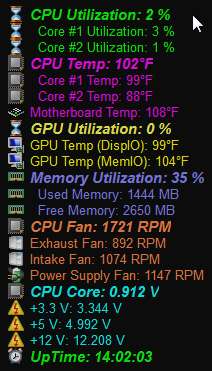
Highly customizable, you can title things whatever you want, colorize any way, have "flyover values" appear when you hover the mouse over the System Tray object if you want (I don't), or have a highly configurable and very attractive OSD (onscreen display) as I do. I've got my values updating every 4 seconds, because I find it interesting and entertaining.

005everest.jpg


Of course there are the expected set of optional "alerts" and +/- limits for alerts, etc.

Note that the above screenshot is on my ASUS P5Q3 machine, and it DOES show both CPU core temps, as well as the overall CPU temp (which is what you wanted). There's also a temp sensor on the motherboard itself, which is that fourth temperature readout. Obviously the items that you can present in your OSD depend on your hardware.

Again, this AIDA64 is the new name for what used to be the respected Everest product.
 
Last edited:

My Computer My Computer

At a glance

Windows 7 Pro x64 (1), Win7 Pro X64 (2)i5-3350p 3.1Ghz/6MB-cache (1); E8400 3.0Ghz/6...8GB PC3-12800 DDR3 (1); 4GB PC3-10600 DDR3 (2)ATI HD7750 (1), (see TV cards); ATI R7 250 (2)
Computer type
PC/Desktop
Computer Manufacturer/Model Number
Home-built, two systems (1) and (2)
OS
Windows 7 Pro x64 (1), Win7 Pro X64 (2)
CPU
i5-3350p 3.1Ghz/6MB-cache (1); E8400 3.0Ghz/6MB-cache (2)
Motherboard
ASUS P8Z77-V Pro (1); ASUS P5Q3 (2)
Memory
8GB PC3-12800 DDR3 (1); 4GB PC3-10600 DDR3 (2)
Graphics Card(s)
ATI HD7750 (1), (see TV cards); ATI R7 250 (2)
Sound Card
Realtek ALC892 HD Audio (1); Realtek ALC1200 HD Audio (2)
Monitor(s) Displays
Eizo HD2441W LCD, Eizo S2433W (1); Eizo 24" S2433W (2)
Screen Resolution
1920x1200, 1920x1200 (1); 1920x1200 (2)
Hard Drives
(1) 1TB SATA-II (7200RPM), 2x2TB SATA-III (7200RPM), 250GB SATA-III (10000RPM) for OS; 2x2TB external USB 3.0

(2) 320GB SATA-II (7200RPM), 750GB SATA-II (7200RPM), 150GB SATA-II (10000RPM) for OS; 2TB external USB 3.0
PSU
Nesteq ECS-6001 600W (1); Nesteq ECS-5001 500W (2)
Case
Acousti-Case 360 (1) and (2)
Cooling
Noctua NH-U12P SE2 for CPU, 2x120mm case fans (1) and (2)
Keyboard
IBM PS/2 (1) and (2)
Mouse
Logitech MX Revolution wireless (1); Microsoft wired (2)
Internet Speed
100mbps down / 10mbps up
Antivirus
Microsoft Security Essentials; Malwarebyte Anti-Malware Pro
Browser
Firefox
Other Info
Ceton InfiniTV 4-tuner cablecard-enabled TV card as well as Hauppauge HVR-2250 OTA/ATSC 2-tuner TV card in (1), running under Win7 WMC
Back
Top