Temperature alarms started going off

Datman

New member
Member
VIP
Local time
12:21 PM
Messages
158
Yesterday I discovered my memory was not functioning correctly and having some spare parts so I swapped it around and got it working. This is a internet only computer for surfing the web. While I had the case open I swapped an AMD 5000+ processor for a 6000+. So one would figure it has something to do with that when I started getting alarms.

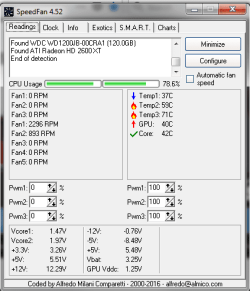
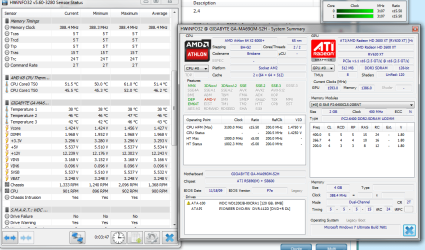
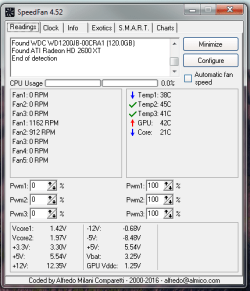
Anyone know where temp 2 & 3 are located. Also it seems the power supply is running hot when these alarms are going off. Does it make sense that the power supply is going bad? Image 1 is a total idle and 2nd is two web pages one weather.com that really pushes the temps up.
 

Attachments
  • temp idle.png
    temp idle.png
    61.6 KB · Views: 20
  • temp 2 web pages opened.png
    temp 2 web pages opened.png
    36.9 KB · Views: 20

My Computer

OS
Window 7 home x64
CPU
AMD FX-8150 Zambezi 3.6GHz Socket AM3+
Motherboard
GIGABYTE GA-970A-UD3 AM3
Memory
G.SKILL Ripjaws X Series 8GB (2 x 4GB
Graphics Card(s)
SAPPHIRE 100328L Radeon HD 6770 1GB GDDR5
Sound Card
Asus xonar hdav 1.3 deluxe
Hard Drives
Seagate Barracuda ST31000524AS 1TB 7200 RPM SATA 6.0Gb/s
Case
Rosewill CHALLENGER Black Gaming ATX Mid Tower
Cooling
CORSAIR Hydro Series H60
going for the obvious here, you did put thermal paste on the processor??
 

My Computer

Computer type
PC/Desktop
Computer Manufacturer/Model Number
Custom Build
OS
windows 7 ultimate x64
CPU
AMD FX 6 CORE PROCESSOR
Memory
16 GB
Graphics Card(s)
on MB
Sound Card
on MB
Monitor(s) Displays
Acer
Screen Resolution
1920x1080
Hard Drives
Seagate ( C:\)
Case
mini tower
Keyboard
Logitech wireless
Mouse
Logitech wireless
Antivirus
MSE
Browser
IE11
going for the obvious here, you did put thermal paste on the processor??
Yes and you can see, if the core is the processor it never gets above 50c
 

My Computer

OS
Window 7 home x64
CPU
AMD FX-8150 Zambezi 3.6GHz Socket AM3+
Motherboard
GIGABYTE GA-970A-UD3 AM3
Memory
G.SKILL Ripjaws X Series 8GB (2 x 4GB
Graphics Card(s)
SAPPHIRE 100328L Radeon HD 6770 1GB GDDR5
Sound Card
Asus xonar hdav 1.3 deluxe
Hard Drives
Seagate Barracuda ST31000524AS 1TB 7200 RPM SATA 6.0Gb/s
Case
Rosewill CHALLENGER Black Gaming ATX Mid Tower
Cooling
CORSAIR Hydro Series H60
On the MB you may have temp sensors. I would say that one is the Chipset (temp 2) and the other is the CPU power supply (temp 3).
I used to have Speed Fan.
Now I use Open hardware monitor (starts with Windows) that also records Max and Min. Open Hardware Monitor - Core temp, fan speed and voltages in a free software gadget
For a complete hardware information I have this portable (no installation) HWiNFO - Download

When you download the open hardware monitor it comes as a zip file. Create a C:\Program Files (x86)\HardwareMonitor folder, expand the zip file to it and execute the OpenHardwareMonitor.exe.
Go to options tab
- Start minimized
- Minimize to tray
- Minimize on close
- Run on windows startup

You can configure to show the CPU case temperature near the clock.
401682d1510492200-need-urgent-help-about-laptop-fan-temp.jpg
 

My Computers

System One System Two

  • Computer type
    PC/Desktop
    Computer Manufacturer/Model Number
    custom build
    OS
    Windows 7 HP 64
    CPU
    i5 6600K - 800MHz to 4200MHz
    Motherboard
    GA-Z170-HD3P
    Memory
    4+4G GSkill DDR4 3000
    Graphics Card(s)
    IG - Intel 530
    Monitor(s) Displays
    Samsung 226BW
    Screen Resolution
    1680x1050
    Hard Drives
    (1) -1 SM951 – 128GB M.2 AHCI PCIe SSD drive for Windows 7 and Lubuntu
    (2) -1 WD SATA 3 - 1T for Data
    (3) -1 WD SATA 3 - 1T for backup
    PSU
    Thermaltake 450W TR2 gold
    Keyboard
    Old and good Chicony mechanical keyboard
    Mouse
    Logitech mX performance - 9 buttons (had to disable some)
    Internet Speed
    500Mb/s
    Browser
    Firefox 64
    Other Info
    TinyWall firewall
  • Computer type
    Laptop
    System Manufacturer/Model Number
    Asus Q550LF
    OS
    Windows 7 Pro
    CPU
    i7-4500U 800MHz to 3.0GHz
    Motherboard
    Asus Q550LF
    Memory
    (4+4)G DDR3 1600
    Graphics Card(s)
    IG intel 4400 + NVIDIA GeForce GT 745M
    Sound Card
    Realtek
    Monitor(s) Displays
    LG Display LP156WF4-SPH1
    Screen Resolution
    1920 x 1080
    Hard Drives
    BX500 120G SSD for Windows and programs +
    1T HDD for data
    Internet Speed
    500 Mb/s
    Browser
    Firefox
    Other Info
    TinyWall firewall
On the MB you may have temp sensors. I would say that one is the Chipset (temp 2) and the other is the CPU power supply (temp 3).
I used to have Speed Fan.
Now I use Open hardware monitor (starts with Windows) that also records Max and Min. Open Hardware Monitor - Core temp, fan speed and voltages in a free software gadget
For a complete hardware information I have this portable (no installation) HWiNFO - Download

When you download the open hardware monitor it comes as a zip file. Create a C:\Program Files (x86)\HardwareMonitor folder, expand the zip file to it and execute the OpenHardwareMonitor.exe.
Go to options tab
- Start minimized
- Minimize to tray
- Minimize on close
- Run on windows startup

You can configure to show the CPU case temperature near the clock.
401682d1510492200-need-urgent-help-about-laptop-fan-temp.jpg
Nice program thanks for the link. Looks like its the core and that makes sense.
 

Attachments

  • core temps.png
    core temps.png
    138.3 KB · Views: 2

My Computer

OS
Window 7 home x64
CPU
AMD FX-8150 Zambezi 3.6GHz Socket AM3+
Motherboard
GIGABYTE GA-970A-UD3 AM3
Memory
G.SKILL Ripjaws X Series 8GB (2 x 4GB
Graphics Card(s)
SAPPHIRE 100328L Radeon HD 6770 1GB GDDR5
Sound Card
Asus xonar hdav 1.3 deluxe
Hard Drives
Seagate Barracuda ST31000524AS 1TB 7200 RPM SATA 6.0Gb/s
Case
Rosewill CHALLENGER Black Gaming ATX Mid Tower
Cooling
CORSAIR Hydro Series H60
I think I'm just going to order a Corsair Hydro series H60. I have this or similar on my video computer and it works fantastic. Are there any concern that these wear out and should be replaced after X amount of years?
 

My Computer

OS
Window 7 home x64
CPU
AMD FX-8150 Zambezi 3.6GHz Socket AM3+
Motherboard
GIGABYTE GA-970A-UD3 AM3
Memory
G.SKILL Ripjaws X Series 8GB (2 x 4GB
Graphics Card(s)
SAPPHIRE 100328L Radeon HD 6770 1GB GDDR5
Sound Card
Asus xonar hdav 1.3 deluxe
Hard Drives
Seagate Barracuda ST31000524AS 1TB 7200 RPM SATA 6.0Gb/s
Case
Rosewill CHALLENGER Black Gaming ATX Mid Tower
Cooling
CORSAIR Hydro Series H60
Back
Top