Temporarily stop programs in startup folder

patermann

New member
Local time
11:15 PM
Messages
3
Windows XP (and earlier?) prevented programs in the startup folder from running if I held down the shift key when logging in. This was very useful as I was able to put shortcuts to all of the programs I normally run into the startup folder but I could do a quick login (no startup programs) by simply holding down the shift key. Unfortunately, this trick does not seem to work in Windows 7. :( Is there a way to enable it, or an alternative method of temporarily preventing startup programs from running when I log in?

Many thanks,
patermann
 

My Computer

OS
Windows 7 Professional 64-bit
Hi Patermann, welcome to the Seven Forums.

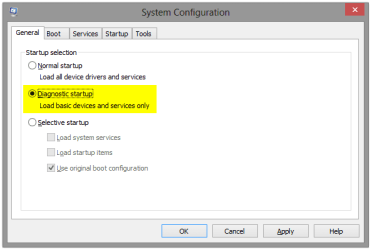
Open msconfig, Windows built-in configuration utility (Start > Run, type msconfig, press Enter) and change boot options as you wish for instance Diagnostic Startup only loads basic services. Reboot.

System_Configuration.png

Kari
 

My Computer

Computer type
Laptop
Computer Manufacturer/Model Number
HP ENVY 17-1150eg
OS
Windows 10 Pro x64 EN-GB
CPU
1.6 GHz Intel Core i7-720QM Processor
Memory
6 GB
Graphics Card(s)
ATI Mobility Radeon HD 5850 Graphics
Sound Card
Beats sound system with integrated subwoofer
Monitor(s) Displays
17" laptop display, 22" LED and 32" Full HD TV through HDMI
Screen Resolution
1600*900 (1), 1920*1080 (2&3)
Hard Drives
Internal: 2 x 500 GB SATA Hard Disk Drive 7200 rpm
External: 2TB for backups, 3TB USB3 network drive for media
Cooling
As Envy runs a bit warm, I have it on a Cooler Master pad
Keyboard
Logitech diNovo Media Desktop Laser (bluetooth)
Mouse
Logitech Performance Mouse MX
Internet Speed
50/10 Mbps VDSL
Antivirus
Windows Defender 4.3.9431.0
Browser
Maxthon 3.5.2., IE11
Many thanks for the information Kari but, unfortunately, it does not solve the problem. Maybe an example will make it clearer. Imagine the scene:

I have just logged out at the end of the day and, oh dear, I forgot to back up that document that I spent all day editing. All I want to do is quickly log back in and copy it to the NAS. I do not want to have to wait while the browser, email, IM and my anti-RSI program all load up! On XP, it was simple: I entered my username and password and clicked Ok on the login screen. Immediately, I pressed the shift key and held it down until Windows had logged me in. This told Windows not to run the programs in the Startup folder, so log-in was fast. I copy the file and log out. In the morning, I log in but do not hold down the shift key so Windows runs all of the programs in the Startup folder as normal.

Unfortunately, the shift key "trick" does not seem to work on Windows 7 and the programs in the Startup folder always run when I log in whether I hold the shift key down or not.

I hope that explains the issue better.

Thanks!
 

My Computer

OS
Windows 7 Professional 64-bit
Many thanks for the information Kari but, unfortunately, it does not solve the problem. Maybe an example will make it clearer. Imagine the scene:

I have just logged out at the end of the day and, oh dear, I forgot to back up that document that I spent all day editing. All I want to do is quickly log back in and copy it to the NAS. I do not want to have to wait while the browser, email, IM and my anti-RSI program all load up! On XP, it was simple: I entered my username and password and clicked Ok on the login screen. Immediately, I pressed the shift key and held it down until Windows had logged me in. This told Windows not to run the programs in the Startup folder, so log-in was fast. I copy the file and log out. In the morning, I log in but do not hold down the shift key so Windows runs all of the programs in the Startup folder as normal.

Unfortunately, the shift key "trick" does not seem to work on Windows 7 and the programs in the Startup folder always run when I log in whether I hold the shift key down or not.

I hope that explains the issue better.

Thanks!

From the following article, it appears that function has been removed from Windows 7;

login - How to SUPPRESS programs from startup folder (Windows 7)? - Super User

Additionally, I am unable to find workaround without using MSConfig.

HTH
 

My Computer

Computer type
PC/Desktop
Computer Manufacturer/Model Number
Custom Built
OS
Windows 7 Professional x64
CPU
Intel i5 quad processor
Motherboard
DP67BG
Memory
16 GB
Graphics Card(s)
Radeon HD 5770
Sound Card
Realtek High Definition Audio
Monitor(s) Displays
Samsung SyncMaster
Screen Resolution
1920X1080
Hard Drives
WD 2TB (SATA Internal)
WD 1TB (USB External)
PSU
Corsair GS800
Case
Tower (Generic)
Cooling
3 Internal Fans
Keyboard
MS Wireless
Mouse
MS Optical Wired
Internet Speed
54 mbps
Antivirus
Emsisoft
Browser
IE-Version 9, Palemoon-Version 24.2.0
Unfortunately as Sir George's link show, it's not possible in Windows 7. You need to select your boot options with msconfig and reboot.

Kari
 

My Computer

Computer type
Laptop
Computer Manufacturer/Model Number
HP ENVY 17-1150eg
OS
Windows 10 Pro x64 EN-GB
CPU
1.6 GHz Intel Core i7-720QM Processor
Memory
6 GB
Graphics Card(s)
ATI Mobility Radeon HD 5850 Graphics
Sound Card
Beats sound system with integrated subwoofer
Monitor(s) Displays
17" laptop display, 22" LED and 32" Full HD TV through HDMI
Screen Resolution
1600*900 (1), 1920*1080 (2&3)
Hard Drives
Internal: 2 x 500 GB SATA Hard Disk Drive 7200 rpm
External: 2TB for backups, 3TB USB3 network drive for media
Cooling
As Envy runs a bit warm, I have it on a Cooler Master pad
Keyboard
Logitech diNovo Media Desktop Laser (bluetooth)
Mouse
Logitech Performance Mouse MX
Internet Speed
50/10 Mbps VDSL
Antivirus
Windows Defender 4.3.9431.0
Browser
Maxthon 3.5.2., IE11
Thanks, Sir George. It seems to be the norm these days that improving the software sometimes means taking features away rather than adding them! If I find a solution, I will post it here.

patermann
 

My Computer

OS
Windows 7 Professional 64-bit
What I have done is to create a new Folder called StartupStuff so that it appears directly below the Startup Folder. I copy all of the Shortcuts in Startup into the StartupStuff folder.

When I want to boot without any Startup items I delete all of the Shortcuts in Startup. When I want to reinstate the them I just copy the StartupStuff Shortcuts back. Not quite as easy as holding down the shift key but a drag and drop for maybe 5 seconds work.
 

My Computer

OS
Win7 Starter
Anything new on this?

I have exactly the same problem as patermann. Sir George's reply and link, although useful, are not definitive. Has patermann or anyone else found a workaround? (not Kari please as she is not describing our problem).
 

My Computer

Computer type
PC/Desktop
Computer Manufacturer/Model Number
Asus CM6630-CA-2AA
OS
Windows 7 Home Premium 64 bit
CPU
i5-2310
Motherboard
ASUSTeK CM6630-CM6730-CM6830
Memory
6 GB DDR3 667 MHz, Nanya
Graphics Card(s)
integrated
Antivirus
Avast
Browser
Firefox
Kari is a man, and he has outlined a perfectly valid solution.

It seems that Microsoft has taken away the ability to use the shift key to avoid loading startups, as you know. The only way I know of to not load them is to use msconfig and set it as Kari has suggested.

I think if you ask almost any member here, they will tell you the same thing.
 

My Computer

Computer type
PC/Desktop
Computer Manufacturer/Model Number
Mellon Labs (custom build)
OS
Win 7 Pro x64/Win 10 Pro x64 dual boot
CPU
AMD FX 8350 Vishera @ 4200
Motherboard
ASUS M5A97 R2.0
Memory
16 GB Mushkin Blackline DDR3-2400 @ 1866 (9-10-10-10-31)
Graphics Card(s)
XFX Radeon R9 280 Double D Black Edition
Sound Card
Realtek HD Audio on MB. Sounds great.
Monitor(s) Displays
Acer 24", Acer 22"
Screen Resolution
3840 x 1080
Hard Drives
1 x Mushkin Chronos 120 GB SSD (Win 10)
1 x Samsung 850 EVO 250 GB SSD (Win 7)
1 x WD 1TB SATA Blue
1 x WD 1TB SATA Green
PSU
Corsair TX-750
Case
CoolerMaster HAF 912+
Cooling
Coolermaster Seidon 240M Liquid AIO. 6 case fans
Keyboard
Logitech G710+
Mouse
Logitech G500s
Internet Speed
Much better since I got fiber, but still way overpriced.
Antivirus
MSE, Malware Bytes for scanning
Browser
Firefox
Other Info
Corsair VOID USB headphones.

A Mellon Labs X-1 - LCD Smartie driven system status display.

Brought to you by the letter E
would creating a second accound with shared access to your documents but with no start up programs help? just name the new account speedy login or something.
 

My Computer

Computer type
PC/Desktop
Computer Manufacturer/Model Number
Built by badgers!!!
OS
Windows 7 Ultimate x64, & Mac OS X 10.9.2
CPU
Intel Core i5 2500k
Motherboard
Asus P8z68 LE
Memory
Corsair Vengence 8gb 1866mhz
Graphics Card(s)
Nvidia GTX 770 OC
Monitor(s) Displays
2x ASUS LED 22" IPS
Screen Resolution
3840x1080
Hard Drives
240GB Crucial M500 SSD
120gb Corsair Force 3 SSD
1TB Western Digital
PSU
Corsair HX650w Modular
Case
Corsair Air 540
Cooling
Corsair H60 Push/Pull
Keyboard
Corsair K70/ Logitech G27 wheel
Mouse
Saitek R.A.T 9
Internet Speed
Too slow!
Other Info
AMD fusion E350N Home server-Windows Home Server 2011 (also made by badgers!)
2011 Macbook 2.4ghz Core2Duo, 4gb ddr3, 120gb Ocz Vertex SSD
Great solution

That is great thinking-out-of-the-box. Thank you badger906. It should solve pattermann's issue as well. (Sorry Mr. Kari, I am not familiar with Finnish names)
 

My Computer

Computer type
PC/Desktop
Computer Manufacturer/Model Number
Asus CM6630-CA-2AA
OS
Windows 7 Home Premium 64 bit
CPU
i5-2310
Motherboard
ASUSTeK CM6630-CM6730-CM6830
Memory
6 GB DDR3 667 MHz, Nanya
Graphics Card(s)
integrated
Antivirus
Avast
Browser
Firefox
The other solution is to see if maybe a reg key in xp is holding that info and to see if it can be extracted and used in 7. I will look into it.
 

My Computer

Computer type
PC/Desktop
Computer Manufacturer/Model Number
Custom Built
OS
Windows 10 Pro
CPU
AMD Ryzen 5 2400G Processor with Radeon RX Vega 11 Graphics
Motherboard
ASRock X470 Master SLI/AC AM4 AMD Promontory X470 SATA 6Gb/s
Memory
G.SKILL Ripjaws V Series 16GB (2 x 8GB) 288-Pin DDR4 SDRAM D
Graphics Card(s)
2047MB NVIDIA GeForce GTX 1060 6GB (EVGA)
Sound Card
Motherboard Built in
Monitor(s) Displays
Acer R240HY bidx 23.8-Inch IPS HDMI DVI VGA (1920 x 1080) Wi
Screen Resolution
1920 x 1080
Hard Drives
1TB Sandisk SSD PLUS (Main drive)
500 GB Seagate 7200 RPM (Games)
500 GB Western Digital 7200 RPM (Virtual Machines)
PSU
CORSAIR TX Series TX650M 650W 80+ Gold Modular Power Supply
Case
CORSAIR CARBIDE SPEC-02 Mid-Tower Gaming Case, Red LED Fan
Cooling
220mm, two 120mm, and four 60mm fans
Keyboard
Wired Dell keyboard
Mouse
Wireless Logitech mouse
Internet Speed
250mb down, 30mb up
Antivirus
Panda Cloud Antivirus
Browser
Chrome-ish x64
Other Info
Your awesome for reading this.
I was looking for the same thing. I also found that holding shift does not work like it used to in Windows XP.

I have a custom logon script for work, residing in the Startup folder, that runs to execute a bunch of programs upon logon. When I take my laptop home, I don't want that custom logon script executing.

Here's what I did as a workaround:
  1. Took ownership of the Utilman.exe file in c:\windows\system32
  2. Wrote a VBscript to move my custom batch file out of the Startup folder in the Start Menu, and into another folder.
  3. Compiled my VBS script using the trial of VBSEdit (or you could use IExpress, which is bundled with Windows 7).
  4. Placed my compiled VBS script into the c:\windows\system32 folder and named it Utilman.exe
Now, from the logon screen, I can click the "Ease of Access" button in the lower left corner of the screen. It then runs the VBS script that moves my custom logon script out of the Startup folder. I just see a command prompt window pop open for a split second and close. Then I login and my logon script does not run, as planned :)

When I want to re-enable my custom logon script, I just click the icon again the next time I am at the logon screen, which sees the file doesn't exist in the Startup folder and moves it back. Then I login again, as normal.

Hope this helps someone!
 
Last edited:

My Computer

Computer type
PC/Desktop
OS
Windows 7 Pro x64
I just found a program that can do this (LaunchMeNot).

The program has an autostart feature "Autolaunch" which loads a custom list of startup programs, after converting all the startup programs to that list I can click "cancel" as soon as the loader launches.

The program is old (2010) and the developer dropped support since it's release probably due to lack of exposition (902 downloads so far). It works well on Windows 8.1 64 bit, the interface is decent and easy to use.

This is my second post here, so I will avoid posting a link, it's free at CodePlex, even the source code is available.

Alternatively there are programs that can delay startup programs like WinPatrol but awkwardly enough don't offer the stop/cancel feature.
 

My Computer

Computer type
PC/Desktop
Computer Manufacturer/Model Number
custom build
OS
Windows 8 64
I know this is an old thread, but I was searching for a solution to this same problem and think I came up with something good:

Move all your startup shortcuts out of Start Menu\Programs\Startup and into another folder like C:\Users\YourName\Documents\Startup.
Create the batch file below and save a shortcut to it in Start Menu\Programs\Startup.
echo OFF
CHOICE /M "Do you want me to open the startup programs? (you have 5 seconds before I assume Y)" /T 5 /D Y
IF ERRORLEVEL ==2 GOTO TWO
IF ERRORLEVEL ==1 GOTO ONE
GOTO END
:TWO
rem -- N selected. do nothing.
GOTO END
:ONE
for %%v in ("C:\Users\YourName\Documents\Startup\*.lnk") do start "" "%%~v"
:END


Perhaps there's a more elegant way to write this code, but I just pieced it together from some examples I found online.
 

My Computer

Computer type
PC/Desktop
OS
Win 10 Pro x64
Back
Top