Temps OK?

steve-pressman

New member
Guru
VIP
Local time
3:38 PM
Messages
842
Location
Droitwich Spa, England
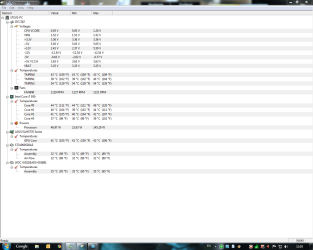
Now summer has arrived here in England I was wondering if my temps are OK as you experts will know better than me :) It is quite warm in my living room where my rig resides.

TIA

Steve
 

Attachments

  • 28-06-2010 12-03-33.png
    28-06-2010 12-03-33.png
    44.6 KB · Views: 87

My Computer

Computer Manufacturer/Model Number
Over Clockers Ultima Viper 2.80Ghz
OS
Windows 7 Ultimate 64 - OEM Service Pack 1
CPU
Intel Core i7 930 2.80Ghz Bloomfield Socket LGA 1366
Motherboard
Gigabyte GA-X58A-UD3R Intel X58 Socket 1366 DDR3
Memory
Patriot Viper 6GB 3x2GB DDR3 PC3-1200C9 1600Mhz Tri Channel
Graphics Card(s)
Asus ATI Radeon HD 5770 CuCore 1024MB GDDR5 PCI Express
Sound Card
Realtek ALC889 @ Intel 82801JB ICH10 - High Definition Audio
Monitor(s) Displays
Samsung SyncMaster 920N 19"
Screen Resolution
1280*1024
Hard Drives
1 x OCZ Vertex2 Series 120GB 2.5" SATA-II SSD
1 x Seagate Barracuda 7200.12 1TB SATA-II 32MB Cache
1 x Western Digital Caviar Green 2TB SATA-II 64 MB Cache
PSU
Corsair TX 650W ATX SLi
Case
Antec 902 Ultimate Gaming Case Black
Cooling
Prolimatech Megahalems Rev B CPU Cooler Socket 775/1156/1366
Keyboard
Microsoft Comfort Curve Keyboard
Mouse
Microsoft Optical USB
Internet Speed
ADSL24 FTTC 34.2 Mbps Down 7.1Mbps Up
Other Info
OcUK 22x DVDSATA ReWriter Black
Akasa AK-FN058 Apache Black Super Silent 120mm Fan
Printer Epson Stylus Photo R300
Scanner Canon Canoscan 8000F
Just how warm is it? I noticed your min and current temps are the same. What are load temps like?
 

My Computer

OS
7 Ultimate x64
CPU
i5-2500k
Motherboard
Asus P8P67 Pro
Memory
8GB G.Skill Ripjaws X F3-12800CL7D-8GBXH 1866MHz 8-9-8-24
Graphics Card(s)
EVGA GTX 570 SC
Sound Card
X-Fi Titanium Fatality
Monitor(s) Displays
Samsung S27A550H 27" LED
Screen Resolution
1920x1080
Hard Drives
OCZ Vertex 3 120GB.
1TB Samsung F3.
2TB Samsung F4.
PSU
PC Power & Cooling Silencer 760
Case
Lian Li Lancool K62
Cooling
Thermalright Venomous X Black/Scythe S-Flex/Shin-Etsu X23
Keyboard
MS Natural Elite 4000 Ergonomic
Mouse
Logitech G500
Internet Speed
6MB/768
Other Info
Logitech Z-5500 505 watts.
D-Link DGL-4500.
Tripp-Lite Smart Pro 1500.
Those are perfectly normal temps, actually a bit lower than most factory built systems.
 
Run prime and post your temps
 

My Computer

Computer Manufacturer/Model Number
I'll Fix IT Computers
OS
Windows 7 Ultimate 64 Bit
CPU
Intel Core 2 Quad 9400 2.66Ghz @ 3.20
Motherboard
Asus P5QL-E
Memory
4Gb (2x2g) Kingston HyperX 1066Mhz Dual Channel @ 2.3v
Graphics Card(s)
Gigabyte HD5670 1Gig no o/c
Sound Card
On board
Monitor(s) Displays
Screen1 = Samsung 953BW Screen 2 = Samsung 943BW
Screen Resolution
Screen 1 @ 1440x900 Screen 2 @ 1440x900
Hard Drives
Seagate SataII 500Gb 7200 Rpm
PSU
Coolermaster 550w
Case
Coolermaster RC-332
Cooling
Front 120mm, Rear 120mm, side (VGA card vent) 80mm
Keyboard
Logitech G15
Mouse
Logitech G9 Gaming Mouse
Internet Speed
Bigpond Wireless Broadband (variable speeds up to 7Mbps)
Other Info
Thermaltake Max Orb II CPU Fan @ 2000rpm
I wouldnt worry to much about idle temps TBH.

Run Prime95 for about 30min.

See what the CPU, and chipset looks like at that point. If the CPU doesnt exceed low 60sC MAX, you're just fine.
 

My Computer

Computer Manufacturer/Model Number
Custom (Self Build)
OS
Windows 7 Home Premium 64bit
CPU
Intel Core i7 2700k
Motherboard
eVGA P67 SLI
Memory
8GB Mushkin Redline Ridgebacks @1866
Graphics Card(s)
EVGA GTX570 SC
Sound Card
XiFi Titanium HD
Monitor(s) Displays
LG W2453V
Screen Resolution
1920x1080
Hard Drives
Intel 320 80GB -- Intel X25-V 40GB --WD Black 1TB x2 -- WD Blue 640GB
PSU
Seasonic x750
Case
Corsair 600T SE White
Cooling
eVGA Superclocked CPU Cooler
Keyboard
Saitek Cyborg
Antivirus
Kaspersky
Browser
IE
Other Info
LG BD/DVD
Ok excuse my ignorance but what is Prime? Is it some testing program ? If so where can I get it?

Room temps vary between 27-32c doesn't get any warmer than that.

As for use I am just surfing and a few other non intensive applications Outlook, Word, Winamp streaming from shoutcast radio.


Steve
 

My Computer

Computer Manufacturer/Model Number
Over Clockers Ultima Viper 2.80Ghz
OS
Windows 7 Ultimate 64 - OEM Service Pack 1
CPU
Intel Core i7 930 2.80Ghz Bloomfield Socket LGA 1366
Motherboard
Gigabyte GA-X58A-UD3R Intel X58 Socket 1366 DDR3
Memory
Patriot Viper 6GB 3x2GB DDR3 PC3-1200C9 1600Mhz Tri Channel
Graphics Card(s)
Asus ATI Radeon HD 5770 CuCore 1024MB GDDR5 PCI Express
Sound Card
Realtek ALC889 @ Intel 82801JB ICH10 - High Definition Audio
Monitor(s) Displays
Samsung SyncMaster 920N 19"
Screen Resolution
1280*1024
Hard Drives
1 x OCZ Vertex2 Series 120GB 2.5" SATA-II SSD
1 x Seagate Barracuda 7200.12 1TB SATA-II 32MB Cache
1 x Western Digital Caviar Green 2TB SATA-II 64 MB Cache
PSU
Corsair TX 650W ATX SLi
Case
Antec 902 Ultimate Gaming Case Black
Cooling
Prolimatech Megahalems Rev B CPU Cooler Socket 775/1156/1366
Keyboard
Microsoft Comfort Curve Keyboard
Mouse
Microsoft Optical USB
Internet Speed
ADSL24 FTTC 34.2 Mbps Down 7.1Mbps Up
Other Info
OcUK 22x DVDSATA ReWriter Black
Akasa AK-FN058 Apache Black Super Silent 120mm Fan
Printer Epson Stylus Photo R300
Scanner Canon Canoscan 8000F

My Computer

Computer type
PC/Desktop
Computer Manufacturer/Model Number
Me
OS
Win 7 Ultimate x64
CPU
FX-8350 @ 4.6 GHz so far
Motherboard
Asus M5A97 EVO
Memory
ADATA XPG V1 Series Black 8GB DDR3 1600
Graphics Card(s)
Sapphire R9 270x Dual-X
Sound Card
Xonar DGX w/ Corsair Vengence 1300
Monitor(s) Displays
Acer S232HL Abid
Screen Resolution
1920x1080
Hard Drives
120 GB OCZ Vertex 3
500 GB Seagate 7200.12
PSU
Antec Earthwatts 650W Green
Case
Antec Three Hundred
Cooling
Cooler Master 212 EVO
Keyboard
Logitech G510
Mouse
Logitech G500s
Internet Speed
35000/3000
Prime95 is a tool used to find Prime numbers, but works very well for stress testing processors.
 

My Computer

Computer Manufacturer/Model Number
Self Built
OS
Win 7 Ultimate 32bit
CPU
C2D E6600 2.4Ghz
Motherboard
Intel D965WH
Memory
4G Kingston KHX5400D2
Graphics Card(s)
EVGA GTX 570 HD SC (012-P3-1573-KR)
Sound Card
On-Board
Monitor(s) Displays
Samsung 226BW
Screen Resolution
1680 x 1050
Hard Drives
2 x 250 Seagate Barracuda
2 x 500 Seagate Barracuda (Raid1)
PSU
Corsair TX750W
Case
In-Win C589
Cooling
Stock Intel Cooling
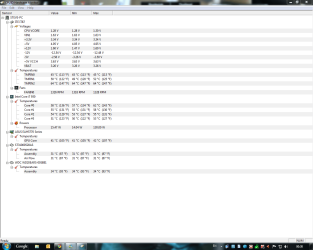
OK I tried running the Prime test and about 5 minutes after running my Rig just stopped. Screen went black and was totally unresponsive :( Had to reset to get it back up and running. Looked in the event viewer but could find nothing suspicious in there I'm afraid :(

But the max temps I got in the 5 minutes it was were Max all 4 cores 100C min all 4 cores were 46C

Image is current usage and the apartment is at it's warmest :)


Steve
 

Attachments

  • 29-06-2010 00-30-32.png
    29-06-2010 00-30-32.png
    44.2 KB · Views: 26

My Computer

Computer Manufacturer/Model Number
Over Clockers Ultima Viper 2.80Ghz
OS
Windows 7 Ultimate 64 - OEM Service Pack 1
CPU
Intel Core i7 930 2.80Ghz Bloomfield Socket LGA 1366
Motherboard
Gigabyte GA-X58A-UD3R Intel X58 Socket 1366 DDR3
Memory
Patriot Viper 6GB 3x2GB DDR3 PC3-1200C9 1600Mhz Tri Channel
Graphics Card(s)
Asus ATI Radeon HD 5770 CuCore 1024MB GDDR5 PCI Express
Sound Card
Realtek ALC889 @ Intel 82801JB ICH10 - High Definition Audio
Monitor(s) Displays
Samsung SyncMaster 920N 19"
Screen Resolution
1280*1024
Hard Drives
1 x OCZ Vertex2 Series 120GB 2.5" SATA-II SSD
1 x Seagate Barracuda 7200.12 1TB SATA-II 32MB Cache
1 x Western Digital Caviar Green 2TB SATA-II 64 MB Cache
PSU
Corsair TX 650W ATX SLi
Case
Antec 902 Ultimate Gaming Case Black
Cooling
Prolimatech Megahalems Rev B CPU Cooler Socket 775/1156/1366
Keyboard
Microsoft Comfort Curve Keyboard
Mouse
Microsoft Optical USB
Internet Speed
ADSL24 FTTC 34.2 Mbps Down 7.1Mbps Up
Other Info
OcUK 22x DVDSATA ReWriter Black
Akasa AK-FN058 Apache Black Super Silent 120mm Fan
Printer Epson Stylus Photo R300
Scanner Canon Canoscan 8000F
Well, 100C is definitely too hot. However, if you aren't doing very strenuous activities with your comp, then the temps should never get that high.
 

My Computer

Computer type
PC/Desktop
Computer Manufacturer/Model Number
SuperBeast
OS
Windows 10 Tech Preview 9926 x64
CPU
AMD FX-8350
Motherboard
Gigabyte GA-990FXA-UD3
Memory
16GB DDR3 1333
Graphics Card(s)
Asus R9 290 DirectCU II OC, Gigabyte Windforce R9 290 OC
Sound Card
Integrated w/ Creative A250 2.1 speakers
Monitor(s) Displays
Main: Asus VN289H 28" Secondary: Acer G246HL 24"
Screen Resolution
1920x1080
Hard Drives
128 GB SanDisk Ultra Plus (Windows drive)

240 GB Crucial M500 SSD (Games drive)

1 TB WDC WD10EACS 7200RPM HDD (Data drive)

2 TB Seagate Expansion Desktop external HDD (Backup drive)
PSU
900w Antec HCG-900
Case
Raidmax Agusta Full ATX
Cooling
Corsair H80
Keyboard
Cooler Master Devastator MB24
Mouse
Cooler Master Devastator MS2K 1000/1600/2000 DPI
Internet Speed
100Mbps cable
Antivirus
Avast!
Browser
Chrome
100°C, ouch. Might want to double check that the heatsink is seated properly.
Also had a quick look around,

i7 930 temps - Google Search

and it seems those i7 930's tend to run a little on the warm side with the stock cooler, and you have one of the better after market ones. Maybe look into backing that overclock off some when it starts getting summertime warm.
 

My Computer

Computer type
PC/Desktop
Computer Manufacturer/Model Number
Me
OS
Win 7 Ultimate x64
CPU
FX-8350 @ 4.6 GHz so far
Motherboard
Asus M5A97 EVO
Memory
ADATA XPG V1 Series Black 8GB DDR3 1600
Graphics Card(s)
Sapphire R9 270x Dual-X
Sound Card
Xonar DGX w/ Corsair Vengence 1300
Monitor(s) Displays
Acer S232HL Abid
Screen Resolution
1920x1080
Hard Drives
120 GB OCZ Vertex 3
500 GB Seagate 7200.12
PSU
Antec Earthwatts 650W Green
Case
Antec Three Hundred
Cooling
Cooler Master 212 EVO
Keyboard
Logitech G510
Mouse
Logitech G500s
Internet Speed
35000/3000
A. If you are hitting 100C from a 5 min stress test of Prime95?
Yes, you have a problem

B. Get ArcticSilver5 and apply it as your thermal paste when reseating your Processor
And make sure you follow these instructions

C. Do this ASAP and do not use your system for much untill you do this and test again and that temp drops way down.

Your system is in eminent danger of burning out in the long run. Even if you only use it for minor things.
Why? Because you are not going to be watching your temps (and should never really need to) every second that you are using your system. at some point you will hit a hard process that will stress the processor and could cause damage.

Take this seriously as an issue that you do not want to ignore.

A. Your heatsink and fan are not good enough (stock heatsinks and fans are usually adequate)

B. The heatsink and fan are not seated properly or do not have enough or very cheap thermal grease
 

My Computer

Computer Manufacturer/Model Number
Self Built
OS
Win 7 Ultimate 32bit
CPU
C2D E6600 2.4Ghz
Motherboard
Intel D965WH
Memory
4G Kingston KHX5400D2
Graphics Card(s)
EVGA GTX 570 HD SC (012-P3-1573-KR)
Sound Card
On-Board
Monitor(s) Displays
Samsung 226BW
Screen Resolution
1680 x 1050
Hard Drives
2 x 250 Seagate Barracuda
2 x 500 Seagate Barracuda (Raid1)
PSU
Corsair TX750W
Case
In-Win C589
Cooling
Stock Intel Cooling
OK I tried running the Prime test and about 5 minutes after running my Rig just stopped. Screen went black and was totally unresponsive :( Had to reset to get it back up and running. Looked in the event viewer but could find nothing suspicious in there I'm afraid :(

But the max temps I got in the 5 minutes it was were Max all 4 cores 100C min all 4 cores were 46C

Image is current usage and the apartment is at it's warmest :)


Steve

No, you did not have a min core temp of 46C while Priming. What happened was the rig hard locked; the temp monitor too. Prime has told you the OC isn't stable. :confused: Best to back way off and go up a little slower.
 

My Computer

OS
7 Ultimate x64
CPU
i5-2500k
Motherboard
Asus P8P67 Pro
Memory
8GB G.Skill Ripjaws X F3-12800CL7D-8GBXH 1866MHz 8-9-8-24
Graphics Card(s)
EVGA GTX 570 SC
Sound Card
X-Fi Titanium Fatality
Monitor(s) Displays
Samsung S27A550H 27" LED
Screen Resolution
1920x1080
Hard Drives
OCZ Vertex 3 120GB.
1TB Samsung F3.
2TB Samsung F4.
PSU
PC Power & Cooling Silencer 760
Case
Lian Li Lancool K62
Cooling
Thermalright Venomous X Black/Scythe S-Flex/Shin-Etsu X23
Keyboard
MS Natural Elite 4000 Ergonomic
Mouse
Logitech G500
Internet Speed
6MB/768
Other Info
Logitech Z-5500 505 watts.
D-Link DGL-4500.
Tripp-Lite Smart Pro 1500.
Best to back way off and go up a little slower.

Except it came that way,

"Ultima Viper" Intel Core i7 930 2.80GHz @ 4.00GHz DDR3 System [] Pro Gamer - Ultima

Why Should You Buy This System?
- A guaranteed 4.00GHz performance for the price of 2.80GHz
- Choose from a selection of graphics cards to meet your performance needs
- 6GB of 1600MHz DDR3 Triple Channel memory allows faster loading of games and better multi-tasking
- Precision built and cabled by Overclockers UK expert technicians

I'm guessing that if it crashed that badly from running Prime95, Overclockers didn't stability test it too much (if at all).
 

My Computer

Computer type
PC/Desktop
Computer Manufacturer/Model Number
Me
OS
Win 7 Ultimate x64
CPU
FX-8350 @ 4.6 GHz so far
Motherboard
Asus M5A97 EVO
Memory
ADATA XPG V1 Series Black 8GB DDR3 1600
Graphics Card(s)
Sapphire R9 270x Dual-X
Sound Card
Xonar DGX w/ Corsair Vengence 1300
Monitor(s) Displays
Acer S232HL Abid
Screen Resolution
1920x1080
Hard Drives
120 GB OCZ Vertex 3
500 GB Seagate 7200.12
PSU
Antec Earthwatts 650W Green
Case
Antec Three Hundred
Cooling
Cooler Master 212 EVO
Keyboard
Logitech G510
Mouse
Logitech G500s
Internet Speed
35000/3000
Guaranteed 4GHz! Well, looks like that company has some splainnin to do.
 

My Computer

OS
7 Ultimate x64
CPU
i5-2500k
Motherboard
Asus P8P67 Pro
Memory
8GB G.Skill Ripjaws X F3-12800CL7D-8GBXH 1866MHz 8-9-8-24
Graphics Card(s)
EVGA GTX 570 SC
Sound Card
X-Fi Titanium Fatality
Monitor(s) Displays
Samsung S27A550H 27" LED
Screen Resolution
1920x1080
Hard Drives
OCZ Vertex 3 120GB.
1TB Samsung F3.
2TB Samsung F4.
PSU
PC Power & Cooling Silencer 760
Case
Lian Li Lancool K62
Cooling
Thermalright Venomous X Black/Scythe S-Flex/Shin-Etsu X23
Keyboard
MS Natural Elite 4000 Ergonomic
Mouse
Logitech G500
Internet Speed
6MB/768
Other Info
Logitech Z-5500 505 watts.
D-Link DGL-4500.
Tripp-Lite Smart Pro 1500.
I agree with the overclocking and I will be on the phone to Customer support first thing in the morning :( I have reverted back to stock settings and run the Prime test now for 30 minutes this is the temps I get now. Not sure if these are still high or not.

At the risk of sounding a real Idiot I know I paid for a guaranteed over clock of 4Ghz but to be perfectly honest when over clocked and at stock I am really hard pushed to see any difference.

I will try over clocking again later and run Prime again and see what happens.


Steve
 

Attachments

  • 29-06-2010 00-30-32.png
    29-06-2010 00-30-32.png
    44.2 KB · Views: 11

My Computer

Computer Manufacturer/Model Number
Over Clockers Ultima Viper 2.80Ghz
OS
Windows 7 Ultimate 64 - OEM Service Pack 1
CPU
Intel Core i7 930 2.80Ghz Bloomfield Socket LGA 1366
Motherboard
Gigabyte GA-X58A-UD3R Intel X58 Socket 1366 DDR3
Memory
Patriot Viper 6GB 3x2GB DDR3 PC3-1200C9 1600Mhz Tri Channel
Graphics Card(s)
Asus ATI Radeon HD 5770 CuCore 1024MB GDDR5 PCI Express
Sound Card
Realtek ALC889 @ Intel 82801JB ICH10 - High Definition Audio
Monitor(s) Displays
Samsung SyncMaster 920N 19"
Screen Resolution
1280*1024
Hard Drives
1 x OCZ Vertex2 Series 120GB 2.5" SATA-II SSD
1 x Seagate Barracuda 7200.12 1TB SATA-II 32MB Cache
1 x Western Digital Caviar Green 2TB SATA-II 64 MB Cache
PSU
Corsair TX 650W ATX SLi
Case
Antec 902 Ultimate Gaming Case Black
Cooling
Prolimatech Megahalems Rev B CPU Cooler Socket 775/1156/1366
Keyboard
Microsoft Comfort Curve Keyboard
Mouse
Microsoft Optical USB
Internet Speed
ADSL24 FTTC 34.2 Mbps Down 7.1Mbps Up
Other Info
OcUK 22x DVDSATA ReWriter Black
Akasa AK-FN058 Apache Black Super Silent 120mm Fan
Printer Epson Stylus Photo R300
Scanner Canon Canoscan 8000F
Let this be a lesson......

I will give you a 100% guarantee and it won't cost you a dime....
No one on this planet with these devices of today can make that guarantee to anyone and be honest.
You can't do it, because every single processor is different as is every motherboard.
You can have a mobo and CPU that will do one thing,, the next one can't, the next one can do better, the next one fries.

Do not ever be fooled by any guarantee of any kind of overclock by anyone. They can't do it with a truly honest conscience unless they really are that dense (stupid).

Also note, Overclocking a CPU that much will kill it's life span tremendously.
So, you can either run it at stock and get several (like 6+ years) out of it
Or overclock it like they have and get 1 year if you are lucky.

For everyone to know.....
Also note,, in the real world,, Overclocking really doesn't amount to that much of a performance gain as the bottleneck of every top end modern system today is a mechanical HDD. Drop an SDD in there and save the CPU from heat death.

Overclocking modern top end PC's these days is a hobby, not a necessity and in most cases will do nothing for you at all.

Adding an SSD though, will give a HUGE performance boost that no amount of overclock will ever be able to compete with.

The reason I say all this is,,, for those that want to know... Overclocking of any kind is not a poor mans hobby. You can and most likely will fry the CPU in a very short amount of time if you do not really know what you are doing. Not to mention the fact that you are infact (no matter the type of cooling) reducing the life span of that overclocked part. Just adivce and warning.

 

My Computer

Computer Manufacturer/Model Number
Self Built
OS
Win 7 Ultimate 32bit
CPU
C2D E6600 2.4Ghz
Motherboard
Intel D965WH
Memory
4G Kingston KHX5400D2
Graphics Card(s)
EVGA GTX 570 HD SC (012-P3-1573-KR)
Sound Card
On-Board
Monitor(s) Displays
Samsung 226BW
Screen Resolution
1680 x 1050
Hard Drives
2 x 250 Seagate Barracuda
2 x 500 Seagate Barracuda (Raid1)
PSU
Corsair TX750W
Case
In-Win C589
Cooling
Stock Intel Cooling
Im sorry to hear the bad news :(
This is what I meant by dont mind idle temps so much.

But, hopefully its not to late to get something done about it.


Everyone has different standards for Prime testing as far as temps go.

Personally, I like to see a 11HR Prime run without the CPU exceeding 65C.

If it can survive 11hrs of prime and stay between 60-65C at the warmest ...
Then that would equate to low- mid 50s at the very most under real world heavy loads.

To me this is ideal.

The hard lock and shut down with 100C temps was likely the chip itself or the MOBO trying to save itself.
However, this should never happen under Prime load.
Dont let them try to tell you otherwise :)
 

My Computer

Computer Manufacturer/Model Number
Custom (Self Build)
OS
Windows 7 Home Premium 64bit
CPU
Intel Core i7 2700k
Motherboard
eVGA P67 SLI
Memory
8GB Mushkin Redline Ridgebacks @1866
Graphics Card(s)
EVGA GTX570 SC
Sound Card
XiFi Titanium HD
Monitor(s) Displays
LG W2453V
Screen Resolution
1920x1080
Hard Drives
Intel 320 80GB -- Intel X25-V 40GB --WD Black 1TB x2 -- WD Blue 640GB
PSU
Seasonic x750
Case
Corsair 600T SE White
Cooling
eVGA Superclocked CPU Cooler
Keyboard
Saitek Cyborg
Antivirus
Kaspersky
Browser
IE
Other Info
LG BD/DVD
The hard lock and shut down with 100C temps was likely the chip itself or the MOBO trying to save itself.
However, this should never happen under Prime load.
Dont let them try to tell you otherwise
:)

I second that.
 

My Computer

Computer Manufacturer/Model Number
Self Built
OS
Win 7 Ultimate 32bit
CPU
C2D E6600 2.4Ghz
Motherboard
Intel D965WH
Memory
4G Kingston KHX5400D2
Graphics Card(s)
EVGA GTX 570 HD SC (012-P3-1573-KR)
Sound Card
On-Board
Monitor(s) Displays
Samsung 226BW
Screen Resolution
1680 x 1050
Hard Drives
2 x 250 Seagate Barracuda
2 x 500 Seagate Barracuda (Raid1)
PSU
Corsair TX750W
Case
In-Win C589
Cooling
Stock Intel Cooling
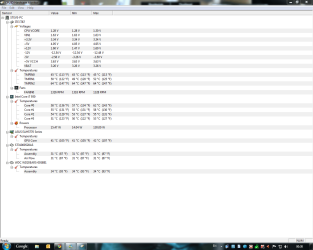
OK I am taking on board all this wisdom, obviously my Rig running at the Manufacture's Bios set over clock does not stand up to the Prime 95 test.

I Know the cooling system is working fine as when I turn the over clock off all the temps return to what you guys have previously said are normal. I have been now running the Prime 95 test at stock 2.8GHz with just me typing this and just the basic programs running in the background. Kaspersky Internet Suite, Malwarebytes, MSE Windows Live Messenger and Google Chrome and these are my current temps, bearing in mind my apartment is currently at a temp of 25.2C.

So where does my problem lay ? Is it the cooling? A faulty processor ? What do I say to the manufacture when I call them later to complain ? I am not prepared to open the case just in case it voids the warranty.

Once again thanks guys for all you advice and input I do really appreciate it.


Steve
 

Attachments

  • 29-06-2010 03-57-59.png
    29-06-2010 03-57-59.png
    45 KB · Views: 6

My Computer

Computer Manufacturer/Model Number
Over Clockers Ultima Viper 2.80Ghz
OS
Windows 7 Ultimate 64 - OEM Service Pack 1
CPU
Intel Core i7 930 2.80Ghz Bloomfield Socket LGA 1366
Motherboard
Gigabyte GA-X58A-UD3R Intel X58 Socket 1366 DDR3
Memory
Patriot Viper 6GB 3x2GB DDR3 PC3-1200C9 1600Mhz Tri Channel
Graphics Card(s)
Asus ATI Radeon HD 5770 CuCore 1024MB GDDR5 PCI Express
Sound Card
Realtek ALC889 @ Intel 82801JB ICH10 - High Definition Audio
Monitor(s) Displays
Samsung SyncMaster 920N 19"
Screen Resolution
1280*1024
Hard Drives
1 x OCZ Vertex2 Series 120GB 2.5" SATA-II SSD
1 x Seagate Barracuda 7200.12 1TB SATA-II 32MB Cache
1 x Western Digital Caviar Green 2TB SATA-II 64 MB Cache
PSU
Corsair TX 650W ATX SLi
Case
Antec 902 Ultimate Gaming Case Black
Cooling
Prolimatech Megahalems Rev B CPU Cooler Socket 775/1156/1366
Keyboard
Microsoft Comfort Curve Keyboard
Mouse
Microsoft Optical USB
Internet Speed
ADSL24 FTTC 34.2 Mbps Down 7.1Mbps Up
Other Info
OcUK 22x DVDSATA ReWriter Black
Akasa AK-FN058 Apache Black Super Silent 120mm Fan
Printer Epson Stylus Photo R300
Scanner Canon Canoscan 8000F
Back
Top