
TeraCopy slower + not copying all the files ?

jackinthebox

New member
Local time
9:42 AM
Messages
3
I've just purchased a Seagate FreeAgent goflex ultra portable drive 1 TB usb 3.0 which I'm using it on my usb 2.0 port on the back of the computer. I've a front usb ports but its not giving it enough power so it's only working on the back side.

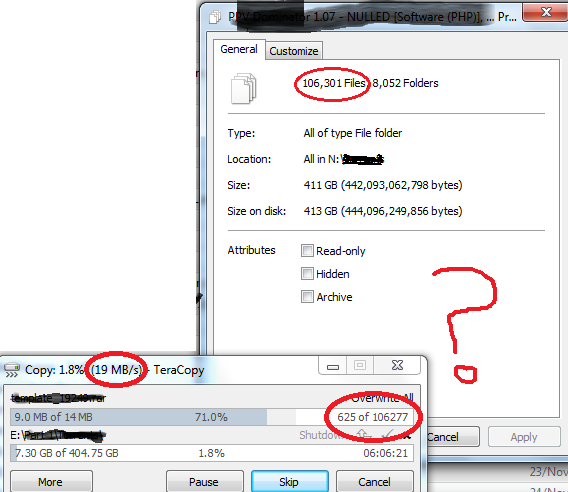
I'm trying to copy some files using TeraCopy from my old transcend 500gb drive into this new seagate goflex 1TB drive. But its only giving me speed between 15-22 mb/sec on usb 2.0, without TeraCopy its even much slower. Both drives are connected on usb 2.0 on windows 7. Why is it not giving me atleast 30 mb/sec ? Should I return this drive and buy some other brand like Western digital or transcend ? Which external hdd get atleast 30-35 mb/sec on usb 2.0 ?

Another problem is that the folders which I dragged and dropped into TeraCopy originally has 106,301 files inside them but TeraCopy says it is copying only 106,277 files. Why would it not copy all the files ?

My system specs:
Intel core 2 cpu 4400 @ 2.00ghz
windows 7 SP1 32 bit home premium
4gb ram

Here's the screenshot:

qJ2q6.png
 
Last edited:

My Computer My Computer

At a glance

windows 7 32 bit
OS
windows 7 32 bit
It is because both drives are USB and that doubles the overhead plus the CPU cost. USB is a shared BUS and shared CPU. Its going to take a while regardless.
 

My Computer My Computer

At a glance

Windows 10 Pro (x64)Intel Core i7-3930K (3.2GHz - 4.5GHz)4x Samsung 4GB PC3-12800 DDR3 (16GB 1600MHz)Nvidia Geforce GTX 690
Computer type
PC/Desktop
Computer Manufacturer/Model Number
Alienware Aurora ALX R4
OS
Windows 10 Pro (x64)
CPU
Intel Core i7-3930K (3.2GHz - 4.5GHz)
Motherboard
Alienware Aurora-R4 x79
Memory
4x Samsung 4GB PC3-12800 DDR3 (16GB 1600MHz)
Graphics Card(s)
Nvidia Geforce GTX 690
Sound Card
SteelSeries Siberia Elite
Monitor(s) Displays
Dell UltraSharp U3011
Screen Resolution
2560x1600
Hard Drives
Samsung 850 Pro 256 GB, Seagate 1TB Desktop Hybrid HDD, 2x Western Digital 4TB Green HDD
PSU
875W Some Dell PSU <.<
Case
Alienware Aurora ALX
Cooling
Custom Liquid Cooling (EK CPU & GPU blocks) dual EK 480RAD
Keyboard
Logitech G710+ Mechanical
Mouse
Logitech G700s
Internet Speed
Verizon Fios (50 mbps average)
Other Info
Server: Intel NUC D54250WYK: i5-4250U, 16GB, 256 GB mSATA, Windows Server 2012 R2
It is because both drives are USB and that doubles the overhead plus the CPU cost. USB is a shared BUS and shared CPU. Its going to take a while regardless.

I also tried the seagate 1tb drive on my laptop which has windows xp, it gave write speed of only around 17-22 mb/sec
 

My Computer My Computer

At a glance

windows 7 32 bit
OS
windows 7 32 bit
You'll only reach the maximum speeds if you copy few very large files (and the drives are reasonably defragmented). Copying more than 100K files suggests many of them are very small, the added overhead will slow the transfer down. What you're seeing is quite normal.

As for why Teracopy seems to copy all but 24 files, I'm guessing that these 24 files are hidden in the Recycle Bin and/or System Information folders. You wouldn't be able to copy what's in these folders anyway, nor have any need to.
 

My Computer My Computer

At a glance

Windows 7 Professional SP1 32-bitIntel Core 2 Duo E6600 2.4GHz4GB DDR2-667 (4x1GB in dual-channel config)nVidia GeForce 9800 GT
Computer type
PC/Desktop
Computer Manufacturer/Model Number
Custom-built
OS
Windows 7 Professional SP1 32-bit
CPU
Intel Core 2 Duo E6600 2.4GHz
Motherboard
Asus PL5D2
Memory
4GB DDR2-667 (4x1GB in dual-channel config)
Graphics Card(s)
nVidia GeForce 9800 GT
Sound Card
Creative X-Fi XtremeMusic
Monitor(s) Displays
Acer P236H
Screen Resolution
1920x1200 (DVI)
Hard Drives
OCZ SSD Vertex Plus 60GB SATA (Firmware 3.55), 64MB cache
Hitachi HD321KJ SATA, 320GB, 7200rpm, 16MB cache
PSU
Antec TruePower 2.0
Case
Cooler Master Centurion
Cooling
Too many fans
Keyboard
Standard
Mouse
Microsoft wireless optical mouse
Internet Speed
AT&T U-verse (18mbit/sec)
Antivirus
Microsoft Security Essentials
Browser
Firefox
Other Info
Other devices:
Compaq CQ-60 laptop
Google Nexus 7 (2012) tablet
Nvidia SHIELD tablet (US/LTE)
Hardkernel ODROID-XU single-board computer (Samsung Exynos 5420)
If you have a free PCIexpress slot I would recommend getting a USB 3.0 dual port card. I have an SIIG in both my dual core and quad HP PCs. Before my USB 3.0 docking stations arrived I tried my Seagate USB 2.0 drive in the USB 3.0 port. (This drive has a power supply. It's not powered by the USB port.) I got about a 15% write increase just by plugging it in to the SIIG card. I have SIIG USB 3.0 docking stations with WD Caviar Black 6 Gb/s drives. They run at full speed. My drives in the docks are faster than the internal system drives. Great for muxing/demuxing video.

Crystal Disk Mark Sequential Write numbers are in the 130s. Buying External drives you are paying for the boxes.
 

My Computer My Computer

At a glance

Windows 7 32 bitAMD 5200+ dual core2 GBNVidia GeForce 6150SE 128 MB
Computer Manufacturer/Model Number
HP Media Center
OS
Windows 7 32 bit
CPU
AMD 5200+ dual core
Memory
2 GB
Graphics Card(s)
NVidia GeForce 6150SE 128 MB
Monitor(s) Displays
CRT
Screen Resolution
1280x1024
Hard Drives
500 GB Sata internal :

SIIG USB 3.0 docking stations w/WD Caviar Black 6 Gb/s drives
Keyboard
PS/2
Mouse
PS/2 Wheel Mouse
Other Info
SIIG USB 3.0 PCIexpress card.
Okay I just tested it again. I tested it by creating a random 3 gb file and copying it from my internal hdd to both of my external hard drives.

My old 500 gb transcend drive gave max speed of 22mb/sec on windows explore and gave max speed of 25 mb/sec when I tried copy it from a 3rd party tool like(fast copy)

My new drive which is seagate goflex 1 TB portable jumped straight to 70mb/sec for couple of seconds then got down to 29-32 mb/sec on windows explorer (I dont know if its accurate) but on fastcopy software it gave constant 25.X mb/sec speed while I was copying that 3GB dump file.

So I think fastcopy results are accurate that is both drives seems to be giving 25mb/sec on usb 2.0. But while I copy large number of small files, speed goes slower to 12-19 mb/sec. So I think its okay.

Maybe there might some tweak to optimize the speed on usb 2.0
 

My Computer My Computer

At a glance

windows 7 32 bit
OS
windows 7 32 bit
Nope, no tweak. This is as good as you get - with many small files it will always slow down. Your numbers are perfectly fine.
 

My Computer My Computer

At a glance

Windows 7 Professional SP1 32-bitIntel Core 2 Duo E6600 2.4GHz4GB DDR2-667 (4x1GB in dual-channel config)nVidia GeForce 9800 GT
Computer type
PC/Desktop
Computer Manufacturer/Model Number
Custom-built
OS
Windows 7 Professional SP1 32-bit
CPU
Intel Core 2 Duo E6600 2.4GHz
Motherboard
Asus PL5D2
Memory
4GB DDR2-667 (4x1GB in dual-channel config)
Graphics Card(s)
nVidia GeForce 9800 GT
Sound Card
Creative X-Fi XtremeMusic
Monitor(s) Displays
Acer P236H
Screen Resolution
1920x1200 (DVI)
Hard Drives
OCZ SSD Vertex Plus 60GB SATA (Firmware 3.55), 64MB cache
Hitachi HD321KJ SATA, 320GB, 7200rpm, 16MB cache
PSU
Antec TruePower 2.0
Case
Cooler Master Centurion
Cooling
Too many fans
Keyboard
Standard
Mouse
Microsoft wireless optical mouse
Internet Speed
AT&T U-verse (18mbit/sec)
Antivirus
Microsoft Security Essentials
Browser
Firefox
Other Info
Other devices:
Compaq CQ-60 laptop
Google Nexus 7 (2012) tablet
Nvidia SHIELD tablet (US/LTE)
Hardkernel ODROID-XU single-board computer (Samsung Exynos 5420)
Nope, no tweak. This is as good as you get - with many small files it will always slow down. Your numbers are perfectly fine.

+1. With lots of little files there's a lot more overhead. Create the file, write hardly anything into it, close it. I only get a few MB/s copying lots of tiny files even on USB 3.0.
 

My Computer My Computer

At a glance

Windows 7 32 bitAMD 5200+ dual core2 GBNVidia GeForce 6150SE 128 MB
Computer Manufacturer/Model Number
HP Media Center
OS
Windows 7 32 bit
CPU
AMD 5200+ dual core
Memory
2 GB
Graphics Card(s)
NVidia GeForce 6150SE 128 MB
Monitor(s) Displays
CRT
Screen Resolution
1280x1024
Hard Drives
500 GB Sata internal :

SIIG USB 3.0 docking stations w/WD Caviar Black 6 Gb/s drives
Keyboard
PS/2
Mouse
PS/2 Wheel Mouse
Other Info
SIIG USB 3.0 PCIexpress card.
Back
Top