TEST -Update 7 installation media

I will update it and reupload. Might be able to upload it here after a bit of trimming.
 

My Computers My Computers

System One System Two

  • Computer type
    PC/Desktop
    OS
    7 X64
    CPU
    i5 8400
    Motherboard
    gigabyte b365m ds3h
    Memory
    2x8gb 3200mhz
    Hard Drives
    various
    PSU
    pure power 11 400w cm
    Case
    Coolermaster
    Cooling
    cryorig m9i
  • Computer type
    PC/Desktop
    OS
    7x64
    CPU
    g5400
    Motherboard
    ga b365m ds3h
    Memory
    8gb ddr4 2400
    PSU
    xfx pro 450w

My Computers My Computers

System One System Two

  • Computer type
    PC/Desktop
    OS
    7 X64
    CPU
    i5 8400
    Motherboard
    gigabyte b365m ds3h
    Memory
    2x8gb 3200mhz
    Hard Drives
    various
    PSU
    pure power 11 400w cm
    Case
    Coolermaster
    Cooling
    cryorig m9i
  • Computer type
    PC/Desktop
    OS
    7x64
    CPU
    g5400
    Motherboard
    ga b365m ds3h
    Memory
    8gb ddr4 2400
    PSU
    xfx pro 450w
SIW2,
I decided to try it all over again (I am a newb so I just wanted to make sure). I deleted all the files except the copy of the iso on C:
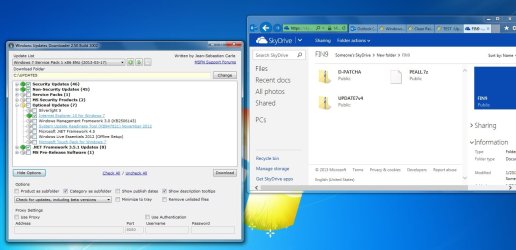
I got this far and then I'm not sure how to extract the file as there doesn't seem to be an option for me to extract?
 

Attachments

  • SevenForum.jpg
    SevenForum.jpg
    120.3 KB · Views: 13

My Computer My Computer

Computer type
PC/Desktop
Computer Manufacturer/Model Number
HP Pavillion
OS
Windows 7 Ultimate SP1 - 32 bit
CPU
Intel(R)Core(TM)2 Quad CPU Q6600 @ 2.40GHz 2.39 GHz X4
Memory
Installed 3 GB network HPmediasmart server 2T
Monitor(s) Displays
Display adapter NVIDIA GeForce 8500 GT
Hard Drives
Samsung HD320KJ ATA device X2
Keyboard
hp wireless
Mouse
HID compliant
Internet Speed
35000Kbps 2040Kbps
Antivirus
Microsoft Security Essentials
Browser
IE; CHROME
Other Info
LSI 1394 OHCI Compliant Host Controller
Ports (COM & LPT) RIM virtual serial port v2 (COM4 and COM5)

My Computers My Computers

System One System Two

  • Computer type
    PC/Desktop
    OS
    7 X64
    CPU
    i5 8400
    Motherboard
    gigabyte b365m ds3h
    Memory
    2x8gb 3200mhz
    Hard Drives
    various
    PSU
    pure power 11 400w cm
    Case
    Coolermaster
    Cooling
    cryorig m9i
  • Computer type
    PC/Desktop
    OS
    7x64
    CPU
    g5400
    Motherboard
    ga b365m ds3h
    Memory
    8gb ddr4 2400
    PSU
    xfx pro 450w
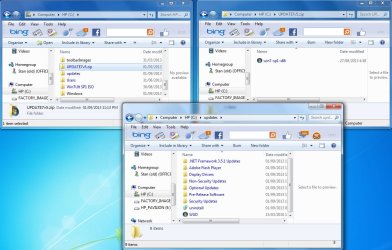
OK. I unzipped the new x86 file and downloaded my selections to C:\UPDATE7v5.zip. Not sure what to do with Skydrive or Run as Admin though?
 

Attachments

  • SevenForum.jpg
    SevenForum.jpg
    122.5 KB · Views: 4

My Computer My Computer

Computer type
PC/Desktop
Computer Manufacturer/Model Number
HP Pavillion
OS
Windows 7 Ultimate SP1 - 32 bit
CPU
Intel(R)Core(TM)2 Quad CPU Q6600 @ 2.40GHz 2.39 GHz X4
Memory
Installed 3 GB network HPmediasmart server 2T
Monitor(s) Displays
Display adapter NVIDIA GeForce 8500 GT
Hard Drives
Samsung HD320KJ ATA device X2
Keyboard
hp wireless
Mouse
HID compliant
Internet Speed
35000Kbps 2040Kbps
Antivirus
Microsoft Security Essentials
Browser
IE; CHROME
Other Info
LSI 1394 OHCI Compliant Host Controller
Ports (COM & LPT) RIM virtual serial port v2 (COM4 and COM5)
SIW2

Downloaded "UPDATE7v5.zip" without a hitch!!:D
Many Thanks for the Download AND THE UPDATER PROCESS.

I'm about to embark on a UPGRADE (Win8 To Win7 x64 Pro) on a Brand New PC with a UEFI Compliant Motherrboard and Have Noted gregrocker has Slipstreamed in some device Drivers which will be important for me ALSO. I know Windows includes a lot of Driver's BUT I So often read about people who have trouble with Hardware not being recognised, Such as Optical (CD/DVD) and HDD & SSD.

In my case I need to use Drivers (Chipset, SATA Controller, Intel LAN Driver's etc) supplied by the ASUS Support Disk!
THE Problem is (a.) How do I go about slipstreaming in the Drivers? and
(b.) HOW do I recognise Which are the Drivers?

To the best of my Knowledge I would be Supplying your Updater with ".inf" file Names. Trouble is I have noted that there are ".sys", ".cat" and even ".exe" files in some of the folders.

I have read a number of articles from sevenforum (THANK GOD for this Forum) about installing UEFI Windows 7 and Shift + F10 to load drivers and YOUR Solution looks EXCELLENT and would really like to give a Go!

Some Quick Specs: Intel i7 3770k; ASUS P8Z77-V MoBo; 16 GB Ram; 1x 2TB Segate HDD - SATA 6g/bps; & 1 x Sandisk Extreme 120GB SATA 6g/bps. Installing Windows on the HDD & The SSD is for the Intel rapid Storage Technology.

Very much appreciate any advise on the driver slipstreaming using your UPDATER!
THANKS HEAPS
Shrike49


Shrike49.

 
Last edited:

My Computer My Computer

Computer type
PC/Desktop
Computer Manufacturer/Model Number
ASUS
OS
Windows 7 Professional
CPU
Intel I7
Memory
8GB
Graphics Card(s)
Nvidia GT340
Monitor(s) Displays
Phillips 22IE
Si what is MS thinking on SP2 now? I get the idea they think the were going to get away without one since Win8 would be such a smash they could quietly smother Win7 in its crib.

Or are they waiting to see what´s worth adding from Win8 to Win7 like they saved Vista in its SP1 with Win7 improvements?

Or maybe they just forgot? They don´t seem to even think about Win7 though it´s all that is keeping them alive now as a credible desktop/laptop OS producer.
 
Hi Siw2
Downloaded "UPDATE7v5.zip" & Extracted files ok!
Re step3
Rt Clicked on "Update-win7.CMD", Selected "Run as Administrator" OK, BUT

Got Error Msg:
"Windows cannot find 'BIN\wincmd'. Make sure you Typed the name correctly, and then try again."
INSTEAD of the "Browse For Folder" DIALOG...
259228d1363231481-test-update-7-installation-media-browse1.jpg

In other words it doesn't let me Browse for the BIN folder - In My Case "C:\BIN".

Catcha Soon
Thanks
Shrike49
 

My Computer My Computer

Computer type
PC/Desktop
Computer Manufacturer/Model Number
ASUS
OS
Windows 7 Professional
CPU
Intel I7
Memory
8GB
Graphics Card(s)
Nvidia GT340
Monitor(s) Displays
Phillips 22IE
Will check now.
 

My Computers My Computers

System One System Two

  • Computer type
    PC/Desktop
    OS
    7 X64
    CPU
    i5 8400
    Motherboard
    gigabyte b365m ds3h
    Memory
    2x8gb 3200mhz
    Hard Drives
    various
    PSU
    pure power 11 400w cm
    Case
    Coolermaster
    Cooling
    cryorig m9i
  • Computer type
    PC/Desktop
    OS
    7x64
    CPU
    g5400
    Motherboard
    ga b365m ds3h
    Memory
    8gb ddr4 2400
    PSU
    xfx pro 450w
Have a look in the BIN folder and see if wincmd.exe is in there. It is working for me.
 

My Computers My Computers

System One System Two

  • Computer type
    PC/Desktop
    OS
    7 X64
    CPU
    i5 8400
    Motherboard
    gigabyte b365m ds3h
    Memory
    2x8gb 3200mhz
    Hard Drives
    various
    PSU
    pure power 11 400w cm
    Case
    Coolermaster
    Cooling
    cryorig m9i
  • Computer type
    PC/Desktop
    OS
    7x64
    CPU
    g5400
    Motherboard
    ga b365m ds3h
    Memory
    8gb ddr4 2400
    PSU
    xfx pro 450w
Have a look in the BIN folder and see if wincmd.exe is in there. It is working for me.

YEP... ITS IN MY "c:\BIN\WinCMD.EXE"

Update-win7.CMD is in my "C:\"

???
Shrike49

PS Just Noticed its a bit after 2 AM - Will Let you get some Shuteye and catchUp later!:o
 

My Computer My Computer

Computer type
PC/Desktop
Computer Manufacturer/Model Number
ASUS
OS
Windows 7 Professional
CPU
Intel I7
Memory
8GB
Graphics Card(s)
Nvidia GT340
Monitor(s) Displays
Phillips 22IE
Probably better if you extract to a folder c:\update7v2.
 

My Computers My Computers

System One System Two

  • Computer type
    PC/Desktop
    OS
    7 X64
    CPU
    i5 8400
    Motherboard
    gigabyte b365m ds3h
    Memory
    2x8gb 3200mhz
    Hard Drives
    various
    PSU
    pure power 11 400w cm
    Case
    Coolermaster
    Cooling
    cryorig m9i
  • Computer type
    PC/Desktop
    OS
    7x64
    CPU
    g5400
    Motherboard
    ga b365m ds3h
    Memory
    8gb ddr4 2400
    PSU
    xfx pro 450w
Probably better if you extract to a folder c:\update7v2.

THANKS SIW2, THAT DID THE TRICK - Moved Files to c:\update7v5, seeing as I Used "UPDATE7v5.zip"!!

Sorry for the Hassle, I've Mis-Read "3. Extract this onto C. UPDATE7v4.zip" as extracting the Zip to "C:\".
OK!

Will get on with the rest
Much appreciate your time!:D
 

My Computer My Computer

Computer type
PC/Desktop
Computer Manufacturer/Model Number
ASUS
OS
Windows 7 Professional
CPU
Intel I7
Memory
8GB
Graphics Card(s)
Nvidia GT340
Monitor(s) Displays
Phillips 22IE
I can't get this to work so I must be doing something wrong.

Had a Windows 7 Ultimate SP1 x64 iso so I un-rared it to a folder.

Downloaded the "Update7v4.zip" and un-rared it to a folder.

Ran WUP and chose all my updates and downloaded them to a folder.

Opened "Update7v4" folder and ran "Update-win7.CMD".

Pointed it to the Windows 7 Ultimate folder

Pointed it to where I had the WUP update downloads

Then I get this


No matter what I choose from 1 to 5, it then says wrong image number try again.
 

My Computer My Computer

Computer type
PC/Desktop
Computer Manufacturer/Model Number
Built By Mike
OS
Windows 7 Pro, x64
CPU
I7 3770k @ 4.4 Gigs
Motherboard
AsRock Z77 Extreme6
Memory
16 (2x8) Gigs Corsair DDR3 1600
Graphics Card(s)
EVGA GTX 680 Signature 2
Sound Card
X-Fi Xtreme Gamer Pro, Logitech Z-5500 5.1 Speaker System
Monitor(s) Displays
Acer P236H 23"
Screen Resolution
1920x1080
Hard Drives
Crucial M500 120 GB SSD, 2 WD 640 Gig Black, WD 1 TB Black, WD 2 TB Black (eSata)
PSU
Corsair TX750w
Case
HSPC Top Deck Tech Station
Cooling
Noctua NH-U14S Heatsink with dual Noctua fans
Keyboard
Deck Lighted
Mouse
Roccat Kone Pure
Internet Speed
Cable
Antivirus
AVG
Other Info
2 DVD SATA R/W Drives

My Computers My Computers

System One System Two

  • Computer type
    PC/Desktop
    OS
    7 X64
    CPU
    i5 8400
    Motherboard
    gigabyte b365m ds3h
    Memory
    2x8gb 3200mhz
    Hard Drives
    various
    PSU
    pure power 11 400w cm
    Case
    Coolermaster
    Cooling
    cryorig m9i
  • Computer type
    PC/Desktop
    OS
    7x64
    CPU
    g5400
    Motherboard
    ga b365m ds3h
    Memory
    8gb ddr4 2400
    PSU
    xfx pro 450w
That did it, thanks Clint. You made my day!

Question.

I notice during the process of adding the updates, not all came out 100%. Some were like 99.8% or so but all said successful. Is that normal?
 
Last edited:

My Computer My Computer

Computer type
PC/Desktop
Computer Manufacturer/Model Number
Built By Mike
OS
Windows 7 Pro, x64
CPU
I7 3770k @ 4.4 Gigs
Motherboard
AsRock Z77 Extreme6
Memory
16 (2x8) Gigs Corsair DDR3 1600
Graphics Card(s)
EVGA GTX 680 Signature 2
Sound Card
X-Fi Xtreme Gamer Pro, Logitech Z-5500 5.1 Speaker System
Monitor(s) Displays
Acer P236H 23"
Screen Resolution
1920x1080
Hard Drives
Crucial M500 120 GB SSD, 2 WD 640 Gig Black, WD 1 TB Black, WD 2 TB Black (eSata)
PSU
Corsair TX750w
Case
HSPC Top Deck Tech Station
Cooling
Noctua NH-U14S Heatsink with dual Noctua fans
Keyboard
Deck Lighted
Mouse
Roccat Kone Pure
Internet Speed
Cable
Antivirus
AVG
Other Info
2 DVD SATA R/W Drives
I think that is just the way dism displays. Sometimes sticks at 98% for a while, then jumps to completed successfully.
 

My Computers My Computers

System One System Two

  • Computer type
    PC/Desktop
    OS
    7 X64
    CPU
    i5 8400
    Motherboard
    gigabyte b365m ds3h
    Memory
    2x8gb 3200mhz
    Hard Drives
    various
    PSU
    pure power 11 400w cm
    Case
    Coolermaster
    Cooling
    cryorig m9i
  • Computer type
    PC/Desktop
    OS
    7x64
    CPU
    g5400
    Motherboard
    ga b365m ds3h
    Memory
    8gb ddr4 2400
    PSU
    xfx pro 450w
I notice you haven't updated the "Update7v4.zip" after you gave me a different "Update-win7.CMD". Is the one you gave me just specific to me?
 

My Computer My Computer

Computer type
PC/Desktop
Computer Manufacturer/Model Number
Built By Mike
OS
Windows 7 Pro, x64
CPU
I7 3770k @ 4.4 Gigs
Motherboard
AsRock Z77 Extreme6
Memory
16 (2x8) Gigs Corsair DDR3 1600
Graphics Card(s)
EVGA GTX 680 Signature 2
Sound Card
X-Fi Xtreme Gamer Pro, Logitech Z-5500 5.1 Speaker System
Monitor(s) Displays
Acer P236H 23"
Screen Resolution
1920x1080
Hard Drives
Crucial M500 120 GB SSD, 2 WD 640 Gig Black, WD 1 TB Black, WD 2 TB Black (eSata)
PSU
Corsair TX750w
Case
HSPC Top Deck Tech Station
Cooling
Noctua NH-U14S Heatsink with dual Noctua fans
Keyboard
Deck Lighted
Mouse
Roccat Kone Pure
Internet Speed
Cable
Antivirus
AVG
Other Info
2 DVD SATA R/W Drives
I hadn't got round to it. Doing it now.
 

My Computers My Computers

System One System Two

  • Computer type
    PC/Desktop
    OS
    7 X64
    CPU
    i5 8400
    Motherboard
    gigabyte b365m ds3h
    Memory
    2x8gb 3200mhz
    Hard Drives
    various
    PSU
    pure power 11 400w cm
    Case
    Coolermaster
    Cooling
    cryorig m9i
  • Computer type
    PC/Desktop
    OS
    7x64
    CPU
    g5400
    Motherboard
    ga b365m ds3h
    Memory
    8gb ddr4 2400
    PSU
    xfx pro 450w
Difference between v4 and v5.

4.5 dotnet slim that was included in v4 not needed anymore?
 

My Computer My Computer

Computer type
PC/Desktop
Computer Manufacturer/Model Number
Built By Mike
OS
Windows 7 Pro, x64
CPU
I7 3770k @ 4.4 Gigs
Motherboard
AsRock Z77 Extreme6
Memory
16 (2x8) Gigs Corsair DDR3 1600
Graphics Card(s)
EVGA GTX 680 Signature 2
Sound Card
X-Fi Xtreme Gamer Pro, Logitech Z-5500 5.1 Speaker System
Monitor(s) Displays
Acer P236H 23"
Screen Resolution
1920x1080
Hard Drives
Crucial M500 120 GB SSD, 2 WD 640 Gig Black, WD 1 TB Black, WD 2 TB Black (eSata)
PSU
Corsair TX750w
Case
HSPC Top Deck Tech Station
Cooling
Noctua NH-U14S Heatsink with dual Noctua fans
Keyboard
Deck Lighted
Mouse
Roccat Kone Pure
Internet Speed
Cable
Antivirus
AVG
Other Info
2 DVD SATA R/W Drives
Back
Top