TEST -Update 7 installation media

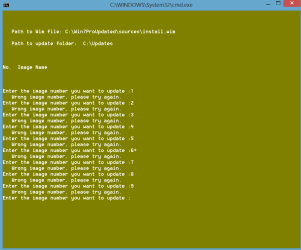
You can ceratainly skip 4, but you may have some programs that need 3. I can't think of any offhand, so you might be able to skip3 also.
 

My Computers My Computers

System One System Two

  • Computer type
    PC/Desktop
    OS
    7 X64
    CPU
    i5 8400
    Motherboard
    gigabyte b365m ds3h
    Memory
    2x8gb 3200mhz
    Hard Drives
    various
    PSU
    pure power 11 400w cm
    Case
    Coolermaster
    Cooling
    cryorig m9i
  • Computer type
    PC/Desktop
    OS
    7x64
    CPU
    g5400
    Motherboard
    ga b365m ds3h
    Memory
    8gb ddr4 2400
    PSU
    xfx pro 450w
self delete
 
Last edited:

My Computer My Computer

Computer type
Laptop
Computer Manufacturer/Model Number
MSI PE60 6QE
OS
Win 10 Pro x64, Win 7 Pro x64
CPU
Intel Core i7-6700HQ Skylake
Motherboard
MSI MS-16J5
Memory
16gb Crucial DDR4
Graphics Card(s)
NVIDIA GeForce GTX 960M 2 GB
Screen Resolution
1920 x 1080
Hard Drives
Samsung 850 EVO 250 GB M.2 SSD (MZ-N5E250BW)
HGST 1TB @7200 RPM HTS721010A9E630
Case
Plastic
Keyboard
Got one...
Mouse
Yep, one of those too.
Internet Speed
FIOS 75/75
Antivirus
Defender
Browser
Chrome/FFox/Ex-PLODE-r/(L)Edge
Other Info
Defender, Custom Hosts, uBlock, regular backups w/ Macrium (Free)
Is it normal that after the "Saving Image" step is completed the program closes itself?
I checked the folder containing the files extracted from the .iso and the install.wim looks like it has been updated (now it 3.3 GB, it was 2.8). Can I just copy and replace this file to my bootable usb drive, right?

P.S.
Using WUD I got this message:
Untitled.png
It's an "Update to support the new currency symbol for the Russian ruble in Windows". Maybe it's usefull to report this. Thanks for your program.
 
Last edited:

My Computer My Computer

Computer type
PC/Desktop
Computer Manufacturer/Model Number
Custom Build
OS
Windows 7 Professional N x64 SP1 U (media refresh)
CPU
AMD FX(tm)-8320 Eight-Core Processor
Motherboard
Gigabyte GA-970A-UD3P
Memory
DDR3 Corsair Vengeance Low Profile CML8GX3M2A1600C9 (2x4GB)
Graphics Card(s)
ASUS R7260X-DC2-1GD5
Sound Card
ASUS Xonar DX/XD
Monitor(s) Displays
DELL U2414H UltraSharp
Screen Resolution
1920x1080
Hard Drives
WDC WD10 EZEX-08M2NA0 SATA Disk Device
PSU
Thermaltake Hamburg 530W ATX 80+
Case
Midi Corsair Carbide Series 200R Compact PC Gaming ATX Nero
Cooling
preinstalled from Case
Keyboard
KRAUN KR.T8 - KB-0503
Mouse
Microsoft Comfort Mouse 4500
Internet Speed
http://www.speedtest.net/my-result/3784231974
Antivirus
Comodo
Browser
Chrome
Other Info
Heatsink CPU Raijintek Themis
warning - the software mentioned in this thread creates folders that are almost impossible to delete. You get the msg 'you do not have permission to delete this folder' etc. I have had 'take ownership' running on the undeletable folders for > 1.5 hour and still do not have control of my own computer. Caveat Emptor - 'let the buyer beware'.

edit > i have finally managed to delete the folders created by the software in this thread using the 3rd party reg fix 'take ownership'. You've got to ask why these folders are undeletable. I don't know if this software is a risk, but IMHO undeletable folders are suspect. If I'm generous, I'd say the software is badly written . . . but as we say in the North of England - I wouldn't touch you with a 10 foot bargepole.
 
Last edited:

My Computer My Computer

Computer type
PC/Desktop
Computer Manufacturer/Model Number
self build
OS
Windows 7 pro x64 SP1
CPU
Intel i7-2600k o/c to 4.6GHz
Motherboard
MSI Z68-GD80
Memory
8GB Mushkin 1866MHz
Graphics Card(s)
Nvidia GTX 750 Ti 2GB
Sound Card
integrated
Monitor(s) Displays
Liyama ProLite 27"
Screen Resolution
1920*1080 px
Hard Drives
Seagate 2TB
PSU
Coolermaster GX 750W
Case
Antec 300 case + 5 fans
Cooling
Dark Rock Pro
Internet Speed
62Mbit down 18Mbit up
Antivirus
MSE
Browser
Firefox
Other Info
Blackgold BGT3650 Quad HD TV card. Also have various 3770 + 4770K render boxes.
Say whut?

warning - the software mentioned in this thread creates folders that are almost impossible to delete. You get the msg 'you do not have permission to delete this folder' etc. I have had 'take ownership' running on the undeletable folders for > 1.5 hour and still do not have control of my own computer. Caveat Emptor - 'let the buyer beware'.

edit > i have finally managed to delete the folders created by the software in this thread using the 3rd party reg fix 'take ownership'. You've got to ask why these folders are undeletable. I don't know if this software is a risk, but IMHO undeletable folders are suspect. If I'm generous, I'd say the software is badly written . . . but as we say in the North of England - I wouldn't touch you with a 10 foot bargepole.

:what: What folders are you talking about? I've used this dozens of times and have never come across any "undeletable" files/folders. :confused:
 

My Computer My Computer

Computer type
Laptop
Computer Manufacturer/Model Number
MSI PE60 6QE
OS
Win 10 Pro x64, Win 7 Pro x64
CPU
Intel Core i7-6700HQ Skylake
Motherboard
MSI MS-16J5
Memory
16gb Crucial DDR4
Graphics Card(s)
NVIDIA GeForce GTX 960M 2 GB
Screen Resolution
1920 x 1080
Hard Drives
Samsung 850 EVO 250 GB M.2 SSD (MZ-N5E250BW)
HGST 1TB @7200 RPM HTS721010A9E630
Case
Plastic
Keyboard
Got one...
Mouse
Yep, one of those too.
Internet Speed
FIOS 75/75
Antivirus
Defender
Browser
Chrome/FFox/Ex-PLODE-r/(L)Edge
Other Info
Defender, Custom Hosts, uBlock, regular backups w/ Macrium (Free)
It is possible. The cmd file just calls Microsoft programs, dism.exe and reg.exe.

Hard to delete a directory containing a mounted image, or loaded hives. That might happen if either dism.exe or reg.exe are interrupted. If so, the image may need remounting, then unmounting. Or if hives are loaded, simply unload with regedit, or reboot to auto unload them.
 

My Computers My Computers

System One System Two

  • Computer type
    PC/Desktop
    OS
    7 X64
    CPU
    i5 8400
    Motherboard
    gigabyte b365m ds3h
    Memory
    2x8gb 3200mhz
    Hard Drives
    various
    PSU
    pure power 11 400w cm
    Case
    Coolermaster
    Cooling
    cryorig m9i
  • Computer type
    PC/Desktop
    OS
    7x64
    CPU
    g5400
    Motherboard
    ga b365m ds3h
    Memory
    8gb ddr4 2400
    PSU
    xfx pro 450w
I had several mounted images that required special steps to remove found in these Comments.
 
Wow this worked like a charm.

Precise instructions and an application which works as advertised, I' m really impressed.

Many many thanks SIW2 for the time and efforts you have put in this great application.
 

My Computer My Computer

Computer type
PC/Desktop
OS
windows 7
Looking at a way to update the sources files and boot.wim as well.

Might be a little while as I am busy for the next few weeks.
 

My Computers My Computers

System One System Two

  • Computer type
    PC/Desktop
    OS
    7 X64
    CPU
    i5 8400
    Motherboard
    gigabyte b365m ds3h
    Memory
    2x8gb 3200mhz
    Hard Drives
    various
    PSU
    pure power 11 400w cm
    Case
    Coolermaster
    Cooling
    cryorig m9i
  • Computer type
    PC/Desktop
    OS
    7x64
    CPU
    g5400
    Motherboard
    ga b365m ds3h
    Memory
    8gb ddr4 2400
    PSU
    xfx pro 450w
You're also needed at 10F so we can gain the Support edge on Win7's logical successor. It's really a great OS already. :geek:
 
Hey guys,

I've tried to follow everything carefully (read all posts)

but I keep getting this error
I've got the Update 7v5 - latest WUD updates (including IE11) and I'm using a Win7 Professional SP1 64bit ISO which I extracted all the files from to begin this. I've already done installs with this ISO so I know the ISO is fine.

Can anyone help please?
 

Attachments

  • win7forum.PNG
    win7forum.PNG
    5.7 KB · Views: 2

My Computer My Computer

Computer type
Laptop
Computer Manufacturer/Model Number
Alienware
OS
Windows 8.1 Pro 64 bit
CPU
i7
Memory
8GB DDR3
Graphics Card(s)
Radeon HD7970M
Hard Drives
1TB 7200RPM and 256GB Samsung 830 SSD
Antivirus
Trend-Micro
Browser
Chrome/Firefox/IE
It is not finding any images in your install.wim.

You are supposed to be running the .cmd file as administrator.
 

My Computers My Computers

System One System Two

  • Computer type
    PC/Desktop
    OS
    7 X64
    CPU
    i5 8400
    Motherboard
    gigabyte b365m ds3h
    Memory
    2x8gb 3200mhz
    Hard Drives
    various
    PSU
    pure power 11 400w cm
    Case
    Coolermaster
    Cooling
    cryorig m9i
  • Computer type
    PC/Desktop
    OS
    7x64
    CPU
    g5400
    Motherboard
    ga b365m ds3h
    Memory
    8gb ddr4 2400
    PSU
    xfx pro 450w
Thanks! I had a closer look and for some reason the entire install files didn't copy over - so I deleted the folder, remounted the ISO and all the files copied over correctly (including the install.wim).

Looks like it's working perfectly now. I run a computer shop, so having these updates pre-installed will save me countless hours. Thank you for this!
 

My Computer My Computer

Computer type
Laptop
Computer Manufacturer/Model Number
Alienware
OS
Windows 8.1 Pro 64 bit
CPU
i7
Memory
8GB DDR3
Graphics Card(s)
Radeon HD7970M
Hard Drives
1TB 7200RPM and 256GB Samsung 830 SSD
Antivirus
Trend-Micro
Browser
Chrome/Firefox/IE
Out of interest, is there a similar tool for Windows 8.1? To automatically include most updates? Applying updates (as I'm sure you guys know!) takes hours and hours when you've got to do it over and over again so any way to skip this time is awesome.
 

My Computer My Computer

Computer type
Laptop
Computer Manufacturer/Model Number
Alienware
OS
Windows 8.1 Pro 64 bit
CPU
i7
Memory
8GB DDR3
Graphics Card(s)
Radeon HD7970M
Hard Drives
1TB 7200RPM and 256GB Samsung 830 SSD
Antivirus
Trend-Micro
Browser
Chrome/Firefox/IE
Could do the same kind of batch for 8x.

There were 8.1 updates via WUD tool you used to download the win 7 ones.
 

My Computers My Computers

System One System Two

  • Computer type
    PC/Desktop
    OS
    7 X64
    CPU
    i5 8400
    Motherboard
    gigabyte b365m ds3h
    Memory
    2x8gb 3200mhz
    Hard Drives
    various
    PSU
    pure power 11 400w cm
    Case
    Coolermaster
    Cooling
    cryorig m9i
  • Computer type
    PC/Desktop
    OS
    7x64
    CPU
    g5400
    Motherboard
    ga b365m ds3h
    Memory
    8gb ddr4 2400
    PSU
    xfx pro 450w
I see what you mean, there's updates for 8.1.

So to clarify, the process and the tools you've provided will work the same way if I do this with a Win 8.1 ISO?

I've just successfully burned a copy of the CD, next time I need a re-install I'm going to try this out and report back with how it goes.
 

My Computer My Computer

Computer type
Laptop
Computer Manufacturer/Model Number
Alienware
OS
Windows 8.1 Pro 64 bit
CPU
i7
Memory
8GB DDR3
Graphics Card(s)
Radeon HD7970M
Hard Drives
1TB 7200RPM and 256GB Samsung 830 SSD
Antivirus
Trend-Micro
Browser
Chrome/Firefox/IE
I downloaded Windows updates using WUD, copied my Win7 Pro x64 CD to my SSD and was able to get UPDATE7v5 to run with 216 .msu files in my windows update directory (I moved all the files to the same folder).
--- EDIT IN RED --- I should not have moved the .MSU files (or have unchecked the box in WUD which saves the updates in folders by category. Looking at the .CMD itself I see it looks in the specific folders. Running again, expecting no problems this time. ---
After UPDATE7V5 mounted the Windows installation, it proceeded very quickly - I remember seeing "6 of 6" and within 30 seconds it was done. I could not find a log file showing what I saw on the screen as the program ran and didn't figure out how to scroll back in the buffer to get the info.

My question is: does this sound like a normal execution? I expected to see "1 of 216" ... or at least "1 of 200" if 6 of the .msu files did not apply...
 
Last edited:

My Computer My Computer

Computer type
PC/Desktop
Computer Manufacturer/Model Number
Dell Latitude e6540
OS
Win 7 Po x86/x64
...sorry, if I would have remembered reading the comments about it taking a while to run, a half hour or so, I wouldn't have needed to ask this question. I installed created a bootable USB using the .ISO and Rufus, which installed (the only issue was dealing with using a USB 3.0 port during installation, for which I switched to USB 2.0).

I'm going through the entire process again, step by step, to see if I have better luck this time around.
 

My Computer My Computer

Computer type
PC/Desktop
Computer Manufacturer/Model Number
Dell Latitude e6540
OS
Win 7 Po x86/x64
How can I accomplish this task with:
Recovery DVD Media ( 3CD's)
Windows 7 Home Professional

Thank you
 

My Computer My Computer

Computer type
Laptop
Computer Manufacturer/Model Number
Azure Blade 15.6
OS
Windows 10 Pro Version 22H2 64-bit Edition
CPU
Intel(R) Core(TM) i7-10875H CPU @ 2.30GHz 2.30 GHz
Memory
2.0 GB (31.8 GB usable)
Monitor(s) Displays
4K UHD OLED TOUCH
Screen Resolution
3840 x 2160
Hard Drives
1 TB
Mouse
Logitech MX Master 3S
Antivirus
Windows Security
Browser
Google Chrome
Other Info
______________________________________________


______________________________________________
Back
Top