Testing restore points?

netrate

New member
Member
VIP
Local time
9:38 AM
Messages
174
Since I had a sudden issue last night where I needed my restore points and they were not there - how can I test my restore points? I am creating restore points about once a week now since I had an issue in December - BUT after trying to use them last night in SAFE MODE and not being able to, I am finding out that my "create restore points" is either :
1) not working
2) Cannot be found
3) on another drive

How can I test and look at the restore point DURING the times windows 7 is working?
 

My Computer

Computer type
PC/Desktop
OS
Win 7 dual boot with win 10
Motherboard
Gigabyte GA-970A-d3
Memory
16gig
Graphics Card(s)
GTX
Monitor(s) Displays
3
Hard Drives
500 gig ssd Samsung
Try in full mode not safe mode
 

My Computer

Computer type
PC/Desktop
OS
win 8 32 bit
Ok, so are you saying there is no way of using RESTORE in safe mode?
Or are you saying to check restore points in full mode?
 

My Computer

Computer type
PC/Desktop
OS
Win 7 dual boot with win 10
Motherboard
Gigabyte GA-970A-d3
Memory
16gig
Graphics Card(s)
GTX
Monitor(s) Displays
3
Hard Drives
500 gig ssd Samsung
How can I test and look at the restore point DURING the times windows 7 is working?


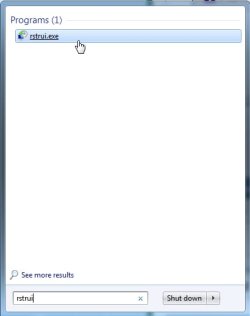
Type rstrui.exe into start search box


rstrui.jpg
 

My Computers

System One System Two

  • Computer type
    PC/Desktop
    OS
    7 X64
    CPU
    i5 8400
    Motherboard
    gigabyte b365m ds3h
    Memory
    2x8gb 3200mhz
    Hard Drives
    various
    PSU
    pure power 11 400w cm
    Case
    Coolermaster
    Cooling
    cryorig m9i
  • Computer type
    PC/Desktop
    OS
    7x64
    CPU
    g5400
    Motherboard
    ga b365m ds3h
    Memory
    8gb ddr4 2400
    PSU
    xfx pro 450w
Thank you!
At least I know I have my restore points, but it certainly does not show all of them. I have had restore points for years, but maybe it copies over the old ones?

But I am a bit perplexed at the result.
Two restore points say "Manual" and one says "Backup"?
 

My Computer

Computer type
PC/Desktop
OS
Win 7 dual boot with win 10
Motherboard
Gigabyte GA-970A-d3
Memory
16gig
Graphics Card(s)
GTX
Monitor(s) Displays
3
Hard Drives
500 gig ssd Samsung
Manual means you created it.

Backup is the restore point created at the same time you used windows backup
 

My Computers

System One System Two

  • Computer type
    PC/Desktop
    OS
    7 X64
    CPU
    i5 8400
    Motherboard
    gigabyte b365m ds3h
    Memory
    2x8gb 3200mhz
    Hard Drives
    various
    PSU
    pure power 11 400w cm
    Case
    Coolermaster
    Cooling
    cryorig m9i
  • Computer type
    PC/Desktop
    OS
    7x64
    CPU
    g5400
    Motherboard
    ga b365m ds3h
    Memory
    8gb ddr4 2400
    PSU
    xfx pro 450w
...At least I know I have my restore points, but it certainly does not show all of them. I have had restore points for years...

They may have been automatically deleted. There is a fixed size for the space set aside to keep restore points. When the limit has been reached the oldest restore point will be deleted when a new one is created.


Restore points are saved until the disk space System Restore reserves is filled up. As new restore points are created, old ones are deleted.

It really depends on how many restore points you would like to have stored on your computer for what you should set the MAX storage size to be.
System Protection - Change Disk Space Usage
 

My Computers

System One System Two

  • Computer type
    Laptop
    Computer Manufacturer/Model Number
    Toshiba satellite C650D
    OS
    Windows 7 Home Premium x64
    CPU
    AMD V120
    Memory
    4GB
    Internet Speed
    150 Mbps
    Antivirus
    MSE
    Browser
    IE11, Edge, Firefox
    Other Info
    I also have W7 Pro on my System Two, and several W7 Hyper-V VMs. My other machines run Windows 10/11. Their specs are in my Ten Forums & Eleven Forum profiles.
  • Computer type
    Laptop
    System Manufacturer/Model Number
    Lenovo Thinkpad T430
    OS
    Windows 7 Pro x64
    CPU
    Intel i5-3320M
    Memory
    8 GB
    Hard Drives
    250GB Samsung SSD 860 EVO
    Other Info
    Antivirus: MSE
A combination of SRPs (System Restore Points) and full image backups residing on external media of one's choosing is an excellent way to head off lots and lots of fixing when Windows goes wrong in a big way. Congratulations for taking such steps!
 

My Computer

Computer type
PC/Desktop
Computer Manufacturer/Model Number
Antec desktop; Acer Aspire laptops
OS
Windows 7 Professional 64-bit
CPU
Desktop i5; Acers i5 & i7
Memory
desktop 16GB; 1 Acer 8GB & 1 Acer 16GB
Hard Drives
1TB split into 2 equal partitions [OS and data] usable by RJS
Internet Speed
AT&T DSL
Browser
FF, GChrome, msIE
Other Info
Windows 7 Firewall, Emsisoft AM/AV, MSE [scan-only], SpywareBlaster, Ruiware/BillP combine
netrate

Personally, I don't use Windows backup and restore. Most every time I needed to use system restore, it didn't work.

I create a full disk image to external hard drive, regularly. Never had a problem with reimaging if needed.

Snick
 

My Computer

Computer type
PC/Desktop
Computer Manufacturer/Model Number
HP Desktop & Compaq Laptop
OS
Win 10 x64, Linux Lite, Win 7 x64, BlackArch, & Kali
Hard Drives
Samsung 850 Pro 256Gb,
Hitachi HDD 1Tb,
Crucial MX SSD 250Gb
Segate 3Tb USB 3.0 Ext. Backup HDD
Internet Speed
150Mbps dn, 20Mbps up
Antivirus
Avast Free, Malwarebytes Anti-Exploit & Anti-Ransomware
Browser
Firefox, Chrome, Opera, & VPN
I am using Macrium Reflect as well. I was using Create Restore points more often as a way to ease my anxiety.
 

My Computer

Computer type
PC/Desktop
OS
Win 7 dual boot with win 10
Motherboard
Gigabyte GA-970A-d3
Memory
16gig
Graphics Card(s)
GTX
Monitor(s) Displays
3
Hard Drives
500 gig ssd Samsung
Restore points can be useful.
 

My Computers

System One System Two

  • Computer type
    PC/Desktop
    OS
    7 X64
    CPU
    i5 8400
    Motherboard
    gigabyte b365m ds3h
    Memory
    2x8gb 3200mhz
    Hard Drives
    various
    PSU
    pure power 11 400w cm
    Case
    Coolermaster
    Cooling
    cryorig m9i
  • Computer type
    PC/Desktop
    OS
    7x64
    CPU
    g5400
    Motherboard
    ga b365m ds3h
    Memory
    8gb ddr4 2400
    PSU
    xfx pro 450w
netrate Personally, I don't use Windows backup and restore. Most every time I needed to use system restore, it didn't work. I create a full disk image to external hard drive, regularly. Never had a problem with reimaging if needed. Snick
I forgot in my earlier post about backups to mention: use any well-known, well-respected, 3rd party backup/restore software, make DVD and USB boots; make routine backups like Snick said!
 

My Computer

Computer type
PC/Desktop
Computer Manufacturer/Model Number
Antec desktop; Acer Aspire laptops
OS
Windows 7 Professional 64-bit
CPU
Desktop i5; Acers i5 & i7
Memory
desktop 16GB; 1 Acer 8GB & 1 Acer 16GB
Hard Drives
1TB split into 2 equal partitions [OS and data] usable by RJS
Internet Speed
AT&T DSL
Browser
FF, GChrome, msIE
Other Info
Windows 7 Firewall, Emsisoft AM/AV, MSE [scan-only], SpywareBlaster, Ruiware/BillP combine
The question remains, how come I cannot use a restore that I have created and seen when I'm in safe mode?
 

My Computer

Computer type
PC/Desktop
OS
Win 7 dual boot with win 10
Motherboard
Gigabyte GA-970A-d3
Memory
16gig
Graphics Card(s)
GTX
Monitor(s) Displays
3
Hard Drives
500 gig ssd Samsung
netrate said:
The question remains, how come I cannot use a restore that I have created and seen when I'm in safe mode?
And, from your first post: "...How can I test and look at the restore point DURING the times windows 7 is working?" I googled "How does one test a Windows 7 System Restore Point? This is the best URL I found so far:
How to Use System Restore in Windows 7, 8, and 10
I am not sure if that article really answers the question you have.
 

My Computer

Computer type
PC/Desktop
Computer Manufacturer/Model Number
Antec desktop; Acer Aspire laptops
OS
Windows 7 Professional 64-bit
CPU
Desktop i5; Acers i5 & i7
Memory
desktop 16GB; 1 Acer 8GB & 1 Acer 16GB
Hard Drives
1TB split into 2 equal partitions [OS and data] usable by RJS
Internet Speed
AT&T DSL
Browser
FF, GChrome, msIE
Other Info
Windows 7 Firewall, Emsisoft AM/AV, MSE [scan-only], SpywareBlaster, Ruiware/BillP combine
I guess it really doesn't matter. If I cannot access restore points from Safe Mode or even from the cmd prompt or advance repair, those restore points are useless. I did see that using "rstrui" showed me I had 3 restore points, however they are not accessible during a repair for some (unknown to me) reason.
This same thing occurred with Win 10.
 

My Computer

Computer type
PC/Desktop
OS
Win 7 dual boot with win 10
Motherboard
Gigabyte GA-970A-d3
Memory
16gig
Graphics Card(s)
GTX
Monitor(s) Displays
3
Hard Drives
500 gig ssd Samsung
Use boot media for system restore. I don't recall hearing of anybody doing it from safe mode, that is very unusual.

Either use the installation media, or a system repair disc.

In addition, if the recovery sequence is set up on your machine, tap F8 during post and it should boot into winre and you should be able do the restore from there.

If none of those work, there is most likely a problem with some of your system files - maybe try SFC, or a repair install.
 

My Computers

System One System Two

  • Computer type
    PC/Desktop
    OS
    7 X64
    CPU
    i5 8400
    Motherboard
    gigabyte b365m ds3h
    Memory
    2x8gb 3200mhz
    Hard Drives
    various
    PSU
    pure power 11 400w cm
    Case
    Coolermaster
    Cooling
    cryorig m9i
  • Computer type
    PC/Desktop
    OS
    7x64
    CPU
    g5400
    Motherboard
    ga b365m ds3h
    Memory
    8gb ddr4 2400
    PSU
    xfx pro 450w
I tried it from boot media - MCT and from advanced trouble shooting - both times, it said "no restore points are found".
When I finally got the system up and running again, I used rstrui and found three restore point, 1 from march last year.
 

My Computer

Computer type
PC/Desktop
OS
Win 7 dual boot with win 10
Motherboard
Gigabyte GA-970A-d3
Memory
16gig
Graphics Card(s)
GTX
Monitor(s) Displays
3
Hard Drives
500 gig ssd Samsung
Back
Top