
text alignment in Win7 Wordpad

Lykho

New member
Member
VIP
Local time
3:08 AM
Messages
115
Location
New Zealand
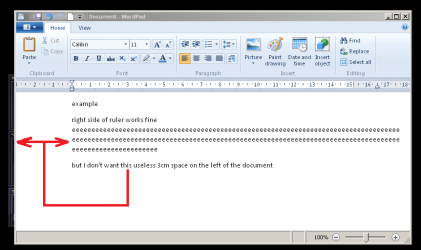
Is there a way to change the ruler limits to remove this wasted space? (so that you can have text, like in a 'text document', spanning from left border to right border of the window?).
 

Attachments
  • superfluousspace.png
    superfluousspace.png
    23.8 KB · Views: 16
Last edited:

My Computer

Computer type
PC/Desktop
Computer Manufacturer/Model Number
custom
OS
Windows 7 Home Premium 32bit
CPU
AMD Athlon II X2 250 Processor 3.00 GHz
Motherboard
Gigabyte
Memory
2Gb DDR2
Graphics Card(s)
onboard
Sound Card
onboard
Monitor(s) Displays
Viewsonic VA2448m-LED 23.6" LED
Screen Resolution
1920 x 1080
Hard Drives
internal: 1.5 TB Samsung Spinpoint
external: Samsung 2TB USB3.0; 1.5TB Samsung G3 Station
PSU
350w
Case
CoolerMaster
Keyboard
Microsoft Desktop 800
Mouse
Microsoft Desktop 800
Internet Speed
1Mbps
Antivirus
MSE
Browser
Firefox
Other Info
3.4 rating on the "Windows Experience Index"
I'll post this similar themed issue in this thread, rather than in its own thread, because I suspect neither have solutions...


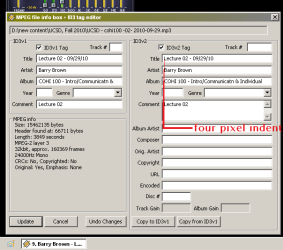
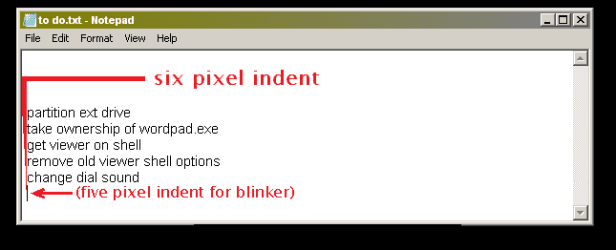
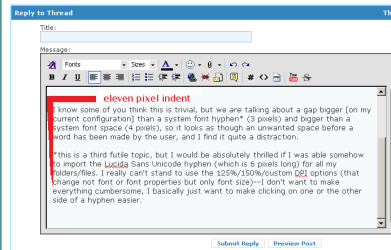
I'd also love to be able to reduce the text indent in all programs (exampled below: Winamp5, Text Document*, FireFox3)

*error: that is in fact a 5, not 6, pixel indent.

I know some of you think this is trivial, but we are talking about a gap bigger [on my current configuration] than a system font hyphen* (3 pixels) and bigger than a system font space (4 pixels), so it looks as though an unwanted space before a word has been made by the user, and I find it quite a distraction.

*this is a third futile topic, but I would be absolutely thrilled if I was able somehow to import the Lucida Sans Unicode hyphen (which is 6 pixels long) for all my folders/files. I really can't stand to use the 125%/150%/custom DPI options (that change not font or font properties but only font size)--I don't want to make everything cumbersome, I basically just want to make clicking on one or the other side of a hyphen easier.
 

Attachments

  • donotwant-4pixind.png
    donotwant-4pixind.png
    10.9 KB · Views: 8
  • donotwant-6pixind.png
    donotwant-6pixind.png
    4.2 KB · Views: 12
  • donotwant-11pixind.png
    donotwant-11pixind.png
    8.6 KB · Views: 6

My Computer

Computer type
PC/Desktop
Computer Manufacturer/Model Number
custom
OS
Windows 7 Home Premium 32bit
CPU
AMD Athlon II X2 250 Processor 3.00 GHz
Motherboard
Gigabyte
Memory
2Gb DDR2
Graphics Card(s)
onboard
Sound Card
onboard
Monitor(s) Displays
Viewsonic VA2448m-LED 23.6" LED
Screen Resolution
1920 x 1080
Hard Drives
internal: 1.5 TB Samsung Spinpoint
external: Samsung 2TB USB3.0; 1.5TB Samsung G3 Station
PSU
350w
Case
CoolerMaster
Keyboard
Microsoft Desktop 800
Mouse
Microsoft Desktop 800
Internet Speed
1Mbps
Antivirus
MSE
Browser
Firefox
Other Info
3.4 rating on the "Windows Experience Index"
probably a total tangent here but have a look at notepad++

I never looked back, it is completely amazing i use it all the time
 

My Computer

Computer Manufacturer/Model Number
Panasonic Toughbook CF F9
OS
Windows 7 Panasonic CF F9 (used to have CF F8)
probably a total tangent here but have a look at notepad++

I never looked back, it is completely amazing i use it all the time

is it better than OpenOffice3? I've already been forced to install that because my old Wordpad "Word for Windows 6.0" formatted files are otherwise unreadable (the alternative* is to re-save thousands of files into RTF format so that this ugly ribboned monster can display their contents properly)

I Wouldn't mind trying something else, especially if it lacks wasted window space (OO3 has a similar problem to the one of new Wordpad) and loads as rapidly as Notepad or Wordpad.


*I know there is also the alternative of 'restore the good old Wordpad', but so far I've been unable to 'take ownership' of the files in order to make it work.
 

My Computer

Computer type
PC/Desktop
Computer Manufacturer/Model Number
custom
OS
Windows 7 Home Premium 32bit
CPU
AMD Athlon II X2 250 Processor 3.00 GHz
Motherboard
Gigabyte
Memory
2Gb DDR2
Graphics Card(s)
onboard
Sound Card
onboard
Monitor(s) Displays
Viewsonic VA2448m-LED 23.6" LED
Screen Resolution
1920 x 1080
Hard Drives
internal: 1.5 TB Samsung Spinpoint
external: Samsung 2TB USB3.0; 1.5TB Samsung G3 Station
PSU
350w
Case
CoolerMaster
Keyboard
Microsoft Desktop 800
Mouse
Microsoft Desktop 800
Internet Speed
1Mbps
Antivirus
MSE
Browser
Firefox
Other Info
3.4 rating on the "Windows Experience Index"
Back
Top