
Solved The 4 primary partition problem

I'm glad to help. ;)
 

My Computer

Computer Manufacturer/Model Number
* BFK Customs *
OS
W 7 64-bit Ultimate
CPU
Intel Q9550 Yorkfield
Motherboard
ASUS P5Q Pro
Memory
8GB Dominator 8500C5D
Graphics Card(s)
ATI : XFX 5870
Sound Card
Realtek HD Audio 7-1
Monitor(s) Displays
1x 47" LCD HDMI & 3x 26" LCD HDMI
Screen Resolution
1920x1080P & 1920x1200
Hard Drives
1x 80GB Intel X25-M G2 SSD : 1x 500GB & 1x 640GB WD Caviar Black(s)
PSU
Corsair 620HX
Case
Cooler Master RC-690
Cooling
Tuniq Tower 120, 2x 140mm and 3x 120mm case fans
Keyboard
Microsoft 500
Mouse
Razer Diamondback 3G
Internet Speed
14 Mb/s
Other Info
1x Koutech 3Gb/s SATA HDD Hot Swap Rack
I'm sorry to bring up an old thread, but I figure there's no need to start a new thread as my question is very relevant to the previous ones.

I'm trying to get a free partition on which I may install Ubuntu (the aim being a dual-boot).

I've been able to download MiniTools Partition Wizard 6.0 and I've managed to change both the C:/ windows partition and the HP_TOOLS partition (alternately) to be a logical drive, but the Ubuntu liveCD says any free space is still unusable. Everything in W7 still functions normally.

How do I actually go about putting the HP_TOOLS to be a within the larger C:/ drive, such that the Ubuntu liveCD might allow me to use unallocated space to make an Ubuntu partition? Do I take these steps in W7 partition manager or in the Partition Wizard program?
 

My Computer

OS
Windows 7 Home Premium 64 Bit
Hello Ocifer, welcome to Seven Forums!


Before we make any specific recommendations will you please post a snip/screen-shot of the entire disk management drive map with a full description as to which drive/partition is which, so we can see what you have going on as there may be a fairly simple way to resolve the situation.

In the Windows start menu right click computer and click manage, in the left pane of the "Computer Management" window that opens click disk management and post a maximized snip of that.


How to Upload and Post a Screenshot and File in Seven Forums
 

My Computer

Computer Manufacturer/Model Number
* BFK Customs *
OS
W 7 64-bit Ultimate
CPU
Intel Q9550 Yorkfield
Motherboard
ASUS P5Q Pro
Memory
8GB Dominator 8500C5D
Graphics Card(s)
ATI : XFX 5870
Sound Card
Realtek HD Audio 7-1
Monitor(s) Displays
1x 47" LCD HDMI & 3x 26" LCD HDMI
Screen Resolution
1920x1080P & 1920x1200
Hard Drives
1x 80GB Intel X25-M G2 SSD : 1x 500GB & 1x 640GB WD Caviar Black(s)
PSU
Corsair 620HX
Case
Cooler Master RC-690
Cooling
Tuniq Tower 120, 2x 140mm and 3x 120mm case fans
Keyboard
Microsoft 500
Mouse
Razer Diamondback 3G
Internet Speed
14 Mb/s
Other Info
1x Koutech 3Gb/s SATA HDD Hot Swap Rack
Hey,

thanks for the quick reply. I did some reading on Google, and found several comments from other users who deleted the HP_tools partition without adverse effects. I did the same, reformatting to an ext3 filesystem, and then I put the Linux install there.

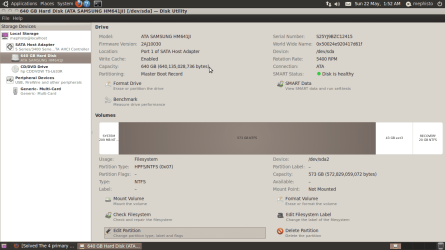
Here's a shot from Ubuntu disk manager. I have the HP_tools backed on a flash drive elsewhere. Now there appear to be 4 primary partitions. I wasn't able to create a swap without deleting/repartitioning something else, but haven't had any installation or RAM overload problems.

I got rather impatient. I'm currently on my Linux install, but the screen was as follows for the Windows built in disk partition manager:

System ---> C:/ ---> D:/ Recovery ---> HP_tools

Using PW, I was able to change C:/ OR (exclusive) HP_tools to have the green outline, signifying logical partition. I could do this to only one of the partitions at a time, and could not figure how to get the HP_tools to be a subset of the C:/ drive, as in iseeuu's picture.
 

Attachments

  • Screenshot-1.png
    Screenshot-1.png
    59.6 KB · Views: 71

My Computer

OS
Windows 7 Home Premium 64 Bit
Back
Top