Solved The default gateway is not available

Packrat87

New member
Local time
5:29 AM
Messages
19
Location
Canada
Hello Forums,

I am currently at university with a new Dell laptop with Windows 7 installed. For some reason, my computer is experiencing intermittent wireless disconnections (WPA2-Enterprise) on a very bad day, every 30 seconds and on good days 5-10 minutes. I've tried troubleshooting problems but it only resets the wireless connection and does not solve the problem. I've had my Intel Centrino software updated and have uninstalled McAfee Security problem uninstalled, ticked off the power management saving option of the Intel Centrino.

I've used my computer at home and did not experience any problems using my home's wireless connection (WEP).

I have flushed the DNS Cache per your request from the posting guidelines

I do not have any Apple software installed on my computer. And Skype does not seem to be enabled.

Thank you for your time.
 

Attachments
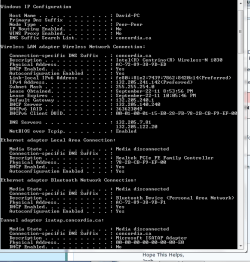
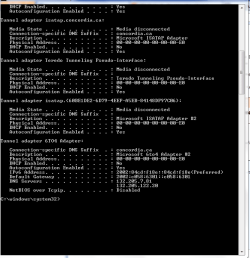
  • Capture 1.PNG
    Capture 1.PNG
    18.5 KB · Views: 120
  • Capture 2.PNG
    Capture 2.PNG
    14.6 KB · Views: 64
Last edited:

My Computer My Computer

Computer Manufacturer/Model Number
Hewlett-Packard
OS
Windows 7 Home Premium 32 bit X84
CPU
AMD Phenom(tm) 9500 Quad-Core Processor
Memory
3.00 GB
Sound Card
Realtek High Definition Audio
Screen Resolution
1680*1050
Keyboard
Standard PS/2 Keyboard
Mouse
Ps/2 Compatible Mouse
Have you specifically updated the driver for the wireless device itself?
 

My Computer My Computer

Computer Manufacturer/Model Number
Insane hobo technologies. ;-)
OS
Windows 7 x64
CPU
Intel i7 2600k
Motherboard
Asrock z68 extreme 4 gen 3
Memory
G.skill Ripjaw 16gigs @ 1866
Graphics Card(s)
Nvidia gtx580 (evga)
Sound Card
Integrated HD audio + hdmi
Monitor(s) Displays
24" ASUS widescreen + 42" insignia
Screen Resolution
1080p (1920x1080)
Hard Drives
128 Samsung 830
256 Samsung 840
3 x 1tb storage drive (various)
1 western digital 1tb (eSATA)
1 Seagate 1tb (eSATA)
PSU
1 kilowatt SLI/Crossfire rated Silverstone modular
Case
NZXT Phantom + additional 220 fan
Cooling
Zalmann
Keyboard
Microsoft wireless 3000 (v2)
Mouse
MS - wireless 5000 (bluetrack)
Internet Speed
depends on if you ask me or my provider.
Other Info
The above information is provided as is, and the author assumes no responsibility for issues it may cause with your sanity or fanboyism.
I right clicked Wireless Network Connection, Properties, Configure, Update Driver. It said it was up to date.
 

My Computer My Computer

Computer Manufacturer/Model Number
Hewlett-Packard
OS
Windows 7 Home Premium 32 bit X84
CPU
AMD Phenom(tm) 9500 Quad-Core Processor
Memory
3.00 GB
Sound Card
Realtek High Definition Audio
Screen Resolution
1680*1050
Keyboard
Standard PS/2 Keyboard
Mouse
Ps/2 Compatible Mouse

My Computer My Computer

Computer Manufacturer/Model Number
Insane hobo technologies. ;-)
OS
Windows 7 x64
CPU
Intel i7 2600k
Motherboard
Asrock z68 extreme 4 gen 3
Memory
G.skill Ripjaw 16gigs @ 1866
Graphics Card(s)
Nvidia gtx580 (evga)
Sound Card
Integrated HD audio + hdmi
Monitor(s) Displays
24" ASUS widescreen + 42" insignia
Screen Resolution
1080p (1920x1080)
Hard Drives
128 Samsung 830
256 Samsung 840
3 x 1tb storage drive (various)
1 western digital 1tb (eSATA)
1 Seagate 1tb (eSATA)
PSU
1 kilowatt SLI/Crossfire rated Silverstone modular
Case
NZXT Phantom + additional 220 fan
Cooling
Zalmann
Keyboard
Microsoft wireless 3000 (v2)
Mouse
MS - wireless 5000 (bluetrack)
Internet Speed
depends on if you ask me or my provider.
Other Info
The above information is provided as is, and the author assumes no responsibility for issues it may cause with your sanity or fanboyism.
According to the Intel support program, my Intel Centrino is up to date.
 

My Computer My Computer

Computer Manufacturer/Model Number
Hewlett-Packard
OS
Windows 7 Home Premium 32 bit X84
CPU
AMD Phenom(tm) 9500 Quad-Core Processor
Memory
3.00 GB
Sound Card
Realtek High Definition Audio
Screen Resolution
1680*1050
Keyboard
Standard PS/2 Keyboard
Mouse
Ps/2 Compatible Mouse
I grew tired of reconnecting manually every two minutes.
1) Downloaded McAfee Removal Tool to verify if the McAfee program that was pre-installed was removed completely. Clean
2) Uninstalled AVG Free Edition and installed Microsoft Security Essentials.

Still no stable wireless connection at school
 

My Computer My Computer

Computer Manufacturer/Model Number
Hewlett-Packard
OS
Windows 7 Home Premium 32 bit X84
CPU
AMD Phenom(tm) 9500 Quad-Core Processor
Memory
3.00 GB
Sound Card
Realtek High Definition Audio
Screen Resolution
1680*1050
Keyboard
Standard PS/2 Keyboard
Mouse
Ps/2 Compatible Mouse
Has this problem ever been solved? I have been searching for a solution.
 

My Computer My Computer

OS
Windows 7 Ultimate x 64
Magnuscreed correctly pointed out that the driver was not updated. You can follow the link he posted and download it. My mistake was not using Internet Explorer to do that.
 

My Computer My Computer

Computer Manufacturer/Model Number
Hewlett-Packard
OS
Windows 7 Home Premium 32 bit X84
CPU
AMD Phenom(tm) 9500 Quad-Core Processor
Memory
3.00 GB
Sound Card
Realtek High Definition Audio
Screen Resolution
1680*1050
Keyboard
Standard PS/2 Keyboard
Mouse
Ps/2 Compatible Mouse
Back
Top