the default gateway problem

man1a

New member
Local time
6:02 AM
Messages
5
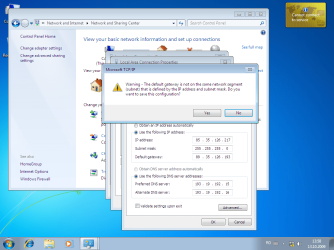
Hi, I'm new on this forum I tried to look like a problem but I found, so I decided to make a new top. Today I installed Windows starter version 7 and I have a problem with internet connection .. I have static IP, enter my IPs and when I give error like the picture is "the default gateway is not on the same network subnet ...

using an integrated network card NVIDIA nForce controller ..
Please help me with the settings step by step I may have something wrong .. I would like to the internet settings are the same that I have and on XP and it works ok ! Help pls:hot:

my English is not put up chair
 

Attachments
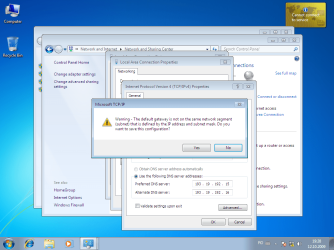
  • erroare.png
    erroare.png
    104.8 KB · Views: 309

My Computer

OS
win 7
Hi man1a, welcome to Seven Forums!

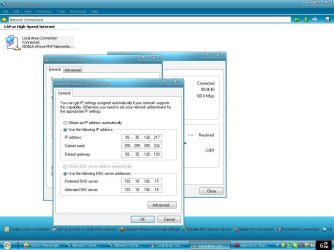
We'll need to see the IP properties sheet, the one under the warning message.

(As a guess, I'd bet your gateway is something like 192.168.1.1, and you have the subnet mask set to 255.255.255.0 with the static IP as something like 192.168.0.xx. If that is the case, the subnet mask need to be changed to 255.255.0.0.)

Anyways, it will be easier if we can see all the IP4 settings.
 

My Computer

Computer Manufacturer/Model Number
Gateway, Toshiba Laptop, and Home Brew
OS
Windows 7 x64 HP, Windows 7 HP, Windows 7 Ult
CPU
Intel I3, Cerelon, Pentium 4 @ 3Ghz
Motherboard
Intel, Intel, Asus
Memory
8G, 3G, 3G
Graphics Card(s)
On-board Intel, On-board nVidia, nVIDIA card
Sound Card
on-board, on-board, SoundBlaster
Monitor(s) Displays
Hannspree HF237, Toshiba, SyncMaster 931B
Screen Resolution
default (all)
Hard Drives
1T internal, 320G internal, 160G internal, 1T networked
PSU
300w, unk, 650w
Case
black, black, grey
Cooling
air (all)
Keyboard
standard wired (all)
Mouse
standard wired (all)
Internet Speed
6M down, 768K up
Other Info
Home LAN through Linksys hub to 4 port and wireless switch/router. Networked HP 2600n. Wife's computer running Windows 7, and spare laptop running Ubuntu "Karmic Kola" (9.10).
picture is made on xp
 

Attachments

  • untitled.JPG
    untitled.JPG
    80.7 KB · Views: 403

My Computer

OS
win 7
Sorry for the delay in responding - Real Life interrupted...:)

It looks like your subnet mask is too restrictive. Try setting it to 255.255.255.0 that should cure the problem.

As an aside - why did you set it the way it is?
 

My Computer

Computer Manufacturer/Model Number
Gateway, Toshiba Laptop, and Home Brew
OS
Windows 7 x64 HP, Windows 7 HP, Windows 7 Ult
CPU
Intel I3, Cerelon, Pentium 4 @ 3Ghz
Motherboard
Intel, Intel, Asus
Memory
8G, 3G, 3G
Graphics Card(s)
On-board Intel, On-board nVidia, nVIDIA card
Sound Card
on-board, on-board, SoundBlaster
Monitor(s) Displays
Hannspree HF237, Toshiba, SyncMaster 931B
Screen Resolution
default (all)
Hard Drives
1T internal, 320G internal, 160G internal, 1T networked
PSU
300w, unk, 650w
Case
black, black, grey
Cooling
air (all)
Keyboard
standard wired (all)
Mouse
standard wired (all)
Internet Speed
6M down, 768K up
Other Info
Home LAN through Linksys hub to 4 port and wireless switch/router. Networked HP 2600n. Wife's computer running Windows 7, and spare laptop running Ubuntu "Karmic Kola" (9.10).
Damnn straight about that subnet mask.

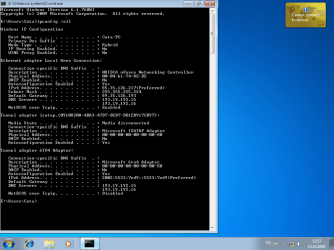
Why not do auto detects first and then see what your IPs are with ipconfig /all.
 

My Computer

Computer Manufacturer/Model Number
Lenovo ThinkPad T60
OS
Windows 7 Ultimate 64Bit
CPU
GenuineIntel Intel(R) Core(TM) DuoCore T2400 @ 1.83GHz
Motherboard
Intel(R) 82801G (ICH7 Family)
Memory
2.00 GB
Graphics Card(s)
Mobile Intel(R) 945 Express Chipset
Sound Card
SoundMAX Integrated Digital HD Audio
Monitor(s) Displays
ThinkPad Display
Screen Resolution
1400x1050
Hard Drives
100Gb SATA
Keyboard
Standard Keyboard
Mouse
HID-compliant Mouse
Internet Speed
Cable Broadband - 54Mbps
Other Info
Intel(R) PRO/1000 PL Network Connection
11a/b/g Wireless LAN Mini PCI Express Adapter
did`n work with sub 255.255.255.0
 

Attachments

  • ipsett.png
    ipsett.png
    80.2 KB · Views: 223
  • ipsett2.png
    ipsett2.png
    105.2 KB · Views: 152

My Computer

OS
win 7
The left hand screen shot shows that the subnet mask is still set to 255.255.255.224.

Try "ipconfig /renew" or power down (not restart) and power back up.
 

My Computer

Computer Manufacturer/Model Number
Gateway, Toshiba Laptop, and Home Brew
OS
Windows 7 x64 HP, Windows 7 HP, Windows 7 Ult
CPU
Intel I3, Cerelon, Pentium 4 @ 3Ghz
Motherboard
Intel, Intel, Asus
Memory
8G, 3G, 3G
Graphics Card(s)
On-board Intel, On-board nVidia, nVIDIA card
Sound Card
on-board, on-board, SoundBlaster
Monitor(s) Displays
Hannspree HF237, Toshiba, SyncMaster 931B
Screen Resolution
default (all)
Hard Drives
1T internal, 320G internal, 160G internal, 1T networked
PSU
300w, unk, 650w
Case
black, black, grey
Cooling
air (all)
Keyboard
standard wired (all)
Mouse
standard wired (all)
Internet Speed
6M down, 768K up
Other Info
Home LAN through Linksys hub to 4 port and wireless switch/router. Networked HP 2600n. Wife's computer running Windows 7, and spare laptop running Ubuntu "Karmic Kola" (9.10).
don`t work

Now try to install another version .. I think that maybe the version I installed was an unstable version! I will return with details
 

My Computer

OS
win 7
Thanks for your help! I solved the problem installing other version .. for now are very pleased with it! you can close the topic
 

My Computer

OS
win 7
Back
Top