
The DNS server isn’t responding

Neophile

New member
Power User
Local time
4:12 PM
Messages
171
The DNS server isn’t responding

Hello,

I have a problem with the internet connection. I can connect, but then it either is very slow or I get a 500 error or the server is found only after several trials, even if having given any error. Getright downloader gives a permanent 403 error, but it is wrong because files can sometimes be downloaded in otherwise after insisting.

I think I know what caused the problem. I had Comodo firewall installed for some time, but I uninstalled because I found it too much interfering. When I installed I made the mistake of accepting the offer of their DNS server protection, and it placed their IP address number on my TCP/IP settings (at “Use the following DNS server address”). That was worse because it replaced the sites or browsers error pages with their ad and useless information. When I uninstalled, this remained. Their forum has complaints about this. I searched for remaining files from Comodo and cleared them, as well as their IP address entry on TCP/IP settings. This is all I did, maybe not enough. After this I started having the mentioned internet connection problems.

I used the OS Internet connection troubleshooter. It did not solve anything, but at the end sent this notice:
The DNS server isn’t responding
Your computer is trying to use a DNS server that is incorrect or doesn’t exist.


Where is that setting that is incorrect or does not exist? I have a dynamic IP, but it doesn’t change much. This is a single computer with a direct DSL connection.

I also tried the internet troubleshooter at MS FixIt center. No way.
Then, I used the commands ipconfig /flushdns and ipconfig /release at command prompt.

Then, following the instructions found on MS's KB-299357 for the manual method, I used the command netsh int ip reset c:\resetlog.txt, and rebooted. No change. I didn't find any text file.

I searched MS answers forums, found one similar issue, but none of them solved. In this forum there are lots of DND cases, but none like mine. The issue remains and the OS troubleshooter keeps showing the same DNS error notice

I could reinstall an image from less than two weeks ago. That would probably solve the DNS issue, but would bring back the undesirable Comodo interferences.

How can I do to solve the issue without getting them back, please?
 

My Computer

Computer type
PC/Desktop
Computer Manufacturer/Model Number
Home assembled
OS
Windows 7 Ultimate 64-bit SP1
CPU
AMD Athlon 64 II X3 440
Motherboard
M4A785TD-V EVO
Memory
Kingston kit 4GB DDR3 1333MHz (KVR1333D3N9K2/4)
Monitor(s) Displays
ASUS AS VH198S
Screen Resolution
1440x900
Hard Drives
Crucial MX300 2.5" SSD SATA,
Western Digital Caviar Black WD1002FAEX SATA-III,
Samsung HD161HJ SATA-II,
Seagate Barracuda ST3120022A ATA,
Western Digital WD800BB ATA.
Case
Standard
Cooling
Standard
Keyboard
Safeway SW-20
Mouse
Logitech Anywhere, Logitech MX Anywhere 2S, Technet M006
Internet Speed
130 Mbs fiber
Antivirus
Avast Premier
Browser
Firefox, Ice Dragon and Opera
Other Info
PCI ATA-133 Adapter,
Parallel Port Card PCI - PU005V2.

My Computer

Computer type
PC/Desktop
Computer Manufacturer/Model Number
Home made Desktop
OS
Windows 10 Pro. 64/ version 1709 Windows 7 Pro/64
CPU
Intel i7-6800K @ 4.3
Motherboard
ASUS X-99 Deluxe II
Memory
Corsair Platinum 16 gig @2400
Graphics Card(s)
EVGA GTX 1070 OC
Monitor(s) Displays
Asus 27" LED LCD/VE278Q
Screen Resolution
1920-1080 or 1280-720 HDMI
Hard Drives
INTEL SSD 730-240 Gb Sata 3.0/
PSU
EVGA Platium 1200W
Case
Phanteks Luxe Tempered Glass 8 fans/ one radiator
Cooling
XSPC/ Water Cooled CPU
Keyboard
Das 4 Professional
Mouse
Logitech M705/MX Anywhere 2-S
Internet Speed
100 mbits
Antivirus
Microsoft Security Essentials/ Malwarebytes Premium 3.0/ SAS
Browser
I.E. 11 default/Firefox/ ISP Time Warner Cable/Spectrum
Other Info
LG BluRay Burner/
Sound system-KLipsch-THX/
Icy Dock ssd Hot Swap bays.
Thank you Layback Bear. It didn't work,sorry.

Something I had already noticed since the issue started is that some sites have more difficulty to load on any browser, like Wikipedia, and a few do not load at all, their name appears on the top left corner of the browser like a message. Getright keeps giving a 403 error. There must be a way to fix this stupid thing.

Edit
The name of the network connection to use for the batch file name is "Local Area Network", I used it just as this. Does the file name need to be in quotes? In the XP time the OS didn't recognize long names.
 

My Computer

Computer type
PC/Desktop
Computer Manufacturer/Model Number
Home assembled
OS
Windows 7 Ultimate 64-bit SP1
CPU
AMD Athlon 64 II X3 440
Motherboard
M4A785TD-V EVO
Memory
Kingston kit 4GB DDR3 1333MHz (KVR1333D3N9K2/4)
Monitor(s) Displays
ASUS AS VH198S
Screen Resolution
1440x900
Hard Drives
Crucial MX300 2.5" SSD SATA,
Western Digital Caviar Black WD1002FAEX SATA-III,
Samsung HD161HJ SATA-II,
Seagate Barracuda ST3120022A ATA,
Western Digital WD800BB ATA.
Case
Standard
Cooling
Standard
Keyboard
Safeway SW-20
Mouse
Logitech Anywhere, Logitech MX Anywhere 2S, Technet M006
Internet Speed
130 Mbs fiber
Antivirus
Avast Premier
Browser
Firefox, Ice Dragon and Opera
Other Info
PCI ATA-133 Adapter,
Parallel Port Card PCI - PU005V2.
Had a similar issue with a friend recently. Ended up having to call her ISP and configure her modem/router to use a static DNS server, rather than obtain it automatically.
 

My Computer

OS
Windows 7 Professional 32bit
Hi Cancerous,

That might work, but I can't get a static DNS from my ISP, and as I have maybe the cheapest fare with unlimited trafic and medium speed (24 Mbi, actually a little over a half – see my specs) I am not wishing to change. So I have to try another way. Thanks for the good idea, even if I am not in a position to follow.
 

My Computer

Computer type
PC/Desktop
Computer Manufacturer/Model Number
Home assembled
OS
Windows 7 Ultimate 64-bit SP1
CPU
AMD Athlon 64 II X3 440
Motherboard
M4A785TD-V EVO
Memory
Kingston kit 4GB DDR3 1333MHz (KVR1333D3N9K2/4)
Monitor(s) Displays
ASUS AS VH198S
Screen Resolution
1440x900
Hard Drives
Crucial MX300 2.5" SSD SATA,
Western Digital Caviar Black WD1002FAEX SATA-III,
Samsung HD161HJ SATA-II,
Seagate Barracuda ST3120022A ATA,
Western Digital WD800BB ATA.
Case
Standard
Cooling
Standard
Keyboard
Safeway SW-20
Mouse
Logitech Anywhere, Logitech MX Anywhere 2S, Technet M006
Internet Speed
130 Mbs fiber
Antivirus
Avast Premier
Browser
Firefox, Ice Dragon and Opera
Other Info
PCI ATA-133 Adapter,
Parallel Port Card PCI - PU005V2.

My Computer

Computer type
PC/Desktop
Computer Manufacturer/Model Number
Home made Desktop
OS
Windows 10 Pro. 64/ version 1709 Windows 7 Pro/64
CPU
Intel i7-6800K @ 4.3
Motherboard
ASUS X-99 Deluxe II
Memory
Corsair Platinum 16 gig @2400
Graphics Card(s)
EVGA GTX 1070 OC
Monitor(s) Displays
Asus 27" LED LCD/VE278Q
Screen Resolution
1920-1080 or 1280-720 HDMI
Hard Drives
INTEL SSD 730-240 Gb Sata 3.0/
PSU
EVGA Platium 1200W
Case
Phanteks Luxe Tempered Glass 8 fans/ one radiator
Cooling
XSPC/ Water Cooled CPU
Keyboard
Das 4 Professional
Mouse
Logitech M705/MX Anywhere 2-S
Internet Speed
100 mbits
Antivirus
Microsoft Security Essentials/ Malwarebytes Premium 3.0/ SAS
Browser
I.E. 11 default/Firefox/ ISP Time Warner Cable/Spectrum
Other Info
LG BluRay Burner/
Sound system-KLipsch-THX/
Icy Dock ssd Hot Swap bays.
Hi Cancerous,

That might work, but I can't get a static DNS from my ISP, and as I have maybe the cheapest fare with unlimited trafic and medium speed (24 Mbi, actually a little over a half – see my specs) I am not wishing to change. So I have to try another way. Thanks for the good idea, even if I am not in a position to follow.
You're not getting a new service, you're just putting your ISP's DNS details in to the modem instead of having it resolve by itself.
You should be able to get their DNS address by a quick google search "ISP DNS address". Put the primary and secondary in to your modem configuration.
 

My Computer

OS
Windows 7 Professional 32bit
Have you tried to just enter a new DNS primary/secondary address and see if your internet works properly? If you click on Local Area Network, then click on the Properties tab at the bottom left, then double click on Internet Protocol Version 4, change from "Obtain DNS server address automatically" to "Use the following DNS server address" and type these addresses in: Primary: 8.8.8.8 Alternate: 8.8.4.4

After that, click OK and exit out.....I always reboot and then go back and see if it took the changes. Try to see if your internet works any better. BTW, those particular DNS addresses are Google, so you don't have to worry about it......it's safe.
 

My Computer

Computer type
PC/Desktop
Computer Manufacturer/Model Number
Custom Built
OS
Windows 7 Professional 64bit SP1
CPU
Intel Core i5-3570K @ 4.5GHz
Motherboard
Asus Sabertooth Z77
Memory
Corsair Vengeance 16GB (4x4) @1866MHz CL 9-9-9-24 1T
Graphics Card(s)
EVGA GTX 750 Ti FTW
Sound Card
Onboard Audio
Monitor(s) Displays
Dell S2309W
Screen Resolution
1920x1080
Hard Drives
Samsung 830 128GB SSD - OS
(4) Seagate 5TB HDD
(1) Seagate 2TB HDD
PSU
Seasonic X750 80+ Gold Full Modular
Case
Antec Eleven Hundred Super Mid Tower
Cooling
Intel Liquid Cooler
Keyboard
Max Nighthawk X8 Mechanical keyboard
Mouse
Mionix Naos 7000
Internet Speed
50 Mbps Down / 10 Mbps Up
Antivirus
Microsoft Security Essentials/Malwarebytes Anti-Malware
Browser
Chrome/Firefox
Other Info
Klipsch ProMedia 2.1's
Asus RT-N66R Wireless Router
The scan gave this result:
Windows Resource Protection found corrupt files but was unable to fix some of th
em.


I think I have to start here. Yes, the Comodo firewall interferes to much with the system, that's why I installed it, but could never get completely rid of it.

I'll have to continue tomorrow late, no time until then. Thank you all.
 

My Computer

Computer type
PC/Desktop
Computer Manufacturer/Model Number
Home assembled
OS
Windows 7 Ultimate 64-bit SP1
CPU
AMD Athlon 64 II X3 440
Motherboard
M4A785TD-V EVO
Memory
Kingston kit 4GB DDR3 1333MHz (KVR1333D3N9K2/4)
Monitor(s) Displays
ASUS AS VH198S
Screen Resolution
1440x900
Hard Drives
Crucial MX300 2.5" SSD SATA,
Western Digital Caviar Black WD1002FAEX SATA-III,
Samsung HD161HJ SATA-II,
Seagate Barracuda ST3120022A ATA,
Western Digital WD800BB ATA.
Case
Standard
Cooling
Standard
Keyboard
Safeway SW-20
Mouse
Logitech Anywhere, Logitech MX Anywhere 2S, Technet M006
Internet Speed
130 Mbs fiber
Antivirus
Avast Premier
Browser
Firefox, Ice Dragon and Opera
Other Info
PCI ATA-133 Adapter,
Parallel Port Card PCI - PU005V2.

My Computer

Computer type
PC/Desktop
Computer Manufacturer/Model Number
Home made Desktop
OS
Windows 10 Pro. 64/ version 1709 Windows 7 Pro/64
CPU
Intel i7-6800K @ 4.3
Motherboard
ASUS X-99 Deluxe II
Memory
Corsair Platinum 16 gig @2400
Graphics Card(s)
EVGA GTX 1070 OC
Monitor(s) Displays
Asus 27" LED LCD/VE278Q
Screen Resolution
1920-1080 or 1280-720 HDMI
Hard Drives
INTEL SSD 730-240 Gb Sata 3.0/
PSU
EVGA Platium 1200W
Case
Phanteks Luxe Tempered Glass 8 fans/ one radiator
Cooling
XSPC/ Water Cooled CPU
Keyboard
Das 4 Professional
Mouse
Logitech M705/MX Anywhere 2-S
Internet Speed
100 mbits
Antivirus
Microsoft Security Essentials/ Malwarebytes Premium 3.0/ SAS
Browser
I.E. 11 default/Firefox/ ISP Time Warner Cable/Spectrum
Other Info
LG BluRay Burner/
Sound system-KLipsch-THX/
Icy Dock ssd Hot Swap bays.
After reading all the useful answers from knowledgeable people (thank you very much) I came to the conclusion that this issue is quite hard to point. I could try all the advices and don’t solve it, wasting your time because I sure would have to come back with the responses and get further advice. So I decided to restore the image I mentioned on my first post and go back to after uninstalling Comodo firewall with Revo and deleted a few more identified files by hand. Probably, others that I don’t know might have remained, and may cause some problem. At this point the browser goes to Comodo’s site when a site is not found, does not exist or because of a typing error.

No more the issue I described at the beginning of my first post, so I believe it will be much simpler to help me only to reset these settings instead of solving a complicated issue.

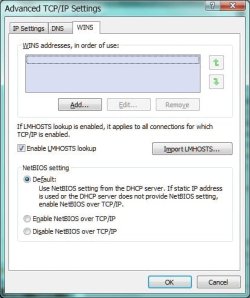
These are the images from the TCP/IPv4 settings and its 3 advanced tabs. The first IP address is Comodo’s, but the alternate doesn’t load.

TCP-IP4_1.JPG TCP-IP4_2.JPG

TCP-IP4_3.JPG TCP-IP4_4.JPG

However, the problem with the SFC remains, I don’t know how.It is prior to taking the image, but it is new. Maybe it has the same origin from uninstalling Comodo, but I don’t know. The scannow result is the same:
Windows Resource Protection found corrupt files but was unable to fix some of them.
I scanned three times with the same result at the end. I am attaching the log file because the command to get the sfcdetails.txt on the desktop as in the tutorial doesn't work for me. What files do I have to replace?
 
Last edited:

My Computer

Computer type
PC/Desktop
Computer Manufacturer/Model Number
Home assembled
OS
Windows 7 Ultimate 64-bit SP1
CPU
AMD Athlon 64 II X3 440
Motherboard
M4A785TD-V EVO
Memory
Kingston kit 4GB DDR3 1333MHz (KVR1333D3N9K2/4)
Monitor(s) Displays
ASUS AS VH198S
Screen Resolution
1440x900
Hard Drives
Crucial MX300 2.5" SSD SATA,
Western Digital Caviar Black WD1002FAEX SATA-III,
Samsung HD161HJ SATA-II,
Seagate Barracuda ST3120022A ATA,
Western Digital WD800BB ATA.
Case
Standard
Cooling
Standard
Keyboard
Safeway SW-20
Mouse
Logitech Anywhere, Logitech MX Anywhere 2S, Technet M006
Internet Speed
130 Mbs fiber
Antivirus
Avast Premier
Browser
Firefox, Ice Dragon and Opera
Other Info
PCI ATA-133 Adapter,
Parallel Port Card PCI - PU005V2.

My Computer

Computer type
PC/Desktop
Computer Manufacturer/Model Number
Home built
OS
Windows 7 Ult, Windows 8.1 Pro,
CPU
Q9650-4.275GHz, E8600 4.5GHz, E6750-3.8GHz
Motherboard
Evga 780i FTW
Memory
G.Skill PC2 9600 1200Mhz 5 5 5 15 2T
Graphics Card(s)
GTX480
Sound Card
Asus Xonar D2
Monitor(s) Displays
HannsG
Screen Resolution
1680X1050
Hard Drives
GSkill Phoenix Pro 120GB SSD
PSU
ThermalTake Toughpower 1000Watt modular
Case
ThermalTake XaserV
Cooling
Xigmatek S1283
Keyboard
Logitech G15
Mouse
Logitech G9
Internet Speed
T1
I followed the instruction, but finished with Little Registry Cleaner from SourceForge. However, the browser keeps jumping to Comodo's site (example), replacing the sites or browsers error pages with their ad index and useless information.

It did not change anything with TCP/IPv4 settings, which are still the same as on the images on my last post. After reimaging I am at the point when I uninstalled Comodo with Revo. Later, when I found that thing about the browser, I tried to clean the registry with LRC with no effect just as now. I need to reset the TCP/IPv4 settings. I Thanks for trying.
 

My Computer

Computer type
PC/Desktop
Computer Manufacturer/Model Number
Home assembled
OS
Windows 7 Ultimate 64-bit SP1
CPU
AMD Athlon 64 II X3 440
Motherboard
M4A785TD-V EVO
Memory
Kingston kit 4GB DDR3 1333MHz (KVR1333D3N9K2/4)
Monitor(s) Displays
ASUS AS VH198S
Screen Resolution
1440x900
Hard Drives
Crucial MX300 2.5" SSD SATA,
Western Digital Caviar Black WD1002FAEX SATA-III,
Samsung HD161HJ SATA-II,
Seagate Barracuda ST3120022A ATA,
Western Digital WD800BB ATA.
Case
Standard
Cooling
Standard
Keyboard
Safeway SW-20
Mouse
Logitech Anywhere, Logitech MX Anywhere 2S, Technet M006
Internet Speed
130 Mbs fiber
Antivirus
Avast Premier
Browser
Firefox, Ice Dragon and Opera
Other Info
PCI ATA-133 Adapter,
Parallel Port Card PCI - PU005V2.
Let's see if this batch file works ... I think Comodo (don't know for sure) may still be hooked to the Layered Service Provider (LSP)

Copy and paste these lines in Note pad.

@Echo on
pushd\windows\system32\drivers\etc
attrib -h -s -r hosts
echo 127.0.0.1 localhost>HOSTS
attrib +r +h +s hosts
popd
ipconfig /release
ipconfig /renew
ipconfig /flushdns
netsh winsock reset all
netsh int ip reset all
shutdown -r -t 1
del %0


Save as flush.bat to your desktop.
Double click on the flush.bat file to run it.Vista and Windows 7... right click the .bat file and choose to run as Administrator. Your computer will reboot itself.

Let us know if that worked or not.
 

My Computer

Computer type
PC/Desktop
Computer Manufacturer/Model Number
Bruce ... somewhere in his 40's
OS
Windows 7 Ultimate 32bit SP1
CPU
Intel(R) Core(TM)2 Quad CPU @ 2.40GHz, 2400 MHz
Motherboard
INTEL/D975XBX2
Memory
4 GB
Graphics Card(s)
ATI Radeon HD 2600 Pro
Monitor(s) Displays
Samsung SyncMaster 914v
Screen Resolution
1280 x 1024
Hard Drives
2/500GB each ... ST3500630AS ATA Device.
One is not connected
PSU
Rocketfish 700 W
Case
G.Skill Gigabyte Chassis
Keyboard
Standard PS/2 Keyboard
Mouse
Microsoft PS/2 Mouse
Internet Speed
DSL
Antivirus
Avira Internet Security
Browser
IE 11
Other Info
ATI HDMI Audio
Pity, Jacee, nothing changed, all settings are still as the snapshots on my post, and the browser too.

While the batch file was working there was a short pause where I could glance that some command could not because because something that was active. I didn't have the time to read it.
 

My Computer

Computer type
PC/Desktop
Computer Manufacturer/Model Number
Home assembled
OS
Windows 7 Ultimate 64-bit SP1
CPU
AMD Athlon 64 II X3 440
Motherboard
M4A785TD-V EVO
Memory
Kingston kit 4GB DDR3 1333MHz (KVR1333D3N9K2/4)
Monitor(s) Displays
ASUS AS VH198S
Screen Resolution
1440x900
Hard Drives
Crucial MX300 2.5" SSD SATA,
Western Digital Caviar Black WD1002FAEX SATA-III,
Samsung HD161HJ SATA-II,
Seagate Barracuda ST3120022A ATA,
Western Digital WD800BB ATA.
Case
Standard
Cooling
Standard
Keyboard
Safeway SW-20
Mouse
Logitech Anywhere, Logitech MX Anywhere 2S, Technet M006
Internet Speed
130 Mbs fiber
Antivirus
Avast Premier
Browser
Firefox, Ice Dragon and Opera
Other Info
PCI ATA-133 Adapter,
Parallel Port Card PCI - PU005V2.
Download DDS from one of these links:
DDS.com
DDS.pif
  • Disable any script blocking protection
  • Double click the dds icon to run the tool.
  • When done, DDS will open two (2) logs:
    1. DDS.txt
    2. Attach.txt <--- will be minimized in the task tray
  • Save both reports to your desktop.
Include the contents of both logs in your next post.
The scan will instruct you to post Attach.txt as an attachment.
 

My Computer

Computer type
PC/Desktop
Computer Manufacturer/Model Number
Bruce ... somewhere in his 40's
OS
Windows 7 Ultimate 32bit SP1
CPU
Intel(R) Core(TM)2 Quad CPU @ 2.40GHz, 2400 MHz
Motherboard
INTEL/D975XBX2
Memory
4 GB
Graphics Card(s)
ATI Radeon HD 2600 Pro
Monitor(s) Displays
Samsung SyncMaster 914v
Screen Resolution
1280 x 1024
Hard Drives
2/500GB each ... ST3500630AS ATA Device.
One is not connected
PSU
Rocketfish 700 W
Case
G.Skill Gigabyte Chassis
Keyboard
Standard PS/2 Keyboard
Mouse
Microsoft PS/2 Mouse
Internet Speed
DSL
Antivirus
Avira Internet Security
Browser
IE 11
Other Info
ATI HDMI Audio
Hello Jacee, thank you for trying. I hope this will allow you to help.

Here are the resulting files. I thought file dds.txt, with some uncompressed 27KB, bigger then attach.txt (16KB), was a bit too long to post it in the post body, so I attached it too. If you want any change, please say so.

I read some references to Comodo close to the beginning of attach.txt, under "Disabled Device Manager Items", but cannot find it in the computer. Also, their IP numbers, as they appear on the TCP/IP images of my post, are there. AMD Fuel is mentioned as a started service, but I have not that; it does appear on Task Maneger as stopped, and if clicked to start it says it can't find the file. I didn't read anything else. Please, remember that I installed a saved image less than two days ago, as mentioned on my post with the TCP/IP images.

Thanks again.
 

Attachments

My Computer

Computer type
PC/Desktop
Computer Manufacturer/Model Number
Home assembled
OS
Windows 7 Ultimate 64-bit SP1
CPU
AMD Athlon 64 II X3 440
Motherboard
M4A785TD-V EVO
Memory
Kingston kit 4GB DDR3 1333MHz (KVR1333D3N9K2/4)
Monitor(s) Displays
ASUS AS VH198S
Screen Resolution
1440x900
Hard Drives
Crucial MX300 2.5" SSD SATA,
Western Digital Caviar Black WD1002FAEX SATA-III,
Samsung HD161HJ SATA-II,
Seagate Barracuda ST3120022A ATA,
Western Digital WD800BB ATA.
Case
Standard
Cooling
Standard
Keyboard
Safeway SW-20
Mouse
Logitech Anywhere, Logitech MX Anywhere 2S, Technet M006
Internet Speed
130 Mbs fiber
Antivirus
Avast Premier
Browser
Firefox, Ice Dragon and Opera
Other Info
PCI ATA-133 Adapter,
Parallel Port Card PCI - PU005V2.

My Computer

Computer type
PC/Desktop
Computer Manufacturer/Model Number
Home built
OS
Windows 7 Ult, Windows 8.1 Pro,
CPU
Q9650-4.275GHz, E8600 4.5GHz, E6750-3.8GHz
Motherboard
Evga 780i FTW
Memory
G.Skill PC2 9600 1200Mhz 5 5 5 15 2T
Graphics Card(s)
GTX480
Sound Card
Asus Xonar D2
Monitor(s) Displays
HannsG
Screen Resolution
1680X1050
Hard Drives
GSkill Phoenix Pro 120GB SSD
PSU
ThermalTake Toughpower 1000Watt modular
Case
ThermalTake XaserV
Cooling
Xigmatek S1283
Keyboard
Logitech G15
Mouse
Logitech G9
Internet Speed
T1
Download AdWareCleaner http://www.bleepingcomputer.com/download/adwcleaner/ to your desktop
1.Right-click on adwcleaner.exe and select Run As Administrator to launch the application.
2.Click on Delete button.
3.Confirm each time with OK.
4.Your computer will be rebooted automatically. A text file will open after the restart. Please post the content of that logfile in your reply.
Note: You can find the logfile at C:\AdwCleaner[Sn].txt as well - n is the order number. Please don't attach a .zip file ....just copy and paste the text. :)
AdwareCleaner.jpg


TCP: Interfaces\{0EB7A342-9BC4-4D11-836E-AB6C59B0B7C9} : NameServer = 8.26.56.26 <-- this is Comodo
 

My Computer

Computer type
PC/Desktop
Computer Manufacturer/Model Number
Bruce ... somewhere in his 40's
OS
Windows 7 Ultimate 32bit SP1
CPU
Intel(R) Core(TM)2 Quad CPU @ 2.40GHz, 2400 MHz
Motherboard
INTEL/D975XBX2
Memory
4 GB
Graphics Card(s)
ATI Radeon HD 2600 Pro
Monitor(s) Displays
Samsung SyncMaster 914v
Screen Resolution
1280 x 1024
Hard Drives
2/500GB each ... ST3500630AS ATA Device.
One is not connected
PSU
Rocketfish 700 W
Case
G.Skill Gigabyte Chassis
Keyboard
Standard PS/2 Keyboard
Mouse
Microsoft PS/2 Mouse
Internet Speed
DSL
Antivirus
Avira Internet Security
Browser
IE 11
Other Info
ATI HDMI Audio
BTW .... did you add Comodo to TeamViewer?
 

My Computer

Computer type
PC/Desktop
Computer Manufacturer/Model Number
Bruce ... somewhere in his 40's
OS
Windows 7 Ultimate 32bit SP1
CPU
Intel(R) Core(TM)2 Quad CPU @ 2.40GHz, 2400 MHz
Motherboard
INTEL/D975XBX2
Memory
4 GB
Graphics Card(s)
ATI Radeon HD 2600 Pro
Monitor(s) Displays
Samsung SyncMaster 914v
Screen Resolution
1280 x 1024
Hard Drives
2/500GB each ... ST3500630AS ATA Device.
One is not connected
PSU
Rocketfish 700 W
Case
G.Skill Gigabyte Chassis
Keyboard
Standard PS/2 Keyboard
Mouse
Microsoft PS/2 Mouse
Internet Speed
DSL
Antivirus
Avira Internet Security
Browser
IE 11
Other Info
ATI HDMI Audio
Back
Top