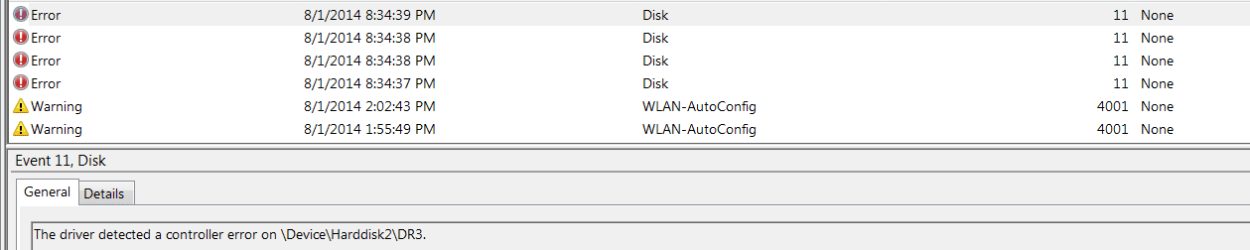
The driver detected a controller error on \Device\Harddisk2\DR3.

julio99

New member
Member
Local time
2:21 PM
Messages
83
Location
Canada
This error has to be the most frustrating I have yet to come across. There are tons of writings on this but you never really get anywhere that is understandable to me and most of the folks that have had the same error. I know what device that is causing this because it only happens when I have either my Verbatim external drive or any one of 5 different USB sticks. I am running Windows 7 x64 with a Corsair 220 gb SSD. I have a second hard drive which is all data. I call it my D:\Drive. Everything in Event Viewer is great until one of the USB or Verbatim external drive is plugged in and then the errors start. I have run chk /dsk on all USB's and the external drive and no help. There are no BSODs or Hangs or boot problems, so you may ask why I'm concerned. Well I believe there has to be some sort of explanation for this error and I really would love to get to the bottom of it before it is an issue. It's strange that all the articles from Microsoft that concern this really say nothing. Nothing simple anyway. If anyone is familiar with this error and what it really means please let me know. I actually took this to a repair tech and he said if it's not giving me problems don't bother with it. Glad I didn't have to pay for that.:eek:
 

Attachments

  • ERROR 11.PNG
    ERROR 11.PNG
    18.8 KB · Views: 4

My Computer

Computer type
Laptop
Computer Manufacturer/Model Number
Acer 8943g
OS
Windows 7 home premium x64
CPU
Core i5-430M
Motherboard
Acer SM83-CP
Memory
8gb
Graphics Card(s)
Mobility Radeo 5650
Monitor(s) Displays
Generic
Screen Resolution
1920x1080
Hard Drives
Samsung HM641jI
Corsair SSD
Antivirus
ESET AV V7
Hard disk 2 would be your third hard disk, or potentially the USB disk. There might be a problem with the USB driver, or hardware (controller).

Have you tried plugging in the USB drives into other USB ports on the machine? Do you have another computer that you could plug these devices into? That would rule out damaged USB devices that may have been damaged by a faulty port on your PC.
 

My Computer

Computer type
PC/Desktop
Computer Manufacturer/Model Number
Mellon Labs (custom build)
OS
Win 7 Pro x64/Win 10 Pro x64 dual boot
CPU
AMD FX 8350 Vishera @ 4200
Motherboard
ASUS M5A97 R2.0
Memory
16 GB Mushkin Blackline DDR3-2400 @ 1866 (9-10-10-10-31)
Graphics Card(s)
XFX Radeon R9 280 Double D Black Edition
Sound Card
Realtek HD Audio on MB. Sounds great.
Monitor(s) Displays
Acer 24", Acer 22"
Screen Resolution
3840 x 1080
Hard Drives
1 x Mushkin Chronos 120 GB SSD (Win 10)
1 x Samsung 850 EVO 250 GB SSD (Win 7)
1 x WD 1TB SATA Blue
1 x WD 1TB SATA Green
PSU
Corsair TX-750
Case
CoolerMaster HAF 912+
Cooling
Coolermaster Seidon 240M Liquid AIO. 6 case fans
Keyboard
Logitech G710+
Mouse
Logitech G500s
Internet Speed
Much better since I got fiber, but still way overpriced.
Antivirus
MSE, Malware Bytes for scanning
Browser
Firefox
Other Info
Corsair VOID USB headphones.

A Mellon Labs X-1 - LCD Smartie driven system status display.

Brought to you by the letter E
Ok. Had to do some testing and here is pretty much what I found. At this time, none of the other times, strictly today I tested all the USB sticks and the external drive and I went to my little 15" ACER x86 and none of the usbs reacted with the error and on my 18.4" ACER x64 the only USB stick that reacted this time was the Cruzer/Sandisk 4GB USB stick. Very strange that this one is the only one that is still popping that error. By the way the Stick is formatted to FAT32
 

My Computer

Computer type
Laptop
Computer Manufacturer/Model Number
Acer 8943g
OS
Windows 7 home premium x64
CPU
Core i5-430M
Motherboard
Acer SM83-CP
Memory
8gb
Graphics Card(s)
Mobility Radeo 5650
Monitor(s) Displays
Generic
Screen Resolution
1920x1080
Hard Drives
Samsung HM641jI
Corsair SSD
Antivirus
ESET AV V7
I would try not using that Sandisk Cruzer for a while and see if the error comes back with the USB sticks and the drive.
 

My Computer

Computer type
PC/Desktop
Computer Manufacturer/Model Number
Mellon Labs (custom build)
OS
Win 7 Pro x64/Win 10 Pro x64 dual boot
CPU
AMD FX 8350 Vishera @ 4200
Motherboard
ASUS M5A97 R2.0
Memory
16 GB Mushkin Blackline DDR3-2400 @ 1866 (9-10-10-10-31)
Graphics Card(s)
XFX Radeon R9 280 Double D Black Edition
Sound Card
Realtek HD Audio on MB. Sounds great.
Monitor(s) Displays
Acer 24", Acer 22"
Screen Resolution
3840 x 1080
Hard Drives
1 x Mushkin Chronos 120 GB SSD (Win 10)
1 x Samsung 850 EVO 250 GB SSD (Win 7)
1 x WD 1TB SATA Blue
1 x WD 1TB SATA Green
PSU
Corsair TX-750
Case
CoolerMaster HAF 912+
Cooling
Coolermaster Seidon 240M Liquid AIO. 6 case fans
Keyboard
Logitech G710+
Mouse
Logitech G500s
Internet Speed
Much better since I got fiber, but still way overpriced.
Antivirus
MSE, Malware Bytes for scanning
Browser
Firefox
Other Info
Corsair VOID USB headphones.

A Mellon Labs X-1 - LCD Smartie driven system status display.

Brought to you by the letter E
I would try not using that Sandisk Cruzer for a while and see if the error comes back with the USB sticks and the drive.

That is about all I can do. You see how many people usually write in these forums and you are the only one that stepped up here. The amount of reading I have done on this error and I just can't get to the bottom of it so we'll leave it as it is and that's good. I won't be using the Sandisk Cruzer at all except to clear the Data on it to another USB.
 

My Computer

Computer type
Laptop
Computer Manufacturer/Model Number
Acer 8943g
OS
Windows 7 home premium x64
CPU
Core i5-430M
Motherboard
Acer SM83-CP
Memory
8gb
Graphics Card(s)
Mobility Radeo 5650
Monitor(s) Displays
Generic
Screen Resolution
1920x1080
Hard Drives
Samsung HM641jI
Corsair SSD
Antivirus
ESET AV V7
Let me know if the problem comes back with the other drives. Maybe there's something else we can try if it does.
 

My Computer

Computer type
PC/Desktop
Computer Manufacturer/Model Number
Mellon Labs (custom build)
OS
Win 7 Pro x64/Win 10 Pro x64 dual boot
CPU
AMD FX 8350 Vishera @ 4200
Motherboard
ASUS M5A97 R2.0
Memory
16 GB Mushkin Blackline DDR3-2400 @ 1866 (9-10-10-10-31)
Graphics Card(s)
XFX Radeon R9 280 Double D Black Edition
Sound Card
Realtek HD Audio on MB. Sounds great.
Monitor(s) Displays
Acer 24", Acer 22"
Screen Resolution
3840 x 1080
Hard Drives
1 x Mushkin Chronos 120 GB SSD (Win 10)
1 x Samsung 850 EVO 250 GB SSD (Win 7)
1 x WD 1TB SATA Blue
1 x WD 1TB SATA Green
PSU
Corsair TX-750
Case
CoolerMaster HAF 912+
Cooling
Coolermaster Seidon 240M Liquid AIO. 6 case fans
Keyboard
Logitech G710+
Mouse
Logitech G500s
Internet Speed
Much better since I got fiber, but still way overpriced.
Antivirus
MSE, Malware Bytes for scanning
Browser
Firefox
Other Info
Corsair VOID USB headphones.

A Mellon Labs X-1 - LCD Smartie driven system status display.

Brought to you by the letter E
Every time you connect a new storage device Windows will install a driver for it. This 'driver' essentially identifies the unique device and tells the controller how to communicate with it. If the device does not behave exactly as the controller expects, or vice versa, then it gets chalked up as an error.

If this only happens with the Sandisk stick, or after using the Sandisk stick, then it could be that the stick is simply not following proper communications protocol. Something Sandisk has been having trouble with recently.

These errors can be ignored if it is the case of miscommunication. But if it were to happen with different drives independently then it might indicate a controller driver corruption requiring the reinstallation of either the USB controller drivers or the SATA controller drivers (in the case of errors with internal hard drives).
 

My Computer

Computer type
PC/Desktop
Computer Manufacturer/Model Number
Home Built - Jan 2013
OS
Windows 7 64 Bit Home Premium SP1
CPU
i7-3820
Motherboard
Asus P9X79-PRO - Bios 4608
Memory
GSkill F3-14900CL9Q - 16GB
Graphics Card(s)
EVGA GeForce GTX660 - Driver 352.86
Sound Card
On board Realtek ALC898
Monitor(s) Displays
Acer S271HL
Screen Resolution
1920 x 1080
Hard Drives
#1- Samsung 840 Pro Series
#2- Western Digital WD1002FAEX Sata3 Black
#3- Western Digital WD1002FAEX Sata3 Black
PSU
Corsair CMPSU-850TX-V2 - 850 watt (by Seasonic)
Case
Corsair Obsidian 550D
Cooling
Standard 3 120mm case fans, Cooler Master Hyper 212 EVO
Keyboard
MS KC-0405
Mouse
Intellimouse 5-button
Internet Speed
56 Mbits/Sec (on a good day)
Antivirus
Avast & Malwarebytes
Browser
Firefox
Other Info
Asus DVD - DRW-24B1ST 24X
I'm posting this same info to the top few search results on Google...

I spent many, many hours researching and testing to find a solution to the Event ID 11 (“The driver detected a controller error on \Device\Harddisk...”) errors in the Event Viewer as well as other related errors and it taking several minutes for a drive letter to be assigned to a USB thumb drive after insertion.

If you encounter this issue when inserting a USB thumb drive in a Win7 PC, disable Autoplay via:

gpedit.msc Computer Configuration->Administrator Templates->Window Components->Autoplay Policies->Turn off Autoplay
 

My Computer

OS
Windows 7 Ultimate x64
"...gpedit.msc Computer Configuration->Administrator Templates->Window Components->Autoplay Policies->Turn off Autoplay..."
Would that also affect autoplay across the board, i.e., no more simply inserting a DVD and having it acted upon by a designated program?
 

My Computer

Computer type
PC/Desktop
Computer Manufacturer/Model Number
Antec desktop; Acer Aspire laptops
OS
Windows 7 Professional 64-bit
CPU
Desktop i5; Acers i5 & i7
Memory
desktop 16GB; 1 Acer 8GB & 1 Acer 16GB
Hard Drives
1TB split into 2 equal partitions [OS and data] usable by RJS
Internet Speed
AT&T DSL
Browser
FF, GChrome, msIE
Other Info
Windows 7 Firewall, Emsisoft AM/AV, MSE [scan-only], SpywareBlaster, Ruiware/BillP combine
"Would that also affect autoplay across the board, i.e., no more simply inserting a DVD and having it acted upon by a designated program?

It does just as it says... It turns off Autoplay, period. I don't use DVD's or CD's anymore so it does not matter to me. As far as I know, there is no way to disable Autoplay for USB devices, only.

I added my post to help those that have encountered the originally reported issue with USB devices. Autoplay is the culprit (for me at least). I have wasted time and money on this issue. I bought new hardware and installed Windows several times before figuring out that Autoplay is causing the issue.

If you are experiencing this issue with USB devices and you need Autoplay for DVD's and CD's, then what I suggested may not be a solution for you.
 

My Computer

OS
Windows 7 Ultimate x64
Thanks for the info, Jeff! I will remember those things :)
 

My Computer

Computer type
PC/Desktop
Computer Manufacturer/Model Number
Antec desktop; Acer Aspire laptops
OS
Windows 7 Professional 64-bit
CPU
Desktop i5; Acers i5 & i7
Memory
desktop 16GB; 1 Acer 8GB & 1 Acer 16GB
Hard Drives
1TB split into 2 equal partitions [OS and data] usable by RJS
Internet Speed
AT&T DSL
Browser
FF, GChrome, msIE
Other Info
Windows 7 Firewall, Emsisoft AM/AV, MSE [scan-only], SpywareBlaster, Ruiware/BillP combine
Back
Top