the explorer process crashing

beeski

New member
Local time
5:21 AM
Messages
10
recently, i have been experiencing frequent crashes of the explorer.exe process under win7 x64. i have since run various malware scans, including microsoft's own, checked for corrupt win 7 files, as well as googled on the issue a little bit. i've found some reports associating this issue with shell extension conflicts, and have done some very minor tweaking using shellex, but as i am not sure what i should really be looking for, i have not come up with a fix yet.

i would really appreciate any tips on solving this.

thank you!
 

My Computer

Computer type
PC/Desktop
Computer Manufacturer/Model Number
custom build
OS
Microsoft Windows 7 Enterprise 64-bit
CPU
Intel(R) Core(TM)2 Quad CPU Q9550 @ 2.83GHz
Motherboard
ASUSTeK Computer INC. P5P43TD PRO
Memory
12.00 GB
Graphics Card(s)
AMD Radeon HD 5450
Sound Card
PCI audio interface
Screen Resolution
1:2560x1440x 2 bits(4294967296 colors)@60Hz 2: 1920x1200
Hard Drives
INTEL SSDSC2CW180A3
SAMSUNG HD103SJ
SAMSUNG HD103UJ
SAMSUNG HD103UJ
Browser
Chrome
Please follow the Easy System specs link in my signature below and
elaborate on what the shell tweaks were done and what utiltiy or method was employed

Thanks
 

My Computer

Computer type
Laptop
Computer Manufacturer/Model Number
HP Pavilion dv6-6c10us
OS
x64 (6.3.9600) Win8.1 Pro & soon dual boot x64 (6.1.7601) Win7_SP1 HomePrem
CPU
AMD A6-3420M APU with Radeon(tm) HD Graphics
Motherboard
Hewlett-Packard 1805
Memory
6.00 GB
Graphics Card(s)
AMD Radeon(TM) HD 6520G
Sound Card
(1) AMD High Definition Audio Device (2) IDT High Definiti
Monitor(s) Displays
HP W2072a 20" LCD (1600 x 900) @ 60 Hz
Screen Resolution
1366 x 768 x 32 bits (4294967296 colors) @ 60 Hz
Hard Drives
ST640LM0 00 HM641JI SATA Disk Device
Keyboard
Logitech k520 wireless KB
Mouse
Logitech m320 wireless mouse (bundled with KB)
Internet Speed
15/5 | 54 MB Wireless 'n'
Antivirus
Realtime: Defender or Avast | On-demand: Malwarebytes, ESET
Browser
IE 11 on Win8, IE 10 on win 7
Other Info
Media: [Gimp, Audacity, VLC] || Comm: [WEmail 2012, Skype] || Productivity: [OpenOffice,| Textpad] || Utils: [Sysinternals, cCleaner, Speccy, Defraggler]
thank you.

i have filled out the sys specs based on the tool you provided.

as regards the shell tweaks-- i used the shellEx x64 tool, and i believe these are extension names i disabled:

acronis secure zone
acronis true image shell context menu extension
VersionsPageSHellExt Class (also related to acronis)
BRU context menu handler (bulk rename utility)
MBAMShlExt Class (malware bytes)

in laymen's terms, shellex is showing a couple of other extensions as 'not disabled', albeit with a pink background; and i am unsure what that is an indication of. those are winrar's extensions, 'shell extension (x64) for altap servant salamander', 'microsoft XPS rich preview handler', a bunch of dropbox's extensions, and a 'sorcerer shell extensio' (sic).
 

My Computer

Computer type
PC/Desktop
Computer Manufacturer/Model Number
custom build
OS
Microsoft Windows 7 Enterprise 64-bit
CPU
Intel(R) Core(TM)2 Quad CPU Q9550 @ 2.83GHz
Motherboard
ASUSTeK Computer INC. P5P43TD PRO
Memory
12.00 GB
Graphics Card(s)
AMD Radeon HD 5450
Sound Card
PCI audio interface
Screen Resolution
1:2560x1440x 2 bits(4294967296 colors)@60Hz 2: 1920x1200
Hard Drives
INTEL SSDSC2CW180A3
SAMSUNG HD103SJ
SAMSUNG HD103UJ
SAMSUNG HD103UJ
Browser
Chrome

My Computer

Computer type
PC/Desktop
Computer Manufacturer/Model Number
Skylake Special #666
OS
Windows 10 Pro x64
CPU
Intel Core i7 6700K
Motherboard
Asus Sabertooth Z170 Mark 1
Memory
GSkill TridentZ RGB 16GB 3600 16-16-16-36
Graphics Card(s)
EVGA GTX 980 Ti SC x2
Sound Card
Realtek High Definition
Monitor(s) Displays
AOC G2460PG
Screen Resolution
1920 x 1080 144Hz
Hard Drives
Samsung 860 Pro 256GB, Seagate Barracuda 4TB x2
PSU
EVGA 1000 P2, EVGA White Custom Braided Cables
Case
Corsair Vengeance C70 Gunmetal Black
Cooling
Corsair H100i v2, Corsair ML120 x2, Thermal Grizzly Kryonaut
Keyboard
Logitech G910 Orion Spectrum
Mouse
Logitech G700s
Internet Speed
Verizon Fios Quantum Gateway 75/75
Antivirus
Windows Defender, Malwarebytes Free 3.8.3
Browser
Chrome
Other Info
Corsair SP120 x4, LG Blu-ray Drive, Durabrand HT-395 100 Watt Dolby Digital Amp, Corsair H2100 Wireless 7.1 Headset
thank you!

i've run the test and it did indeed come up (and reset) some files; unfortunately the cmd shell closed so i cannot tell what the affected file(s) were (edit: unless this gets logged somewhere - ?)

i will have to see now if the issue continues to show...

thank you again.
 

My Computer

Computer type
PC/Desktop
Computer Manufacturer/Model Number
custom build
OS
Microsoft Windows 7 Enterprise 64-bit
CPU
Intel(R) Core(TM)2 Quad CPU Q9550 @ 2.83GHz
Motherboard
ASUSTeK Computer INC. P5P43TD PRO
Memory
12.00 GB
Graphics Card(s)
AMD Radeon HD 5450
Sound Card
PCI audio interface
Screen Resolution
1:2560x1440x 2 bits(4294967296 colors)@60Hz 2: 1920x1200
Hard Drives
INTEL SSDSC2CW180A3
SAMSUNG HD103SJ
SAMSUNG HD103UJ
SAMSUNG HD103UJ
Browser
Chrome
Windows\logs\CBS\CBS.log

See OPTION THREE of tutorial "How to See and Read....from the CBS.log"
 

My Computer

Computer type
Laptop
Computer Manufacturer/Model Number
HP Pavilion dv6-6c10us
OS
x64 (6.3.9600) Win8.1 Pro & soon dual boot x64 (6.1.7601) Win7_SP1 HomePrem
CPU
AMD A6-3420M APU with Radeon(tm) HD Graphics
Motherboard
Hewlett-Packard 1805
Memory
6.00 GB
Graphics Card(s)
AMD Radeon(TM) HD 6520G
Sound Card
(1) AMD High Definition Audio Device (2) IDT High Definiti
Monitor(s) Displays
HP W2072a 20" LCD (1600 x 900) @ 60 Hz
Screen Resolution
1366 x 768 x 32 bits (4294967296 colors) @ 60 Hz
Hard Drives
ST640LM0 00 HM641JI SATA Disk Device
Keyboard
Logitech k520 wireless KB
Mouse
Logitech m320 wireless mouse (bundled with KB)
Internet Speed
15/5 | 54 MB Wireless 'n'
Antivirus
Realtime: Defender or Avast | On-demand: Malwarebytes, ESET
Browser
IE 11 on Win8, IE 10 on win 7
Other Info
Media: [Gimp, Audacity, VLC] || Comm: [WEmail 2012, Skype] || Productivity: [OpenOffice,| Textpad] || Utils: [Sysinternals, cCleaner, Speccy, Defraggler]
Possible cause

I can't say that I'm an expert on this but I did have the same issue "Windows explorer has stopped working" and after some research found that it could be down to a whole range of issues. I decided that the most likely cause was a corrupt media (image or video) file somewhere on the HD. That's just one possible cause that you could investigate. I'm sure that other forum members will help you check out the other possible causes.

After checking all jpeg image files for corruption the problem remained so I moved all personal image and video files onto another HD and since then I've been problem free.

See: Error: Windows Explorer has stopped working

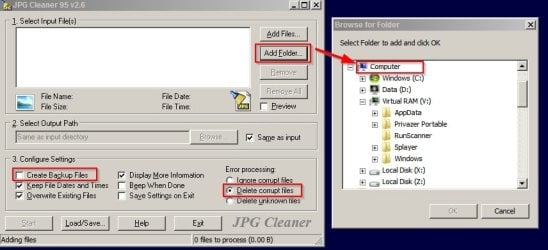
You can use JPG Cleaner to scan for and bulk delete corrupt jpeg files:

Rainbow Software - Programs

Download link is hard to spot. It's in the blue box below the description.

Settings that I used:

JPG Cleaner.jpg

I didn't manage to find a similar method to deal with other image file formats or video files. I just moved any folders of images or videos that I had personally created off my hard drive onto an external one.

This might not help in your case but in my case it did indeed solve the problem.

Good Luck!
 

My Computer

Computer type
Laptop
Computer Manufacturer/Model Number
ASUS
OS
Microsoft Windows 7 Home Premium 64-bit 7601 Multiprocessor Free Service Pack 1
CPU
AMD C-60 APU with Radeon(tm) HD Graphics
Motherboard
ASUSTeK COMPUTER INC. X501U
Memory
4.00 GB
Graphics Card(s)
AMD Radeon HD 6290 Graphics
Sound Card
(1) AMD High Definition Audio Device (2) Realtek High Defi
Screen Resolution
1366 x 768 x 32 bits (4294967296 colors) @ 60 Hz
Hard Drives
Hitachi HTS545050A7E380 SATA Disk Device
Antivirus
Comodo CIS & FW, SecureAplus App Whitelisting, Threatfire
Browser
Cyberfox 64bit, Opera 64bit, Airfox
Other Info
Spy-The-Spy, HitmanPro.Alert, Norton Connect Safe, MJRegWatcher, BitDefender TrafficLight, Voodoo Shield, Zemana AntiMalware
I can't say that I'm an expert on this but I did have the same issue "Windows explorer has stopped working" and after some research found that it could be down to a whole range of issues. I decided that the most likely cause was a corrupt media (image or video) file somewhere on the HD. That's just one possible cause that you could investigate. I'm sure that other forum members will help you check out the other possible causes.

After checking all jpeg image files for corruption the problem remained so I moved all personal image and video files onto another HD and since then I've been problem free.

See: Error: Windows Explorer has stopped working

You can use JPG Cleaner to scan for and bulk delete corrupt jpeg files:

Rainbow Software - Programs

Download link is hard to spot. It's in the blue box below the description.

Settings that I used:

View attachment 300908

I didn't manage to find a similar method to deal with other image file formats or video files. I just moved any folders of images or videos that I had personally created off my hard drive onto an external one.

This might not help in your case but in my case it did indeed solve the problem.

Good Luck!

thank you very much for the detailed response! i have to admit however that this explanation seems most unusual to me (i'd understand a corrupt .dll or other piece of code is critical, but a random jpg file that may not even be accessed, seems so very strange to me!).

i will keep it in mind though, and failing the system file checker scan i just did, i can try it.
 

My Computer

Computer type
PC/Desktop
Computer Manufacturer/Model Number
custom build
OS
Microsoft Windows 7 Enterprise 64-bit
CPU
Intel(R) Core(TM)2 Quad CPU Q9550 @ 2.83GHz
Motherboard
ASUSTeK Computer INC. P5P43TD PRO
Memory
12.00 GB
Graphics Card(s)
AMD Radeon HD 5450
Sound Card
PCI audio interface
Screen Resolution
1:2560x1440x 2 bits(4294967296 colors)@60Hz 2: 1920x1200
Hard Drives
INTEL SSDSC2CW180A3
SAMSUNG HD103SJ
SAMSUNG HD103UJ
SAMSUNG HD103UJ
Browser
Chrome
I personally stay away from so-called cleaners. No one knows what might be causing this yet. But, you did spark something in this old man's head.

Beeski
- after complying with Addram's request and any subsequent follow up requests,
you might try rebuilding the search index
http://www.sevenforums.com/tutorials/17880-index-rebuild.html
 

My Computer

Computer type
Laptop
Computer Manufacturer/Model Number
HP Pavilion dv6-6c10us
OS
x64 (6.3.9600) Win8.1 Pro & soon dual boot x64 (6.1.7601) Win7_SP1 HomePrem
CPU
AMD A6-3420M APU with Radeon(tm) HD Graphics
Motherboard
Hewlett-Packard 1805
Memory
6.00 GB
Graphics Card(s)
AMD Radeon(TM) HD 6520G
Sound Card
(1) AMD High Definition Audio Device (2) IDT High Definiti
Monitor(s) Displays
HP W2072a 20" LCD (1600 x 900) @ 60 Hz
Screen Resolution
1366 x 768 x 32 bits (4294967296 colors) @ 60 Hz
Hard Drives
ST640LM0 00 HM641JI SATA Disk Device
Keyboard
Logitech k520 wireless KB
Mouse
Logitech m320 wireless mouse (bundled with KB)
Internet Speed
15/5 | 54 MB Wireless 'n'
Antivirus
Realtime: Defender or Avast | On-demand: Malwarebytes, ESET
Browser
IE 11 on Win8, IE 10 on win 7
Other Info
Media: [Gimp, Audacity, VLC] || Comm: [WEmail 2012, Skype] || Productivity: [OpenOffice,| Textpad] || Utils: [Sysinternals, cCleaner, Speccy, Defraggler]
Please attach sfcdetails.txt to a new post and someone will take a look

Use the paperclip icon on the menu above a post window to attach the file
..... i will keep it in mind though, and failing the system file checker scan i just did, i can try it.
 

My Computer

Computer type
Laptop
Computer Manufacturer/Model Number
HP Pavilion dv6-6c10us
OS
x64 (6.3.9600) Win8.1 Pro & soon dual boot x64 (6.1.7601) Win7_SP1 HomePrem
CPU
AMD A6-3420M APU with Radeon(tm) HD Graphics
Motherboard
Hewlett-Packard 1805
Memory
6.00 GB
Graphics Card(s)
AMD Radeon(TM) HD 6520G
Sound Card
(1) AMD High Definition Audio Device (2) IDT High Definiti
Monitor(s) Displays
HP W2072a 20" LCD (1600 x 900) @ 60 Hz
Screen Resolution
1366 x 768 x 32 bits (4294967296 colors) @ 60 Hz
Hard Drives
ST640LM0 00 HM641JI SATA Disk Device
Keyboard
Logitech k520 wireless KB
Mouse
Logitech m320 wireless mouse (bundled with KB)
Internet Speed
15/5 | 54 MB Wireless 'n'
Antivirus
Realtime: Defender or Avast | On-demand: Malwarebytes, ESET
Browser
IE 11 on Win8, IE 10 on win 7
Other Info
Media: [Gimp, Audacity, VLC] || Comm: [WEmail 2012, Skype] || Productivity: [OpenOffice,| Textpad] || Utils: [Sysinternals, cCleaner, Speccy, Defraggler]
Folder Options - Separate Process

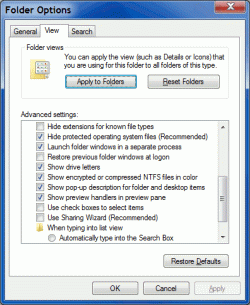
Have you tried using the "Launch folder windows in a separate process" option (Folder Options > View tab)?
Folder Options - Separate Process.gif
My Windows Explorer started to go "crash happy" a while ago (2011?).
I started using the "Launch folder windows in a separate process" option (Folder Options > View tab).

Windows Explorer has only crashed ~10 times since I did that.
 

My Computer

Computer type
PC/Desktop
Computer Manufacturer/Model Number
n/a
OS
W7 Ultimate SP1, LM19.2 MATE, W10 Home 1703, W10 Pro 1703 VM, #All 64 bit
CPU
AMD Phenom II x6 1100T, 3.3 GHz
Motherboard
ASUS M4A88T-M/USB3 (AM3)
Memory
12GB DDR3 1333 G-Skill (4GB x 2), G-Skill (2GB x 2)
Graphics Card(s)
NVIDIA GeForce GTX 660
Sound Card
Realtek?
Monitor(s) Displays
Samsung S23B350
Screen Resolution
1920x1080
Hard Drives
WD Green 2TB (SATA), WD Green 3TB (SATA), WD Blue 4TB (SATA), WD Blue 6TB (SATA)
PSU
Cooler Master
Case
Antec GX300 Tower
Cooling
3x Antec TRICOOL 120mm Fans
Mouse
Wired Optical
Internet Speed
DSL
Antivirus
Avast
Browser
Pale Moon (64 bit)
Other Info
2018-12-27 Upgraded HDDs
2015-12-10 Upgraded case, graphics card, storage
2015-08-15 Upgraded motherboard & RAM
2015-07-15 Upgraded LM17.1 to LM17.2
Have you tried using the "Launch folder windows in a separate process" option (Folder Options > View tab)?My Windows Explorer started to go "crash happy" a while ago (2011?).
I started using the "Launch folder windows in a separate process" option (Folder Options > View tab).

Windows Explorer has only crashed ~10 times since I did that.

Thank you. I have had this option enabled for as long as I remember.
 

My Computer

Computer type
PC/Desktop
Computer Manufacturer/Model Number
custom build
OS
Microsoft Windows 7 Enterprise 64-bit
CPU
Intel(R) Core(TM)2 Quad CPU Q9550 @ 2.83GHz
Motherboard
ASUSTeK Computer INC. P5P43TD PRO
Memory
12.00 GB
Graphics Card(s)
AMD Radeon HD 5450
Sound Card
PCI audio interface
Screen Resolution
1:2560x1440x 2 bits(4294967296 colors)@60Hz 2: 1920x1200
Hard Drives
INTEL SSDSC2CW180A3
SAMSUNG HD103SJ
SAMSUNG HD103UJ
SAMSUNG HD103UJ
Browser
Chrome
Please attach sfcdetails.txt to a new post and someone will take a look

Use the paperclip icon on the menu above a post window to attach the file
..... i will keep it in mind though, and failing the system file checker scan i just did, i can try it.

Thank you. I am a little confused; searching the system drive produced 0 hits on this filename. Did you mean I am to create it and populate it w/ something from the cbs log? Sorry.
 

My Computer

Computer type
PC/Desktop
Computer Manufacturer/Model Number
custom build
OS
Microsoft Windows 7 Enterprise 64-bit
CPU
Intel(R) Core(TM)2 Quad CPU Q9550 @ 2.83GHz
Motherboard
ASUSTeK Computer INC. P5P43TD PRO
Memory
12.00 GB
Graphics Card(s)
AMD Radeon HD 5450
Sound Card
PCI audio interface
Screen Resolution
1:2560x1440x 2 bits(4294967296 colors)@60Hz 2: 1920x1200
Hard Drives
INTEL SSDSC2CW180A3
SAMSUNG HD103SJ
SAMSUNG HD103UJ
SAMSUNG HD103UJ
Browser
Chrome
Let's have a look at a few other things...

Please post a full copy of the report produced by the MGADiag tool
(download and save to desktop - http://go.microsoft.com/fwlink/?linkid=52012 )
Once saved, run the tool.
Click on the Continue button, which will produce the report.
To copy the report to your response, click on the Copy button in the tool (ignore any error messages at this point), and then paste (using either r-click/Paste, or Ctrl+V ) into your response.
- **in your own thread**, please
Please also state the Version and Edition of Windows quoted on your COA sticker (if you have one) on the case of your machine (or inside the battery compartment), but do NOT quote the Key on the sticker!
 

My Computer

Computer type
PC/Desktop
Computer Manufacturer/Model Number
Custom Built
OS
Windows 10 Pro
CPU
AMD Ryzen 5 2400G Processor with Radeon RX Vega 11 Graphics
Motherboard
ASRock X470 Master SLI/AC AM4 AMD Promontory X470 SATA 6Gb/s
Memory
G.SKILL Ripjaws V Series 16GB (2 x 8GB) 288-Pin DDR4 SDRAM D
Graphics Card(s)
2047MB NVIDIA GeForce GTX 1060 6GB (EVGA)
Sound Card
Motherboard Built in
Monitor(s) Displays
Acer R240HY bidx 23.8-Inch IPS HDMI DVI VGA (1920 x 1080) Wi
Screen Resolution
1920 x 1080
Hard Drives
1TB Sandisk SSD PLUS (Main drive)
500 GB Seagate 7200 RPM (Games)
500 GB Western Digital 7200 RPM (Virtual Machines)
PSU
CORSAIR TX Series TX650M 650W 80+ Gold Modular Power Supply
Case
CORSAIR CARBIDE SPEC-02 Mid-Tower Gaming Case, Red LED Fan
Cooling
220mm, two 120mm, and four 60mm fans
Keyboard
Wired Dell keyboard
Mouse
Wireless Logitech mouse
Internet Speed
250mb down, 30mb up
Antivirus
Panda Cloud Antivirus
Browser
Chrome-ish x64
Other Info
Your awesome for reading this.
Let's have a look at a few other things...

Please post a full copy of the report produced by the MGADiag tool
(download and save to desktop - http://go.microsoft.com/fwlink/?linkid=52012 )
Once saved, run the tool.
Click on the Continue button, which will produce the report.
To copy the report to your response, click on the Copy button in the tool (ignore any error messages at this point), and then paste (using either r-click/Paste, or Ctrl+V ) into your response.
- **in your own thread**, please
Please also state the Version and Edition of Windows quoted on your COA sticker (if you have one) on the case of your machine (or inside the battery compartment), but do NOT quote the Key on the sticker!

ok, do you mean i should start a separate topic for this? (BTW running the tool/copying did not produce any error messages)
 

My Computer

Computer type
PC/Desktop
Computer Manufacturer/Model Number
custom build
OS
Microsoft Windows 7 Enterprise 64-bit
CPU
Intel(R) Core(TM)2 Quad CPU Q9550 @ 2.83GHz
Motherboard
ASUSTeK Computer INC. P5P43TD PRO
Memory
12.00 GB
Graphics Card(s)
AMD Radeon HD 5450
Sound Card
PCI audio interface
Screen Resolution
1:2560x1440x 2 bits(4294967296 colors)@60Hz 2: 1920x1200
Hard Drives
INTEL SSDSC2CW180A3
SAMSUNG HD103SJ
SAMSUNG HD103UJ
SAMSUNG HD103UJ
Browser
Chrome
nope, keep in the same thread. And like the above stated, post the log file/report in your reply.
 

My Computer

Computer type
PC/Desktop
Computer Manufacturer/Model Number
Custom Built
OS
Windows 10 Pro
CPU
AMD Ryzen 5 2400G Processor with Radeon RX Vega 11 Graphics
Motherboard
ASRock X470 Master SLI/AC AM4 AMD Promontory X470 SATA 6Gb/s
Memory
G.SKILL Ripjaws V Series 16GB (2 x 8GB) 288-Pin DDR4 SDRAM D
Graphics Card(s)
2047MB NVIDIA GeForce GTX 1060 6GB (EVGA)
Sound Card
Motherboard Built in
Monitor(s) Displays
Acer R240HY bidx 23.8-Inch IPS HDMI DVI VGA (1920 x 1080) Wi
Screen Resolution
1920 x 1080
Hard Drives
1TB Sandisk SSD PLUS (Main drive)
500 GB Seagate 7200 RPM (Games)
500 GB Western Digital 7200 RPM (Virtual Machines)
PSU
CORSAIR TX Series TX650M 650W 80+ Gold Modular Power Supply
Case
CORSAIR CARBIDE SPEC-02 Mid-Tower Gaming Case, Red LED Fan
Cooling
220mm, two 120mm, and four 60mm fans
Keyboard
Wired Dell keyboard
Mouse
Wireless Logitech mouse
Internet Speed
250mb down, 30mb up
Antivirus
Panda Cloud Antivirus
Browser
Chrome-ish x64
Other Info
Your awesome for reading this.
You don't need to apologize - I was typing in shorthand sentences and I wasn't clear at all.

Addram in post# 4 had asked you to run SFC and pointed you to a tutorial.
I posted where you could find the log, if one existed.
In post# 10 I referred to option 3 in the SFC tutorial which outputs the sfcdetails.txt file.

No wonder you're confused - I didn't connect the dots.

If you get the chance or come to an impasse, then you run SFC (Option One or Option Two) and post the sfcdetails.txt files created in Option Three of http://www.sevenforums.com/tutorials/1538-sfc-scannow-command-system-file-checker.html
It might be necessary to run SFC at boot given the sysmptoms you're describing.


Anyway, you're on a path now - stick to that path.

There's enough good people helping herre, so I'll back out.

Please attach sfcdetails.txt to a new post and someone will take a look

Use the paperclip icon on the menu above a post window to attach the file
..... i will keep it in mind though, and failing the system file checker scan i just did, i can try it.

Thank you. I am a little confused; searching the system drive produced 0 hits on this filename. Did you mean I am to create it and populate it w/ something from the cbs log? Sorry.
 
Last edited:

My Computer

Computer type
Laptop
Computer Manufacturer/Model Number
HP Pavilion dv6-6c10us
OS
x64 (6.3.9600) Win8.1 Pro & soon dual boot x64 (6.1.7601) Win7_SP1 HomePrem
CPU
AMD A6-3420M APU with Radeon(tm) HD Graphics
Motherboard
Hewlett-Packard 1805
Memory
6.00 GB
Graphics Card(s)
AMD Radeon(TM) HD 6520G
Sound Card
(1) AMD High Definition Audio Device (2) IDT High Definiti
Monitor(s) Displays
HP W2072a 20" LCD (1600 x 900) @ 60 Hz
Screen Resolution
1366 x 768 x 32 bits (4294967296 colors) @ 60 Hz
Hard Drives
ST640LM0 00 HM641JI SATA Disk Device
Keyboard
Logitech k520 wireless KB
Mouse
Logitech m320 wireless mouse (bundled with KB)
Internet Speed
15/5 | 54 MB Wireless 'n'
Antivirus
Realtime: Defender or Avast | On-demand: Malwarebytes, ESET
Browser
IE 11 on Win8, IE 10 on win 7
Other Info
Media: [Gimp, Audacity, VLC] || Comm: [WEmail 2012, Skype] || Productivity: [OpenOffice,| Textpad] || Utils: [Sysinternals, cCleaner, Speccy, Defraggler]

My Computer

Computer type
PC/Desktop
Computer Manufacturer/Model Number
Custom Built
OS
Windows 10 Pro
CPU
AMD Ryzen 5 2400G Processor with Radeon RX Vega 11 Graphics
Motherboard
ASRock X470 Master SLI/AC AM4 AMD Promontory X470 SATA 6Gb/s
Memory
G.SKILL Ripjaws V Series 16GB (2 x 8GB) 288-Pin DDR4 SDRAM D
Graphics Card(s)
2047MB NVIDIA GeForce GTX 1060 6GB (EVGA)
Sound Card
Motherboard Built in
Monitor(s) Displays
Acer R240HY bidx 23.8-Inch IPS HDMI DVI VGA (1920 x 1080) Wi
Screen Resolution
1920 x 1080
Hard Drives
1TB Sandisk SSD PLUS (Main drive)
500 GB Seagate 7200 RPM (Games)
500 GB Western Digital 7200 RPM (Virtual Machines)
PSU
CORSAIR TX Series TX650M 650W 80+ Gold Modular Power Supply
Case
CORSAIR CARBIDE SPEC-02 Mid-Tower Gaming Case, Red LED Fan
Cooling
220mm, two 120mm, and four 60mm fans
Keyboard
Wired Dell keyboard
Mouse
Wireless Logitech mouse
Internet Speed
250mb down, 30mb up
Antivirus
Panda Cloud Antivirus
Browser
Chrome-ish x64
Other Info
Your awesome for reading this.
@beeski

Can we try the following items?

1.) http://www.sevenforums.com/tutorial...ation-conflicts-performing-clean-startup.html

2.) Boot into safe mode. Does the issue still exist?

http://www.sevenforums.com/tutorials/69585-safe-mode.html

3.) What security software do you use? Have you run any optimization or registry cleaners programs?

Thank you!

Re 3:
I have habitually run cc cleaner x64; I also have a (legitimate) copy of Acronis True Image that I believe does some rather low level OS tweaks. I am also experiencing frequent AppHang/crashes of Office applications (currently running, again - legitimate - version of Office 2013 365).

Re 1 & 2:
I will need to try that tomorrow.
 

My Computer

Computer type
PC/Desktop
Computer Manufacturer/Model Number
custom build
OS
Microsoft Windows 7 Enterprise 64-bit
CPU
Intel(R) Core(TM)2 Quad CPU Q9550 @ 2.83GHz
Motherboard
ASUSTeK Computer INC. P5P43TD PRO
Memory
12.00 GB
Graphics Card(s)
AMD Radeon HD 5450
Sound Card
PCI audio interface
Screen Resolution
1:2560x1440x 2 bits(4294967296 colors)@60Hz 2: 1920x1200
Hard Drives
INTEL SSDSC2CW180A3
SAMSUNG HD103SJ
SAMSUNG HD103UJ
SAMSUNG HD103UJ
Browser
Chrome
Other options:

1.) I would create a new windows administrator account and run a sfc scan as instructed before. I would then see if the newly created windows user account has the same issues at the old account.

2.) If all else fails, I would go for a http://www.sevenforums.com/tutorials/3413-repair-install.html which would be the quickest way to get up and running without losing your programs or data. (But of course, still have your data backed up)
 

My Computer

Computer type
PC/Desktop
Computer Manufacturer/Model Number
Custom Built
OS
Windows 10 Pro
CPU
AMD Ryzen 5 2400G Processor with Radeon RX Vega 11 Graphics
Motherboard
ASRock X470 Master SLI/AC AM4 AMD Promontory X470 SATA 6Gb/s
Memory
G.SKILL Ripjaws V Series 16GB (2 x 8GB) 288-Pin DDR4 SDRAM D
Graphics Card(s)
2047MB NVIDIA GeForce GTX 1060 6GB (EVGA)
Sound Card
Motherboard Built in
Monitor(s) Displays
Acer R240HY bidx 23.8-Inch IPS HDMI DVI VGA (1920 x 1080) Wi
Screen Resolution
1920 x 1080
Hard Drives
1TB Sandisk SSD PLUS (Main drive)
500 GB Seagate 7200 RPM (Games)
500 GB Western Digital 7200 RPM (Virtual Machines)
PSU
CORSAIR TX Series TX650M 650W 80+ Gold Modular Power Supply
Case
CORSAIR CARBIDE SPEC-02 Mid-Tower Gaming Case, Red LED Fan
Cooling
220mm, two 120mm, and four 60mm fans
Keyboard
Wired Dell keyboard
Mouse
Wireless Logitech mouse
Internet Speed
250mb down, 30mb up
Antivirus
Panda Cloud Antivirus
Browser
Chrome-ish x64
Other Info
Your awesome for reading this.
Back
Top