
The iTunes question......

noobvious

R.I.P. June 2nd 2014
Guru
VIP
Local time
7:43 PM
Messages
6,494
Location
east central NY state
I've pretty much decided that after my recent increase in work hours that it is time to treat myself to something, and I'd like to pick up a 32GB 4th-gen iPod Touch. However, I've seen enough posts regarding peoples' issues with iTunes on Windows machines, in various forums, that I'm a little leery of it.

I've had a pretty good streak of not having any problems with my computer, and I would like to keep that going.....so iPod owners out there, anything specific to watch out for? I know I would need the 64-bit version....I guess basically I'm asking if I am worrying needlessly or not....lol. I tend to over-think things sometimes, and this may well be one of those times.:o
 

My Computer

Computer type
PC/Desktop
Computer Manufacturer/Model Number
Gigabyte Technology Co., Ltd.
OS
Win 7 Ultimate 64-bit SP1 (desktop)
CPU
Intel Core 2 Duo E8400
Motherboard
Gigabyte GA-EP35-DS3R
Memory
2x 2GB OCZ DDR II SDRAM PC2-6400
Graphics Card(s)
NVIDIA GeForce 9400GT
Monitor(s) Displays
HP 2009m(primary), Acer P191W
Screen Resolution
1600x900, 1440x900
Hard Drives
Internal:WD Caviar Black 640GB 32MB cache 7200RPM
External:Samsung Story Station 1TB HDD desktop drive
500GB Toshiba portable drive
PSU
Antec Earthwatts EA500D
Case
Antec Sonata III
Cooling
4 fans
Keyboard
Logitech Wave
Mouse
Logitech M-SBF90
Internet Speed
Slow due to home Wireless-G router
Antivirus
MSE, Hitman Pro, Malwarebytes
Browser
Chrome and Palemoon
Other Info
Laptop....Acer 5750Z-4835
15.6" HD Widescreen CineCrystal™ LED-backlit LCD Display: (1366x768 resolution, 16:9 aspect ratio)
Intel® Pentium® Processor B940 (2.0GHz, 2MB L3 cache)
Windows® 7 Home Premium,500GB Hard Drive,4GB DDR3 RAM, Intel® HD Graphics,8X DVD-Super Multi Double-Layer Drive
Multi-in-1 Digital Media Card Reader,802.11b/g/n Wi-Fi
Chrome and Palemoon, MSE, Hitman Pro
you are overthinking this one.

itunes 10 (latest ver is 10.1.1, i think) on 64-bit is just fine - no issues.
it installs bonjour (you can disable or set the service to manual if you dont need it - you only need it for apple specific stuff, air speakers and what not) and a couple of other services and a couple of registry RUN key items (leave those since you need them for your device)
(once bonjour is disabled, restart itunes, it'll complain that it's turned off, hit ok and continue as normal, even on minor / major upgrades)

you have to install quicktime with it (which installs a qtboottask.exe in your registry RUN key - that entry you can safely delete - and go into the quicktime settings to make sure that the load in tray on windows start is disabled...something along those lines)

(you will have to re-remove that entry each time you update quicktime...)

what else... that's it. reboot is optional.

oh yeah, once you add your music into itunes, everything is selected by default. uncheck what you need and create playlists - then sync those playlists to your device to have itunes copy the music over to it.

i sync an iphone 3g and itunes is most well-behaved.
only suggestion i'd make would be about moving the folder out of 'my music' to elsewhere (which is as easy as pressing shift and launching itunes...serious)

other than that, itunes is awesome.
if you have an apple device and want to use something to sync your audio, you need itunes.
if you are using some other device, itunes still works as pretty much the ideal consolidated setup.


personally, i cannot understand why people have issues with itunes killing their computer - the only real issue i am aware of was around a particular series of motherboards (the p55's, i think) that needed a bios update to let an iphone/touch sync with itunes 9 on that pc
 

My Computer

OS
Windows 7 Ultimate x64
CPU
Core i7 960
Motherboard
ASUS P6TD Deluxe
Memory
Corsair XMS3 DDR3-1600 - 12 GB
Graphics Card(s)
eVGA GTX 275 1792 MB
Sound Card
Onboard HD etc
Monitor(s) Displays
Dell SP2208WFP
Hard Drives
Western Digital Caviar Black 1 TB x 2 (RAID-1)
PSU
BFG EX-1200
Case
CoolerMaster HAF 922
Cooling
Thermalright Ultra 120 Extreme with Noctua NH-12 Fan
Keyboard
MS Natural (you know, like the ones you find in nature...)
Mouse
MS Intellimouse Explorer
I haven't run into any issues with iTunes on my machine. Granted, I'm no "power user" for iTunes but when I use it, it works.
 

My Computer

Computer Manufacturer/Model Number
Home built
OS
Windows 7 Home Premium x64
CPU
Phenom II X4 955 BE
Motherboard
Asus Sabertooth 990FX
Memory
8 GB OCZ BE 1667
Graphics Card(s)
EVGA GeForce GTX470 SC
Monitor(s) Displays
BenQ 19"
Screen Resolution
1280x1024
Hard Drives
256 GB OCZ Vertex 3 SSD
2x WD 1 TB
1x WD 2 TB
PSU
Thermaltake 850W
Case
Coolermaster Cosmos 1000
Cooling
Air
Keyboard
Logitech
Mouse
Cyborg R.A.T 7
Internet Speed
Standard RR
I have the latest iTunes running on W7 home 64bit. I connect an iPhone 3G, an ipod Nano, and an older ipod Video. I have had absolutley no issues with it running, syncing, and managing my music. My wife also has it on her laptop for her iPhone and runs it with no issue. The new version seems a lot less flakey than previous versions. Just my experience though.
 

My Computer

Computer Manufacturer/Model Number
Dell Dimension E521
OS
Windows 8, Ubuntu 12.04 64bit, Pear Linux Triple Boot
CPU
AMD AthlonTM 64 X2 dual-core
Memory
3 GB
Graphics Card(s)
ATI Radeon HD 4350 1GB
Sound Card
M-Audio Mobile Pre USB External
Monitor(s) Displays
Acer 1916W x2
Screen Resolution
1440X900
Hard Drives
250 GB internal main, 500 GB internal backup, 1TB External
PSU
300 Watt
Keyboard
Dell
I've pretty much decided that after my recent increase in work hours that it is time to treat myself to something, and I'd like to pick up a 32GB 4th-gen iPod Touch. However, I've seen enough posts regarding peoples' issues with iTunes on Windows machines, in various forums, that I'm a little leery of it.

I've had a pretty good streak of not having any problems with my computer, and I would like to keep that going.....so iPod owners out there, anything specific to watch out for? I know I would need the 64-bit version....I guess basically I'm asking if I am worrying needlessly or not....lol. I tend to over-think things sometimes, and this may well be one of those times.:o

Itunes 64 bit is a really great program. After learning the ropes and setting your "preferences" you should have no problems. Not only can Itunes "sync" Music, Apps, Photos, Audio Books, Videos, TV shows, and Podcasts but it will even sync your Contacts, Calendar, and Notes if you use a program like Microsoft Outlook.

In addition to the synching with any Apple "Device" (Iphone, Ipad, Ipod) it also provides an easy way to upgrade your devices firmware (to the latest available version) and to monitor its memory usage allocation.

And when you're not using Itunes with your portable device its a really great Music Player on its own (using your Computers Audio Card). Itunes even has a "psychedelic visualizer" display that generates colored graphic displays modulated by the music.

In addition to all that (and other features which I'm sure I've forgotten to mention), Itunes will also burn any of your "play lists" to a CD utilizing your CD writer.

BUT, because Itunes IS SUCH A GREAT Program and has SO MANY Features, I would recommend buying a simple Itunes User Manual (Like the Itunes and Ipod for Dummies Book) if you're going to get into it for the first time. If some people have had a hard time with it's probably just because it has so many features, settings, and does so much.

To top it all off, Itunes is 100% Free :):):) It's a SUPER program.

One of the things that makes the Apple Line of Portable Devices so good is Itunes - When You buy into an Apple Portable device or phone youre getting a lot more than just the device - youre getting Itunes too - the Whole is Greater than the Sum of its Parts !!!!!!!

(No, I dont work for Apple)
 
Last edited:

My Computer

Computer Manufacturer/Model Number
Alienware Aurora
OS
Win 7 Ultimate x64
CPU
Core I7 980X O.C. to 4.0 Ghz
Motherboard
Custom Intel mATX (Bios ver A10)
Memory
12GB 1600 mhz triple channel DDR3 - Kingston
Graphics Card(s)
ATI Radeon HD 5970 2GB Video Card
Sound Card
Creative Labs Titanium sound blaster
Monitor(s) Displays
30" Dell LCD
Screen Resolution
2560 x 1600
Hard Drives
240 GB OCZ Vertex 2 SSD
256 GB Samsung V2 SSD
2TB WD Black Caviar 7200 rpm SATA3
600GB WD Velociraptor 10,000 rpm SATA3
3TB WD MyBook Essential USB 3.0 7200 rpm External
PSU
850 Watt
Case
Alienware Aurora
Cooling
Water
Keyboard
Logitech G15 (original version)
Mouse
Logitech MX1000 Laser - Wireless
Internet Speed
Cable 22 Mb/sec download
Other Info
USB 3.0,
Blue Ray DVD Read/Writer
Bose Companion 3 Speakers
WRT54G Wireless Router
Well, I think I am going to make the plunge tonight....thanks all!
 

My Computer

Computer type
PC/Desktop
Computer Manufacturer/Model Number
Gigabyte Technology Co., Ltd.
OS
Win 7 Ultimate 64-bit SP1 (desktop)
CPU
Intel Core 2 Duo E8400
Motherboard
Gigabyte GA-EP35-DS3R
Memory
2x 2GB OCZ DDR II SDRAM PC2-6400
Graphics Card(s)
NVIDIA GeForce 9400GT
Monitor(s) Displays
HP 2009m(primary), Acer P191W
Screen Resolution
1600x900, 1440x900
Hard Drives
Internal:WD Caviar Black 640GB 32MB cache 7200RPM
External:Samsung Story Station 1TB HDD desktop drive
500GB Toshiba portable drive
PSU
Antec Earthwatts EA500D
Case
Antec Sonata III
Cooling
4 fans
Keyboard
Logitech Wave
Mouse
Logitech M-SBF90
Internet Speed
Slow due to home Wireless-G router
Antivirus
MSE, Hitman Pro, Malwarebytes
Browser
Chrome and Palemoon
Other Info
Laptop....Acer 5750Z-4835
15.6" HD Widescreen CineCrystal™ LED-backlit LCD Display: (1366x768 resolution, 16:9 aspect ratio)
Intel® Pentium® Processor B940 (2.0GHz, 2MB L3 cache)
Windows® 7 Home Premium,500GB Hard Drive,4GB DDR3 RAM, Intel® HD Graphics,8X DVD-Super Multi Double-Layer Drive
Multi-in-1 Digital Media Card Reader,802.11b/g/n Wi-Fi
Chrome and Palemoon, MSE, Hitman Pro
First step, install iTunes and disable bonjour......success! However, the top songs on the sidebar do not exactly restore my faith in humanity.....lol.
Capture.JPG
 

My Computer

Computer type
PC/Desktop
Computer Manufacturer/Model Number
Gigabyte Technology Co., Ltd.
OS
Win 7 Ultimate 64-bit SP1 (desktop)
CPU
Intel Core 2 Duo E8400
Motherboard
Gigabyte GA-EP35-DS3R
Memory
2x 2GB OCZ DDR II SDRAM PC2-6400
Graphics Card(s)
NVIDIA GeForce 9400GT
Monitor(s) Displays
HP 2009m(primary), Acer P191W
Screen Resolution
1600x900, 1440x900
Hard Drives
Internal:WD Caviar Black 640GB 32MB cache 7200RPM
External:Samsung Story Station 1TB HDD desktop drive
500GB Toshiba portable drive
PSU
Antec Earthwatts EA500D
Case
Antec Sonata III
Cooling
4 fans
Keyboard
Logitech Wave
Mouse
Logitech M-SBF90
Internet Speed
Slow due to home Wireless-G router
Antivirus
MSE, Hitman Pro, Malwarebytes
Browser
Chrome and Palemoon
Other Info
Laptop....Acer 5750Z-4835
15.6" HD Widescreen CineCrystal™ LED-backlit LCD Display: (1366x768 resolution, 16:9 aspect ratio)
Intel® Pentium® Processor B940 (2.0GHz, 2MB L3 cache)
Windows® 7 Home Premium,500GB Hard Drive,4GB DDR3 RAM, Intel® HD Graphics,8X DVD-Super Multi Double-Layer Drive
Multi-in-1 Digital Media Card Reader,802.11b/g/n Wi-Fi
Chrome and Palemoon, MSE, Hitman Pro
First step, install iTunes and disable bonjour......success! However, the top songs on the sidebar do not exactly restore my faith in humanity.....lol.
View attachment 130307

Easy to fix
Go under the View Menu and check "Turn Off Itunes Sidebar" :):):)
 

My Computer

Computer Manufacturer/Model Number
Alienware Aurora
OS
Win 7 Ultimate x64
CPU
Core I7 980X O.C. to 4.0 Ghz
Motherboard
Custom Intel mATX (Bios ver A10)
Memory
12GB 1600 mhz triple channel DDR3 - Kingston
Graphics Card(s)
ATI Radeon HD 5970 2GB Video Card
Sound Card
Creative Labs Titanium sound blaster
Monitor(s) Displays
30" Dell LCD
Screen Resolution
2560 x 1600
Hard Drives
240 GB OCZ Vertex 2 SSD
256 GB Samsung V2 SSD
2TB WD Black Caviar 7200 rpm SATA3
600GB WD Velociraptor 10,000 rpm SATA3
3TB WD MyBook Essential USB 3.0 7200 rpm External
PSU
850 Watt
Case
Alienware Aurora
Cooling
Water
Keyboard
Logitech G15 (original version)
Mouse
Logitech MX1000 Laser - Wireless
Internet Speed
Cable 22 Mb/sec download
Other Info
USB 3.0,
Blue Ray DVD Read/Writer
Bose Companion 3 Speakers
WRT54G Wireless Router

My Computer

Computer type
PC/Desktop
Computer Manufacturer/Model Number
Gigabyte Technology Co., Ltd.
OS
Win 7 Ultimate 64-bit SP1 (desktop)
CPU
Intel Core 2 Duo E8400
Motherboard
Gigabyte GA-EP35-DS3R
Memory
2x 2GB OCZ DDR II SDRAM PC2-6400
Graphics Card(s)
NVIDIA GeForce 9400GT
Monitor(s) Displays
HP 2009m(primary), Acer P191W
Screen Resolution
1600x900, 1440x900
Hard Drives
Internal:WD Caviar Black 640GB 32MB cache 7200RPM
External:Samsung Story Station 1TB HDD desktop drive
500GB Toshiba portable drive
PSU
Antec Earthwatts EA500D
Case
Antec Sonata III
Cooling
4 fans
Keyboard
Logitech Wave
Mouse
Logitech M-SBF90
Internet Speed
Slow due to home Wireless-G router
Antivirus
MSE, Hitman Pro, Malwarebytes
Browser
Chrome and Palemoon
Other Info
Laptop....Acer 5750Z-4835
15.6" HD Widescreen CineCrystal™ LED-backlit LCD Display: (1366x768 resolution, 16:9 aspect ratio)
Intel® Pentium® Processor B940 (2.0GHz, 2MB L3 cache)
Windows® 7 Home Premium,500GB Hard Drive,4GB DDR3 RAM, Intel® HD Graphics,8X DVD-Super Multi Double-Layer Drive
Multi-in-1 Digital Media Card Reader,802.11b/g/n Wi-Fi
Chrome and Palemoon, MSE, Hitman Pro
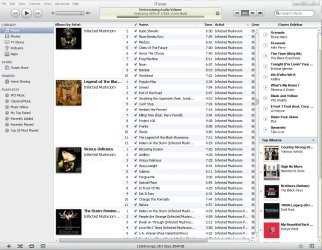
First step, install iTunes and disable bonjour......success! However, the top songs on the sidebar do not exactly restore my faith in humanity.....lol.
View attachment 130307

Hi noobvious - In the past I have always left the Bonjour Service "running". I tried shutting it off today (in MsCofig > Services) and did some checking (benchmarking) and noticed absolutely NO performance gains by disabling it. Apprently it's only utilized by various Apple music sharing applications.

There is, however, an annoying "nag message" thats appears whenever you start Itunes if Bonjour is missing or disabled. I turned mine back on just to get rid of the "nag message".

Since it causes no degradation in system performance I see no good reason for disabling it. Just thought I'd share that. :):):)

There dosent seem to be any way to get rid of the "nag message" in Itunes itself.
 

My Computer

Computer Manufacturer/Model Number
Alienware Aurora
OS
Win 7 Ultimate x64
CPU
Core I7 980X O.C. to 4.0 Ghz
Motherboard
Custom Intel mATX (Bios ver A10)
Memory
12GB 1600 mhz triple channel DDR3 - Kingston
Graphics Card(s)
ATI Radeon HD 5970 2GB Video Card
Sound Card
Creative Labs Titanium sound blaster
Monitor(s) Displays
30" Dell LCD
Screen Resolution
2560 x 1600
Hard Drives
240 GB OCZ Vertex 2 SSD
256 GB Samsung V2 SSD
2TB WD Black Caviar 7200 rpm SATA3
600GB WD Velociraptor 10,000 rpm SATA3
3TB WD MyBook Essential USB 3.0 7200 rpm External
PSU
850 Watt
Case
Alienware Aurora
Cooling
Water
Keyboard
Logitech G15 (original version)
Mouse
Logitech MX1000 Laser - Wireless
Internet Speed
Cable 22 Mb/sec download
Other Info
USB 3.0,
Blue Ray DVD Read/Writer
Bose Companion 3 Speakers
WRT54G Wireless Router
the nag message appears only once.
close / reopen itunes again and it wont complain.
 

My Computer

OS
Windows 7 Ultimate x64
CPU
Core i7 960
Motherboard
ASUS P6TD Deluxe
Memory
Corsair XMS3 DDR3-1600 - 12 GB
Graphics Card(s)
eVGA GTX 275 1792 MB
Sound Card
Onboard HD etc
Monitor(s) Displays
Dell SP2208WFP
Hard Drives
Western Digital Caviar Black 1 TB x 2 (RAID-1)
PSU
BFG EX-1200
Case
CoolerMaster HAF 922
Cooling
Thermalright Ultra 120 Extreme with Noctua NH-12 Fan
Keyboard
MS Natural (you know, like the ones you find in nature...)
Mouse
MS Intellimouse Explorer
First step, install iTunes and disable bonjour......success! However, the top songs on the sidebar do not exactly restore my faith in humanity.....lol.
View attachment 130307

Hi noobvious - In the past I have always left the Bonjour Service "running". I tried shutting it off today (in MsCofig > Services) and did some checking (benchmarking) and noticed absolutely NO performance gains by disabling it. Apprently it's only utilized by various Apple music sharing applications.

There is, however, an annoying "nag message" thats appears whenever you start Itunes if Bonjour is missing or disabled. I turned mine back on just to get rid of the "nag message".

Since it causes no degradation in system performance I see no good reason for disabling it. Just thought I'd share that. :):):)

There dosent seem to be any way to get rid of the "nag message" in Itunes itself.
Hi happyman...I actually discovered today that I hadn't permanently disabled it like I thought. It was stopped, but last night I did my occasional full shutdown instead of just using sleep mode, and sure enough, as someone in another forum had suggested might happen, Bonjour had resumed. They had a suggestion on how to stop it for good, but it looked to me like something that maybe was above my proverbial pay grade, and that might result in me screwing up my system, so I decided to leave it alone, at least for now.

And yes, I did see the "nag message". I didn't do any benchmarking, but everything seems to be running normally. So we'll see what happens....thanks for sharing your experiences! :D:dinesh:
 

My Computer

Computer type
PC/Desktop
Computer Manufacturer/Model Number
Gigabyte Technology Co., Ltd.
OS
Win 7 Ultimate 64-bit SP1 (desktop)
CPU
Intel Core 2 Duo E8400
Motherboard
Gigabyte GA-EP35-DS3R
Memory
2x 2GB OCZ DDR II SDRAM PC2-6400
Graphics Card(s)
NVIDIA GeForce 9400GT
Monitor(s) Displays
HP 2009m(primary), Acer P191W
Screen Resolution
1600x900, 1440x900
Hard Drives
Internal:WD Caviar Black 640GB 32MB cache 7200RPM
External:Samsung Story Station 1TB HDD desktop drive
500GB Toshiba portable drive
PSU
Antec Earthwatts EA500D
Case
Antec Sonata III
Cooling
4 fans
Keyboard
Logitech Wave
Mouse
Logitech M-SBF90
Internet Speed
Slow due to home Wireless-G router
Antivirus
MSE, Hitman Pro, Malwarebytes
Browser
Chrome and Palemoon
Other Info
Laptop....Acer 5750Z-4835
15.6" HD Widescreen CineCrystal™ LED-backlit LCD Display: (1366x768 resolution, 16:9 aspect ratio)
Intel® Pentium® Processor B940 (2.0GHz, 2MB L3 cache)
Windows® 7 Home Premium,500GB Hard Drive,4GB DDR3 RAM, Intel® HD Graphics,8X DVD-Super Multi Double-Layer Drive
Multi-in-1 Digital Media Card Reader,802.11b/g/n Wi-Fi
Chrome and Palemoon, MSE, Hitman Pro
I've been using iTunes under both Vista 32 & 64-bit as well as Windows 7 64-bit (used it in XP as well) and haven't had any issues. In fact it is the only audio player I use.

I also never disabled Bonjour in all my times with iTunes. Never gave me an issue so I never thought about it. LOL I don't even know what it does, I just hear people say disable it :shock:

Anyway I use it with my 4th gen Classic Ipod.
 

My Computer

Computer type
PC/Desktop
Computer Manufacturer/Model Number
Custom built by me.
OS
Windows 10 Pro
CPU
Intel Core i7-4770K (3.5Ghz)
Motherboard
Gigabyte G1 Sniper 5 (F10 Bios)
Memory
32 gig Corsair Dominator Platinum (4x8Gig)
Graphics Card(s)
Sapphire Tri-X R9 Fury
Sound Card
Soundblaster ZXR
Monitor(s) Displays
NEC PA242W 24" LCD Monitor
Screen Resolution
1920 x 1200
Hard Drives
Primary - Samsung 850 Pro (512gig), Samsung 840 Pro (256gig), 2TB WD Caviar Black.
PSU
EVGA Supernova 1000 G2
Case
Cooler Master HAF X
Cooling
Corsair H100i with Corsair Air Series SP120 Quiet Fans
Keyboard
Logitech Wireless Wave
Mouse
Logitech Performance MX
Internet Speed
High Speed Cable
Antivirus
Norton Security
Browser
IE11
Other Info
Memory Timings - 1866MHz @ 9-9-9-27-1T @ 1.5 volts
the nag message appears only once.
close / reopen itunes again and it wont complain.

I didnt realize the nag message only appeared once - so I will try disabling it again
Thanx Packet :):):)
 

My Computer

Computer Manufacturer/Model Number
Alienware Aurora
OS
Win 7 Ultimate x64
CPU
Core I7 980X O.C. to 4.0 Ghz
Motherboard
Custom Intel mATX (Bios ver A10)
Memory
12GB 1600 mhz triple channel DDR3 - Kingston
Graphics Card(s)
ATI Radeon HD 5970 2GB Video Card
Sound Card
Creative Labs Titanium sound blaster
Monitor(s) Displays
30" Dell LCD
Screen Resolution
2560 x 1600
Hard Drives
240 GB OCZ Vertex 2 SSD
256 GB Samsung V2 SSD
2TB WD Black Caviar 7200 rpm SATA3
600GB WD Velociraptor 10,000 rpm SATA3
3TB WD MyBook Essential USB 3.0 7200 rpm External
PSU
850 Watt
Case
Alienware Aurora
Cooling
Water
Keyboard
Logitech G15 (original version)
Mouse
Logitech MX1000 Laser - Wireless
Internet Speed
Cable 22 Mb/sec download
Other Info
USB 3.0,
Blue Ray DVD Read/Writer
Bose Companion 3 Speakers
WRT54G Wireless Router
First step, install iTunes and disable bonjour......success! However, the top songs on the sidebar do not exactly restore my faith in humanity.....lol.
View attachment 130307

Hi noobvious - In the past I have always left the Bonjour Service "running". I tried shutting it off today (in MsCofig > Services) and did some checking (benchmarking) and noticed absolutely NO performance gains by disabling it. Apprently it's only utilized by various Apple music sharing applications.

There is, however, an annoying "nag message" thats appears whenever you start Itunes if Bonjour is missing or disabled. I turned mine back on just to get rid of the "nag message".

Since it causes no degradation in system performance I see no good reason for disabling it. Just thought I'd share that. :):):)

There dosent seem to be any way to get rid of the "nag message" in Itunes itself.
Hi happyman...I actually discovered today that I hadn't permanently disabled it like I thought. It was stopped, but last night I did my occasional full shutdown instead of just using sleep mode, and sure enough, as someone in another forum had suggested might happen, Bonjour had resumed. They had a suggestion on how to stop it for good, but it looked to me like something that maybe was above my proverbial pay grade, and that might result in me screwing up my system, so I decided to leave it alone, at least for now.

And yes, I did see the "nag message". I didn't do any benchmarking, but everything seems to be running normally. So we'll see what happens....thanks for sharing your experiences! :D:dinesh:

Hi noobvious - After "Packet" pointed out that the "Nag Message" would only appear once I disabled Bonjour again (one less unnecessary service running). All I did to stop it was to run "msconfig" and uncheck the Bonjour service (under the services tag) and click "apply". Then I did a complete shutdown and restarted and sure enough, no "No Nag Message", and Bonjour did not restart on it's own - so I'm just going to leave off. :):):) Good luck there !!!
 

My Computer

Computer Manufacturer/Model Number
Alienware Aurora
OS
Win 7 Ultimate x64
CPU
Core I7 980X O.C. to 4.0 Ghz
Motherboard
Custom Intel mATX (Bios ver A10)
Memory
12GB 1600 mhz triple channel DDR3 - Kingston
Graphics Card(s)
ATI Radeon HD 5970 2GB Video Card
Sound Card
Creative Labs Titanium sound blaster
Monitor(s) Displays
30" Dell LCD
Screen Resolution
2560 x 1600
Hard Drives
240 GB OCZ Vertex 2 SSD
256 GB Samsung V2 SSD
2TB WD Black Caviar 7200 rpm SATA3
600GB WD Velociraptor 10,000 rpm SATA3
3TB WD MyBook Essential USB 3.0 7200 rpm External
PSU
850 Watt
Case
Alienware Aurora
Cooling
Water
Keyboard
Logitech G15 (original version)
Mouse
Logitech MX1000 Laser - Wireless
Internet Speed
Cable 22 Mb/sec download
Other Info
USB 3.0,
Blue Ray DVD Read/Writer
Bose Companion 3 Speakers
WRT54G Wireless Router
Hi noobvious - In the past I have always left the Bonjour Service "running". I tried shutting it off today (in MsCofig > Services) and did some checking (benchmarking) and noticed absolutely NO performance gains by disabling it. Apprently it's only utilized by various Apple music sharing applications.

There is, however, an annoying "nag message" thats appears whenever you start Itunes if Bonjour is missing or disabled. I turned mine back on just to get rid of the "nag message".

Since it causes no degradation in system performance I see no good reason for disabling it. Just thought I'd share that. :):):)

There dosent seem to be any way to get rid of the "nag message" in Itunes itself.
Hi happyman...I actually discovered today that I hadn't permanently disabled it like I thought. It was stopped, but last night I did my occasional full shutdown instead of just using sleep mode, and sure enough, as someone in another forum had suggested might happen, Bonjour had resumed. They had a suggestion on how to stop it for good, but it looked to me like something that maybe was above my proverbial pay grade, and that might result in me screwing up my system, so I decided to leave it alone, at least for now.

And yes, I did see the "nag message". I didn't do any benchmarking, but everything seems to be running normally. So we'll see what happens....thanks for sharing your experiences! :D:dinesh:

Hi noobvious - After "Packet" pointed out that the "Nag Message" would only appear once I disabled Bonjour again (one less unnecessary service running). All I did to stop it was to run "msconfig" and uncheck the Bonjour service (under the services tag) and click "apply". Then I did a complete shutdown and restarted and sure enough, no "No Nag Message", and Bonjour did not restart on it's own - so I'm just going to leave off. :):):) Good luck there !!!
And the saga continues! I just went in and unchecked it and clicked apply, and once I finish looking at my subscribed threads, I will try the shutdown & restart and see if the same happens for me.

Asides from all of this, I am enjoying the new Touch.:geek: I broke the news to a buddy by sending him an email with it.....he immediately wrote back, "Why does it say 'Sent by my iPod'?" :D
 

My Computer

Computer type
PC/Desktop
Computer Manufacturer/Model Number
Gigabyte Technology Co., Ltd.
OS
Win 7 Ultimate 64-bit SP1 (desktop)
CPU
Intel Core 2 Duo E8400
Motherboard
Gigabyte GA-EP35-DS3R
Memory
2x 2GB OCZ DDR II SDRAM PC2-6400
Graphics Card(s)
NVIDIA GeForce 9400GT
Monitor(s) Displays
HP 2009m(primary), Acer P191W
Screen Resolution
1600x900, 1440x900
Hard Drives
Internal:WD Caviar Black 640GB 32MB cache 7200RPM
External:Samsung Story Station 1TB HDD desktop drive
500GB Toshiba portable drive
PSU
Antec Earthwatts EA500D
Case
Antec Sonata III
Cooling
4 fans
Keyboard
Logitech Wave
Mouse
Logitech M-SBF90
Internet Speed
Slow due to home Wireless-G router
Antivirus
MSE, Hitman Pro, Malwarebytes
Browser
Chrome and Palemoon
Other Info
Laptop....Acer 5750Z-4835
15.6" HD Widescreen CineCrystal™ LED-backlit LCD Display: (1366x768 resolution, 16:9 aspect ratio)
Intel® Pentium® Processor B940 (2.0GHz, 2MB L3 cache)
Windows® 7 Home Premium,500GB Hard Drive,4GB DDR3 RAM, Intel® HD Graphics,8X DVD-Super Multi Double-Layer Drive
Multi-in-1 Digital Media Card Reader,802.11b/g/n Wi-Fi
Chrome and Palemoon, MSE, Hitman Pro
Hi noobvious - mine says "sent from my Iphone" - you can change that signature string to whatever you want (ha, ha) in the SETTINGS > MAIL > SIGNATURE setting.
Good Luck :):):)
 

My Computer

Computer Manufacturer/Model Number
Alienware Aurora
OS
Win 7 Ultimate x64
CPU
Core I7 980X O.C. to 4.0 Ghz
Motherboard
Custom Intel mATX (Bios ver A10)
Memory
12GB 1600 mhz triple channel DDR3 - Kingston
Graphics Card(s)
ATI Radeon HD 5970 2GB Video Card
Sound Card
Creative Labs Titanium sound blaster
Monitor(s) Displays
30" Dell LCD
Screen Resolution
2560 x 1600
Hard Drives
240 GB OCZ Vertex 2 SSD
256 GB Samsung V2 SSD
2TB WD Black Caviar 7200 rpm SATA3
600GB WD Velociraptor 10,000 rpm SATA3
3TB WD MyBook Essential USB 3.0 7200 rpm External
PSU
850 Watt
Case
Alienware Aurora
Cooling
Water
Keyboard
Logitech G15 (original version)
Mouse
Logitech MX1000 Laser - Wireless
Internet Speed
Cable 22 Mb/sec download
Other Info
USB 3.0,
Blue Ray DVD Read/Writer
Bose Companion 3 Speakers
WRT54G Wireless Router
Back
Top