The most SECURE browser?

Browser tests?

Browser tests. Mostly they just check that plugins are up to date rather than simulate exploits.

Here's a few that do more. Screenshots posted so that results can be compared.

check-and-secure | powered by cyscon GmbH! (Warning. Will offer to install HitmanPro Alert. Maybe you don't want it).

Feature Settings Check - Main - Not really a browser check. Checks to see if your security blocks harmless malware test samples.

BrowserSpy.dk - aimed at testing privacy.

Zeigen's Referrer Test referrer test
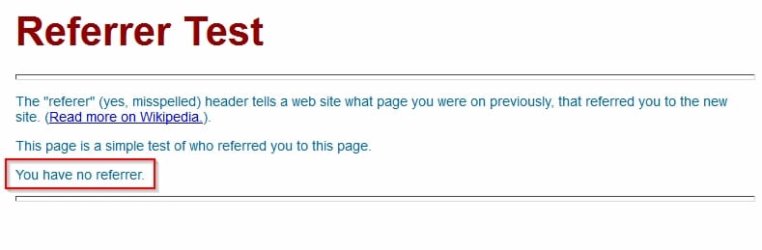
Referrer Test.jpg

PC Flank: Make sure you're protected on all sides. - lots of stuff

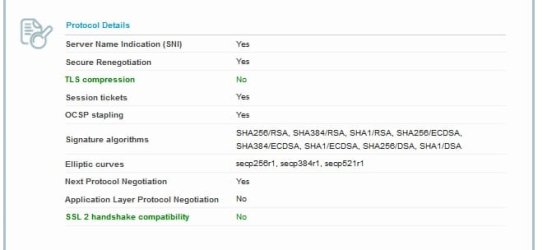
https://www.ssllabs.com/ssltest/viewMyClient.html SSL/TLS test (Ciphers test)

SSL Client Test.jpgSSL Client Test 2.jpgSSL Client Test 3.jpgSSL Client Test 4.jpg

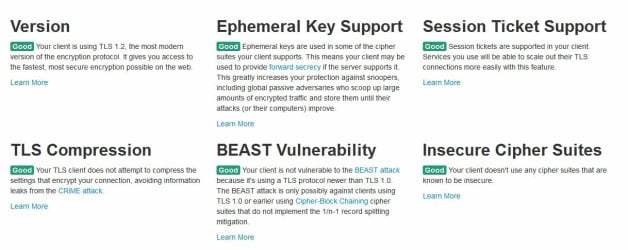
https://www.howsmyssl.com/ Another SSL test

How is My SSL.jpg

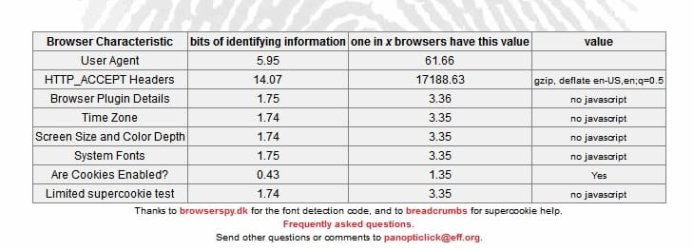
https://panopticlick.eff.org/index.php - Browser Fingerprinting

Panopticlick.jpg

https://www.grc.com/dns/dns.htm - DNS Nameserver Test

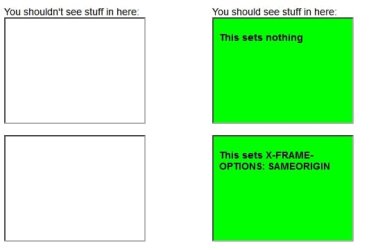
Test for X-FRAME-OPTIONS - Click-jacking test

Test for X-FRAME.jpg

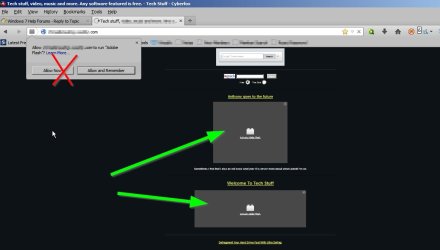
As for IE - I don't want to knock it. It does well if configured correctly but that's the hard bit! I've never found a way to selectively allow flash content rather than allowing flash to run for the whole page.

Flash Content.jpg
 

My Computer

Computer type
Laptop
Computer Manufacturer/Model Number
ASUS
OS
Microsoft Windows 7 Home Premium 64-bit 7601 Multiprocessor Free Service Pack 1
CPU
AMD C-60 APU with Radeon(tm) HD Graphics
Motherboard
ASUSTeK COMPUTER INC. X501U
Memory
4.00 GB
Graphics Card(s)
AMD Radeon HD 6290 Graphics
Sound Card
(1) AMD High Definition Audio Device (2) Realtek High Defi
Screen Resolution
1366 x 768 x 32 bits (4294967296 colors) @ 60 Hz
Hard Drives
Hitachi HTS545050A7E380 SATA Disk Device
Antivirus
Comodo CIS & FW, SecureAplus App Whitelisting, Threatfire
Browser
Cyberfox 64bit, Opera 64bit, Airfox
Other Info
Spy-The-Spy, HitmanPro.Alert, Norton Connect Safe, MJRegWatcher, BitDefender TrafficLight, Voodoo Shield, Zemana AntiMalware
Forgot to post these

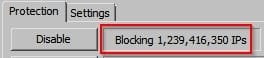
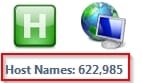
Domains and IP's blocked:

Block 1.jpgHosts.jpg
 

My Computer

Computer type
Laptop
Computer Manufacturer/Model Number
ASUS
OS
Microsoft Windows 7 Home Premium 64-bit 7601 Multiprocessor Free Service Pack 1
CPU
AMD C-60 APU with Radeon(tm) HD Graphics
Motherboard
ASUSTeK COMPUTER INC. X501U
Memory
4.00 GB
Graphics Card(s)
AMD Radeon HD 6290 Graphics
Sound Card
(1) AMD High Definition Audio Device (2) Realtek High Defi
Screen Resolution
1366 x 768 x 32 bits (4294967296 colors) @ 60 Hz
Hard Drives
Hitachi HTS545050A7E380 SATA Disk Device
Antivirus
Comodo CIS & FW, SecureAplus App Whitelisting, Threatfire
Browser
Cyberfox 64bit, Opera 64bit, Airfox
Other Info
Spy-The-Spy, HitmanPro.Alert, Norton Connect Safe, MJRegWatcher, BitDefender TrafficLight, Voodoo Shield, Zemana AntiMalware
I did not mean to imply that IE11 was the best for you. You might do fine with Aviator. Just don't believe all of the hype that they have written about it.

For me, I enabled EPM within IE11. Nothing else to configure. I don't have Flash installed. If I want to see a website with flash content, I use Pale Moon or Chrome. I keep all three (IE, Pale Moon and Chrome) open most of the time. It helps me separate websites that I'm logged into from ones where I want some level of privacy.

Callender mentioned some good info on testing a browser, but contests with cash prizes seem to be some of the best testing. I doubt that you will see a small player like Aviator join competitions like that anytime soon.
 

My Computer

Computer type
Laptop
Computer Manufacturer/Model Number
Employer provided Dell Latitude
OS
W7 Pro SP1 64bit
CPU
i7
Memory
8GB
Graphics Card(s)
Intel HD Graphics
Hard Drives
crappy SSD
Antivirus
Employer mandated Symantec Endpoint Protection
Browser
Pale Moon 64bit, IE11 64bit & Chrome 64bit
Whitehat Inquiry Reponse

Let me ask you something. How many entries do you have in your Host file? That will tell me how concerned you are about security. How many sites do you allow to use Flash? Are you using a 64-bit browser? Do you have enhanced security turned on? Do you have Windows Firewall turned on? How many entries have you put in the firewall?

Most answers to these questions will be; zero, all, don't know, what's that and who cares. Then they will complain that IE or Windows is unsafe. Yeah, right.

I wrote an email to WhiteHate Aviator support to get clarification for the sake of this thread. My email is as follows:

Hello,

I have tried out your browser which was recommended to me on a forum that i started HERE and honestly, so far, i love it.

I am wanting to get information on what Aviator supports and what it does not. Such as "ASLR" and which versions of "TLS" do you guys support and which one is enabled by default?

My goal is to find a browser that is secure out of the box with minimal configuration required. I thought Aviator was AWESOME until people started talking about IE11 and how secure it is on that forum blah blah blah (then again it is SevenForums so people being in favor or IE11 is to be expected)

Please give me some information to add to that t possibly convert them to Aviator, LOL.

Also, do extensions that work in Chrome such as Zenmate and Adblock work just like they would in Chrome? I think its awesome that you already add Disconnect because thats what i was using in addition to the other two i mentioned while i was still using Chrome. Also, can adding these extensions to White Hate Aviator effect it's security? Say for instance, Zenmate has a newly found exploit and someone tries to use it on me.


P.S.

Any recommendations on settings that I can configure in order to make Aviator even MORE secure than it already is? And maybe some type of "Benchmark" site recommendation to calculate the security of the browser compared to others?


Their reply is as follows:

Hi,

Thanks for the questions! I’ll take them one at a time:

- Aviator in terms of security support is similar to Chrome due to the shared Chromium source. That means it supports ASLR, DEP and TLS 1.0, 1.1 and 1.2. Due to the click-to-play that’s standard on Aviator for Flash and Java, the drive by downloads that compromise these systems are drastically reduced in effectiveness for the average user.

- Yeah I can see a Windows oriented forum being a bit biased towards IE. Just a bit.

- Extensions for the most part work with Aviator just as they would in Chrome. Adblock definitely works for Aviator (though there’s a native adblock built in to Aviator), and even though a customer has told me they couldn’t use Zenmate, it’s worked just fine for me. Extensions that can be incompatible are some password managers which require a check of the browser type before working with it (1Password is like this, though we are in the process of getting approved) and some that don’t work in incognito mode in Chrome won’t work in Protected mode in Aviator (since this is the default mode in Aviator it decreases the effectiveness of these extensions) among others types. Exploits in terms of extensions seem to be limited to the permissions granted to the extension. So if you give an extension access to cookies or history, then those are at risk with the extension if it is exploited.

- For an increase in security, you can keep in mind that Aviator’s settings are designed to be a strict as can be allowed without drastically affecting the browsing experience. If you want to crank up Aviator from “Secure and Accessible” to “Ungodly levels of Security” the options to do that are in place in terms of things like preventing javascript, flash and cookies entirely, bulking up on the standard security and privacy extensions (HTTPS Everywhere, avast!, VPNs) and generally just an increase in awareness and good habits in browsing (regularly closing Aviator, caution on unknown sites, etc). There are tons of ways to ensure even more security and privacy, the only real limit is how much convenience and effort are you willing to sacrifice really.

- As for browser bookmark sites; despite being a person who, you know, works for a browser I don’t really have any good suggestions outside of the usual acid or html5-compatibility tests that a quick search will show are pretty common. I don’t know if there’s any legitimate sites that could do security/privacy testing in such an acceptable way that I could recommend here, but there very well could be some out there unbeknownst to me.

I hope this answers your questions, if I missed anything let me know and I’ll try to cover it. And if you have any others, please don’t hesitate to let us know!
 
Last edited:

My Computer

Computer type
PC/Desktop
Computer Manufacturer/Model Number
Dell Inspiron 530
OS
Windows 7 Professional Version 6.1 Build 7601 SP1
CPU
Q6600
Motherboard
IDK
Memory
4GB Total
Graphics Card(s)
GeForce 9500GT =(
Sound Card
Onboard
Monitor(s) Displays
Smaller than what i want
Screen Resolution
Not up to par
Hard Drives
Not an SSD
PSU
350 Watt or W/E this model comes with
Case
Dell Inspiron 530
Cooling
Factory
Keyboard
Logitech G510
Mouse
Logitech G500
Internet Speed
Eh, its okay.
Browser
Aviator.
Other Info
I want my old computer back.
Browser tests. Mostly they just check that plugins are up to date rather than simulate exploits.

Here's a few that do more. Screenshots posted so that results can be compared.

check-and-secure | powered by cyscon GmbH! (Warning. Will offer to install HitmanPro Alert. Maybe you don't want it).

Feature Settings Check - Main - Not really a browser check. Checks to see if your security blocks harmless malware test samples.

BrowserSpy.dk - aimed at testing privacy.

Zeigen's Referrer Test referrer test

View attachment 318619

PC Flank: Make sure you're protected on all sides. - lots of stuff

https://www.ssllabs.com/ssltest/viewMyClient.html SSL/TLS test (Ciphers test)
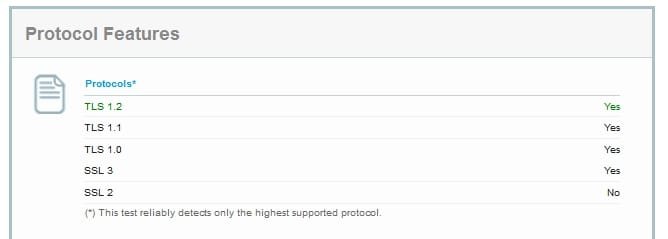
View attachment 318624View attachment 318621View attachment 318622View attachment 318623

https://www.howsmyssl.com/ Another SSL test

View attachment 318617

https://panopticlick.eff.org/index.php - Browser Fingerprinting

View attachment 318618

https://www.grc.com/dns/dns.htm - DNS Nameserver Test

Test for X-FRAME-OPTIONS - Click-jacking test

View attachment 318625

As for IE - I don't want to knock it. It does well if configured correctly but that's the hard bit! I've never found a way to selectively allow flash content rather than allowing flash to run for the whole page.

View attachment 318629

I'm unfamiliar with all except PC FLank. I like that site. Seems to do a thorough job. But i have to actually enabled a few features in Aviator (I forget which ones exactly i think Cookies).

I'll look in to the others... Thanks!!!
 

My Computer

Computer type
PC/Desktop
Computer Manufacturer/Model Number
Dell Inspiron 530
OS
Windows 7 Professional Version 6.1 Build 7601 SP1
CPU
Q6600
Motherboard
IDK
Memory
4GB Total
Graphics Card(s)
GeForce 9500GT =(
Sound Card
Onboard
Monitor(s) Displays
Smaller than what i want
Screen Resolution
Not up to par
Hard Drives
Not an SSD
PSU
350 Watt or W/E this model comes with
Case
Dell Inspiron 530
Cooling
Factory
Keyboard
Logitech G510
Mouse
Logitech G500
Internet Speed
Eh, its okay.
Browser
Aviator.
Other Info
I want my old computer back.
Browser tests. Mostly they just check that plugins are up to date rather than simulate exploits.

Here's a few that do more. Screenshots posted so that results can be compared.

check-and-secure | powered by cyscon GmbH! (Warning. Will offer to install HitmanPro Alert. Maybe you don't want it).

Feature Settings Check - Main - Not really a browser check. Checks to see if your security blocks harmless malware test samples.

BrowserSpy.dk - aimed at testing privacy.

Zeigen's Referrer Test referrer test

View attachment 318619

PC Flank: Make sure you're protected on all sides. - lots of stuff

https://www.ssllabs.com/ssltest/viewMyClient.html SSL/TLS test (Ciphers test)
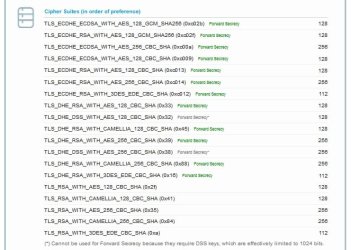
View attachment 318624View attachment 318621View attachment 318622View attachment 318623

https://www.howsmyssl.com/ Another SSL test
View attachment 318617

https://panopticlick.eff.org/index.php - Browser Fingerprinting
View attachment 318618

https://www.grc.com/dns/dns.htm - DNS Nameserver Test

Test for X-FRAME-OPTIONS - Click-jacking test
View attachment 318625

As for IE - I don't want to knock it. It does well if configured correctly but that's the hard bit! I've never found a way to selectively allow flash content rather than allowing flash to run for the whole page.
View attachment 318629

You might have stated already... But what browser do you use? Wanna play a game and compare results on each site? LoL... I'll be testing Aviator.
 

My Computer

Computer type
PC/Desktop
Computer Manufacturer/Model Number
Dell Inspiron 530
OS
Windows 7 Professional Version 6.1 Build 7601 SP1
CPU
Q6600
Motherboard
IDK
Memory
4GB Total
Graphics Card(s)
GeForce 9500GT =(
Sound Card
Onboard
Monitor(s) Displays
Smaller than what i want
Screen Resolution
Not up to par
Hard Drives
Not an SSD
PSU
350 Watt or W/E this model comes with
Case
Dell Inspiron 530
Cooling
Factory
Keyboard
Logitech G510
Mouse
Logitech G500
Internet Speed
Eh, its okay.
Browser
Aviator.
Other Info
I want my old computer back.
What browser

Well for those tests I used Cyberfox 28.0.1 64bit AMD optimized version but it's been tweaked a lot (via preferences) and also uses add ons for certain stuff. For example javascript is enabled but can't be detected by Panopticlick and the user agent is randomised. So it's not really a true "out of the box" test.

I don't limit myself to one single browser either!

And that TLS stuff - I used the Powershell script here:

How to fix SSL 2.0 and BEAST on IIS - Information Security Stack Exchange

And the reg files attached here:

Changing IE's SSL cipher order | Wilders Security Forums

That takes care of windows but also had to configure browsers to disable weak ciphers.
 

My Computer

Computer type
Laptop
Computer Manufacturer/Model Number
ASUS
OS
Microsoft Windows 7 Home Premium 64-bit 7601 Multiprocessor Free Service Pack 1
CPU
AMD C-60 APU with Radeon(tm) HD Graphics
Motherboard
ASUSTeK COMPUTER INC. X501U
Memory
4.00 GB
Graphics Card(s)
AMD Radeon HD 6290 Graphics
Sound Card
(1) AMD High Definition Audio Device (2) Realtek High Defi
Screen Resolution
1366 x 768 x 32 bits (4294967296 colors) @ 60 Hz
Hard Drives
Hitachi HTS545050A7E380 SATA Disk Device
Antivirus
Comodo CIS & FW, SecureAplus App Whitelisting, Threatfire
Browser
Cyberfox 64bit, Opera 64bit, Airfox
Other Info
Spy-The-Spy, HitmanPro.Alert, Norton Connect Safe, MJRegWatcher, BitDefender TrafficLight, Voodoo Shield, Zemana AntiMalware
Well for those tests I used Cyberfox 28.0.1 64bit AMD optimized version but it's been tweaked a lot (via preferences) and also uses add ons for certain stuff. For example javascript is enabled but can't be detected by Panopticlick and the user agent is randomised. So it's not really a true "out of the box" test.

I don't limit myself to one single browser either!

And that TLS stuff - I used the Powershell script here:

How to fix SSL 2.0 and BEAST on IIS - Information Security Stack Exchange

And the reg files attached here:

Changing IE's SSL cipher order | Wilders Security Forums

That takes care of windows but also had to configure browsers to disable weak ciphers.

I will check out the CyberFox browser as well. I am fine with using multiple browsers for different situations.

What do you think about the response from Whitehat Aviator? Seem secure "Out of the Box" with what he was saying? Do you disagree with anything that he said?

Also, how do i change the "Agent" for a browser? Meaning if i want it to show up as Internet Explorer instead of Chrome (to other users) how would i do so? I'm at work and dont have Aviator installed on this machine.
 

My Computer

Computer type
PC/Desktop
Computer Manufacturer/Model Number
Dell Inspiron 530
OS
Windows 7 Professional Version 6.1 Build 7601 SP1
CPU
Q6600
Motherboard
IDK
Memory
4GB Total
Graphics Card(s)
GeForce 9500GT =(
Sound Card
Onboard
Monitor(s) Displays
Smaller than what i want
Screen Resolution
Not up to par
Hard Drives
Not an SSD
PSU
350 Watt or W/E this model comes with
Case
Dell Inspiron 530
Cooling
Factory
Keyboard
Logitech G510
Mouse
Logitech G500
Internet Speed
Eh, its okay.
Browser
Aviator.
Other Info
I want my old computer back.
Aviator User Agent String

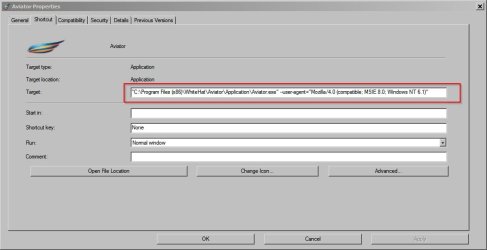
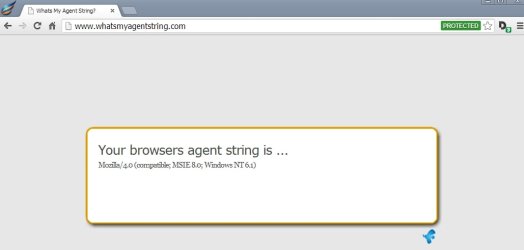
Well you can manually change the user agent string in Aviator by right clicking the Aviator shortcut and adding the user agent in the target box. So if you add:


--user-agent="Mozilla/4.0 (compatible; MSIE 8.0; Windows NT 6.1)"

including the space before -- ,then sites will identify the browser as IE8 but it might cause some features on the site not work correctly.

Aviator Properties.jpg

Whats My Agent String_Aviator.jpg

It does seem to be pretty secure in so far as that without any plugins installed there shouldn't be a problem!

How can you make your browser more secure? Well whatever browser you use, keep plugins updated, keep the browser updated and if possible try to configure it securely. Then use a secure DNS Nameserver.

As for other browsers like Cyberfox - it's a Firefox variant, you can change the user agent string or use an add ons like User Agent Switcher or User Agent Cleaner plus a few others.
 

My Computer

Computer type
Laptop
Computer Manufacturer/Model Number
ASUS
OS
Microsoft Windows 7 Home Premium 64-bit 7601 Multiprocessor Free Service Pack 1
CPU
AMD C-60 APU with Radeon(tm) HD Graphics
Motherboard
ASUSTeK COMPUTER INC. X501U
Memory
4.00 GB
Graphics Card(s)
AMD Radeon HD 6290 Graphics
Sound Card
(1) AMD High Definition Audio Device (2) Realtek High Defi
Screen Resolution
1366 x 768 x 32 bits (4294967296 colors) @ 60 Hz
Hard Drives
Hitachi HTS545050A7E380 SATA Disk Device
Antivirus
Comodo CIS & FW, SecureAplus App Whitelisting, Threatfire
Browser
Cyberfox 64bit, Opera 64bit, Airfox
Other Info
Spy-The-Spy, HitmanPro.Alert, Norton Connect Safe, MJRegWatcher, BitDefender TrafficLight, Voodoo Shield, Zemana AntiMalware
Well you can manually change the user agent string in Aviator by right clicking the Aviator shortcut and adding the user agent in the target box. So if you add:


--user-agent="Mozilla/4.0 (compatible; MSIE 8.0; Windows NT 6.1)"

including the space before -- ,then sites will identify the browser as IE8 but it might cause some features on the site not work correctly.

View attachment 318724

View attachment 318725

It does seem to be pretty secure in so far as that without any plugins installed there shouldn't be a problem!

How can you make your browser more secure? Well whatever browser you use, keep plugins updated, keep the browser updated and if possible try to configure it securely. Then use a secure DNS Nameserver.

As for other browsers like Cyberfox - it's a Firefox variant, you can change the user agent string or use an add ons like User Agent Switcher or User Agent Cleaner plus a few others.

Excellent, thanks!!

I'll probably change it to read "Chrome" since it is a Chrome variant. I'm wondering if it displays that it is "Whitehat Aviator" to begin with or if it already reads as "Chrome/Chromium" ..

BTW, i tried to +1 you but it sais i need to spread some around before giving. I don't think I've even +1'd you yet...
 

My Computer

Computer type
PC/Desktop
Computer Manufacturer/Model Number
Dell Inspiron 530
OS
Windows 7 Professional Version 6.1 Build 7601 SP1
CPU
Q6600
Motherboard
IDK
Memory
4GB Total
Graphics Card(s)
GeForce 9500GT =(
Sound Card
Onboard
Monitor(s) Displays
Smaller than what i want
Screen Resolution
Not up to par
Hard Drives
Not an SSD
PSU
350 Watt or W/E this model comes with
Case
Dell Inspiron 530
Cooling
Factory
Keyboard
Logitech G510
Mouse
Logitech G500
Internet Speed
Eh, its okay.
Browser
Aviator.
Other Info
I want my old computer back.
User Agent Strings

Here's a list that you could use:

UserAgentString.com - List of User Agent Strings

I didn't really answer your earlier question. I think that Aviator seems to have been designed to make things like "drive by downloads" when browsing less likely and they say that Java and Flash are click to play. As they pointed out adding a bunch of add ons like say a video downloader or similar won't help security. Personally I only ever install Java on a when needed to use basis then remove it.

If you need to browse in pretty much 100% safety then most people would still say use a Linux Live USB and don't transfer or download any files onto your windows partition when using it!
 

My Computer

Computer type
Laptop
Computer Manufacturer/Model Number
ASUS
OS
Microsoft Windows 7 Home Premium 64-bit 7601 Multiprocessor Free Service Pack 1
CPU
AMD C-60 APU with Radeon(tm) HD Graphics
Motherboard
ASUSTeK COMPUTER INC. X501U
Memory
4.00 GB
Graphics Card(s)
AMD Radeon HD 6290 Graphics
Sound Card
(1) AMD High Definition Audio Device (2) Realtek High Defi
Screen Resolution
1366 x 768 x 32 bits (4294967296 colors) @ 60 Hz
Hard Drives
Hitachi HTS545050A7E380 SATA Disk Device
Antivirus
Comodo CIS & FW, SecureAplus App Whitelisting, Threatfire
Browser
Cyberfox 64bit, Opera 64bit, Airfox
Other Info
Spy-The-Spy, HitmanPro.Alert, Norton Connect Safe, MJRegWatcher, BitDefender TrafficLight, Voodoo Shield, Zemana AntiMalware
ASLR on a 32bit app is not as useful as it is on a 64bit app...
...hence the argument that a 64bit browser can be more secure
...or maybe I'm not understanding what I'm reading on the topic.


Maybe I should ask those at Aviator why I cannot have Windows shortcuts as bookmarks within the browser. I seem to be the only person in the world that wants this for all browsers.


Also, I worded my question wrong.
Which TLS version is in use by default?
should have been
Which TLS versions are enabled by default?
...but the e-mail answered that. Thanks

Maybe I'm wrong (it would not be the first time), but I don't think that Aviator should be launched after the install process. Doing so makes the main "parent process" run at the high integrity level (run as admin). It would be safer to lauch the browser at the medium integrity level - like a default Windows user does. This only happens after the install, so maybe it is not a big deal.


Take a look in this folder:
C:\Users\username\AppData\Local\Aviator\User Data\Default\Extensions
My understanding of Chrome extensions could be flawed - but it seems that there are 6 of them installed by default with Aviator and yet only one (Disconnect) shows in the GUI. How can you check to see that those other extensions are up to date?

Aviator version 2.0 is based on Chrome version 33.0.1750.117 (pushed to clients in late Feb 2014). There have been several security flaws fixed since that version of Chrome was released. The production version of Chrome is 35.0.1916.114 (pushed to clients this week). You can page thru the release history here. What does all of this mean in terms of Aviator's security? Do they mitigate the security flaws in other ways?
 

My Computer

Computer type
Laptop
Computer Manufacturer/Model Number
Employer provided Dell Latitude
OS
W7 Pro SP1 64bit
CPU
i7
Memory
8GB
Graphics Card(s)
Intel HD Graphics
Hard Drives
crappy SSD
Antivirus
Employer mandated Symantec Endpoint Protection
Browser
Pale Moon 64bit, IE11 64bit & Chrome 64bit
Here's a list that you could use:

UserAgentString.com - List of User Agent Strings

I didn't really answer your earlier question. I think that Aviator seems to have been designed to make things like "drive by downloads" when browsing less likely and they say that Java and Flash are click to play. As they pointed out adding a bunch of add ons like say a video downloader or similar won't help security. Personally I only ever install Java on a when needed to use basis then remove it.

If you need to browse in pretty much 100% safety then most people would still say use a Linux Live USB and don't transfer or download any files onto your windows partition when using it!

Yea... I use only Zenmate, Disconnect, and Adblock... Disconnect is already built in so thats good... and they said in the email that they have their own little adblock built in.

I agree with the Linux Live USB thing. SOOO easy to avoid infection if your lonely and feel like visiting a few sites :D

ASLR on a 32bit app is not as useful as it is on a 64bit app...
...hence the argument that a 64bit browser can be more secure
...or maybe I'm not understanding what I'm reading on the topic.


Maybe I should ask those at Aviator why I cannot have Windows shortcuts as bookmarks within the browser. I seem to be the only person in the world that wants this for all browsers.


Also, I worded my question wrong.
Which TLS version is in use by default?
should have been
Which TLS versions are enabled by default?
...but the e-mail answered that. Thanks

Maybe I'm wrong (it would not be the first time), but I don't think that Aviator should be launched after the install process. Doing so makes the main "parent process" run at the high integrity level (run as admin). It would be safer to lauch the browser at the medium integrity level - like a default Windows user does. This only happens after the install, so maybe it is not a big deal.


Take a look in this folder:
C:\Users\username\AppData\Local\Aviator\User Data\Default\Extensions
My understanding of Chrome extensions could be flawed - but it seems that there are 6 of them installed by default with Aviator and yet only one (Disconnect) shows in the GUI. How can you check to see that those other extensions are up to date?

Aviator version 2.0 is based on Chrome version 33.0.1750.117 (pushed to clients in late Feb 2014). There have been several security flaws fixed since that version of Chrome was released. The production version of Chrome is 35.0.1916.114 (pushed to clients this week). You can page thru the release history here. What does all of this mean in terms of Aviator's security? Do they mitigate the security flaws in other ways?

How to check to see if the extensions are up to date is a good question... As i stated to Callender in my included quotation Disconnect is in there as well as some type of Adblock thing. If you figure out what the other ones are (and their purpose) please post and let me know. I'm curious by nature... But I wonder if they only get updated when you update the browser itself, or if they can be updated by actually downloading the extension itself.

But whether it be Chrome, Firefox, or IE... All of them at one point in time have some kind of major security flaw. The thing is, which of them end up have the least security flaws overall and which is the most difficult for the black hats to take advantage of.

If you are actually being "Targeted" by someone with a decent amount of knowledge... i don't think it matters what browser your using. You will get hacked unless you have an equal amount of knowledge or more.
 

My Computer

Computer type
PC/Desktop
Computer Manufacturer/Model Number
Dell Inspiron 530
OS
Windows 7 Professional Version 6.1 Build 7601 SP1
CPU
Q6600
Motherboard
IDK
Memory
4GB Total
Graphics Card(s)
GeForce 9500GT =(
Sound Card
Onboard
Monitor(s) Displays
Smaller than what i want
Screen Resolution
Not up to par
Hard Drives
Not an SSD
PSU
350 Watt or W/E this model comes with
Case
Dell Inspiron 530
Cooling
Factory
Keyboard
Logitech G510
Mouse
Logitech G500
Internet Speed
Eh, its okay.
Browser
Aviator.
Other Info
I want my old computer back.
Sandboxing

It seems that it user some kind of sandboxing for each tab and the cache is cleared on shutdown.

I'd agree that it shouldn't launch on install and it shouldn't start with windows. Had to delete the startup entry!

I can't use Aviator as a file browser - it blocks access to files. As for those extensions - one seems to be a pop up blocker - so far I haven't worked out what the others are!

Edit: It just launched an update check.
 
Last edited:

My Computer

Computer type
Laptop
Computer Manufacturer/Model Number
ASUS
OS
Microsoft Windows 7 Home Premium 64-bit 7601 Multiprocessor Free Service Pack 1
CPU
AMD C-60 APU with Radeon(tm) HD Graphics
Motherboard
ASUSTeK COMPUTER INC. X501U
Memory
4.00 GB
Graphics Card(s)
AMD Radeon HD 6290 Graphics
Sound Card
(1) AMD High Definition Audio Device (2) Realtek High Defi
Screen Resolution
1366 x 768 x 32 bits (4294967296 colors) @ 60 Hz
Hard Drives
Hitachi HTS545050A7E380 SATA Disk Device
Antivirus
Comodo CIS & FW, SecureAplus App Whitelisting, Threatfire
Browser
Cyberfox 64bit, Opera 64bit, Airfox
Other Info
Spy-The-Spy, HitmanPro.Alert, Norton Connect Safe, MJRegWatcher, BitDefender TrafficLight, Voodoo Shield, Zemana AntiMalware
You can open the json (text) file in each extension folder to see what it is/does, but this is hardly practical for the average user.
 

My Computer

Computer type
Laptop
Computer Manufacturer/Model Number
Employer provided Dell Latitude
OS
W7 Pro SP1 64bit
CPU
i7
Memory
8GB
Graphics Card(s)
Intel HD Graphics
Hard Drives
crappy SSD
Antivirus
Employer mandated Symantec Endpoint Protection
Browser
Pale Moon 64bit, IE11 64bit & Chrome 64bit
Maybe look here:

Well try typing this into the address bar:

aviator://aviator-urls/

Will take a while to look through the whole lot!
 

My Computer

Computer type
Laptop
Computer Manufacturer/Model Number
ASUS
OS
Microsoft Windows 7 Home Premium 64-bit 7601 Multiprocessor Free Service Pack 1
CPU
AMD C-60 APU with Radeon(tm) HD Graphics
Motherboard
ASUSTeK COMPUTER INC. X501U
Memory
4.00 GB
Graphics Card(s)
AMD Radeon HD 6290 Graphics
Sound Card
(1) AMD High Definition Audio Device (2) Realtek High Defi
Screen Resolution
1366 x 768 x 32 bits (4294967296 colors) @ 60 Hz
Hard Drives
Hitachi HTS545050A7E380 SATA Disk Device
Antivirus
Comodo CIS & FW, SecureAplus App Whitelisting, Threatfire
Browser
Cyberfox 64bit, Opera 64bit, Airfox
Other Info
Spy-The-Spy, HitmanPro.Alert, Norton Connect Safe, MJRegWatcher, BitDefender TrafficLight, Voodoo Shield, Zemana AntiMalware
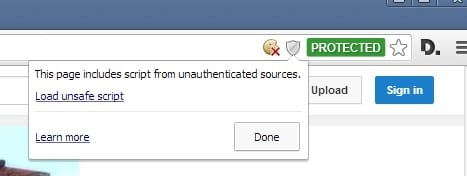
Script blocker

Edit json files - that's what I did! I suppose that more information will come to light once it's been around for a while.

In the meantime a couple of tests.

Doesn't load potentially unsafe scripts and doesn't store cookies or even flash cookies. Just checked.

Script Blocker.jpg
 
Last edited:

My Computer

Computer type
Laptop
Computer Manufacturer/Model Number
ASUS
OS
Microsoft Windows 7 Home Premium 64-bit 7601 Multiprocessor Free Service Pack 1
CPU
AMD C-60 APU with Radeon(tm) HD Graphics
Motherboard
ASUSTeK COMPUTER INC. X501U
Memory
4.00 GB
Graphics Card(s)
AMD Radeon HD 6290 Graphics
Sound Card
(1) AMD High Definition Audio Device (2) Realtek High Defi
Screen Resolution
1366 x 768 x 32 bits (4294967296 colors) @ 60 Hz
Hard Drives
Hitachi HTS545050A7E380 SATA Disk Device
Antivirus
Comodo CIS & FW, SecureAplus App Whitelisting, Threatfire
Browser
Cyberfox 64bit, Opera 64bit, Airfox
Other Info
Spy-The-Spy, HitmanPro.Alert, Norton Connect Safe, MJRegWatcher, BitDefender TrafficLight, Voodoo Shield, Zemana AntiMalware
This is what I see:


My Computer

Computer type
Laptop
Computer Manufacturer/Model Number
Employer provided Dell Latitude
OS
W7 Pro SP1 64bit
CPU
i7
Memory
8GB
Graphics Card(s)
Intel HD Graphics
Hard Drives
crappy SSD
Antivirus
Employer mandated Symantec Endpoint Protection
Browser
Pale Moon 64bit, IE11 64bit & Chrome 64bit

My Computer

Computer type
Laptop
Computer Manufacturer/Model Number
ASUS
OS
Microsoft Windows 7 Home Premium 64-bit 7601 Multiprocessor Free Service Pack 1
CPU
AMD C-60 APU with Radeon(tm) HD Graphics
Motherboard
ASUSTeK COMPUTER INC. X501U
Memory
4.00 GB
Graphics Card(s)
AMD Radeon HD 6290 Graphics
Sound Card
(1) AMD High Definition Audio Device (2) Realtek High Defi
Screen Resolution
1366 x 768 x 32 bits (4294967296 colors) @ 60 Hz
Hard Drives
Hitachi HTS545050A7E380 SATA Disk Device
Antivirus
Comodo CIS & FW, SecureAplus App Whitelisting, Threatfire
Browser
Cyberfox 64bit, Opera 64bit, Airfox
Other Info
Spy-The-Spy, HitmanPro.Alert, Norton Connect Safe, MJRegWatcher, BitDefender TrafficLight, Voodoo Shield, Zemana AntiMalware
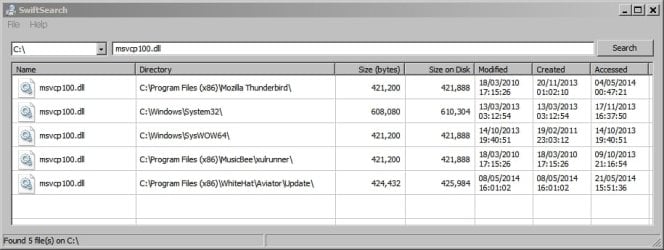
msvcp100_dll - a search

A quick search shows this.
msvcp100_dll.jpg
 

My Computer

Computer type
Laptop
Computer Manufacturer/Model Number
ASUS
OS
Microsoft Windows 7 Home Premium 64-bit 7601 Multiprocessor Free Service Pack 1
CPU
AMD C-60 APU with Radeon(tm) HD Graphics
Motherboard
ASUSTeK COMPUTER INC. X501U
Memory
4.00 GB
Graphics Card(s)
AMD Radeon HD 6290 Graphics
Sound Card
(1) AMD High Definition Audio Device (2) Realtek High Defi
Screen Resolution
1366 x 768 x 32 bits (4294967296 colors) @ 60 Hz
Hard Drives
Hitachi HTS545050A7E380 SATA Disk Device
Antivirus
Comodo CIS & FW, SecureAplus App Whitelisting, Threatfire
Browser
Cyberfox 64bit, Opera 64bit, Airfox
Other Info
Spy-The-Spy, HitmanPro.Alert, Norton Connect Safe, MJRegWatcher, BitDefender TrafficLight, Voodoo Shield, Zemana AntiMalware
Back
Top