Solved the program has stopped responding

Sven1458

New member
Member
VIP
Local time
4:52 PM
Messages
137
Hi All.
I got a little problem with my win 7 desktop.
For about 2 week now I got 3 BSOD’s and several times a day I get “the program has stopped responding” messages. Sometimes it comes back, sometimes I hit the reset button to get it back.
When I hit the reset button, windows tells me that the drive has to get checked for consistency or something like that. It then starts checking and boots normally.
I also ran chkdsk with the “try to recover bad cluster” option checked. Takes about 2 hours to run.
I ran malwerbytes, it found a bunch of stuff and removed it, but no improvement.
A few month ago I wanted to make a backup of my system, but could not because of a CRC error. I ran chkdsk then and it found bad clusters. So I am worried that my drive is going south.
Any suggestion on what I can do to get rid of those stopped responding messages? Or is it time to look for a new hard drive?

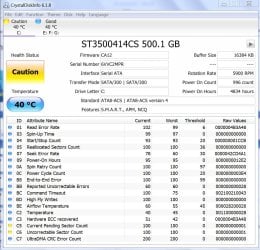
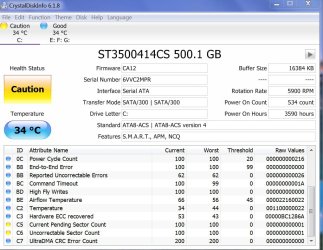
Attached you can see the readout from crystal disk from May and from today.
They are different, but the lines c5 + c6 in yellow have not changed.
I named them old and new
BTW, I just back up my system without a problem
Thanks
Sven
 

Attachments
  • old.jpg
    old.jpg
    223 KB · Views: 3
  • new.JPG
    new.JPG
    203.9 KB · Views: 3

My Computer

Computer type
PC/Desktop
Computer Manufacturer/Model Number
Custom Build
OS
windows 7 ultimate x64
CPU
AMD FX 6 CORE PROCESSOR
Memory
16 GB
Graphics Card(s)
on MB
Sound Card
on MB
Monitor(s) Displays
Acer
Screen Resolution
1920x1080
Hard Drives
Seagate ( C:\)
Case
mini tower
Keyboard
Logitech wireless
Mouse
Logitech wireless
Antivirus
MSE
Browser
IE11
Hello and welcome to SevenForums, i can help you with the BSOD's as these may be pointing to your main issue.

Please click on the link below and use the provided tool.

   Information
:info: Before posting a BSOD thread, please read the instructions here: Blue Screen of Death (BSOD) Posting Instructions

If you need to add new information like the dump files, please make a new post in your initial BSOD thread. Please do not make an extra new thread.
He
 

My Computer

Computer type
PC/Desktop
Computer Manufacturer/Model Number
Custom Build
OS
Windows 7 Ultimate 64-bit
CPU
Intel G3420 3.2GHZ Dual Core
Motherboard
Gigabyte H87-HD3
Memory
Kingson 8GB 1600mhz
Graphics Card(s)
MSI R7970 TF 3GD5/OC BE
Monitor(s) Displays
21" LG & "19 Vertical Samsung
Hard Drives
120GB SSD - Boot
1TB WD
350GB External
2TB External (Wireless)
PSU
Corsair CX 500 modular
Case
Zalman Z11 Plus (modified)
Cooling
Corsair H55, 2x 120mm SP Corsair, 1x 140 Coolermaster
Keyboard
Corsair K50
Mouse
CSL Gaming
Internet Speed
164Mbps
Antivirus
Avast, Malwarebytes
Browser
Google Chrome, IE, Firefox
did as you asked
Sven
 

Attachments

My Computer

Computer type
PC/Desktop
Computer Manufacturer/Model Number
Custom Build
OS
windows 7 ultimate x64
CPU
AMD FX 6 CORE PROCESSOR
Memory
16 GB
Graphics Card(s)
on MB
Sound Card
on MB
Monitor(s) Displays
Acer
Screen Resolution
1920x1080
Hard Drives
Seagate ( C:\)
Case
mini tower
Keyboard
Logitech wireless
Mouse
Logitech wireless
Antivirus
MSE
Browser
IE11
I also downloaded the test software for my drive from Seagate. it passed all tests, so the drive is OK.
What to do next?
Sven
 

My Computer

Computer type
PC/Desktop
Computer Manufacturer/Model Number
Custom Build
OS
windows 7 ultimate x64
CPU
AMD FX 6 CORE PROCESSOR
Memory
16 GB
Graphics Card(s)
on MB
Sound Card
on MB
Monitor(s) Displays
Acer
Screen Resolution
1920x1080
Hard Drives
Seagate ( C:\)
Case
mini tower
Keyboard
Logitech wireless
Mouse
Logitech wireless
Antivirus
MSE
Browser
IE11
Okay so the Bugcheck we are reciving here is a: "F4"

Code:
BugCheck [B]F4[/B], {3, fffffa800f0943c0, fffffa800f0946a0, fffff800031d6270}

Here is some troubleshooting information on the "F4" BC:

   Information
BCCode: F4 0x000000F4

  • Check and reseat all cards, memory and cables (on both ends when possible) actually remove and
    replace - do not just snug.

  • Memory could be the problem so if you have more than 1
    stick swap them in and out to see if the problem follows one stick or try new memory.

  • Antivirus/anti-spyware/security programs have been known to cause or have a role in this issue.

Please can you fill in your system Specs, to help us diagnose the problem faster.
 

My Computer

Computer type
PC/Desktop
Computer Manufacturer/Model Number
Custom Build
OS
Windows 7 Ultimate 64-bit
CPU
Intel G3420 3.2GHZ Dual Core
Motherboard
Gigabyte H87-HD3
Memory
Kingson 8GB 1600mhz
Graphics Card(s)
MSI R7970 TF 3GD5/OC BE
Monitor(s) Displays
21" LG & "19 Vertical Samsung
Hard Drives
120GB SSD - Boot
1TB WD
350GB External
2TB External (Wireless)
PSU
Corsair CX 500 modular
Case
Zalman Z11 Plus (modified)
Cooling
Corsair H55, 2x 120mm SP Corsair, 1x 140 Coolermaster
Keyboard
Corsair K50
Mouse
CSL Gaming
Internet Speed
164Mbps
Antivirus
Avast, Malwarebytes
Browser
Google Chrome, IE, Firefox
Thanks for helping
I have updated my system specks as best as I could.
Also, I have " ghosted " my system to May of this year and it seems to be stable and responsive.
maybe I was just downloading to much crap and it gummed up the system and therefore not responding.
my hitting the reset button probably did not help the situation any.
I will follow your recommendation on reseating all cards (2) and memory ( 2 sticks of 8GB )
again thanks for helping
Sven
 

My Computer

Computer type
PC/Desktop
Computer Manufacturer/Model Number
Custom Build
OS
windows 7 ultimate x64
CPU
AMD FX 6 CORE PROCESSOR
Memory
16 GB
Graphics Card(s)
on MB
Sound Card
on MB
Monitor(s) Displays
Acer
Screen Resolution
1920x1080
Hard Drives
Seagate ( C:\)
Case
mini tower
Keyboard
Logitech wireless
Mouse
Logitech wireless
Antivirus
MSE
Browser
IE11
No worries, Happy posting!
 

My Computer

Computer type
PC/Desktop
Computer Manufacturer/Model Number
Custom Build
OS
Windows 7 Ultimate 64-bit
CPU
Intel G3420 3.2GHZ Dual Core
Motherboard
Gigabyte H87-HD3
Memory
Kingson 8GB 1600mhz
Graphics Card(s)
MSI R7970 TF 3GD5/OC BE
Monitor(s) Displays
21" LG & "19 Vertical Samsung
Hard Drives
120GB SSD - Boot
1TB WD
350GB External
2TB External (Wireless)
PSU
Corsair CX 500 modular
Case
Zalman Z11 Plus (modified)
Cooling
Corsair H55, 2x 120mm SP Corsair, 1x 140 Coolermaster
Keyboard
Corsair K50
Mouse
CSL Gaming
Internet Speed
164Mbps
Antivirus
Avast, Malwarebytes
Browser
Google Chrome, IE, Firefox
Hi HarriePateman.

After 50 or so of more "the program has stopped responding" I finally took it apart and reset all cards and all plugs and also swapped the two memory sticks.
it feels like it is running faster, but I will test some more.
thanks for your suggestion.

Sven
 

My Computer

Computer type
PC/Desktop
Computer Manufacturer/Model Number
Custom Build
OS
windows 7 ultimate x64
CPU
AMD FX 6 CORE PROCESSOR
Memory
16 GB
Graphics Card(s)
on MB
Sound Card
on MB
Monitor(s) Displays
Acer
Screen Resolution
1920x1080
Hard Drives
Seagate ( C:\)
Case
mini tower
Keyboard
Logitech wireless
Mouse
Logitech wireless
Antivirus
MSE
Browser
IE11
No worries, glad i could help.
 

My Computer

Computer type
PC/Desktop
Computer Manufacturer/Model Number
Custom Build
OS
Windows 7 Ultimate 64-bit
CPU
Intel G3420 3.2GHZ Dual Core
Motherboard
Gigabyte H87-HD3
Memory
Kingson 8GB 1600mhz
Graphics Card(s)
MSI R7970 TF 3GD5/OC BE
Monitor(s) Displays
21" LG & "19 Vertical Samsung
Hard Drives
120GB SSD - Boot
1TB WD
350GB External
2TB External (Wireless)
PSU
Corsair CX 500 modular
Case
Zalman Z11 Plus (modified)
Cooling
Corsair H55, 2x 120mm SP Corsair, 1x 140 Coolermaster
Keyboard
Corsair K50
Mouse
CSL Gaming
Internet Speed
164Mbps
Antivirus
Avast, Malwarebytes
Browser
Google Chrome, IE, Firefox
Back
Top