Since the problem remains I complied this list of things done...
Everyone,
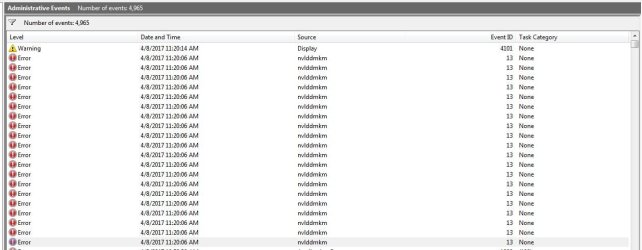
[FONT=Arial, serif]Here is a list of things I have tried, and items that have been changed to alleviate the "TDR" error message. Note that these are in no particular order! Specific message is " Driver xxx.xx has stopped responding but has recovered" OR in place of the driver number it can be 'nvlddmkm' has stopped...etc. etc..
[/FONT]
[FONT=Arial, serif]Multiple instances of various anti virus programs and malware programs have been used all came up with nothing.[/FONT]
[FONT=Arial, serif]
[/FONT]
[FONT=Arial, serif]Random multiple instances of CHKDSK---NOTHING FOUND[/FONT]
[FONT=Arial, serif]
[/FONT]
[FONT=Arial, serif]Ran Mem Test for over eight passes---NOTHING FOUND[/FONT]
[FONT=Arial, serif]
[/FONT]
[FONT=Arial, serif]Ran "SFC /scannow" ----- no missing files found[/FONT]
[FONT=Arial, serif]
[/FONT]
[FONT=Arial, serif]Replaced all RAM memory--- problem remained[/FONT]
[FONT=Arial, serif]
[/FONT]
[FONT=Arial, serif]Replaced graphics card, followed instructions to the letter and installed NUMEROUS new and old video drivers---NO CHANGES[/FONT]
[FONT=Arial, serif]
[/FONT]
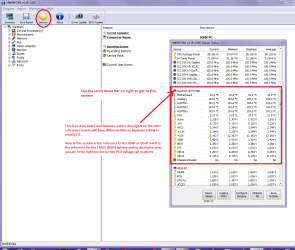
[FONT=Arial, serif]Ran extensive tests on motherboard including,Speccy, HWinfo,[/FONT]
[FONT=Arial, serif]
[/FONT]
[FONT=Arial, serif]Furmark, Firestrike 3D Mark were run on the graphics card ----- ALL OK[/FONT]
[FONT=Arial, serif]
[/FONT]
[FONT=Arial, serif]Ran multiple tests on PSU voltages -------- all are within tolerance[/FONT]
[FONT=Arial, serif]
[/FONT]
[FONT=Arial, serif]Removed and re-seated all connections to the motherboard[/FONT]
[FONT=Arial, serif]
[/FONT]
[FONT=Arial, serif]Cleaned the dust from all cooling fans inside computer case[/FONT]
[FONT=Arial, serif]
[/FONT]
[FONT=Arial, serif]Tried a registry hack to modify the parameters for "TDR"---not successful[/FONT]
[FONT=Arial, serif]
[/FONT]
[FONT=Arial, serif]Did extensive research on various solutions for "TDR" ----- not successful thus far[/FONT]
[FONT=Arial, serif]
[/FONT]
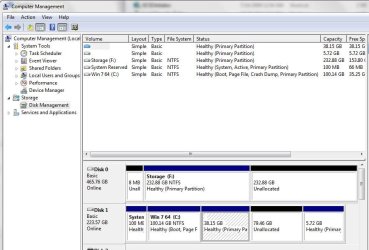
[FONT=Arial, serif]Changed hard drives to one that had a good working troulbe free installation of Windows 7----Problem remained
[/FONT]
[FONT=Arial, serif]
[/FONT]
[FONT=Arial, serif]Changed back to my current version of Windows 7 on my SSD[/FONT]
[FONT=Arial, serif]It should be noted that this problem started occurring with my original Nvidia graphics card, changing to a newer card made no difference. Previous Nvidia GTX 8600 was especially sensitive to what drivers were being used. For instance, when the machine was put on standby, or sleep, upon waking many times I would get a BSOD, this new graphics card [/FONT][FONT=Arial, serif]does [/FONT][FONT=Arial, serif]allow me to the machine on standby and successfully wake it up.[/FONT]
[FONT=Arial, serif]At this point I am of the opinion that a component or components has failed on the motherboard. But I cannot justify replacing the motherboard, processor, more new memory, and probably a new operating system like Windows 10. If there is a bright side to any of this it is the fact that Linux Mint performs flawlessly. This OS resides on the same SSD that Windows 7 does, and of course is using the same components on the Asus motherboard. The difference between Linux and Windows 7 is that Linux doesn't care about the "TDR ". I'm sure whatever is causing it doesn't go away when I use Linux, it is simply being ignored by that operating system. The damnable part of all this is the fact that there have been times when Windows 7 would run almost a week without any errors. But yet on the next startup it would give the error "Windows kernel driver 375.70 I stopped responding but has recovered." It's either that or in place of the kernel driver number it says that " nvlddmkm driver has stopped responding....etc".[/FONT]
[FONT=Arial, serif]If anyone has any ideas or thoughts on what I may have missed please advise me that this point I am at a loss.[/FONT]
[FONT=Arial, serif]
[/FONT]
[FONT=Arial, serif]Thanks to all![/FONT]
[FONT=Arial, serif]
[/FONT]
[FONT=Arial, serif]J T
[/FONT]






 !!!
!!!