

- Local time
- 5:30 AM
- Messages
- 137
Hi All.
I got a little problem with my win 7 desktop.
For about 2 week now I got 3 BSOD’s and several times a day I get “the program has stopped responding” messages. Sometimes it comes back, sometimes I hit the reset button to get it back.
When I hit the reset button, windows tells me that the drive has to get checked for consistency or something like that. It then starts checking and boots normally.
I also ran chkdsk with the “try to recover bad cluster” option checked. Takes about 2 hours to run.
I ran malwerbytes, it found a bunch of stuff and removed it, but no improvement.
A few month ago I wanted to make a backup of my system, but could not because of a CRC error. I ran chkdsk then and it found bad clusters. So I am worried that my drive is going south.
Any suggestion on what I can do to get rid of those stopped responding messages? Or is it time to look for a new hard drive?
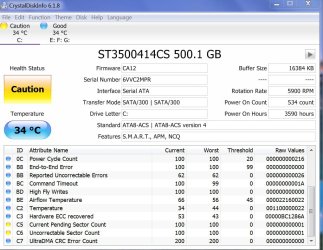
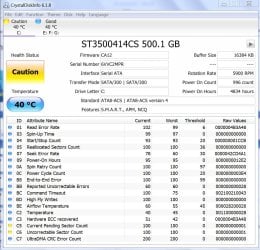
Attached you can see the readout from crystal disk from May and from today.
They are different, but the lines c5 + c6 in yellow have not changed.
I named them old and new
BTW, I just back up my system without a problem
Thanks
Sven
I got a little problem with my win 7 desktop.
For about 2 week now I got 3 BSOD’s and several times a day I get “the program has stopped responding” messages. Sometimes it comes back, sometimes I hit the reset button to get it back.
When I hit the reset button, windows tells me that the drive has to get checked for consistency or something like that. It then starts checking and boots normally.
I also ran chkdsk with the “try to recover bad cluster” option checked. Takes about 2 hours to run.
I ran malwerbytes, it found a bunch of stuff and removed it, but no improvement.
A few month ago I wanted to make a backup of my system, but could not because of a CRC error. I ran chkdsk then and it found bad clusters. So I am worried that my drive is going south.
Any suggestion on what I can do to get rid of those stopped responding messages? Or is it time to look for a new hard drive?
Attached you can see the readout from crystal disk from May and from today.
They are different, but the lines c5 + c6 in yellow have not changed.
I named them old and new
BTW, I just back up my system without a problem
Thanks
Sven
Attachments
My Computer
At a glance
windows 7 ultimate x64AMD FX 6 CORE PROCESSOR16 GBon MB
- Computer type
- PC/Desktop
- Computer Manufacturer/Model Number
- Custom Build
- OS
- windows 7 ultimate x64
- CPU
- AMD FX 6 CORE PROCESSOR
- Memory
- 16 GB
- Graphics Card(s)
- on MB
- Sound Card
- on MB
- Monitor(s) Displays
- Acer
- Screen Resolution
- 1920x1080
- Hard Drives
- Seagate ( C:\)
- Case
- mini tower
- Keyboard
- Logitech wireless
- Mouse
- Logitech wireless
- Antivirus
- MSE
- Browser
- IE11


