The Sims 3 deluxe

fegsdc

New member
Member
VIP
Local time
6:33 AM
Messages
165
Location
Angola
Hi everyone. Today i tried to download The Sims 3 Deluxe on my windows 7 PC and it took hours with an error message showing up every few minutes and it got worse towards the end i had to cancel everything.

The back of the game says windows XP or windows Vista. Does it not work because of my windows version or is it something else??
 
Last edited:

My Computer My Computer

Computer type
PC/Desktop
OS
Windows 7
File F:\Caches\Sunset Valley.ObjectCache
Error: Erro de dados (erro por redundância cíclica).

Is the error I get every few minutes through the download....I went to the link you sent and saw the system specs and my PC passes the test also i selected my game (The sims 3) on a tester to see if it works on my pc and the test says that it does....
 

My Computer My Computer

Computer type
PC/Desktop
OS
Windows 7
I think it works now, I cleaned the CD it was dirty....
 

My Computer My Computer

Computer type
PC/Desktop
OS
Windows 7
I'm glad you figured it out. I didn't know that you were installing from disc.
 

My Computer My Computer

Computer type
Laptop
Computer Manufacturer/Model Number
Dell M6500 Precision Work Station
OS
Windows 7 Pro SP1 64 bit
Memory
8 GB
Screen Resolution
1920x
Internet Speed
30 Mbps
Antivirus
Norton Security
Browser
IE 11
It only works with the CD in the CD drive though, any way to make it work without the CD?
 

My Computer My Computer

Computer type
PC/Desktop
OS
Windows 7
I'm having another problem, my keyboard is in Portuguese and it's a different keyboard from the game..Any way i can change that?
 

My Computer My Computer

Computer type
PC/Desktop
OS
Windows 7
It only works with the CD in the CD drive though, any way to make it work without the CD?


Since you already own the game, you'll need something called a "no CD patch". You can download that here: GameBurnWorld - Downloading Password is on screen there as gbw.

I would backup the two files TS3W.exe and TSLHost.dll from your game directory FIRST before patching.


I'm having another problem, my keyboard is in Portuguese and it's a different keyboard from the game..Any way i can change that?

If the game has a language selection prior to installing then use that. That may allow for the adaptation of your keyboard.

The other option is to use a program to remap your keys. Here are some:

MapKeyboard - remap your keyboard

KeyTweak - remap your keyboard

I have never used these programs so your mileage may vary. Ideally you'd want one of these programs to save profiles so you can go back to the standard keyboard after you play Sims.

Then there's the voice control option that may work. VoiceBot Free - control any game or application with voice commands

Again, your mileage may vary. Never used that program before. Been meaning to try it out.
 

My Computer My Computer

Computer type
PC/Desktop
OS
Windows 7 Ultimate x64
Sorry can you tell me how do i access the game directory/folder?
 

My Computer My Computer

Computer type
PC/Desktop
OS
Windows 7
Open Windows Explorer and right click on the drive containing your CD. Select Explore. You should then be able to find the files he's referring to.
 

My Computer My Computer

Computer type
Laptop
Computer Manufacturer/Model Number
Dell M6500 Precision Work Station
OS
Windows 7 Pro SP1 64 bit
Memory
8 GB
Screen Resolution
1920x
Internet Speed
30 Mbps
Antivirus
Norton Security
Browser
IE 11
Sorry can you tell me how do i access the game directory/folder?


It would be under the programs folder. Either the x86 programs folder or the programs folder.
 

My Computer My Computer

Computer type
PC/Desktop
OS
Windows 7 Ultimate x64
I probably misunderstood. Are those files on his HDD/SDD or the game disc?
 

My Computer My Computer

Computer type
Laptop
Computer Manufacturer/Model Number
Dell M6500 Precision Work Station
OS
Windows 7 Pro SP1 64 bit
Memory
8 GB
Screen Resolution
1920x
Internet Speed
30 Mbps
Antivirus
Norton Security
Browser
IE 11
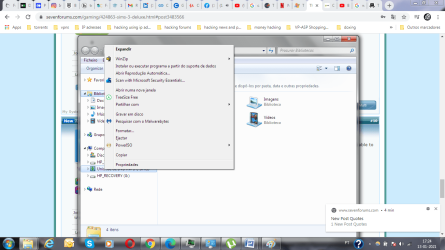
I just added a screenshot, there is no explore option when i right click on the CD location (F:)....
 

Attachments

  • Where is Explore screenshot.png
    Where is Explore screenshot.png
    76.8 KB · Views: 1

My Computer My Computer

Computer type
PC/Desktop
OS
Windows 7
I think it would be Expandir in your screenshot. If they're on the disc, I suspect they would be in a .cab file.

However, if I understand F22 Simpilot correctly, the files would be in either C:\Program Files (x86) or C:\Program Files. I'm waiting for him to answer if that's what he meant.
 

My Computer My Computer

Computer type
Laptop
Computer Manufacturer/Model Number
Dell M6500 Precision Work Station
OS
Windows 7 Pro SP1 64 bit
Memory
8 GB
Screen Resolution
1920x
Internet Speed
30 Mbps
Antivirus
Norton Security
Browser
IE 11
I probably misunderstood. Are those files on his HDD/SDD or the game disc?


Yeah, the patch files for a no CD requirement need to be installed in the game's directory. Read the readme file for the patcher.

OP, if you don't know what or how to go to a directory yet this point I can't really help you.
 

My Computer My Computer

Computer type
PC/Desktop
OS
Windows 7 Ultimate x64
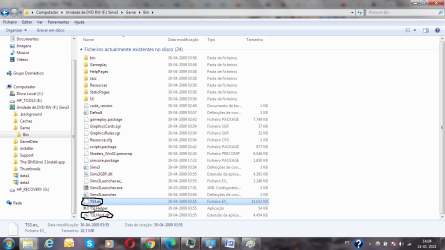
I think on my screenshot is the Game Directory you are talking about? There is a TS3.ex_ file (Not TS3W.exe) and a TSLHost.dll file are these the ones I need to save?
 

Attachments

  • Game directory.png
    Game directory.png
    75.6 KB · Views: 3

My Computer My Computer

Computer type
PC/Desktop
OS
Windows 7
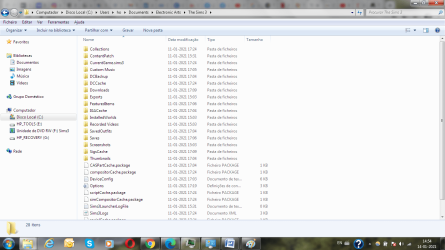
I did not find The sims 3 under C:\Program Files (x86) or C:\Program Files, but i found it in another location. I did not choose to download it there it did so automatically i think....
 

Attachments

  • The Sims 3.png
    The Sims 3.png
    68.5 KB · Views: 3

My Computer My Computer

Computer type
PC/Desktop
OS
Windows 7
Run Everything.exe. Search for TS3W.exe and TSLHost.dll.

You can right click the file in Everything and navigate to its path.

In Everything you can simply right click and copy the two files. Once that is done and they are backed up use the patcher and you should not have to use the CD again.


voidtools
 

My Computer My Computer

Computer type
PC/Desktop
OS
Windows 7 Ultimate x64
I think the biggest problem is the game seems to be in " Documents " as per post #17
Art.
 

My Computer My Computer

Computer type
PC/Desktop
Computer Manufacturer/Model Number
Home built
OS
Win7 sp1 Pro 64bit / XP sp2 Pro (games only)
CPU
Intel Core 2 Duo E8400 @ 3.00GHz
Motherboard
Intel Corporation DP35DP (CPU1)
Memory
8.00 GB Dual-Channel DDR2 @ 400MHz (5-5-5-18)
Graphics Card(s)
1024MB GeForce GTX 560
Sound Card
NVIDIA High Definition Audio
Monitor(s) Displays
SyncMaster (2048x1152@60Hz)
Hard Drives
240GB Sandisc Extreme Pro SSD
244GB Seagate ST3250410AS
488GB Seagate ST500DM002-1BD142
931GB Western Digital WDC WD1003FZEX
PSU
Corsair 720
Case
ATX
Keyboard
HID Keyboard Device Logitech
Mouse
HID-compliant mouse Microsoft
Other Info
TSSTcorp CDDVDW SH-S223L

HL-DT-ST BD-RE BH12LS35
Ok I think Everything.exe is working but where do I paste the files to after copying it??
 

My Computer My Computer

Computer type
PC/Desktop
OS
Windows 7
Back
Top