
You are using an out of date browser. It may not display this or other websites correctly.
You should upgrade or use an alternative browser.
You should upgrade or use an alternative browser.
The System Volume Information keeps growing
- Thread starter AlexOC97
- Start date

I use WizTree to see what is in System Volume Information.
They have a portable zip available, no install needed, just unzip and run the exe.
Antibody Software - WizTree finds the files and folders using the most disk space on your hard drive
It might be System Restore Points, but that's just a guess.
You can post a WizTree pic of where your space is used and someone here may know why ?
http://www.sevenforums.com/tutorials/9733-screenshots-files-upload-post-seven-forums.html
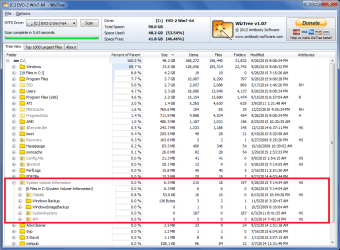
Here is an example of what you could see with WizTree (this OS uses 6.3 MB for System Volume Information).
They have a portable zip available, no install needed, just unzip and run the exe.
Antibody Software - WizTree finds the files and folders using the most disk space on your hard drive
It might be System Restore Points, but that's just a guess.
You can post a WizTree pic of where your space is used and someone here may know why ?
http://www.sevenforums.com/tutorials/9733-screenshots-files-upload-post-seven-forums.html
Here is an example of what you could see with WizTree (this OS uses 6.3 MB for System Volume Information).
My Computer
- Computer type
- PC/Desktop
- Computer Manufacturer/Model Number
- home built
- OS
- Multi-Boot W7_Pro_x64 W8.1_Pro_x64 W10_Pro_x64 +Linux_VMs +Chromium_VM
- CPU
- AMD Athlon II x4 620
- Motherboard
- Gigabyte GA-MA785G-UD3H
- Memory
- 6GB GSkill DDR2 800
- Graphics Card(s)
- AMD 4670 GPU + AMD 4200 IGP
- Sound Card
- on board Realtek ALC889A
- Monitor(s) Displays
- RCA 40" LCD TV, Insignia 32" LCD TV, HP 15" LCD monitor
- Screen Resolution
- 1680 x 1050
- Hard Drives
- OCZ Vertex 3 120GB,
Samsung F3 1TB (3),
Several others - WD, Seagate, Hitachi, ...
- PSU
- Corsair 500 W
- Case
- Rosewill mid tower
- Cooling
- CM 90mm rifle
- Keyboard
- Gyration wireless, Logitech wireless, Dell USB wired
- Mouse
- Gyration wireless, Logitech wireless, V7 USB wired
- Internet Speed
- Spectrum - 100Mbps D / 10Mbps U
- Antivirus
- Avast, MBAM3, EMET, WinPatrol
- Browser
- Pale Moon, Firefox, IE
- Other Info
- 2 multi-boot PC's
Mainly HTPC/Office/Gen purpose (no gaming).
Trendnet USB KVM.
LG DVD burner/Blue Ray Player.
Tray system for removable SATA backup drives.
Not currently OCd, under-volted.
I use Hybrid sleep, rarely re-boot or shutdown.
Hauppauge HD-PVR, Avermedia PCIe TV Tuner, Hauppauge PCI TV Tuner.
My Computer
- Computer type
- PC/Desktop
- OS
- Windows 7 Ultimate 64 bit
I'm blocked from seeing your screen print, so i can't help.
If you upload the screen print to Seven Forums I and many others can see it, and try to help.
If you need help uploading screen prints to SF, ask here, or in this tutorial.
http://www.sevenforums.com/tutorials/9733-screenshots-files-upload-post-seven-forums.html
If you upload the screen print to Seven Forums I and many others can see it, and try to help.
If you need help uploading screen prints to SF, ask here, or in this tutorial.
http://www.sevenforums.com/tutorials/9733-screenshots-files-upload-post-seven-forums.html
My Computer
- Computer type
- PC/Desktop
- Computer Manufacturer/Model Number
- home built
- OS
- Multi-Boot W7_Pro_x64 W8.1_Pro_x64 W10_Pro_x64 +Linux_VMs +Chromium_VM
- CPU
- AMD Athlon II x4 620
- Motherboard
- Gigabyte GA-MA785G-UD3H
- Memory
- 6GB GSkill DDR2 800
- Graphics Card(s)
- AMD 4670 GPU + AMD 4200 IGP
- Sound Card
- on board Realtek ALC889A
- Monitor(s) Displays
- RCA 40" LCD TV, Insignia 32" LCD TV, HP 15" LCD monitor
- Screen Resolution
- 1680 x 1050
- Hard Drives
- OCZ Vertex 3 120GB,
Samsung F3 1TB (3),
Several others - WD, Seagate, Hitachi, ...
- PSU
- Corsair 500 W
- Case
- Rosewill mid tower
- Cooling
- CM 90mm rifle
- Keyboard
- Gyration wireless, Logitech wireless, Dell USB wired
- Mouse
- Gyration wireless, Logitech wireless, V7 USB wired
- Internet Speed
- Spectrum - 100Mbps D / 10Mbps U
- Antivirus
- Avast, MBAM3, EMET, WinPatrol
- Browser
- Pale Moon, Firefox, IE
- Other Info
- 2 multi-boot PC's
Mainly HTPC/Office/Gen purpose (no gaming).
Trendnet USB KVM.
LG DVD burner/Blue Ray Player.
Tray system for removable SATA backup drives.
Not currently OCd, under-volted.
I use Hybrid sleep, rarely re-boot or shutdown.
Hauppauge HD-PVR, Avermedia PCIe TV Tuner, Hauppauge PCI TV Tuner.
The biggest usage for the System Volume Information folder is for Restore points and previous versions of files. By default this is limited to 5% of disk space but some software has been known to increase this. This is configured in the system properties.
My Computer
- Computer type
- PC/Desktop
- Computer Manufacturer/Model Number
- HP
- OS
- Windows 7 Pro 64 bit
- CPU
- Xeon W3520
- Memory
- 8 GB
- Graphics Card(s)
- Nvidia Geforce 210

Heres the picture

Looks pretty normal to me
Looks pretty normal to me
My Computer
- Computer type
- PC/Desktop
- Computer Manufacturer/Model Number
- Pauly Special
- OS
- Win7 Ultimate X64
- CPU
- Intel i5 3570K
- Motherboard
- Gigabyte Z77X-DS3H
- Memory
- 8GB DDR3 1600
- Graphics Card(s)
- Onboard
- Sound Card
- Onboard
- Screen Resolution
- 1280x1024
- Hard Drives
- Samsung 840 Evo SSD (OS)
1TB Spinner (Data)
- PSU
- 800W Arctic
- Case
- Cooler Master
- Cooling
- 3x120mm Fans
- Keyboard
- MS Wireless
- Mouse
- MS Wireless
- Internet Speed
- 20M

My Computer
- Computer type
- Laptop
- Computer Manufacturer/Model Number
- ASUS
- OS
- Microsoft Windows 7 Home Premium 64-bit 7601 Multiprocessor Free Service Pack 1
- CPU
- AMD C-60 APU with Radeon(tm) HD Graphics
- Motherboard
- ASUSTeK COMPUTER INC. X501U
- Memory
- 4.00 GB
- Graphics Card(s)
- AMD Radeon HD 6290 Graphics
- Sound Card
- (1) AMD High Definition Audio Device (2) Realtek High Defi
- Screen Resolution
- 1366 x 768 x 32 bits (4294967296 colors) @ 60 Hz
- Hard Drives
- Hitachi HTS545050A7E380 SATA Disk Device
- Antivirus
- Comodo CIS & FW, SecureAplus App Whitelisting, Threatfire
- Browser
- Cyberfox 64bit, Opera 64bit, Airfox
- Other Info
- Spy-The-Spy, HitmanPro.Alert, Norton Connect Safe, MJRegWatcher, BitDefender TrafficLight, Voodoo Shield, Zemana AntiMalware

AlexOC97 by chance would you have Avast installed or have you every had Avast installed?
My Computer
- Computer type
- PC/Desktop
- Computer Manufacturer/Model Number
- Home made Desktop
- OS
- Windows 10 Pro. 64/ version 1709 Windows 7 Pro/64
- CPU
- Intel i7-6800K @ 4.3
- Motherboard
- ASUS X-99 Deluxe II
- Memory
- Corsair Platinum 16 gig @2400
- Graphics Card(s)
- EVGA GTX 1070 OC
- Monitor(s) Displays
- Asus 27" LED LCD/VE278Q
- Screen Resolution
- 1920-1080 or 1280-720 HDMI
- Hard Drives
- INTEL SSD 730-240 Gb Sata 3.0/
- PSU
- EVGA Platium 1200W
- Case
- Phanteks Luxe Tempered Glass 8 fans/ one radiator
- Cooling
- XSPC/ Water Cooled CPU
- Keyboard
- Das 4 Professional
- Mouse
- Logitech M705/MX Anywhere 2-S
- Internet Speed
- 100 mbits
- Antivirus
- Microsoft Security Essentials/ Malwarebytes Premium 3.0/ SAS
- Browser
- I.E. 11 default/Firefox/ ISP Time Warner Cable/Spectrum
- Other Info
- LG BluRay Burner/
Sound system-KLipsch-THX/
Icy Dock ssd Hot Swap bays.
AlexOC97 by chance would you have Avast installed or have you every had Avast installed?
Yes, I have Avast installed.
My Computer
- Computer type
- PC/Desktop
- OS
- Windows 7 Ultimate 64 bit
Avast was causing the Restore Point to increase to 50%. It's been a while back so I thinking that the problem should be solved by the Avast Team by now.
Check you settings and see if your setting are staying as you set them.
This is what might be happening. Take a read here on the Avast Forum.
https://forum.avast.com/index.php?topic=166697.0
Check you settings and see if your setting are staying as you set them.
This is what might be happening. Take a read here on the Avast Forum.
https://forum.avast.com/index.php?topic=166697.0
My Computer
- Computer type
- PC/Desktop
- Computer Manufacturer/Model Number
- Home made Desktop
- OS
- Windows 10 Pro. 64/ version 1709 Windows 7 Pro/64
- CPU
- Intel i7-6800K @ 4.3
- Motherboard
- ASUS X-99 Deluxe II
- Memory
- Corsair Platinum 16 gig @2400
- Graphics Card(s)
- EVGA GTX 1070 OC
- Monitor(s) Displays
- Asus 27" LED LCD/VE278Q
- Screen Resolution
- 1920-1080 or 1280-720 HDMI
- Hard Drives
- INTEL SSD 730-240 Gb Sata 3.0/
- PSU
- EVGA Platium 1200W
- Case
- Phanteks Luxe Tempered Glass 8 fans/ one radiator
- Cooling
- XSPC/ Water Cooled CPU
- Keyboard
- Das 4 Professional
- Mouse
- Logitech M705/MX Anywhere 2-S
- Internet Speed
- 100 mbits
- Antivirus
- Microsoft Security Essentials/ Malwarebytes Premium 3.0/ SAS
- Browser
- I.E. 11 default/Firefox/ ISP Time Warner Cable/Spectrum
- Other Info
- LG BluRay Burner/
Sound system-KLipsch-THX/
Icy Dock ssd Hot Swap bays.

Had exactly the same issue. As Layback Bear said, it was fixed a couple of updates back.
Updating to the newest version will fix this, you may have to clean out your old restore points to get the space back.
Although I've completely turned off Avast virtual machine (NG) now as the newer updates have apparently introduced some other issues.
Updating to the newest version will fix this, you may have to clean out your old restore points to get the space back.
Although I've completely turned off Avast virtual machine (NG) now as the newer updates have apparently introduced some other issues.
My Computer
- Computer type
- PC/Desktop
- Computer Manufacturer/Model Number
- Custom Build
- OS
- Win 7 Ultimate, Win 8.1 Pro, Linux Mint 19 Cinnamon (All 64-Bit)
- CPU
- Intel i5 4690K
- Motherboard
- Gigabyte Z97X-UD3H
- Memory
- Corsair Vengeance LP 32GB DDR3
- Graphics Card(s)
- MSI GTX 1060 GAMING X 6GB
- Sound Card
- Onboard
- Hard Drives
- Samsung 850 EVO 250GB SSD (x2)
Samsung 860 EVO 1TB SSD (x2)
Crucial MX300 525GB SSD
WD Blue 2TB 5400rpm Intellipark Disabled (x2)
- PSU
- Corsair HX750i
- Case
- Phanteks Enthoo Pro
- Cooling
- CM Hyper 212 EVO on CPU, Noctua Redux NF-P14S 1500rpm (x6)
- Keyboard
- Corsair K70 RGB LUX
- Mouse
- Corsair Sabre RGB
- Antivirus
- Avast Free, MalwareBytes, SAS & CryptoPrevent
- Browser
- Chrome
- Other Info
- StarTech PEXESAT322I 2 Port PCI-E SATA Card
ASUS PCE-AC56 Dual-band AC1300 Wireless Card
Akasa FC.Six Manual Fan Controller
And a Partridge in a Pear Tree!
Similar threads

- Replies
- 3
- Views
- 823

- Replies
- 35
- Views
- 5K
- Replies
- 22
- Views
- 12K

- Replies
- 1
- Views
- 2K

- Replies
- 2
- Views
- 4K