
Theme Pack - Create, Save, Install, and Delete

How to Make your own Windows 7 Theme Pack

   Information
A theme pack is a cab file (.themepack) that includes a desktop background, window colors, sounds, screen saver, icons, and mouse pointers (cursors) used to change your Windows 7 theme all at once instead of each individual item.

A theme pack (.themepack) file will allow you to share your theme with family and friends.

This will show you how to create, save, install, and delete a theme pack.

The Windows 7 Starter and Home Basic editions do not have this feature included in them.


   Tip


OPTION ONE

To Make a Theme Pack


NOTE: If you have not already, then you will need to customize your current Windows 7 theme to how you want the theme pack to be saved as by changing the items you want listed below.
1. Change the Desktop Background picture and settings.

2. Change the Window Color and Appearance settings.

3. Change the Sounds for the Windows 7 sound events to any sound file that you would like instead.

4. Change the Screen Saver and settings to be used for this theme pack.

5. Change the Mouse Pointers (cursors) to use pointers of your choice.

6. Save this theme.

7. Proceed to OPTION TWO below to save your customized theme as a theme pack.


OPTION TWO

To Save Current Theme as a Theme Pack File


NOTE: This will save the current customized theme you have running now as a .themepack file with any name you like to any location that you select.
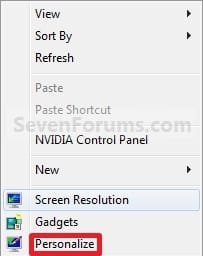
1. Right click on a empty space on the desktop and click on Personalize. (See screenshot below)
Right_Click.jpg
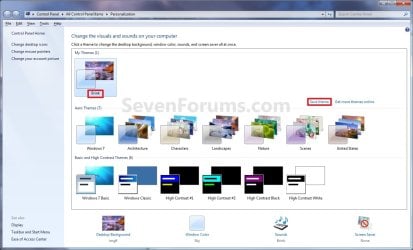
2. Under My Themes, click on the Save theme link towards the right. (See screenshot above)
Personalization.jpg
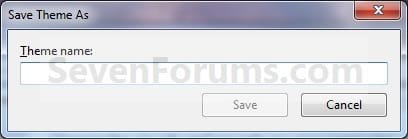
3. Type in a name you want for this theme, and click on the Save button. (See screenshot below)
Name.jpg
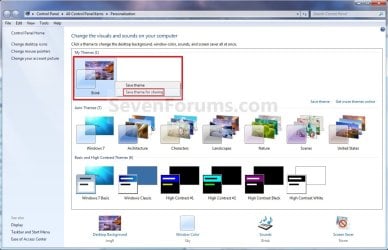
4. Under My Themes, right click on the current theme and click on Save theme for sharing. (See sceenshot below)
Personalization-2.jpg
5. Navigate to the location that you want to save the .themepack file at, type in a file name for the .themepack, and click on the Save button. (See screenshot below)
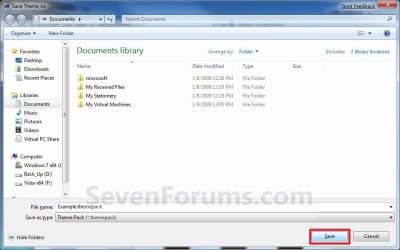
Save_Theme_As-2.jpg
6. You can now close the Personalization window. (See screenshot under step 2)


OPTION THREE

To Install a Theme Pack


NOTE: This will show you how to install a .themepack file so that it will become your current theme and be available to select in the Personaliztion window under My Themes.
1. Download and save a .themepack file of your choice to your desktop.
NOTE: For example, the Example.themepack file used in OPTION TWO.

2. Double click on the .themepack file to install it on your computer.
NOTE: This will install the .themepack to a folder with the themepack name in the hidden
C:\Users\User-Name\AppData\Local\Microsoft\Windows\Themes folder.

3. You will notice that this .themepack file is now your current theme and has been added to the Personalization window under My Themes. (See screenshot below)
Personalization-3.jpg


OPTION FOUR

To Delete a Installed Theme Pack


NOTE: This will show you how to delete a theme that you have installed to remove it from the My Themes section in the Personalization windows.
1. Right click on a empty space on the desktop and click on Personalize. (See screenshot below)
Right_Click.jpg
2. Select another theme other than the one that you want to delete in the My Themes section. (See screenshot below step 3)

3. Right click on the theme (ex: Example) in the My Themes section that you want to delete, and click on Delete Theme. (See screenshot below)
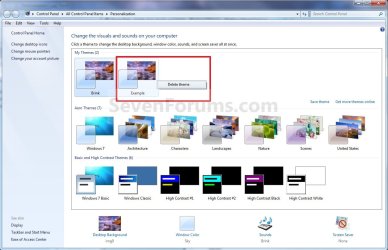
Personalization-Delete.jpg
4. Click on Yes to confirm the deletion. (See screenshot below)
Confirm_Deletion.jpg
5. When done, close the Personalization window. (See screenshot below step 3)
That's it,
Shawn


Last edited:
Thanks Shawn keep up the good work. :party:
 

My Computer

Computer Manufacturer/Model Number
HP Compaq Presario/SR5113WM
OS
Windows 7 Ultimate x64/ Windows Vista Ultimate x64
CPU
AMD Athlon 64 X2 3600+ 1.9Ghz
Motherboard
Asus M2N68-LA
Memory
PNY Optima Memory DDR2 2GB 2x1 kit
Graphics Card(s)
PNY Nvidia 8400 GS 256MB
Sound Card
On board RealTek
Monitor(s) Displays
Acer X163W LCD
Screen Resolution
1366x768
Hard Drives
Western Digital 160 GB SATA 3G (3.0Gb/sec)
7200 rpm
Western Digital 160 GB IDE
PSU
Dynex 400w
Case
Nothin Special
Cooling
Stock
Keyboard
Standard 102 key with volume and sleep buttons
Mouse
Wireless Logitech LX7
Internet Speed
Comcrap 10mb cable
Other Info
Insignia 2.1 speakers, wireless Xbox 360 controller w/plug n play charger, Belkin wireless G + mimo usb network adapter.
You're welcome Mansrm81. :)
 

My Computer

Computer type
PC/Desktop
Computer Manufacturer/Model Number
Self built custom
OS
64-bit Windows 11 Pro for Workstations
CPU
Intel i7-8700K OC'd to 5 GHz
Motherboard
ASUS ROG Maximus XI Formula Z390
Memory
64 GB (4x16GB) G.SKILL TridentZ RGB DDR4 3600 MHz
Graphics Card(s)
ASUS ROG-STRIX-GTX1080TI-O11G-GAMING
Sound Card
Integrated
Monitor(s) Displays
2 x Samsung Odyssey G7 27"
Screen Resolution
2560x1440
Hard Drives
1TB Samsung 990 PRO M.2,
4TB Samsung 990 PRO PRO M.2,
TerraMaster F8 SSD Plus NAS
PSU
Seasonic Prime Titanium 850W
Case
Thermaltake Core P3
Cooling
Corsair Hydro H115i
Keyboard
Logitech wireless K800
Mouse
Logitech MX Master 4
Internet Speed
2 Gb/s Download and 100 Mb/s Upload
Antivirus
Malwarebyte Anti-Malware Premium
Browser
Google Chrome
Other Info
Logitech Z625 speaker system,
Logitech BRIO 4K Pro webcam,
HP Color LaserJet Pro MFP M477fdn,
APC SMART-UPS RT 1000 XL - SURT1000XLI,
Galaxy S23 Plus phone
Great tutorial.
One question:
Does the screen resolution matter? In other words, if I save a theme using my current resolution (1650x1080) can it be used on others PC's that might have other resolutions?
 

My Computer

Computer Manufacturer/Model Number
Home Made / Numero Uno
OS
Win7 x64 Ultimate RTM
CPU
Intel i7 920
Motherboard
Gigabyte GA-EX58-UD4P
Memory
G.SKILL 6GB DDR3 1333
Graphics Card(s)
VisionTek ATI 4870 512 x2 (Crossfire)
Sound Card
Onboard Realtek HD
Monitor(s) Displays
HP W2408 24 inch
Screen Resolution
1920x1200
Hard Drives
WD VelociRaptor x2 (Raid 0)
Western Digital Caviar Black WD1001FALS 1TB (2 partitions)
PSU
KINGWIN Mach 1 1000w
Case
Antec 900
Cooling
Air - Coolmaster V8 CPU Heatsink
Keyboard
Microsoft Basic (love it)
Mouse
Logitech 518
Internet Speed
Not as fast as I would like
Hi VegasDen,

Resolution settings will not transfer over with the theme pack, only the image itself. When the other person uses the .themepack it will be used with their resolution and other display settings instead. :)
 

My Computer

Computer type
PC/Desktop
Computer Manufacturer/Model Number
Self built custom
OS
64-bit Windows 11 Pro for Workstations
CPU
Intel i7-8700K OC'd to 5 GHz
Motherboard
ASUS ROG Maximus XI Formula Z390
Memory
64 GB (4x16GB) G.SKILL TridentZ RGB DDR4 3600 MHz
Graphics Card(s)
ASUS ROG-STRIX-GTX1080TI-O11G-GAMING
Sound Card
Integrated
Monitor(s) Displays
2 x Samsung Odyssey G7 27"
Screen Resolution
2560x1440
Hard Drives
1TB Samsung 990 PRO M.2,
4TB Samsung 990 PRO PRO M.2,
TerraMaster F8 SSD Plus NAS
PSU
Seasonic Prime Titanium 850W
Case
Thermaltake Core P3
Cooling
Corsair Hydro H115i
Keyboard
Logitech wireless K800
Mouse
Logitech MX Master 4
Internet Speed
2 Gb/s Download and 100 Mb/s Upload
Antivirus
Malwarebyte Anti-Malware Premium
Browser
Google Chrome
Other Info
Logitech Z625 speaker system,
Logitech BRIO 4K Pro webcam,
HP Color LaserJet Pro MFP M477fdn,
APC SMART-UPS RT 1000 XL - SURT1000XLI,
Galaxy S23 Plus phone
Nice tutorial. Clear and easy to follow using the links. :)
 

My Computer

Computer Manufacturer/Model Number
Dell Dimension e520
OS
Windows 7 Ultimate Beta 32bit, Windows Vista Home Premium 32bit, Ubuntu 8.04 32bit
CPU
Intel Core 2 Duo 6300 1.86GHz
Memory
4gb DDR2 4200 533mHz
Graphics Card(s)
NVIDIA 7300 LE
Sound Card
SigmaTel High Def Audio
Screen Resolution
1360x768
PSU
305W
Cooling
Fan
Keyboard
Dell Multi-media Keyboard
You're welcome Crazydude, and thank you.

Shawn
 

My Computer

Computer type
PC/Desktop
Computer Manufacturer/Model Number
Self built custom
OS
64-bit Windows 11 Pro for Workstations
CPU
Intel i7-8700K OC'd to 5 GHz
Motherboard
ASUS ROG Maximus XI Formula Z390
Memory
64 GB (4x16GB) G.SKILL TridentZ RGB DDR4 3600 MHz
Graphics Card(s)
ASUS ROG-STRIX-GTX1080TI-O11G-GAMING
Sound Card
Integrated
Monitor(s) Displays
2 x Samsung Odyssey G7 27"
Screen Resolution
2560x1440
Hard Drives
1TB Samsung 990 PRO M.2,
4TB Samsung 990 PRO PRO M.2,
TerraMaster F8 SSD Plus NAS
PSU
Seasonic Prime Titanium 850W
Case
Thermaltake Core P3
Cooling
Corsair Hydro H115i
Keyboard
Logitech wireless K800
Mouse
Logitech MX Master 4
Internet Speed
2 Gb/s Download and 100 Mb/s Upload
Antivirus
Malwarebyte Anti-Malware Premium
Browser
Google Chrome
Other Info
Logitech Z625 speaker system,
Logitech BRIO 4K Pro webcam,
HP Color LaserJet Pro MFP M477fdn,
APC SMART-UPS RT 1000 XL - SURT1000XLI,
Galaxy S23 Plus phone
Thanx Bro,
juz now installed seven.
Happy to see ur tutorials are rocking here too:D
 

My Computer

OS
Windows Vista And installing Windows Se7en now!
CPU
Core 2 Quad 2.4 Ghz
Motherboard
Intel DG 35 EC
Memory
4 GB
Graphics Card(s)
Nvidia 8500 GT
Monitor(s) Displays
ViewSonic 19"
Screen Resolution
1400x900
Hard Drives
500GB Seagate!
You're welcome Jeyessh, and welcome to Seven Forums. :)

Shawn
 

My Computer

Computer type
PC/Desktop
Computer Manufacturer/Model Number
Self built custom
OS
64-bit Windows 11 Pro for Workstations
CPU
Intel i7-8700K OC'd to 5 GHz
Motherboard
ASUS ROG Maximus XI Formula Z390
Memory
64 GB (4x16GB) G.SKILL TridentZ RGB DDR4 3600 MHz
Graphics Card(s)
ASUS ROG-STRIX-GTX1080TI-O11G-GAMING
Sound Card
Integrated
Monitor(s) Displays
2 x Samsung Odyssey G7 27"
Screen Resolution
2560x1440
Hard Drives
1TB Samsung 990 PRO M.2,
4TB Samsung 990 PRO PRO M.2,
TerraMaster F8 SSD Plus NAS
PSU
Seasonic Prime Titanium 850W
Case
Thermaltake Core P3
Cooling
Corsair Hydro H115i
Keyboard
Logitech wireless K800
Mouse
Logitech MX Master 4
Internet Speed
2 Gb/s Download and 100 Mb/s Upload
Antivirus
Malwarebyte Anti-Malware Premium
Browser
Google Chrome
Other Info
Logitech Z625 speaker system,
Logitech BRIO 4K Pro webcam,
HP Color LaserJet Pro MFP M477fdn,
APC SMART-UPS RT 1000 XL - SURT1000XLI,
Galaxy S23 Plus phone
This tutorial has been updated due to changes made in the 7057 build. :)

Shawn
 

My Computer

Computer type
PC/Desktop
Computer Manufacturer/Model Number
Self built custom
OS
64-bit Windows 11 Pro for Workstations
CPU
Intel i7-8700K OC'd to 5 GHz
Motherboard
ASUS ROG Maximus XI Formula Z390
Memory
64 GB (4x16GB) G.SKILL TridentZ RGB DDR4 3600 MHz
Graphics Card(s)
ASUS ROG-STRIX-GTX1080TI-O11G-GAMING
Sound Card
Integrated
Monitor(s) Displays
2 x Samsung Odyssey G7 27"
Screen Resolution
2560x1440
Hard Drives
1TB Samsung 990 PRO M.2,
4TB Samsung 990 PRO PRO M.2,
TerraMaster F8 SSD Plus NAS
PSU
Seasonic Prime Titanium 850W
Case
Thermaltake Core P3
Cooling
Corsair Hydro H115i
Keyboard
Logitech wireless K800
Mouse
Logitech MX Master 4
Internet Speed
2 Gb/s Download and 100 Mb/s Upload
Antivirus
Malwarebyte Anti-Malware Premium
Browser
Google Chrome
Other Info
Logitech Z625 speaker system,
Logitech BRIO 4K Pro webcam,
HP Color LaserJet Pro MFP M477fdn,
APC SMART-UPS RT 1000 XL - SURT1000XLI,
Galaxy S23 Plus phone
Am I the only one having problems with themes?

When I install a new theme, the wallpaper is not working right. I can put it in the Windows > Net > Wallpaper folder but should this not be happening when the theme is installed? This has happened to me with 3 builds now. I would like to know if I'm doinf something wrong.
 

My Computer

Computer Manufacturer/Model Number
Keeps changing - (Custom)
OS
Windows 7 Professional x64
CPU
Intel Core i7 860
Motherboard
Gigabyte GA-P55-UD4P
Memory
4GB DDR3 Mushkin 1600Mhz @ 7-8-7-20
Graphics Card(s)
MSI GTS250 1GB DDR3 Twin Frozr
Sound Card
Onboard realtek
Monitor(s) Displays
Samsung SyncMaster 24" P2450 + Samsung 20" 2033
Screen Resolution
1920 X 1080 and 1600 X 900 (#2 system 1440 X 900)
Hard Drives
Patriot Inferno 120GB SSD + 3 WD Blue 640GB drives
PSU
Corsair 750 HX Modular
Case
Lancool PC-K62
Cooling
Cooler Master TX3 CPU cooler and 4-140mm and 1-120mm case
Keyboard
Gigabyte USB keyboard
Mouse
Microsoft wireless laser mouse 5000
Internet Speed
7 Mb down 1.5 up
Other Info
System #2: AMD Phenom II X6 1055T (Freezer 7 Pro cooler) - Gigabyte 880GMA-UD2H - WD 500GB Black - 9500GT (1GB) 500W OCZ modular PSU - Antec 200 case. System #3 (LapTop) Core 2 Duo T6670 - 320GB 7200RPM HD - 4GB DDR3 RAM.
Hi Nate,

Is this a theme that was created from a older build of Windows 7. If so, then that may be the problem. I have noticed that the default subfolders C:\Windows\Web\Wallpaper subfolders was changed in how they were organized a few builds back. Creating a new theme pack from within the 7077 build on should work fine for now though.

After you have fixed this theme, you can save it as a new theme pack file to allow it to work for next time you install.

Hope this helps,
Shawn
 
Last edited:

My Computer

Computer type
PC/Desktop
Computer Manufacturer/Model Number
Self built custom
OS
64-bit Windows 11 Pro for Workstations
CPU
Intel i7-8700K OC'd to 5 GHz
Motherboard
ASUS ROG Maximus XI Formula Z390
Memory
64 GB (4x16GB) G.SKILL TridentZ RGB DDR4 3600 MHz
Graphics Card(s)
ASUS ROG-STRIX-GTX1080TI-O11G-GAMING
Sound Card
Integrated
Monitor(s) Displays
2 x Samsung Odyssey G7 27"
Screen Resolution
2560x1440
Hard Drives
1TB Samsung 990 PRO M.2,
4TB Samsung 990 PRO PRO M.2,
TerraMaster F8 SSD Plus NAS
PSU
Seasonic Prime Titanium 850W
Case
Thermaltake Core P3
Cooling
Corsair Hydro H115i
Keyboard
Logitech wireless K800
Mouse
Logitech MX Master 4
Internet Speed
2 Gb/s Download and 100 Mb/s Upload
Antivirus
Malwarebyte Anti-Malware Premium
Browser
Google Chrome
Other Info
Logitech Z625 speaker system,
Logitech BRIO 4K Pro webcam,
HP Color LaserJet Pro MFP M477fdn,
APC SMART-UPS RT 1000 XL - SURT1000XLI,
Galaxy S23 Plus phone
Okay....thanks Brink. That is probably it. I will try it again or maybe use your tutorial to create a theme myself. Thank you for the info.
 

My Computer

Computer Manufacturer/Model Number
Keeps changing - (Custom)
OS
Windows 7 Professional x64
CPU
Intel Core i7 860
Motherboard
Gigabyte GA-P55-UD4P
Memory
4GB DDR3 Mushkin 1600Mhz @ 7-8-7-20
Graphics Card(s)
MSI GTS250 1GB DDR3 Twin Frozr
Sound Card
Onboard realtek
Monitor(s) Displays
Samsung SyncMaster 24" P2450 + Samsung 20" 2033
Screen Resolution
1920 X 1080 and 1600 X 900 (#2 system 1440 X 900)
Hard Drives
Patriot Inferno 120GB SSD + 3 WD Blue 640GB drives
PSU
Corsair 750 HX Modular
Case
Lancool PC-K62
Cooling
Cooler Master TX3 CPU cooler and 4-140mm and 1-120mm case
Keyboard
Gigabyte USB keyboard
Mouse
Microsoft wireless laser mouse 5000
Internet Speed
7 Mb down 1.5 up
Other Info
System #2: AMD Phenom II X6 1055T (Freezer 7 Pro cooler) - Gigabyte 880GMA-UD2H - WD 500GB Black - 9500GT (1GB) 500W OCZ modular PSU - Antec 200 case. System #3 (LapTop) Core 2 Duo T6670 - 320GB 7200RPM HD - 4GB DDR3 RAM.
You're welcome Nate. :)
 

My Computer

Computer type
PC/Desktop
Computer Manufacturer/Model Number
Self built custom
OS
64-bit Windows 11 Pro for Workstations
CPU
Intel i7-8700K OC'd to 5 GHz
Motherboard
ASUS ROG Maximus XI Formula Z390
Memory
64 GB (4x16GB) G.SKILL TridentZ RGB DDR4 3600 MHz
Graphics Card(s)
ASUS ROG-STRIX-GTX1080TI-O11G-GAMING
Sound Card
Integrated
Monitor(s) Displays
2 x Samsung Odyssey G7 27"
Screen Resolution
2560x1440
Hard Drives
1TB Samsung 990 PRO M.2,
4TB Samsung 990 PRO PRO M.2,
TerraMaster F8 SSD Plus NAS
PSU
Seasonic Prime Titanium 850W
Case
Thermaltake Core P3
Cooling
Corsair Hydro H115i
Keyboard
Logitech wireless K800
Mouse
Logitech MX Master 4
Internet Speed
2 Gb/s Download and 100 Mb/s Upload
Antivirus
Malwarebyte Anti-Malware Premium
Browser
Google Chrome
Other Info
Logitech Z625 speaker system,
Logitech BRIO 4K Pro webcam,
HP Color LaserJet Pro MFP M477fdn,
APC SMART-UPS RT 1000 XL - SURT1000XLI,
Galaxy S23 Plus phone
I have noticed that the default subfolders C:\Windows\Web\Wallpaper subfolders was changed in how they were organized a few builds back.

what did you mean by this exactly? I fail to see any change except that there are the subfolders now in there. Are you speaking how they were organized by tags in viewing thru personalization/background in 7000, and i'm assumming the subfolders name now takes place of the organizational way?
 
Last edited:

My Computer

Computer Manufacturer/Model Number
CUSTOM
OS
XP/win7 x86 build 7127
CPU
Athlon64 X2 DUAL 4200+ 2.21ghz
Motherboard
ASUS K8 PRO SLI
Memory
2GB Dual Chan DDR2 Corsair
Graphics Card(s)
Nvidia 6800GT
Sound Card
nvidia
Monitor(s) Displays
19' LCD
Screen Resolution
1280x1024
Hard Drives
WD 250, 2x500, 2x1TB IDE/USB
WD 250 SATA (system)
SEAGATE 120 Sata
PSU
coolermaster 450
Case
SUPERFLOWER
Cooling
1 HDD bay fan, 5x80mm Case Fans, AEROGATE II Fan/Temp
Keyboard
MS wireless
Mouse
MS Wireless
Internet Speed
fassssssssst
Hi Digger,

Yes, I meant how they are organized by subfolders in there now instead. :)
 

My Computer

Computer type
PC/Desktop
Computer Manufacturer/Model Number
Self built custom
OS
64-bit Windows 11 Pro for Workstations
CPU
Intel i7-8700K OC'd to 5 GHz
Motherboard
ASUS ROG Maximus XI Formula Z390
Memory
64 GB (4x16GB) G.SKILL TridentZ RGB DDR4 3600 MHz
Graphics Card(s)
ASUS ROG-STRIX-GTX1080TI-O11G-GAMING
Sound Card
Integrated
Monitor(s) Displays
2 x Samsung Odyssey G7 27"
Screen Resolution
2560x1440
Hard Drives
1TB Samsung 990 PRO M.2,
4TB Samsung 990 PRO PRO M.2,
TerraMaster F8 SSD Plus NAS
PSU
Seasonic Prime Titanium 850W
Case
Thermaltake Core P3
Cooling
Corsair Hydro H115i
Keyboard
Logitech wireless K800
Mouse
Logitech MX Master 4
Internet Speed
2 Gb/s Download and 100 Mb/s Upload
Antivirus
Malwarebyte Anti-Malware Premium
Browser
Google Chrome
Other Info
Logitech Z625 speaker system,
Logitech BRIO 4K Pro webcam,
HP Color LaserJet Pro MFP M477fdn,
APC SMART-UPS RT 1000 XL - SURT1000XLI,
Galaxy S23 Plus phone
I am trying to make a theme that I can distribute to people that will automatically rotate through all the images I have in a certain folder in photobucket. I read everything on here and the MSDN articles, and created a theme file (which I've attached).

My problem is that first of all, the theme doesn't display any images. Secondly, the screensaver I specified (which I created using Screensaver Factory 5 Enterprise) doesn't get installed or become the default. I also tried making a Theme Pack, but when I looked at its contents all that was in there was a theme file (which by the way was changed from the one I made).

Any ideas why it's not working? Thanks!
 

Attachments

My Computer

Computer Manufacturer/Model Number
Gateway E-295C
OS
Windows 7 Ultimate x64 [Signature Edition]
CPU
Intel Core 2 Duo T7700 (2.40GHz, 800MHz FSB, 4MB L2 Cache)
Memory
4GB 667MHz DDR2 Dual-Channel
Graphics Card(s)
ATI Radeon X2300 HD 256MB (128MB GDDR3 Dedicated)
Hard Drives
HITACHI 500GB 5400 RPM 8MB Cache SATA 3.0Gb/s HDD
Hello Clay, and welcome to Seven Forums.

You saved the theme as a .theme file instead of a .themepack file. When you get to step 4 in OPTION TWO, you needed to select Save theme for sharing instead of Save theme. That's all. :)
 

My Computer

Computer type
PC/Desktop
Computer Manufacturer/Model Number
Self built custom
OS
64-bit Windows 11 Pro for Workstations
CPU
Intel i7-8700K OC'd to 5 GHz
Motherboard
ASUS ROG Maximus XI Formula Z390
Memory
64 GB (4x16GB) G.SKILL TridentZ RGB DDR4 3600 MHz
Graphics Card(s)
ASUS ROG-STRIX-GTX1080TI-O11G-GAMING
Sound Card
Integrated
Monitor(s) Displays
2 x Samsung Odyssey G7 27"
Screen Resolution
2560x1440
Hard Drives
1TB Samsung 990 PRO M.2,
4TB Samsung 990 PRO PRO M.2,
TerraMaster F8 SSD Plus NAS
PSU
Seasonic Prime Titanium 850W
Case
Thermaltake Core P3
Cooling
Corsair Hydro H115i
Keyboard
Logitech wireless K800
Mouse
Logitech MX Master 4
Internet Speed
2 Gb/s Download and 100 Mb/s Upload
Antivirus
Malwarebyte Anti-Malware Premium
Browser
Google Chrome
Other Info
Logitech Z625 speaker system,
Logitech BRIO 4K Pro webcam,
HP Color LaserJet Pro MFP M477fdn,
APC SMART-UPS RT 1000 XL - SURT1000XLI,
Galaxy S23 Plus phone
I had also tried making the Theme Pack. The RSS wallpaper isn't working in the themepack either, and neither is the screensaver. I'll attach the themepack to this post. In the ZIP file I've included the .theme file as I created it as well as the themepack as created by Windows.
 

Attachments

My Computer

Computer Manufacturer/Model Number
Gateway E-295C
OS
Windows 7 Ultimate x64 [Signature Edition]
CPU
Intel Core 2 Duo T7700 (2.40GHz, 800MHz FSB, 4MB L2 Cache)
Memory
4GB 667MHz DDR2 Dual-Channel
Graphics Card(s)
ATI Radeon X2300 HD 256MB (128MB GDDR3 Dedicated)
Hard Drives
HITACHI 500GB 5400 RPM 8MB Cache SATA 3.0Gb/s HDD
Back
Top