
thermal paste dried after 2 weeks ?!

zap9x

Banned
Local time
2:42 PM
Messages
93
i didnt really noticed it , but now comes to think of it i remember after i bought my PC for 2 weeks , i opened the case and check the fan , because it was misplaced and it was making loudsy noises , and i saw the thermal paste dried , like totally dried , i didnt know alot about PCs back then ... but now my PC starts to act weird , its laggy and my PC crash because of high temp sometimes , so the question is , should i be worry about the CPU ? , was it 2nd hand when i bought it ? , i mean , what kind of paste last 2 weeks ?! i didnt see the intel trade mark in the CPU box , and i bought it from my aunt so its really weird , and her store have bad reputation already ... so .. if she abused me just for some extra bucks i need to know.
 

My Computer

Computer type
PC/Desktop
Computer Manufacturer/Model Number
custom build
OS
Windows 7 Home Premium x64
CPU
I3-3220 3,3Ghz
Motherboard
Asus B75M-Plus
Memory
Dynet 4gb @1333Mhz
Graphics Card(s)
Gigabyte GTX 750Ti Windforce OC'd 13%
Sound Card
Realtek
Screen Resolution
1280x1024
Hard Drives
WD blue 500gb
Keyboard
E-Blue Cobra Reinforcement
Mouse
E-Blue Gaming Mouse
Internet Speed
580kb/s | 67kb/s
Antivirus
Bitdefender Internet Security
Browser
Google Chrome / Firefox
Well, you can always add more paste. You can check your CPU by going to Start > Right click Computer > Properties and read what it says in "Processor" to make sure it matches what you bought or were supposed to get.

You may want to make sure your fans are working properly if you're crashing due to temps. It's possible that your fan it simply defective.
 

My Computer

Computer type
PC/Desktop
Computer Manufacturer/Model Number
Custom
OS
Dual Boot: Windows 8.1 & Server 2012r2 VMs: Kali Linux, Backbox, Matriux, Windows 8.1
CPU
A10 7700 Kavari SteamRoller
Motherboard
ASUS A88XM-PLUS (FM2+ )
Memory
8GB DDR3 SDRAM PC3-8500
Graphics Card(s)
1024MB ATI AMD Radeon R7 Graphics
Sound Card
Realtek High Definition Audio
Monitor(s) Displays
Samsung
Hard Drives
SSD Crucial 120gb
WD VelociRaptor 1tb
PSU
Rosewill Gaming 650w
Case
Rosewill Galaxy 2
Internet Speed
55/12
Antivirus
Malwarebytes, MSE, SAS
Browser
FireFox, Chrome
ty for fast reply.
well i have done some researches and i found out that all i3-3220 runs at 50+ *C after a while of gaming , but still that paste last too fast and it makes me worry that the CPU is 2nd hand and that paste was there before , not new.
 

My Computer

Computer type
PC/Desktop
Computer Manufacturer/Model Number
custom build
OS
Windows 7 Home Premium x64
CPU
I3-3220 3,3Ghz
Motherboard
Asus B75M-Plus
Memory
Dynet 4gb @1333Mhz
Graphics Card(s)
Gigabyte GTX 750Ti Windforce OC'd 13%
Sound Card
Realtek
Screen Resolution
1280x1024
Hard Drives
WD blue 500gb
Keyboard
E-Blue Cobra Reinforcement
Mouse
E-Blue Gaming Mouse
Internet Speed
580kb/s | 67kb/s
Antivirus
Bitdefender Internet Security
Browser
Google Chrome / Firefox
ty for fast reply.
well i have done some researches and i found out that all i3-3220 runs at 50+ *C after a while of gaming , but still that paste last too fast and it makes me worry that the CPU is 2nd hand and that paste was there before , not new.

It's possible but without seeing the PC myself, it would be hard to tell whether or not it was completely new and/or you got older/used parts.

Was the Hard Drive included with the PC?
 

My Computer

Computer type
PC/Desktop
Computer Manufacturer/Model Number
Custom
OS
Dual Boot: Windows 8.1 & Server 2012r2 VMs: Kali Linux, Backbox, Matriux, Windows 8.1
CPU
A10 7700 Kavari SteamRoller
Motherboard
ASUS A88XM-PLUS (FM2+ )
Memory
8GB DDR3 SDRAM PC3-8500
Graphics Card(s)
1024MB ATI AMD Radeon R7 Graphics
Sound Card
Realtek High Definition Audio
Monitor(s) Displays
Samsung
Hard Drives
SSD Crucial 120gb
WD VelociRaptor 1tb
PSU
Rosewill Gaming 650w
Case
Rosewill Galaxy 2
Internet Speed
55/12
Antivirus
Malwarebytes, MSE, SAS
Browser
FireFox, Chrome

My Computer

Computer type
PC/Desktop
Computer Manufacturer/Model Number
Skylake Special #666
OS
Windows 10 Pro x64
CPU
Intel Core i7 6700K
Motherboard
Asus Sabertooth Z170 Mark 1
Memory
GSkill TridentZ RGB 16GB 3600 16-16-16-36
Graphics Card(s)
EVGA GTX 980 Ti SC x2
Sound Card
Realtek High Definition
Monitor(s) Displays
AOC G2460PG
Screen Resolution
1920 x 1080 144Hz
Hard Drives
Samsung 860 Pro 256GB, Seagate Barracuda 4TB x2
PSU
EVGA 1000 P2, EVGA White Custom Braided Cables
Case
Corsair Vengeance C70 Gunmetal Black
Cooling
Corsair H100i v2, Corsair ML120 x2, Thermal Grizzly Kryonaut
Keyboard
Logitech G910 Orion Spectrum
Mouse
Logitech G700s
Internet Speed
Verizon Fios Quantum Gateway 75/75
Antivirus
Windows Defender, Malwarebytes Free 3.8.3
Browser
Chrome
Other Info
Corsair SP120 x4, LG Blu-ray Drive, Durabrand HT-395 100 Watt Dolby Digital Amp, Corsair H2100 Wireless 7.1 Headset
ty for fast reply.
well i have done some researches and i found out that all i3-3220 runs at 50+ *C after a while of gaming , but still that paste last too fast and it makes me worry that the CPU is 2nd hand and that paste was there before , not new.

It's possible but without seeing the PC myself, it would be hard to tell whether or not it was completely new and/or you got older/used parts.

Was the Hard Drive included with the PC?

nope ... i belonged to my old PC .... if i destroy my PC to pieces and take pictures of it would it help ?

This is what I use and recommend :)

Arctic Alumina

ty
 

My Computer

Computer type
PC/Desktop
Computer Manufacturer/Model Number
custom build
OS
Windows 7 Home Premium x64
CPU
I3-3220 3,3Ghz
Motherboard
Asus B75M-Plus
Memory
Dynet 4gb @1333Mhz
Graphics Card(s)
Gigabyte GTX 750Ti Windforce OC'd 13%
Sound Card
Realtek
Screen Resolution
1280x1024
Hard Drives
WD blue 500gb
Keyboard
E-Blue Cobra Reinforcement
Mouse
E-Blue Gaming Mouse
Internet Speed
580kb/s | 67kb/s
Antivirus
Bitdefender Internet Security
Browser
Google Chrome / Firefox
ty for fast reply.
well i have done some researches and i found out that all i3-3220 runs at 50+ *C after a while of gaming , but still that paste last too fast and it makes me worry that the CPU is 2nd hand and that paste was there before , not new.

It's possible but without seeing the PC myself, it would be hard to tell whether or not it was completely new and/or you got older/used parts.

Was the Hard Drive included with the PC?

nope ... i belonged to my old PC .... if i destroy my PC to pieces and take pictures of it would it help ?

This is what I use and recommend :)

Arctic Alumina

ty

Not really but you need to add thermal and I'd suggest getting a new fan. Since its already going to be apart (assuming you do as we suggest) you could take a picture of it but it wont do us much good now that its installed and has been running and tinkered with before.

Where I was going with the hard drive question was if it was with the PC you got from the shop, you could have checked the life of the hard drive and get a general idea of how long its been used. That wouldn't be a fool proof way of telling whether or not the CPU was used but I would guess if they tried to give you a used PC and said it was new, the CPU probably would have been with that system.

It's hard if not impossible to tell whether or not it was previously used as I don't know of any software off hand that checks the lifespan (usage) of a CPU.
 

My Computer

Computer type
PC/Desktop
Computer Manufacturer/Model Number
Custom
OS
Dual Boot: Windows 8.1 & Server 2012r2 VMs: Kali Linux, Backbox, Matriux, Windows 8.1
CPU
A10 7700 Kavari SteamRoller
Motherboard
ASUS A88XM-PLUS (FM2+ )
Memory
8GB DDR3 SDRAM PC3-8500
Graphics Card(s)
1024MB ATI AMD Radeon R7 Graphics
Sound Card
Realtek High Definition Audio
Monitor(s) Displays
Samsung
Hard Drives
SSD Crucial 120gb
WD VelociRaptor 1tb
PSU
Rosewill Gaming 650w
Case
Rosewill Galaxy 2
Internet Speed
55/12
Antivirus
Malwarebytes, MSE, SAS
Browser
FireFox, Chrome
kk ... i guess i wont do any tinkering ... but!
Actually .... i remember the exact date and month i got the hard drive , it was 14/1 chinese calendar 2012.
i'll try to guess some thermal paste for the CPU as soon as possible .... i guess now i should take off the side door of the case and get it to somewhere have better airflow. ty for your suggestion
 

My Computer

Computer type
PC/Desktop
Computer Manufacturer/Model Number
custom build
OS
Windows 7 Home Premium x64
CPU
I3-3220 3,3Ghz
Motherboard
Asus B75M-Plus
Memory
Dynet 4gb @1333Mhz
Graphics Card(s)
Gigabyte GTX 750Ti Windforce OC'd 13%
Sound Card
Realtek
Screen Resolution
1280x1024
Hard Drives
WD blue 500gb
Keyboard
E-Blue Cobra Reinforcement
Mouse
E-Blue Gaming Mouse
Internet Speed
580kb/s | 67kb/s
Antivirus
Bitdefender Internet Security
Browser
Google Chrome / Firefox
kk ... i guess i wont do any tinkering ... but!
Actually .... i remember the exact date and month i got the hard drive , it was 14/1 chinese calendar 2012.
i'll try to guess some thermal paste for the CPU as soon as possible .... i guess now i should take off the side door of the case and get it to somewhere have better airflow. ty for your suggestion

No, I don't mean tinkering as in a bad thing. I mean, you already took it out to check what is wrong so that would have contributed to anything that we could see as previous use.

Opening up the case on a permanent basis isn't a good idea. Dust could get in there and cause more problems.

I would open it up, get some compressed air cans and get any dust out of it. Buy a new fan, usually they come with thermal paste (or at least get thermal paste if you can't get a fan, fans are typically 20-30 bucks for a PC that isn't doing any crazy gaming). You could try bunching cables together for better airflow inside the case as well.

If you do the above, and problems still persist, come back and we can try to troubleshoot from there.
 

My Computer

Computer type
PC/Desktop
Computer Manufacturer/Model Number
Custom
OS
Dual Boot: Windows 8.1 & Server 2012r2 VMs: Kali Linux, Backbox, Matriux, Windows 8.1
CPU
A10 7700 Kavari SteamRoller
Motherboard
ASUS A88XM-PLUS (FM2+ )
Memory
8GB DDR3 SDRAM PC3-8500
Graphics Card(s)
1024MB ATI AMD Radeon R7 Graphics
Sound Card
Realtek High Definition Audio
Monitor(s) Displays
Samsung
Hard Drives
SSD Crucial 120gb
WD VelociRaptor 1tb
PSU
Rosewill Gaming 650w
Case
Rosewill Galaxy 2
Internet Speed
55/12
Antivirus
Malwarebytes, MSE, SAS
Browser
FireFox, Chrome
.... well i havent took it out ... all i did was just remove the fan to clean it and install it the right way to get rid of the noise so the CPU should be good as new.
and my boss should be paying me in 2 days ... is it bad to open the case and get a fan to blow air at it for 48 hours ?
im not sure if i can buy a fan ... i have alot of debts on my head ... buying a fan worth 15$+ right now could destroy my reputation ...
 

My Computer

Computer type
PC/Desktop
Computer Manufacturer/Model Number
custom build
OS
Windows 7 Home Premium x64
CPU
I3-3220 3,3Ghz
Motherboard
Asus B75M-Plus
Memory
Dynet 4gb @1333Mhz
Graphics Card(s)
Gigabyte GTX 750Ti Windforce OC'd 13%
Sound Card
Realtek
Screen Resolution
1280x1024
Hard Drives
WD blue 500gb
Keyboard
E-Blue Cobra Reinforcement
Mouse
E-Blue Gaming Mouse
Internet Speed
580kb/s | 67kb/s
Antivirus
Bitdefender Internet Security
Browser
Google Chrome / Firefox
.... well i havent took it out ... all i did was just remove the fan to clean it and install it the right way to get rid of the noise so the CPU should be good as new.
and my boss should be paying me in 2 days ... is it bad to open the case and get a fan to blow air at it for 48 hours ?
im not sure if i can buy a fan ... i have alot of debts on my head ... buying a fan worth 15$+ right now could destroy my reputation ...

It should be ok for 48 hours or so just not as a permanent solution. If you can't buy one now, go buy some thermal paste and see if that fixes your issues. Its quite possible just thermal paste works for you so just try that for now.
 

My Computer

Computer type
PC/Desktop
Computer Manufacturer/Model Number
Custom
OS
Dual Boot: Windows 8.1 & Server 2012r2 VMs: Kali Linux, Backbox, Matriux, Windows 8.1
CPU
A10 7700 Kavari SteamRoller
Motherboard
ASUS A88XM-PLUS (FM2+ )
Memory
8GB DDR3 SDRAM PC3-8500
Graphics Card(s)
1024MB ATI AMD Radeon R7 Graphics
Sound Card
Realtek High Definition Audio
Monitor(s) Displays
Samsung
Hard Drives
SSD Crucial 120gb
WD VelociRaptor 1tb
PSU
Rosewill Gaming 650w
Case
Rosewill Galaxy 2
Internet Speed
55/12
Antivirus
Malwarebytes, MSE, SAS
Browser
FireFox, Chrome
kk ty i'll buy it asap.
 

My Computer

Computer type
PC/Desktop
Computer Manufacturer/Model Number
custom build
OS
Windows 7 Home Premium x64
CPU
I3-3220 3,3Ghz
Motherboard
Asus B75M-Plus
Memory
Dynet 4gb @1333Mhz
Graphics Card(s)
Gigabyte GTX 750Ti Windforce OC'd 13%
Sound Card
Realtek
Screen Resolution
1280x1024
Hard Drives
WD blue 500gb
Keyboard
E-Blue Cobra Reinforcement
Mouse
E-Blue Gaming Mouse
Internet Speed
580kb/s | 67kb/s
Antivirus
Bitdefender Internet Security
Browser
Google Chrome / Firefox
If you remover your CPU cooler and not just the fan, you should have completely cleaned the old paste off and put on new, old pastes won't work. It probably wasn't dried out but more in a cured state.
 

My Computer

Computer type
PC/Desktop
Computer Manufacturer/Model Number
Home Built Desktop By DataTech
OS
Windows 7 Ultimate X64 SP1
CPU
Intel i5-2550K, Differing ~4.4-4.8GHz No built in GPU
Motherboard
ASUS P8Z68-V PRO/GEN3
Memory
16GB G.Skill Sniper 1866MHz @ 2133MHz 2x8GB
Graphics Card(s)
ASUS GTX650TIB-DC2OC-2GD5, (650TI Boost)
Sound Card
Onboard Realtek 5-1
Monitor(s) Displays
Samsung P2570HD
Screen Resolution
1920x1080
Hard Drives
Samsung 840 Pro 256GB SSD for OS, 500GB Seagate Constellation (Enterprise drive) for Data
PSU
Corsair HX650W
Case
Inwin Dragon Rider
Cooling
Hyper 212 EVO w/two Noctua fans, push-pull, @1300 RPM
Keyboard
E-Z Eyes, bright yellow keys with large characters
Mouse
steelseries SENSEI Laser Pro Gaming
Internet Speed
48-51Mbs Mbs down, 11 Mbs up Xfinity Cable
Antivirus
Norton Internet Security 2013
Browser
IE 10, Opera, Pale Moon if needed
Other Info
4 case fans, LG BluRay-RE, ASUS DVD-RW, Mr. Fusion power supply, 1.21 gigawatts.
If you remover your CPU cooler and not just the fan, you should have completely cleaned the old paste off and put on new, old pastes won't work. It probably wasn't dried out but more in a cured state.

well ... when i took the fan out ... it was 2 months ago , i didnt know alot about PC stuffs ... i have no idea what is the cooler though but .... based on what i saw ... under the heat sink there were some dried white thermal paste , on the CPU there was some of that too , its COMPLETELY white and i had no idea of how to clean it and should i clean it ... so i ignored it :D (a while back i searched on google about "how to replace thermal paste" the result was .... i have no idea of what word to use here , i was pretty curious about it , because on his PC , the paste wasnt white , it wasnt completely white , it was ... half white half grey)
as cured state , u mean like ... it'll dry out when its not needed and some how do its job later ?
 

My Computer

Computer type
PC/Desktop
Computer Manufacturer/Model Number
custom build
OS
Windows 7 Home Premium x64
CPU
I3-3220 3,3Ghz
Motherboard
Asus B75M-Plus
Memory
Dynet 4gb @1333Mhz
Graphics Card(s)
Gigabyte GTX 750Ti Windforce OC'd 13%
Sound Card
Realtek
Screen Resolution
1280x1024
Hard Drives
WD blue 500gb
Keyboard
E-Blue Cobra Reinforcement
Mouse
E-Blue Gaming Mouse
Internet Speed
580kb/s | 67kb/s
Antivirus
Bitdefender Internet Security
Browser
Google Chrome / Firefox
Some paste when cured firms up, get a little harder yes. Some never get hard though, which I like, but the one that do harden still do the job OK.

Can you take a pic and upload it here? The fan should be removable from the heatsink/cooler, leaving the heatsink still mounted.
 

My Computer

Computer type
PC/Desktop
Computer Manufacturer/Model Number
Home Built Desktop By DataTech
OS
Windows 7 Ultimate X64 SP1
CPU
Intel i5-2550K, Differing ~4.4-4.8GHz No built in GPU
Motherboard
ASUS P8Z68-V PRO/GEN3
Memory
16GB G.Skill Sniper 1866MHz @ 2133MHz 2x8GB
Graphics Card(s)
ASUS GTX650TIB-DC2OC-2GD5, (650TI Boost)
Sound Card
Onboard Realtek 5-1
Monitor(s) Displays
Samsung P2570HD
Screen Resolution
1920x1080
Hard Drives
Samsung 840 Pro 256GB SSD for OS, 500GB Seagate Constellation (Enterprise drive) for Data
PSU
Corsair HX650W
Case
Inwin Dragon Rider
Cooling
Hyper 212 EVO w/two Noctua fans, push-pull, @1300 RPM
Keyboard
E-Z Eyes, bright yellow keys with large characters
Mouse
steelseries SENSEI Laser Pro Gaming
Internet Speed
48-51Mbs Mbs down, 11 Mbs up Xfinity Cable
Antivirus
Norton Internet Security 2013
Browser
IE 10, Opera, Pale Moon if needed
Other Info
4 case fans, LG BluRay-RE, ASUS DVD-RW, Mr. Fusion power supply, 1.21 gigawatts.
sorry i cant do that ... right now. my PC needs to be on for atleast afew hours more ... and i'll need to check that out though , i've never tried to detach the fan and the heat sink , im pretty new to these things.
 

My Computer

Computer type
PC/Desktop
Computer Manufacturer/Model Number
custom build
OS
Windows 7 Home Premium x64
CPU
I3-3220 3,3Ghz
Motherboard
Asus B75M-Plus
Memory
Dynet 4gb @1333Mhz
Graphics Card(s)
Gigabyte GTX 750Ti Windforce OC'd 13%
Sound Card
Realtek
Screen Resolution
1280x1024
Hard Drives
WD blue 500gb
Keyboard
E-Blue Cobra Reinforcement
Mouse
E-Blue Gaming Mouse
Internet Speed
580kb/s | 67kb/s
Antivirus
Bitdefender Internet Security
Browser
Google Chrome / Firefox
You don't need to shut it down or take off the fan. Just remove the side panel and snap a photo of the insides as clear as possible.
 

My Computer

Computer type
PC/Desktop
Computer Manufacturer/Model Number
Home Built Desktop By DataTech
OS
Windows 7 Ultimate X64 SP1
CPU
Intel i5-2550K, Differing ~4.4-4.8GHz No built in GPU
Motherboard
ASUS P8Z68-V PRO/GEN3
Memory
16GB G.Skill Sniper 1866MHz @ 2133MHz 2x8GB
Graphics Card(s)
ASUS GTX650TIB-DC2OC-2GD5, (650TI Boost)
Sound Card
Onboard Realtek 5-1
Monitor(s) Displays
Samsung P2570HD
Screen Resolution
1920x1080
Hard Drives
Samsung 840 Pro 256GB SSD for OS, 500GB Seagate Constellation (Enterprise drive) for Data
PSU
Corsair HX650W
Case
Inwin Dragon Rider
Cooling
Hyper 212 EVO w/two Noctua fans, push-pull, @1300 RPM
Keyboard
E-Z Eyes, bright yellow keys with large characters
Mouse
steelseries SENSEI Laser Pro Gaming
Internet Speed
48-51Mbs Mbs down, 11 Mbs up Xfinity Cable
Antivirus
Norton Internet Security 2013
Browser
IE 10, Opera, Pale Moon if needed
Other Info
4 case fans, LG BluRay-RE, ASUS DVD-RW, Mr. Fusion power supply, 1.21 gigawatts.

Attachments

  • IMAG0500.jpg
    IMAG0500.jpg
    660.8 KB · Views: 1
  • IMAG0501.jpg
    IMAG0501.jpg
    610.9 KB · Views: 1

My Computer

Computer type
PC/Desktop
Computer Manufacturer/Model Number
custom build
OS
Windows 7 Home Premium x64
CPU
I3-3220 3,3Ghz
Motherboard
Asus B75M-Plus
Memory
Dynet 4gb @1333Mhz
Graphics Card(s)
Gigabyte GTX 750Ti Windforce OC'd 13%
Sound Card
Realtek
Screen Resolution
1280x1024
Hard Drives
WD blue 500gb
Keyboard
E-Blue Cobra Reinforcement
Mouse
E-Blue Gaming Mouse
Internet Speed
580kb/s | 67kb/s
Antivirus
Bitdefender Internet Security
Browser
Google Chrome / Firefox
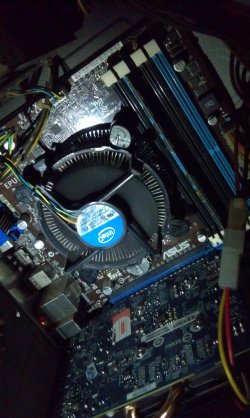
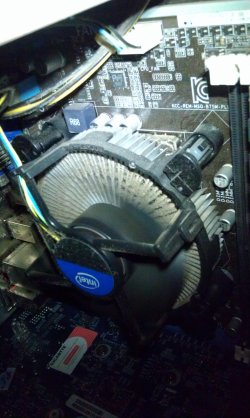
OK, that's the stock Intel cooler, the fan cannot be removed separately. You could use some canned air to blow the dust out, but take it outside first, it makes a big dust cloud. It can build up quickly.

Good picture too.
 

My Computer

Computer type
PC/Desktop
Computer Manufacturer/Model Number
Home Built Desktop By DataTech
OS
Windows 7 Ultimate X64 SP1
CPU
Intel i5-2550K, Differing ~4.4-4.8GHz No built in GPU
Motherboard
ASUS P8Z68-V PRO/GEN3
Memory
16GB G.Skill Sniper 1866MHz @ 2133MHz 2x8GB
Graphics Card(s)
ASUS GTX650TIB-DC2OC-2GD5, (650TI Boost)
Sound Card
Onboard Realtek 5-1
Monitor(s) Displays
Samsung P2570HD
Screen Resolution
1920x1080
Hard Drives
Samsung 840 Pro 256GB SSD for OS, 500GB Seagate Constellation (Enterprise drive) for Data
PSU
Corsair HX650W
Case
Inwin Dragon Rider
Cooling
Hyper 212 EVO w/two Noctua fans, push-pull, @1300 RPM
Keyboard
E-Z Eyes, bright yellow keys with large characters
Mouse
steelseries SENSEI Laser Pro Gaming
Internet Speed
48-51Mbs Mbs down, 11 Mbs up Xfinity Cable
Antivirus
Norton Internet Security 2013
Browser
IE 10, Opera, Pale Moon if needed
Other Info
4 case fans, LG BluRay-RE, ASUS DVD-RW, Mr. Fusion power supply, 1.21 gigawatts.
kk ty , i'll try that out as soon as i get the new thermal paste .
 

My Computer

Computer type
PC/Desktop
Computer Manufacturer/Model Number
custom build
OS
Windows 7 Home Premium x64
CPU
I3-3220 3,3Ghz
Motherboard
Asus B75M-Plus
Memory
Dynet 4gb @1333Mhz
Graphics Card(s)
Gigabyte GTX 750Ti Windforce OC'd 13%
Sound Card
Realtek
Screen Resolution
1280x1024
Hard Drives
WD blue 500gb
Keyboard
E-Blue Cobra Reinforcement
Mouse
E-Blue Gaming Mouse
Internet Speed
580kb/s | 67kb/s
Antivirus
Bitdefender Internet Security
Browser
Google Chrome / Firefox
Back
Top