Solved Thermal Shutdown while browsing

BreBruce

New member
Local time
8:15 AM
Messages
6
Location
Tampa, FL
Suffered a thermal shutdown while browsing. I waited about one hour for my HP laptop to cool down. Signed in and after about 10-20 seconds the screen froze. Hours later the same problem.
What should I do?:confused:
 

My Computer

Computer type
Laptop
Computer Manufacturer/Model Number
Hewlett Packard
OS
Windows 7
Antivirus
AVG
Browser
Internet Explorer, SlimBrowser
Blow thru the vents with a bottle of compressed air as you can find in Home Depot. There may be a lot of grime blocking the airflow.

If that does not help, you will have to check the CPU cooling system. Your case is pretty extreme so something might be on the blink.

Also, if the laptop is vented to the bottom (and not to the side), make sure that nothing blocks the vents - e.g. a pillow on the couch.
 

My Computer

Computer Manufacturer/Model Number
HP, Dell, Gateway, Toshiba - 4 laptops and 2 desktops
OS
Vista, Windows7, Mint Mate, Zorin, Windows 8
CPU
from 1.6GHz Duo to i7
Monitor(s) Displays
2x HP w2207
Hard Drives
5x HDD, 7x SSD, 12x Externals
Keyboard
with trackball - no mices
Mouse
Trackball mice
Internet Speed
DSL 6000
Thank you.
 

My Computer

Computer type
Laptop
Computer Manufacturer/Model Number
Hewlett Packard
OS
Windows 7
Antivirus
AVG
Browser
Internet Explorer, SlimBrowser
Addition to Thermal Shutdown While Browsing

I'll try the compressed air tomorrow morning. Do I blow the compressed air from the inside of my laptop out or from the outside of my laptop in?

I've gone here: Troubleshooting an Overheating and Auto Shutdown Issue | HP® Support

This morning my fan ran at maximum speed before Thermal Shutdown. And the area around my laptop fan and vent which is on the side was hot.

My BIOS is not out of date because I ran the Hewlett Packard Support Assistant last weekend.

If the compressed air doesn't do the trick I'll probably seek out a computer repair here in Tampa.
 

My Computer

Computer type
Laptop
Computer Manufacturer/Model Number
Hewlett Packard
OS
Windows 7
Antivirus
AVG
Browser
Internet Explorer, SlimBrowser
You can really only work thru the vents unless you want to take the PC apart. If you see a computer repair shop, ask them to also replace the paste and reseat the fan.
 

My Computer

Computer Manufacturer/Model Number
HP, Dell, Gateway, Toshiba - 4 laptops and 2 desktops
OS
Vista, Windows7, Mint Mate, Zorin, Windows 8
CPU
from 1.6GHz Duo to i7
Monitor(s) Displays
2x HP w2207
Hard Drives
5x HDD, 7x SSD, 12x Externals
Keyboard
with trackball - no mices
Mouse
Trackball mice
Internet Speed
DSL 6000
I tried the compressed air through the vents but the same problem persists. Went to a Computer Repair Shop this morning and explained the problem with my laptop which is a HP G62-339WM, a 2 1/2 year old refurbished laptop. He said it would cost $90 for labor and he would have to order a new fan which would probably come in 10 days. I've decided to try and replace the fan with a new one, apply thermal paste by the directions and reseat the new fan.

I have the manual for my laptop and directions to take out the fan. Any advice would be appreciated. Especially where to order a fan.
 

My Computer

Computer type
Laptop
Computer Manufacturer/Model Number
Hewlett Packard
OS
Windows 7
Antivirus
AVG
Browser
Internet Explorer, SlimBrowser
Taking a laptop apart is rather challenging. Just make sure you keep track of all the wires because I am sure you will have to disconnect a few in order to get to the bits. Try to find a video tutorial on the web.
 

My Computer

Computer Manufacturer/Model Number
HP, Dell, Gateway, Toshiba - 4 laptops and 2 desktops
OS
Vista, Windows7, Mint Mate, Zorin, Windows 8
CPU
from 1.6GHz Duo to i7
Monitor(s) Displays
2x HP w2207
Hard Drives
5x HDD, 7x SSD, 12x Externals
Keyboard
with trackball - no mices
Mouse
Trackball mice
Internet Speed
DSL 6000
Found it! http://www.youtube.com/watch?v=HVpi4tJQL3w

One more question. This laptop is a 2 1/2 year old refurbished laptop purchased at Walmart. Forgot to mention that the laptop functions in "safe mode." Will the replacement of the fan solve my problem?

Thank you for your help.
 
Last edited:

My Computer

Computer type
Laptop
Computer Manufacturer/Model Number
Hewlett Packard
OS
Windows 7
Antivirus
AVG
Browser
Internet Explorer, SlimBrowser
That's hard to say from here. It looks like a problem in the cooling system which could be the fan, the paste, the seating of the fan, the duct or whatever is blocking. You will only know after you inspected it.

And also check whether some other unit is unusually warm - disk, psu.
 

My Computer

Computer Manufacturer/Model Number
HP, Dell, Gateway, Toshiba - 4 laptops and 2 desktops
OS
Vista, Windows7, Mint Mate, Zorin, Windows 8
CPU
from 1.6GHz Duo to i7
Monitor(s) Displays
2x HP w2207
Hard Drives
5x HDD, 7x SSD, 12x Externals
Keyboard
with trackball - no mices
Mouse
Trackball mice
Internet Speed
DSL 6000
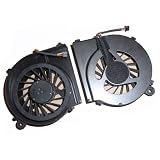
Okay. Should I purchase just the fan:
41jr5aKA-vL._AA160_.jpg


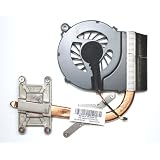
or this?
51t7t0Kj2ZL._AA160_.jpg
 

My Computer

Computer type
Laptop
Computer Manufacturer/Model Number
Hewlett Packard
OS
Windows 7
Antivirus
AVG
Browser
Internet Explorer, SlimBrowser
I would buy nothing before you do not know what's wrong.
 

My Computer

Computer Manufacturer/Model Number
HP, Dell, Gateway, Toshiba - 4 laptops and 2 desktops
OS
Vista, Windows7, Mint Mate, Zorin, Windows 8
CPU
from 1.6GHz Duo to i7
Monitor(s) Displays
2x HP w2207
Hard Drives
5x HDD, 7x SSD, 12x Externals
Keyboard
with trackball - no mices
Mouse
Trackball mice
Internet Speed
DSL 6000
Back
Top