
Think i have a memory leak, cant find it though

Thornton

New member
Power User
Local time
11:12 AM
Messages
597
Location
Orlando Florida
when i start my computer it stays at around 26% ram usage (2.6gb in my case) for about 3-5 hours, then it starts increasing, by the next morning i will sometimes find it at 4gb or sometimes even 5gb. i tried running a filter on my RAM usage, but nothing was popping out at me. i estimated the total amount ram being used that it is actually showing me is often allot less, my list only has a little over 120-150 processes running, and they dont seem to add up to 4gb, EVER. i ran anti virus multiple times... nothing. im runing out of options. is it possible that there are applications or services that are not appearing in the list, but are still there?
 

My Computer My Computer

At a glance

windows 7 ProfessionalIntel I7 4790k16gb DDR3 1600mhzDual GTX 780 ASUS
Computer type
PC/Desktop
Computer Manufacturer/Model Number
Custom Build
OS
windows 7 Professional
CPU
Intel I7 4790k
Motherboard
ASUS Hero VII
Memory
16gb DDR3 1600mhz
Graphics Card(s)
Dual GTX 780 ASUS
Monitor(s) Displays
2x HP 2331
Screen Resolution
1080p
Hard Drives
750gb Hitachi 7200rpm
500gb Crucial SSD
PSU
Corsair 800g
Case
NZXT Phantom
Cooling
fan
Keyboard
Razer Deathstalker
Mouse
Razer Ouroboros
Internet Speed
70mbps
Antivirus
MSE + M-Bam
Browser
Chrome
when i start my computer it stays at around 26% ram usage (2.6gb in my case) for about 3-5 hours, then it starts increasing, by the next morning i will sometimes find it at 4gb or sometimes even 5gb. i tried running a filter on my RAM usage, but nothing was popping out at me. i estimated the total amount ram being used that it is actually showing me is often allot less, my list only has a little over 120-150 processes running, and they dont seem to add up to 4gb, EVER. i ran anti virus multiple times... nothing. im runing out of options. is it possible that there are applications or services that are not appearing in the list, but are still there?

First are you lloking in task manager? If so, do you have show processes from all users ?

120-150 processes is really, really high. Right now I have two browsers open, team view, astra, skype, am downloading a video, email, etc and I have 62 processes (64 bit)

I suspect something is wrong. Can you upload a snapshot of the performance tab sorted by ram?
 

My Computer My Computer

At a glance

Win 8 Release candidate 8400[email protected]4 gigsNvidia 9600M
Computer Manufacturer/Model Number
HP Pavillion dv-7 1005 Tx
OS
Win 8 Release candidate 8400
CPU
[email protected]
Memory
4 gigs
Graphics Card(s)
Nvidia 9600M
Sound Card
HD built-in
Monitor(s) Displays
17" Wxga
Screen Resolution
1440x900
Cooling
none
Internet Speed
45Mb down 5Mb up
Instead of using the processes tab of the task manager to check for ram usage. Click the resource monitor button on the performance tab. Then click on the memory tab and then sort by the "working set". The working set is the actual physical ram in use at the moment by the program. There are more things that will show up here than the task manager, for example VM Ware's virtual disk allocation does not show up in task manager but does show up here. (And that is almost 2 gigs on my VMs!)

If that still fails to show the culprit, a more verbose but less pretty version of the resource monitor is the Process Explorer from Microsoft:

Process Explorer

[Edit] posted at same time as zigzag and I concur with his statement, 120-150 processes is a LOT. I have 72 running and a ton of stuff open atm... Use the resource monitor or process explorer to try to track some of them down. When you see a dll or exe name listed that you don;t recognise. Type it into google. 99% of the time a site called "What is this process" or something will come up in the list and tell you what it is. [/edit]
 

My Computer My Computer

At a glance

Windows 7 x64 Ultimatei7 96012 Gig Corsair DominatorNvidia 480
Computer Manufacturer/Model Number
Scratch built
OS
Windows 7 x64 Ultimate
CPU
i7 960
Motherboard
Asus P6X58D
Memory
12 Gig Corsair Dominator
Graphics Card(s)
Nvidia 480
Sound Card
Maudio Delta 44 + breakout box
Monitor(s) Displays
Dell UltraSharp U2410 24in and Samsung 21 dual monitors
Screen Resolution
1920x1200 and 1280x1024
Hard Drives
Primary: Intel X-25M G2 160G SSD
Secondary: Segate baracuda 1.0 TB
HDs in AHCI mode.
PSU
Corasair TX850
Case
Cooler Master HAF
Cooling
Corsair H50
Keyboard
Logitech G15 + N52 game pad
Mouse
Logitech MX518
Internet Speed
15kbs down 4.5kbps up
Other Info
WEI 7.6
CPU & RAM 7.6
Graphics 7.9
Hard disk 7.7
Instead of using the processes tab of the task manager to check for ram usage. Click the resource monitor button on the performance tab. Then click on the memory tab and then sort by the "working set". The working set is the actual physical ram in use at the moment by the program. There are more things that will show up here than the task manager, for example VM Ware's virtual disk allocation does not show up in task manager but does show up here. (And that is almost 2 gigs on my VMs!)

If that still fails to show the culprit, a more verbose but less pretty version of the resource monitor is the Process Explorer from Microsoft:

Process Explorer

[Edit] posted at same time as zigzag and I concur with his statement, 120-150 processes is a LOT. I have 72 running and a ton of stuff open atm... Use the resource monitor or process explorer to try to track some of them down. When you see a dll or exe name listed that you don;t recognise. Type it into google. 99% of the time a site called "What is this process" or something will come up in the list and tell you what it is. [/edit]

thank you for the information, i will look into trying that later and will post my findings
 

My Computer My Computer

At a glance

windows 7 ProfessionalIntel I7 4790k16gb DDR3 1600mhzDual GTX 780 ASUS
Computer type
PC/Desktop
Computer Manufacturer/Model Number
Custom Build
OS
windows 7 Professional
CPU
Intel I7 4790k
Motherboard
ASUS Hero VII
Memory
16gb DDR3 1600mhz
Graphics Card(s)
Dual GTX 780 ASUS
Monitor(s) Displays
2x HP 2331
Screen Resolution
1080p
Hard Drives
750gb Hitachi 7200rpm
500gb Crucial SSD
PSU
Corsair 800g
Case
NZXT Phantom
Cooling
fan
Keyboard
Razer Deathstalker
Mouse
Razer Ouroboros
Internet Speed
70mbps
Antivirus
MSE + M-Bam
Browser
Chrome
when i start my computer it stays at around 26% ram usage (2.6gb in my case) for about 3-5 hours, then it starts increasing, by the next morning i will sometimes find it at 4gb or sometimes even 5gb. i tried running a filter on my RAM usage, but nothing was popping out at me. i estimated the total amount ram being used that it is actually showing me is often allot less, my list only has a little over 120-150 processes running, and they dont seem to add up to 4gb, EVER. i ran anti virus multiple times... nothing. im runing out of options. is it possible that there are applications or services that are not appearing in the list, but are still there?

First are you lloking in task manager? If so, do you have show processes from all users ?

120-150 processes is really, really high. Right now I have two browsers open, team view, astra, skype, am downloading a video, email, etc and I have 62 processes (64 bit)

I suspect something is wrong. Can you upload a snapshot of the performance tab sorted by ram?

i just restarted my computer so the physical memory is down to 25% (thank god). its running 100 processes as i write this. and i will post a snap shot.

Processes1.jpg

Processes2.jpg


they look rather identical but the second image i scrolled down so you could see the rest of the list

not sure what happend but it lost allot of quality it looks like on upload

i used blogger to upload and i guess the file was too big for them, sry, not sure what to say bout that
 

My Computer My Computer

At a glance

windows 7 ProfessionalIntel I7 4790k16gb DDR3 1600mhzDual GTX 780 ASUS
Computer type
PC/Desktop
Computer Manufacturer/Model Number
Custom Build
OS
windows 7 Professional
CPU
Intel I7 4790k
Motherboard
ASUS Hero VII
Memory
16gb DDR3 1600mhz
Graphics Card(s)
Dual GTX 780 ASUS
Monitor(s) Displays
2x HP 2331
Screen Resolution
1080p
Hard Drives
750gb Hitachi 7200rpm
500gb Crucial SSD
PSU
Corsair 800g
Case
NZXT Phantom
Cooling
fan
Keyboard
Razer Deathstalker
Mouse
Razer Ouroboros
Internet Speed
70mbps
Antivirus
MSE + M-Bam
Browser
Chrome
Images are too small even full size to read
 

My Computer My Computer

At a glance

Win 8 Release candidate 8400[email protected]4 gigsNvidia 9600M
Computer Manufacturer/Model Number
HP Pavillion dv-7 1005 Tx
OS
Win 8 Release candidate 8400
CPU
[email protected]
Memory
4 gigs
Graphics Card(s)
Nvidia 9600M
Sound Card
HD built-in
Monitor(s) Displays
17" Wxga
Screen Resolution
1440x900
Cooling
none
Internet Speed
45Mb down 5Mb up
Images are too small even full size to read
im sry? full size is 5760x1080! thats not small at all leme see if i can do somthing bout it


nope, still not likein it full size
 

My Computer My Computer

At a glance

windows 7 ProfessionalIntel I7 4790k16gb DDR3 1600mhzDual GTX 780 ASUS
Computer type
PC/Desktop
Computer Manufacturer/Model Number
Custom Build
OS
windows 7 Professional
CPU
Intel I7 4790k
Motherboard
ASUS Hero VII
Memory
16gb DDR3 1600mhz
Graphics Card(s)
Dual GTX 780 ASUS
Monitor(s) Displays
2x HP 2331
Screen Resolution
1080p
Hard Drives
750gb Hitachi 7200rpm
500gb Crucial SSD
PSU
Corsair 800g
Case
NZXT Phantom
Cooling
fan
Keyboard
Razer Deathstalker
Mouse
Razer Ouroboros
Internet Speed
70mbps
Antivirus
MSE + M-Bam
Browser
Chrome
I can't read them even when using the magnifier.
Let start at the beginning. Start/search and type in msconfig/open it up and go to start up and let us know how many things are starting up. I only have my security and mouse/keyboard. Then while you are in msconfig go to services and check Hide all Microsoft Services. I only have my security checked. You may be running a gazillion thing that don't need to run until you tell them to. Please don't mess with Microsoft Services.
 

My Computer My Computer

At a glance

Windows 10 Pro. 64/ version 1709 Windows 7 Pr...Intel i7-6800K @ 4.3Corsair Platinum 16 gig @2400EVGA GTX 1070 OC
Computer type
PC/Desktop
Computer Manufacturer/Model Number
Home made Desktop
OS
Windows 10 Pro. 64/ version 1709 Windows 7 Pro/64
CPU
Intel i7-6800K @ 4.3
Motherboard
ASUS X-99 Deluxe II
Memory
Corsair Platinum 16 gig @2400
Graphics Card(s)
EVGA GTX 1070 OC
Monitor(s) Displays
Asus 27" LED LCD/VE278Q
Screen Resolution
1920-1080 or 1280-720 HDMI
Hard Drives
INTEL SSD 730-240 Gb Sata 3.0/
PSU
EVGA Platium 1200W
Case
Phanteks Luxe Tempered Glass 8 fans/ one radiator
Cooling
XSPC/ Water Cooled CPU
Keyboard
Das 4 Professional
Mouse
Logitech M705/MX Anywhere 2-S
Internet Speed
100 mbits
Antivirus
Microsoft Security Essentials/ Malwarebytes Premium 3.0/ SAS
Browser
I.E. 11 default/Firefox/ ISP Time Warner Cable/Spectrum
Other Info
LG BluRay Burner/
Sound system-KLipsch-THX/
Icy Dock ssd Hot Swap bays.
I can't read them even when using the magnifier.
Let start at the beginning. Start/search and type in msconfig/open it up and go to start up and let us know how many things are starting up. I only have my security and mouse/keyboard. Then while you are in msconfig go to services and check Hide all Microsoft Services. I only have my security checked. You may be running a gazillion thing that don't need to run until you tell them to. Please don't mess with Microsoft Services.

my startup apps...
keyboard drivers
mouse driver software
mouse driver configuration software
trend micro
DW6 (???)
MS windows OS
Origin
akamai net session
AMD Hydravision MD
Vision Control Center
trend micro safe sync
Object Dock


and thats it
 

My Computer My Computer

At a glance

windows 7 ProfessionalIntel I7 4790k16gb DDR3 1600mhzDual GTX 780 ASUS
Computer type
PC/Desktop
Computer Manufacturer/Model Number
Custom Build
OS
windows 7 Professional
CPU
Intel I7 4790k
Motherboard
ASUS Hero VII
Memory
16gb DDR3 1600mhz
Graphics Card(s)
Dual GTX 780 ASUS
Monitor(s) Displays
2x HP 2331
Screen Resolution
1080p
Hard Drives
750gb Hitachi 7200rpm
500gb Crucial SSD
PSU
Corsair 800g
Case
NZXT Phantom
Cooling
fan
Keyboard
Razer Deathstalker
Mouse
Razer Ouroboros
Internet Speed
70mbps
Antivirus
MSE + M-Bam
Browser
Chrome
If it was my computer I would keep trend mirco security, mouse and keyboard.
Some of those things can use up a lot of computer. Heck DW6 is a game starting up on boot. What do you have for non Microsoft services.
 

My Computer My Computer

At a glance

Windows 10 Pro. 64/ version 1709 Windows 7 Pr...Intel i7-6800K @ 4.3Corsair Platinum 16 gig @2400EVGA GTX 1070 OC
Computer type
PC/Desktop
Computer Manufacturer/Model Number
Home made Desktop
OS
Windows 10 Pro. 64/ version 1709 Windows 7 Pro/64
CPU
Intel i7-6800K @ 4.3
Motherboard
ASUS X-99 Deluxe II
Memory
Corsair Platinum 16 gig @2400
Graphics Card(s)
EVGA GTX 1070 OC
Monitor(s) Displays
Asus 27" LED LCD/VE278Q
Screen Resolution
1920-1080 or 1280-720 HDMI
Hard Drives
INTEL SSD 730-240 Gb Sata 3.0/
PSU
EVGA Platium 1200W
Case
Phanteks Luxe Tempered Glass 8 fans/ one radiator
Cooling
XSPC/ Water Cooled CPU
Keyboard
Das 4 Professional
Mouse
Logitech M705/MX Anywhere 2-S
Internet Speed
100 mbits
Antivirus
Microsoft Security Essentials/ Malwarebytes Premium 3.0/ SAS
Browser
I.E. 11 default/Firefox/ ISP Time Warner Cable/Spectrum
Other Info
LG BluRay Burner/
Sound system-KLipsch-THX/
Icy Dock ssd Hot Swap bays.
If it was my computer I would keep trend mirco security, mouse and keyboard.
Some of those things can use up a lot of computer. Heck DW6 is a game starting up on boot. What do you have for non Microsoft services.

DW6 should be dynasty warriors 6 (dont have it)

VCC has to stay, thats my graphics drivers, if that gos, my 3d monitor goes.
as for object doc, i often use that inplace of my start bar, so that needs to stay (its also using only 20 some od Kb).
i could turn hydravision off, but its part of my graphics driver so ill loose the abillity of multiple desk tops until i turn it back on.
IDK what akami net session is, but i have no clue what it is, if its tied with logmein than i need it, if not, ill toss it off the list.

origin is already off the startup list so thats not a problem
 

My Computer My Computer

At a glance

windows 7 ProfessionalIntel I7 4790k16gb DDR3 1600mhzDual GTX 780 ASUS
Computer type
PC/Desktop
Computer Manufacturer/Model Number
Custom Build
OS
windows 7 Professional
CPU
Intel I7 4790k
Motherboard
ASUS Hero VII
Memory
16gb DDR3 1600mhz
Graphics Card(s)
Dual GTX 780 ASUS
Monitor(s) Displays
2x HP 2331
Screen Resolution
1080p
Hard Drives
750gb Hitachi 7200rpm
500gb Crucial SSD
PSU
Corsair 800g
Case
NZXT Phantom
Cooling
fan
Keyboard
Razer Deathstalker
Mouse
Razer Ouroboros
Internet Speed
70mbps
Antivirus
MSE + M-Bam
Browser
Chrome
Well more than likely it's only a single program that is causing the runaway memory usage.

I would use the Resource Monitor or Process Explorer if necessary to try to find out which one first. Otherwise you'll have to disable them one by one to find out who the culprit is. (Which it may come to in the end anyway, but why not start with the easy way first? :D)
 

My Computer My Computer

At a glance

Windows 7 x64 Ultimatei7 96012 Gig Corsair DominatorNvidia 480
Computer Manufacturer/Model Number
Scratch built
OS
Windows 7 x64 Ultimate
CPU
i7 960
Motherboard
Asus P6X58D
Memory
12 Gig Corsair Dominator
Graphics Card(s)
Nvidia 480
Sound Card
Maudio Delta 44 + breakout box
Monitor(s) Displays
Dell UltraSharp U2410 24in and Samsung 21 dual monitors
Screen Resolution
1920x1200 and 1280x1024
Hard Drives
Primary: Intel X-25M G2 160G SSD
Secondary: Segate baracuda 1.0 TB
HDs in AHCI mode.
PSU
Corasair TX850
Case
Cooler Master HAF
Cooling
Corsair H50
Keyboard
Logitech G15 + N52 game pad
Mouse
Logitech MX518
Internet Speed
15kbs down 4.5kbps up
Other Info
WEI 7.6
CPU & RAM 7.6
Graphics 7.9
Hard disk 7.7
Well more than likely it's only a single program that is causing the runaway memory usage.

I would use the Resource Monitor or Process Explorer if necessary to try to find out which one first. Otherwise you'll have to disable them one by one to find out who the culprit is. (Which it may come to in the end anyway, but why not start with the easy way first? :D)

ok, so i have resource monitor up, but have to say, im really not sure how you want me to go about searching for the culprit in this application if you wouldn't mind walking me through what you had planned for me to do. i have it open and am in the memory tab // whats next
 

My Computer My Computer

At a glance

windows 7 ProfessionalIntel I7 4790k16gb DDR3 1600mhzDual GTX 780 ASUS
Computer type
PC/Desktop
Computer Manufacturer/Model Number
Custom Build
OS
windows 7 Professional
CPU
Intel I7 4790k
Motherboard
ASUS Hero VII
Memory
16gb DDR3 1600mhz
Graphics Card(s)
Dual GTX 780 ASUS
Monitor(s) Displays
2x HP 2331
Screen Resolution
1080p
Hard Drives
750gb Hitachi 7200rpm
500gb Crucial SSD
PSU
Corsair 800g
Case
NZXT Phantom
Cooling
fan
Keyboard
Razer Deathstalker
Mouse
Razer Ouroboros
Internet Speed
70mbps
Antivirus
MSE + M-Bam
Browser
Chrome
I spelled it out earlier in this thread.

Bring up the Memory tab and sort on "Working Set" which is the actual physical memory being used. It'll bring the highest memory users to the top, if you have a single program leaking gigs of ram it will likely show up pretty clearly.

However there is still the possibility it may not show up there if it's actually a driver causing the problem :( A program called RamMap may then actually show the leaked memory it but tracking down exactly what driver it is could be tricky.
 

My Computer My Computer

At a glance

Windows 7 x64 Ultimatei7 96012 Gig Corsair DominatorNvidia 480
Computer Manufacturer/Model Number
Scratch built
OS
Windows 7 x64 Ultimate
CPU
i7 960
Motherboard
Asus P6X58D
Memory
12 Gig Corsair Dominator
Graphics Card(s)
Nvidia 480
Sound Card
Maudio Delta 44 + breakout box
Monitor(s) Displays
Dell UltraSharp U2410 24in and Samsung 21 dual monitors
Screen Resolution
1920x1200 and 1280x1024
Hard Drives
Primary: Intel X-25M G2 160G SSD
Secondary: Segate baracuda 1.0 TB
HDs in AHCI mode.
PSU
Corasair TX850
Case
Cooler Master HAF
Cooling
Corsair H50
Keyboard
Logitech G15 + N52 game pad
Mouse
Logitech MX518
Internet Speed
15kbs down 4.5kbps up
Other Info
WEI 7.6
CPU & RAM 7.6
Graphics 7.9
Hard disk 7.7
Well more than likely it's only a single program that is causing the runaway memory usage.

I would use the Resource Monitor or Process Explorer if necessary to try to find out which one first. Otherwise you'll have to disable them one by one to find out who the culprit is. (Which it may come to in the end anyway, but why not start with the easy way first? :D)

ok, so i have resource monitor up, but have to say, im really not sure how you want me to go about searching for the culprit in this application if you wouldn't mind walking me through what you had planned for me to do. i have it open and am in the memory tab // whats next

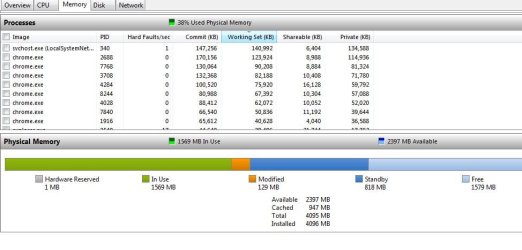
Basically, this is what it should look like

attachment.php


You achieve this result when left clicking the column header labeled "Working Set"

It should be in the descending order. I usually have these types of memory leaks when leaving browser windows open for a long time.
 

Attachments

  • Capture.JPG
    Capture.JPG
    58 KB · Views: 162

My Computer My Computer

At a glance

Windows 7 Ultimate x64 Service Pack 1AMD Athlon II x4 Propus 2.9 GHz2 x 4GB Corsair XMS 3 DDR3 -1600 CL9AMD Radeon HD 5850 1GB GDDR5
Computer type
PC/Desktop
Computer Manufacturer/Model Number
Custom Build
OS
Windows 7 Ultimate x64 Service Pack 1
CPU
AMD Athlon II x4 Propus 2.9 GHz
Motherboard
ASRock N68C-GS FX
Memory
2 x 4GB Corsair XMS 3 DDR3 -1600 CL9
Graphics Card(s)
AMD Radeon HD 5850 1GB GDDR5
Sound Card
On-board 6-Channel HD Audio
Monitor(s) Displays
18' LG Flatron E1942TC-BN on DVI, 18' Chimei 95ND on HDMI
Screen Resolution
1366 x 768 x 2
Hard Drives
1 x 500 GB Seagate
1 x 1 TB Western Digital Caviar Green
1 x 1 TB Hitachi Touro Mobile USB 3
PSU
Seasonic S12II 520W
Case
Generic with Cable Management
Cooling
Deep Cool Gammaxx 200
Keyboard
Dragonwar Desert Eagle
Mouse
Logitech B85
Internet Speed
5Mb/s DL, 0.9Mb/s UL
Antivirus
ESET Nod32
Browser
Google Chrome 64 Bit
Other Info
LG G4 H818P - Rooted with Xposed Framework
Well more than likely it's only a single program that is causing the runaway memory usage.

I would use the Resource Monitor or Process Explorer if necessary to try to find out which one first. Otherwise you'll have to disable them one by one to find out who the culprit is. (Which it may come to in the end anyway, but why not start with the easy way first? :D)

ok, so i have resource monitor up, but have to say, im really not sure how you want me to go about searching for the culprit in this application if you wouldn't mind walking me through what you had planned for me to do. i have it open and am in the memory tab // whats next

Basically, this is what it should look like

attachment.php


You achieve this result when left clicking the column header labeled "Working Set"

It should be in the descending order. I usually have these types of memory leaks when leaving browser windows open for a long time.

i did that originally and had to ask the question for sure, few conclusive results come from guessing, however i guess it might have in my case
 

My Computer My Computer

At a glance

windows 7 ProfessionalIntel I7 4790k16gb DDR3 1600mhzDual GTX 780 ASUS
Computer type
PC/Desktop
Computer Manufacturer/Model Number
Custom Build
OS
windows 7 Professional
CPU
Intel I7 4790k
Motherboard
ASUS Hero VII
Memory
16gb DDR3 1600mhz
Graphics Card(s)
Dual GTX 780 ASUS
Monitor(s) Displays
2x HP 2331
Screen Resolution
1080p
Hard Drives
750gb Hitachi 7200rpm
500gb Crucial SSD
PSU
Corsair 800g
Case
NZXT Phantom
Cooling
fan
Keyboard
Razer Deathstalker
Mouse
Razer Ouroboros
Internet Speed
70mbps
Antivirus
MSE + M-Bam
Browser
Chrome
Can you post the screenshot here?
 

My Computer My Computer

At a glance

Windows 7 Ultimate x64 Service Pack 1AMD Athlon II x4 Propus 2.9 GHz2 x 4GB Corsair XMS 3 DDR3 -1600 CL9AMD Radeon HD 5850 1GB GDDR5
Computer type
PC/Desktop
Computer Manufacturer/Model Number
Custom Build
OS
Windows 7 Ultimate x64 Service Pack 1
CPU
AMD Athlon II x4 Propus 2.9 GHz
Motherboard
ASRock N68C-GS FX
Memory
2 x 4GB Corsair XMS 3 DDR3 -1600 CL9
Graphics Card(s)
AMD Radeon HD 5850 1GB GDDR5
Sound Card
On-board 6-Channel HD Audio
Monitor(s) Displays
18' LG Flatron E1942TC-BN on DVI, 18' Chimei 95ND on HDMI
Screen Resolution
1366 x 768 x 2
Hard Drives
1 x 500 GB Seagate
1 x 1 TB Western Digital Caviar Green
1 x 1 TB Hitachi Touro Mobile USB 3
PSU
Seasonic S12II 520W
Case
Generic with Cable Management
Cooling
Deep Cool Gammaxx 200
Keyboard
Dragonwar Desert Eagle
Mouse
Logitech B85
Internet Speed
5Mb/s DL, 0.9Mb/s UL
Antivirus
ESET Nod32
Browser
Google Chrome 64 Bit
Other Info
LG G4 H818P - Rooted with Xposed Framework
I spelled it out earlier in this thread.

Bring up the Memory tab and sort on "Working Set" which is the actual physical memory being used. It'll bring the highest memory users to the top, if you have a single program leaking gigs of ram it will likely show up pretty clearly.

However there is still the possibility it may not show up there if it's actually a driver causing the problem :( A program called RamMap may then actually show the leaked memory it but tracking down exactly what driver it is could be tricky.

so, heres what it loos like BEFORE i start having problems (understandably not like the day i built it/bought it, but when i first installed windows it ran with a smooth 16%- 20% on start up... now its 24 to 36 on start up)
 

My Computer My Computer

At a glance

windows 7 ProfessionalIntel I7 4790k16gb DDR3 1600mhzDual GTX 780 ASUS
Computer type
PC/Desktop
Computer Manufacturer/Model Number
Custom Build
OS
windows 7 Professional
CPU
Intel I7 4790k
Motherboard
ASUS Hero VII
Memory
16gb DDR3 1600mhz
Graphics Card(s)
Dual GTX 780 ASUS
Monitor(s) Displays
2x HP 2331
Screen Resolution
1080p
Hard Drives
750gb Hitachi 7200rpm
500gb Crucial SSD
PSU
Corsair 800g
Case
NZXT Phantom
Cooling
fan
Keyboard
Razer Deathstalker
Mouse
Razer Ouroboros
Internet Speed
70mbps
Antivirus
MSE + M-Bam
Browser
Chrome

My Computer My Computer

At a glance

windows 7 ProfessionalIntel I7 4790k16gb DDR3 1600mhzDual GTX 780 ASUS
Computer type
PC/Desktop
Computer Manufacturer/Model Number
Custom Build
OS
windows 7 Professional
CPU
Intel I7 4790k
Motherboard
ASUS Hero VII
Memory
16gb DDR3 1600mhz
Graphics Card(s)
Dual GTX 780 ASUS
Monitor(s) Displays
2x HP 2331
Screen Resolution
1080p
Hard Drives
750gb Hitachi 7200rpm
500gb Crucial SSD
PSU
Corsair 800g
Case
NZXT Phantom
Cooling
fan
Keyboard
Razer Deathstalker
Mouse
Razer Ouroboros
Internet Speed
70mbps
Antivirus
MSE + M-Bam
Browser
Chrome
Ok your looking ok so far... Now I guess you have to wait for the problem to get bad and take a look again. :)
 

My Computer My Computer

At a glance

Windows 7 x64 Ultimatei7 96012 Gig Corsair DominatorNvidia 480
Computer Manufacturer/Model Number
Scratch built
OS
Windows 7 x64 Ultimate
CPU
i7 960
Motherboard
Asus P6X58D
Memory
12 Gig Corsair Dominator
Graphics Card(s)
Nvidia 480
Sound Card
Maudio Delta 44 + breakout box
Monitor(s) Displays
Dell UltraSharp U2410 24in and Samsung 21 dual monitors
Screen Resolution
1920x1200 and 1280x1024
Hard Drives
Primary: Intel X-25M G2 160G SSD
Secondary: Segate baracuda 1.0 TB
HDs in AHCI mode.
PSU
Corasair TX850
Case
Cooler Master HAF
Cooling
Corsair H50
Keyboard
Logitech G15 + N52 game pad
Mouse
Logitech MX518
Internet Speed
15kbs down 4.5kbps up
Other Info
WEI 7.6
CPU & RAM 7.6
Graphics 7.9
Hard disk 7.7
Back
Top